Can't See Local Files

I'm currently trying to allow spotify to use local files on my computer. However, when I go to "Your Library" the setting simply does not show. In fact, the only setting even available is "Use compact library layout"
I don't even have a clue on what to do here, so I'd like it if somebody could help me with figuring out what's going wrong.
Accepted answers
All comments

I don't have "Your Library" under settings either.

Hey folks,
Jumping in here with some clarifications.
@Logan_M, sounds like you might have been using the Web Player, where the feature isn't available yet. You can listen to your local files in the dedicated desktop app instead - you can download it here.
With the desktop app, you should be able to toggle on Local Files by following these steps:
- Click your profile picture at the top, and select Settings.
- Scroll to 'Your Library' and switch on Show Local Files.
- Under 'Show songs from', click Add a source to select the folder where your local files are located.
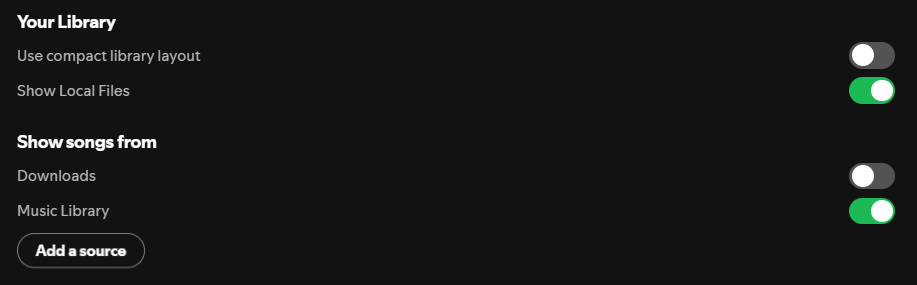
Your stored music is now in the Local Files folder in Your Library.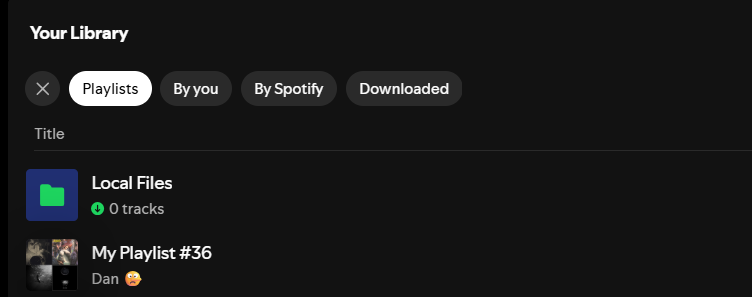
@mr_snappy_teeth, are you also on desktop? If so, you can follow the above steps to switch on the Local Files feature. In case you're using the mobile app, the option can be found in Settings and privacy > Apps and devices > Local audio files. For more info on how to set up Local Files on mobile check out the articles below:
Cheers 🤘
Hey @Logan_M , welcome to the community, and thanks for your post!
That definitely seems strange that the "show local files" setting is missing for you. I would recommend trying a clean reinstall first to help narrow down if it may just be a temporary bug. If that doesn't work, could you please let me know what version of Spotify you are using as well as your operating system and version?