Tracks skipping on desktop

We've received reports from some users that there's stuttering and playback issues on desktop. Music plays for 8-9 seconds, and then the track skips with no sound.
This seems to only affect the desktop app.
Comments

Plan
Premium
Country
Netherlands
Device
PC
Operating System
Windows 11 24h2
My Question or Issue
Hi,recently Spotify started to bug after the update i guess and i want to see if someone can help me or has a same problem as me.
So,when i play a song from playlist and try to rewind in the bar the songs immediately start to be unavailable or get stuck playing for 3-5 seconds and going to a next song.
I will leave the video for u too see 🙂
Video of the problem : https://www.youtube.com/watch?v=xPmHyWewTV4

Hello, I'm having the same problem. Spotify is downloaded on my computer, and it automatically skips tracks at 9 seconds, and I can't stop it. I've reinstalled the app and cleared the cache, but it hasn't helped.
Plan
Premium
Country
Egipte
Device
PC
Operating System
10 Windows
Spotify for Windows (64 bit)
1.2.87.414.g4e7a1155

im having the same issue were the app version would just start skipping every song and when i click to skip ahead on any song it just skips and then starts glitching badly it would play a few secs then rewind and then skip the song and then after it would say cant find song it files or cant play song and no music will be output it was fine before i updated my nvdia drivers and cleaned my pc my pc works fine but the app is bugging the web version works fine

Hey @x3mm, welcome to the Spotify Community! 🎵
I am not able to see the screen recording because the video is set to private. You can either add it to your reply or make the video unlisted so only those with the link can watch it.
Also, is this happening for a specific playlist or songs? 🙂
I made the video unlisted,i think you can see it now.
Also it is happening to all playlists,even with a DJ also
I will try to see if itt fixes it for me.
Thank you.
Hey folks,
Our teams are currently looking into this - we'll keep you posted in this thread if we have any news to share! Feel free to Subscribe from the 3 dot menu to stay tuned.
In the meantime, we can recommend using the Web Player. It would also be great if you could let us know the following, which will help with the investigation:
- The make, model & OS version of your device.
- Current Spotify version.
Cheers!
I have this problem, in the application on my computer, that the tracks skip at 9 seconds in the browser itself everything works well, I updated the drivers but the problem was not solved. I hope someone can help me.
Plan
Premium
Country
Egipte
Device
PC
Operating System
10 Windows
Spotify for Windows (64 bit)
1.2.87.414.g4e7a1155

Currently having this problem after installing the latest update. Song stops playing at 7 seconds and skips to another song, then stops at 7 seconds again, then skips to another song. Just going for a loop. Downgrading the version seems to work.

Also having this issue.
Clean spotify install
Spotify for Windows (64 bit)
1.2.87.414.g4e7a1155
Edition Windows 11 Pro
Version 24H2
Installed on 10/22/2024
OS build 26100.8037
Experience Windows Feature Experience Pack 1000.26100.300.0
Processor 11th Gen Intel(R) Core(TM) i7-11700K

Same issue here, please fix this asap!

Same issue as other users, tracks cut out and skip around 10 seconds. On desktop only. At first I suspected it was related to lossless quality, it would auto-upgrade to that then immediately fail, so I disabled auto quality select and forced high quality only but I still cannot play any tracks.
I tried rebooting, adjusting preferences, reinstalling spotify, and upgrading my nvidia driver (for the HD audio). No luck.

i have the same problem when i install the new update in spotify when i play the song it freezing after 6-9 sec and skips the song, plz help me to fix it

Processor 12th Gen Intel(R) Core(TM) i7-12700KF 3.60 GHz
Graphics Card NVIDIA GeForce RTX 5060 (8 GB)
System Type 64-bit operating system, x64-based processor
Edition Windows 10 Pro
Version 22H2
Installed on 10/30/2020
OS Build 19045.7058
Spotify for Windows (64 bit)
1.2.87.414.g4e7a1155
Same issue as the original post. Rollback to 1.2.86.502.g8cd7fb22 resolved the issue.

Hello guys, i got the same problem, if someone can keep me updated on it, because Spotify is a important thing for me. Thank you
Teo

Same problem on my PC. with latest update, spotify skip songs after few seconds automatically.

Dear Spotify,
You guys messed up your implementation of Widevine in the app.
Here is my Gemini chat of me going crazy troubleshooting this. Hopes this help you guys fix the problem.

Plan
Premium
Country
United Kingdom
Device
PC
Operating System
Windows 11 Home 25H2 26200.8037
Same issues as the above thread, just here to put my device information ^^

Had this issue happen to me this morning as well.
Spotify for Windows (64 bit) | (Windows 11)
1.2.87.414.g4e7a1155
---------------------------------------------------------
The following troubleshooting has not resolved this issue for me on the desktop client (hopefully this is helpful):
- Clearing Cache
- Relogging into account
- Re-Downloading the app
- Toggling hardware acceleration off and on
- Toggling automatic streaming quality off and on
- Setting streaming quality
- Downloading songs
- Downloading songs and attempting to play in offline mode
---------------------------------------------------------
My Google Pixel 8 is also having the same issue (ver 9.1.36.1948) :
(Have not attempted to troubleshoot on mobile)
I initially believed that the issue derived from my phones alarms (google clock app) being linked to Spotify. The issue started when I was listening to music on my desktop and my alarm went off, pulling Spotify from my desktop onto my google pixel 8. After this happened, streaming on either device (through the apps) has not been working.
---------------------------------------------------------
Web player works fine.

I’m having the same problem but it is after I installed the following updates for windows
2026-04 Security Update (KB5083769) (26200.8246)
2026-04.NET Framework Security Update (KB5082417)
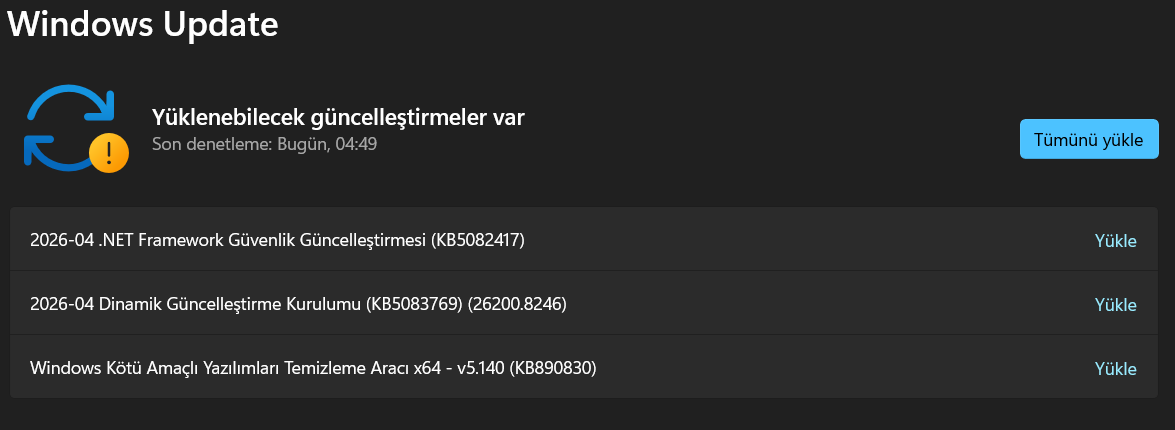
@Darq07i have same updates today. i think it is not about that. problem start 2 days ago i mean before that updates.
today im using spotify web player.

Plan
Premium
Country
Estonia
Device
PC
Operating System
Windows 11 Pro 23H2 22631.5909
Same issue as the above thread

Same issue, can be temporarily fixed by uninstalling spotify and then downloading a previous version of it, it will update itself the next time you close and open it though.

Hey, I have the same problem - also using the Web Player. Right now Spotify only works on my phone

Can't fast forward songs, they just skip to the next one, as well as glitch and stutter
this is so lame. turn off equalizer, all the bells and whistles, **bleep** even volume normalization on the web player just pops up a window telling you to download the desktop app, which doesn't work.
Spotify duo (~20 dollars a month for this not to work btw, really rad and cool)
Windows 11
Spotify for Windows (64 bit)
1.2.87.414.g4e7a1155
Downloaded straight from the spotify website and microsoft store versions, both have the same problems.
Reinstall didn't work, multiple times
Deleting any spotify folders in %appdata% and restarting didn't work
resetting audio stack in windows and trying different playback devices (I.E. bluetooth speaker over headset) didn't work. same issue.
I'm beginning to think this ISN'T a problem on my end

Plan
Premium
Country
Turkey
Device
PC
Operating System
Windows 10 22H2
Spotify client version
1.2.87.414.g4e7a1155 (64 bit)

Same issues as everyone else:
- Edition Windows 11 Home
Version 25H2
Installed on 5/12/2025
OS build 26200.8246
Experience Windows Feature Experience Pack 1000.26100.297.0 - Spotify for Windows (64 bit)
1.2.87.415.g88652836

Hello. I installed Spotify on my computer and have been listening to music exclusively through it for a long time; in fact, I'm a premium user. However, for the last 3-4 hours, due to a hardware issue, even though no other applications on my computer are experiencing problems, only Spotify is causing issues. When I randomly open a song, it keeps switching to the next song after 10 seconds.


Plan
Premium (Family Plan)
Country
Croatia
Device
PC
Operating System
Windows 10 21H2 LTSC (OS Build 19044.7058)
Spotify Version
Spotify for Windows (64 bit)
1.2.87.414.g4e7a1155
Device Specifications
AMD Ryzen 7 2700X, AMD RX 580 8GB, DDR4-3200 32GB
Main Issue
Any playing song will be automatically skipped or result in an error: "Spotify can't play this right now. If you have the file on your computer you can import it." after a few seconds.
Reproducibility Rate
10/10 times, deterministic.
Steps to Reproduce
Open Spotify (Desktop ver.), play any song from any playlist, wait 3-7 seconds or use the Progress Bar.
Attempted Fixes
Disable/Enable HW Acceleration in Spotify, Restart Spotify, Install Spotify (dirty), Re-install Spotify (dirty), Install Spotify (clean), Change System Audio Source, Adjust System Sample Rate, Update Latest Drivers for Audio (Microsoft 10.0.19041.1 and Realtek 6.0.9225.1), Reboot System, Change Audio Quality in Spotify, Clear Cache in Spotify, Change Output Device in Spotify, Use Factory Default Settings (clean)...
Plan
Premium
Country
Germany
Operating System
Windows 11 Enterprise 25H2
Question or Issue
Hi everyone,
I am experiencing a severe playback issue with the latest version of the Spotify ( 1.2.87.414.g4e7a1155) Desktop app on Windows. Every time I play a song, the audio first starts to lag and stops completely after exactly 6 to 8 seconds. It seems like the app loads the initial buffer but fails to load the rest of the stream.
This is what I've tried already:
Restarted my PC and ran Spotify as Administrator.
Checked my hosts file (it is clean).
Performed a completely clean reinstall
Tried both the standard .exe installer from the website and the Microsoft Store version.
Disabled Hardware Acceleration.
Forced a Windows time sync to rule out DRM certificate issues.
The recent update clearly introduced a bug regarding the audio engine or buffering process on specific setups.
To isolate the issue, I uninstalled the current build and downgraded to an older version of the Spotify desktop client. It works perfectly now! No dropouts, no freezing after 6 seconds.