Change order of playlists when you click 'add to playlist' on desktop

Plan
Family/Premium
Country
Canada
Device
Macbook Air
Operating System
macOS Sequoia 15.6.1
My Question or Issue
When I use Spotify on mobile and click "add to playlist" on a song, the list that comes up displays my playlists starting with those I have most recently added songs to. On desktop, however, they seem to be in the order of most recently created. I have a lot of playlists, and use Spotify fairly often on my computer, making it incredibly inconvenient to add songs to playlists many times in a row, as I either have to scroll or search for it every time. Is there any way to change this in settings, and if not, is there a way to suggest this function be changed? Thanks.
Accepted answers
All comments

Hey there @WeeWaa13,
Thanks for posting in the Community and welcome.
We can confirm it is not possible to manually rearrange the way the playlists are shown when you select the Add to playlist option. It is possible to find a playlist quicker by using the search bar at the top of the menu. The option is available in both the mobile and the desktop app. You'll just need to type the name of the playlist you're looking for:

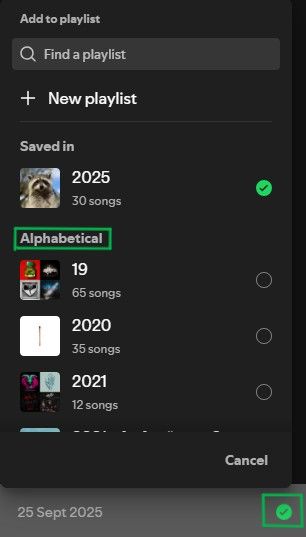
Another option (on the desktop app) is to open the Add to playlist view via the Checkmark instead. This way, you can sort how the playlists appear by clicking on Alphabetical/Recents/etc.
We understand this might not be ideal if perhaps you'd like to see at the top the playlists you added content to more recently directly from the Add to playlist option. You can also post your suggestion on our Ideas board. The Idea Exchange is a place where Spotify users can share their feedback in the form of ideas. Every user can suggest an idea or show their support for an existing one by voting for it. When posting there, remember to always follow our Ideas Exchange Guidelines.
We hope you found this helpful. Let us know if you need anything else.

it is actually possible, if you go to your library, then click the button playlists at the top, and then set the sort button to custom order, you can manually rearrange the order of the playlists which are displayed.


I had this same issue. I found out if you use the search feature when adding to a playlist, your search remains typed in for subsequent songs when adding to a playlist, essentially making the playlist you are currently adding many songs to stay at the top.

Aleja,
This is silly. in literally every other scenario, on desktop, web player, and mobile, the order in which I display playlists is consistent. It feels like your developers rushed through this part of the code base and created tech debt that, in hindsight, you have no intention of fixing. FFS, do better.
Hey there @WeeWaa13,
Thanks for posting in the Community and welcome.
We can confirm it is not possible to manually rearrange the way the playlists are shown when you select the Add to playlist option. It is possible to find a playlist quicker by using the search bar at the top of the menu. The option is available in both the mobile and the desktop app. You'll just need to type the name of the playlist you're looking for:
Another option (on the desktop app) is to open the Add to playlist view via the Checkmark instead. This way, you can sort how the playlists appear by clicking on Alphabetical/Recents/etc.
We understand this might not be ideal if perhaps you'd like to see at the top the playlists you added content to more recently directly from the Add to playlist option. You can also post your suggestion on our Ideas board. The Idea Exchange is a place where Spotify users can share their feedback in the form of ideas. Every user can suggest an idea or show their support for an existing one by voting for it. When posting there, remember to always follow our Ideas Exchange Guidelines.
We hope you found this helpful. Let us know if you need anything else.