Podcasts in the "Your Episodes" playlist show the wrong date

Plan
Premium
Country
U.S.A. -- Arizona
Device
iPhone 17 Pro
Operating System
iOS 26.6.X and now iOS 27
My Question or Issue
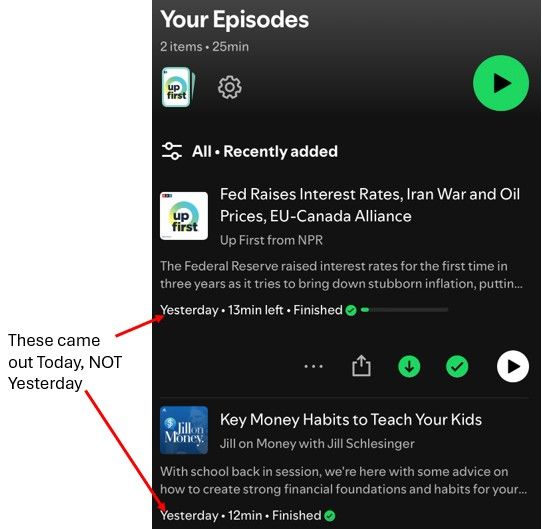
When a podcast I follow (or even ones I manually add) is added to the "Your Episodes" playlist, it shows the wrong date. This started about a month ago in early August. I follow several podcasts that come out on a daily basis and when I look at those podcasts in my library, they show the correct date, i.e. "Today," but when they are added to the "Your Episodes" playlist, the date is "Yesterday." This only happens on my iPhone. There's no issue when looking at the "Your Episodes" playlist on the native Windows 11 Spotify app or when using Spotify in a web browser on my laptop. A couple friends with Android phones don't have this problem, but at least one person who has an iPhone also has this problem. Is anyone else experiencing this problem? I've done detailed troubleshooting including contacting Spotify Support, but I still have no resolution.
Accepted answers
All comments

It sounds like an iOS timezone caching bug in Spotify's app. Try changing your iPhone's timezone settings off automatic and back, or toggle Background App Refresh off/on for Spotify! PayByPlateMA account
@josephm421white thanks for the suggestion, but I already tried changing the time zone and did testing with the change, but the problem persisted. However, the problem resolved itself last week with Spotify v9.1.88.2209. The whole problem lasted about a month, but my podcasts now show the correct date when viewing them in the "Your Episodes" playlist. Now if Spotify will correct the auto deletion of podcasts in the "Finished" state (which has been a problem since March/April), everything will be good.
Same issue for me as well.