Can't Hide Playlist

So I deleted a certain playlist forever ago (that doesn't have any music in it, mind you), however when I click on my Profile, it appears under my Public Playlists TWICE. I have no idea why. When I click it, I cannot delete it or make it private. It isn't even in existence under my Private and Public Playlists list.
I'm stumped. And I'd like to remove it. Please help!
Accepted answers
All comments

https://www.spotify.com/account/recover-playlists/
It isn't even in my list of deleted playlists, I can't even recover it. I honestly don't remember creating it to begin with- but I must have if it's there and says created by me...
Thanks for the fast reply!

I've taken a look on our system and I can't see any double playlist instances. Could you let us know what the name of the playlist in question is? We'll see if we can get this fixed for you.
The name of the playlist is simply: "Macklemore" and it appears twice. As I said, neither of these playlists have any music in them and they won't delete... I'm attaching a screenshot of my public playlists when I try to delete it.
Again, thank you for the help!!
We just refreshed your playlists on our end - has this made any difference?
YES! Thank you so so much! I am a very happy Spotify fan!


I have the same problem with a public playlist! Can I make the refresh to remove it my self?
https://www.spotify.com/account/recover-playlists/
Alexandersson
Thats weird!? I have 4 public playlists and 3 of them is actual playlists that I have created. The 4:th that I want help with removing is an album that I dont have any recall of saving as a playlist ever...
As you can see there is no option for removing it as public!
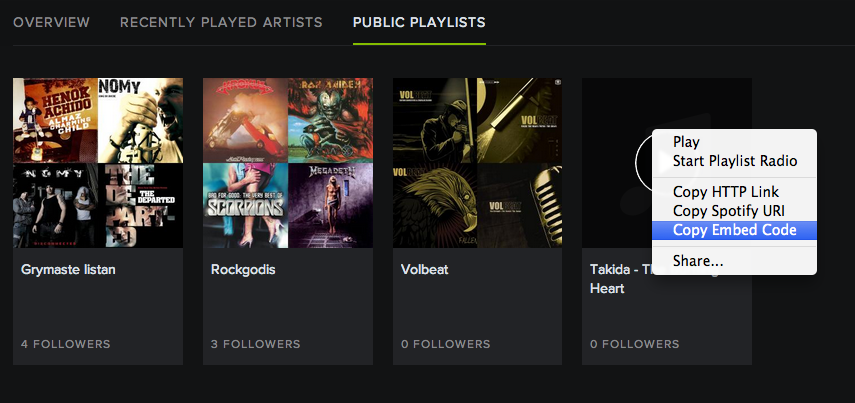
I think Spotify support are going to need to look at your account on their end to get to the bottom of this. Quickest way to get in touch with them is normally over on Twitter: @SpotifyCares.
You can also get in touch with the customer services team directly using the online contact form and they will be able to lend a hand by email.
If you get an automated email reply back directing you to the community or help pages, you need to reply directly to that email (even if its from no-reply) and one of the customer services agents will get back to you as soon as possible.
Ok! Thank you for your help.
We just refreshed your playlists on our end - has this made any difference?