How to Disable Shuffle Play on the iPhone

This seems to be a very common issue so outside of Spotify changing the behavior, I'm going to post a separate topic based in THIS thread.
The problem is once you press the shuffle button, the app will play all subsequent playlists in shuffle mode until you disable it. However, disabling this function isn't as intuitive as it should be. Otherwise, the aforementioned thread wouldn't be so large and growing.

Here's how to disable it. While you're in a playlist, at the bottom of the screen the name of the artist and song appears. To the right of it, the play or pause icon appears.
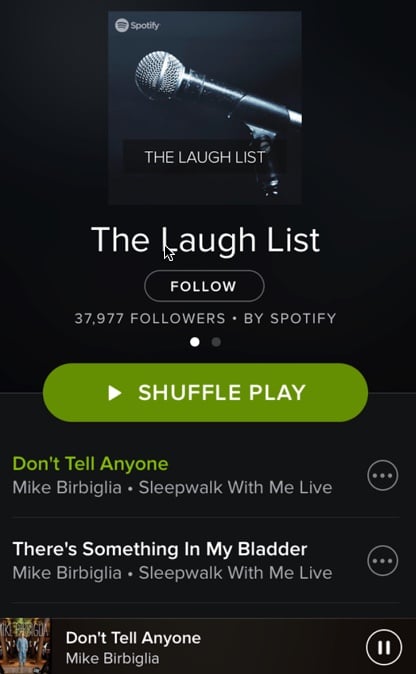
1. Press anywhere in the red circle below (in other words, don't press the play/pause icon).

2. This will bring up the album cover with even more options towards the bottom of your screen. See image below.
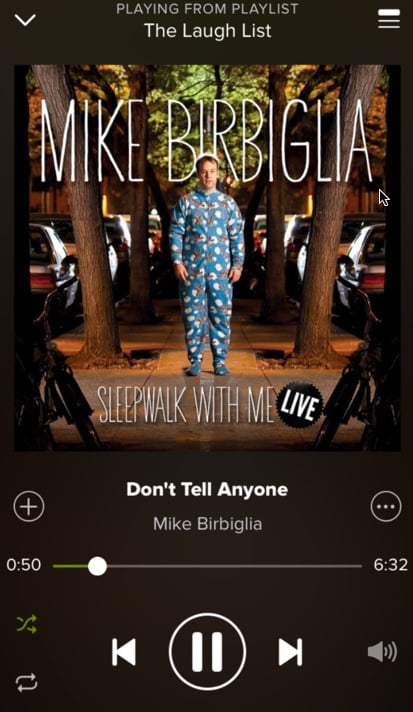
3. At the very bottom will be your song options (play/pause, rewind, advance forward, etc).
4. Look to the very left of the play and you will see two more icons right below the timeline. These are the repeat and shuffle icons.
5. The shuffle icon is above the repeat icon. If it's green, it means shuffle is enabled. If it's white/gray, it is disabled. Press to toggle.
Example below with shuffle enabled:
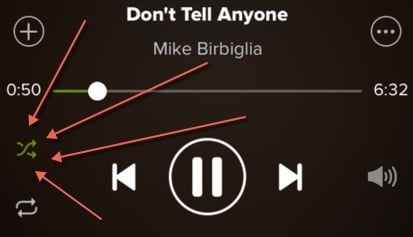
And when toggled, now shuffle is disabled:

Accepted answers
All comments


'Don't Tell Anyone' ...what an apt song title to use for your very imformative post. I think this is the song the Spotify engineers were listening to when they designed the user interface for this feature. Thank you.

FINALLY a solution that works!! Thank you so much!

It's not working anymore. When you tap the shuffle button it tells you to upgrade. Thanks spotify for not letting me listen to one album on my phone as shuffleplay will move onto other albums of the same artist like it was the logical thing to do...



Yes, the mobile app will only work in shuffle mode for free users.
Free users can listen without shuffle mode on the desktop app.

This is very annoying. I was considering upgrading to premium if I could get it on all my devices. Now I may try another product because this is so creepy. any suggestions?

Many thanks! Really helpful!
Andreas

Hello! You should contact Business Insider with this tip.
I bet there are millions of people who don't know how to toggle between Shuffle and straight play.
Until a moment ago, I was but one 🙂
thanks!

THANK YOU!!!!!!!! And yes, I'm shouting. Because it has been driving me nuts. Thank you Thank you Thank you!

Turned out i was subscribed to Spotify Unlimited, not Spotify Premium. You can disable shuffle on a desktop with Unlimited, but not on a mobile. I have now upgraded to Premium.
Thanks for your help guys.


When I toggle the shuffle icon to grey, it just invites me to upgrade,
and the only option there is "Got it"
Thanks for the help though

thanks !! its annoying , what a stupid thing not to tell people!!!


But how do I disable Shuffle Play permanently? Do I have to do this every time I want to play an album?
Btw; I have premium


Hi,
I have the Free Account for the Iphone 6s Plus. But when I press this button Spotify tells me that "You discovered a Premium Feature", in other words it tells me to upgrade to Premium.
Do you guys have Premium account?
Thanks.