Spotify freezing on latest release? Report it here.

Hey everyone,
As we're rolling out a new release of Spotify for desktops - v0.8.4 - we're keen to stay on top of any bugs that may have crept in while we weren't looking. We hate bugs.
So if you're having problems please use the following template to report them in this thread. This will help our top tech boffins investigate the issue. And then we'll be able to whip out the bugspray.
Don't forget to try a reinstall first! So make sure you're on 0.8.4 before reporting this to us (check under Spotify > About Spotify)
=== START OF TEMPLATE ===
Description
When and where the crashing or freezing occurs
OSX Version
eg. Macbook Pro running OS X 10.5.8
Did a reinstall help?
Yes/No
Has anything else helped at all?
eg. turning off gapless playback made it crash less often, etc.
NB: Attach screenshots if possible and you're getting any messages/pop-ups.
=== END OF TEMPLATE ===
Thanks for helping us make Spotify the best it can be.
Update: We pushed a fix to the most recent version of Spotify. So please try redownloading from www.spotify.com/download before reporting any issues.
Accepted answers

Uncheck these boxes.
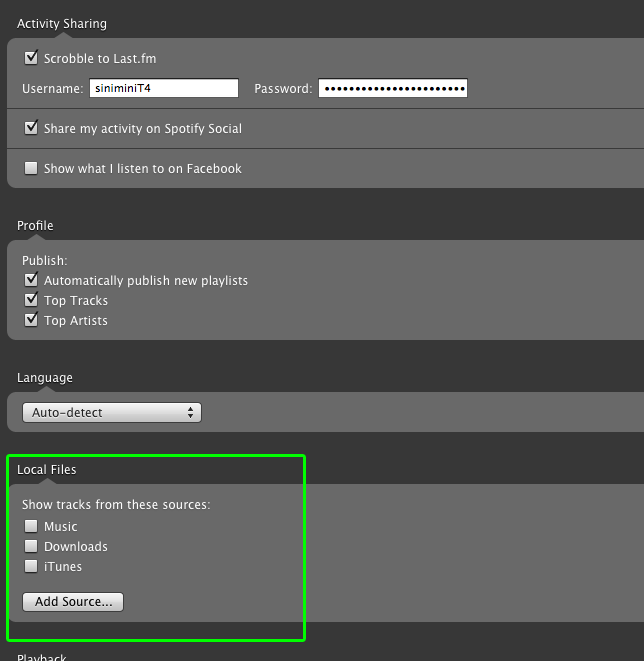
Hey all, as tagg said above, we've just pushed a new installer live which should fix this crashing issue.
Simply download Spotify again from the download page and everything should be better.
Let us know how you get on!

Just installed the new 0.8.4.93. Seems like the local file playback issue is resolved.
Never had the problem with streamed songs and with brief testing it seems I can
play consecutive local files without freezing.

This works for me:
Go to library/application support/SIMBL and delete the plugin-folder. Now login works every time!
Macbook pro running osx 10.8.2

SUCCESSFUL SOLUTION:
I went through the re-install routine again, as per Spotify web advice.
First time I could not find the two folders in Cache and Application Support to delete. Turns out I was looking in HDD rather than my home account. Found them this time and deleted them. Put Spotify app in Trash, reinstalled from .dmg...
Now enjoying Spotify again.
🙂
All comments

darn - appr. 2 hours later it suddenly froze again. I guess there's no avoiding re-installing....

freezes whenever an ad pops up even when I'm listening to local file playlist (why are there ads when I'm listening to local files?). looks like it has to do with flash.

Turned my local files back on, updated, and so far I've listened to 5 songs with no problems. Let's hope it stays that way!!

Yeah, mine stopped freezing after I restarted and was working fine for a few hours, but now the issue has occured again.

Description
It'll usually occur near the end of a song; the music will just stop, the app will freeze, and I have to force quit and reopen it.
OSX Version
iMac running OSX 10.6.8
Did a reinstall help?
I re-installed a few minutes ago, so I'll update you all later.
Has anything else helped at all?
Not so far. This only started about a week after I installed app (around mid-June), and so far it's occured anywhere from 25-50 times.

Description
Spotify freezes after an inconsistent period of time. Average fail rate, about twice a day.
OSX Version
MacBook Pro Intel running OS X 10.6.8, Spotify version: 0.8.4.93.gd9f49c35
Did a reinstall help?
No
Has anything else helped at all?
No
NB: Attach screenshots if possible and you're getting any messages/pop-ups.
Nothing to see. I get no error message, Spotify just stops playing music. Usually trying to switch to the Spotify app at that point results in a spinny beach ball. A force quit is always required.

Description
Spotify freezes after an inconsistent period of time (after 5 to 10 songs…)
OSX Version
Multiple Intel iMacs running OS X 10.7.4, Spotify version: 0.8.4.93.gd9f49c35
Did a reinstall help?
No. Tried to remove all local files and readd them. Turned of Last.fm and Facebook activity…
Has anything else helped at all?
No

This is ridiculous. Spotify and Rdio seemed pretty indistinguishable to me, but now I guess I'll simply go with the working app.
Description
Spotify freezes immediately on opening and after an inconsistent period of time (after 5 to 10 songs…)
OSX Version
Macbook Pro running OS X 10.7.4, Spotify version: the latest as of today downloaded from the site
Did a reinstall help?
No. I turned off local files as well.
Has anything else helped at all?
No. It still freezes up immediately when I start the app. Since I've downloaded and reinstalled the newest version, it's gotten worse. My whole computer freezes when it was only the app before!

=== START OF TEMPLATE ===
Description
Spotify freezes with uneven intervals. Some times I play one song before it freezes, some times I can play 10. But I force quit and restart maybe 10-15 times a day.
OSX Version
Macbook Pro OS X 10.7.4
Did a reinstall help?
No
Has anything else helped at all?
Have not tried anything else than a full reinstall.
NB: Attach screenshots if possible and you're getting any messages/pop-ups.
=== END OF TEMPLATE ===

mine keeps freezing while shuffling my playlists.. it will play about 3 or 4 songs then freeze up.. the only way to get it to work again is to force quit the program and start again..but then the problem will happen again.. it doesnt seem to happen if i play a whole album insted of shuffling my play lists..
Description
For me it seems to be somehow related to playback of local files.
Streams work fine but when playing local files client freezes after each played song.
OSX Version
Macbook Pro running OS X 10.7.4
Did a reinstall help?
No
Has anything else helped at all?
Turning off Gapless playback didn't help at all.

Description
I have to admit that I'm not 100% on this, but I think Spotify is actually crashing my entire computer, not just the program itself. its happened at least 5 6 times in the last two days where I've had the program open and running but not necessarily playing any music, and my entire computer has just frozen up and become unresponsive. Its happened both when I've been actively using the computer and when its been in sleep mode, and only began after my last software update. Yesterday I tried keeping the program closed most of the day and had no trouble, but when I used it later in the day and left it running it crashed again. (Actually just happened again as I was typing this - thank goodness for Chrome auto-recover.) It could be coincidence but I somehow don't think so, given the issues others are reporting.
OSX Version
Power Mac OS X version 10.6.8
Did a reinstall help?
No
Has anything else helped at all?
haven't tried much because the crashes are adversley affecting my work day and I can't devote a lot of time to troubleshooting.
I see that a solution seems to have been found for the program crashes, so I guess I'll try it out and see if it solves my problem as well, but since I haven't come across any other reports of the same issue (admittedly without checking every reply on this thread) I figure I ought to put it out there. Will update if disabling local files helps.
Oh thank goodness, someone else who's having their entire computer freeze - i thought it was just me and was worried something else might be causing it, but now I'm even more sure its Spotify.
Just an update to my previous report that disabling local files does not help. It may have taken a bit longer to freeze up, but eventually it still did and I had to hard reset my entire computer just like every time previous. And I can't say for sure on the time thing, because there hasn't been any sort of pattern I could recognize so far. Uninstalling and downloading the most recent release did not help either.
The program is pretty much un-usable to me at this point on my work desktop, which is where I primarily use it; since I'm paying for premium I'm getting pretty frustrated. Will try to be patient and wait for a fix but if I'm still having this problem by the time the billing cycle comes around again I might have to cancel. I adore this service and have done nothing but sing its praises since it launched in the US, and I'll be really, REALLY disappointed if I can't use it anymore 😞

Description
All of the time. I go to start a random playlist, and it crashes part way through the first or second song. I haven't been able to listen to ANY desktop music since the update.
OSX Version
Mackbook Pro using OSX 10.7.4
Did a reinstall help?
No
Has anything else helped at all?
Nothing, and I am not even getting a crash report option to send you people. I kinda want my money back.
Just installed the new 0.8.4.93. Seems like the local file playback issue is resolved.
Never had the problem with streamed songs and with brief testing it seems I can
play consecutive local files without freezing.

Ok, I reported this bug on the first page of this thread. Turns out I still have a problem. As someone else said, it MIGHT be associated with local files, but not sure.

=== START OF TEMPLATE ===
Description
Spotify crashes as soon as I play a song. The music bar freezes at 0:02 but the music will keep playing. The rest of the program is unresponsive. Music will quit playing after about the 3rd song. Application does not become responsive again.
OSX Version
Macbook Pro running OS X 10.7.4
Did a reinstall help?
I did a reinstall via App Cleaner, but it did not help.
Has anything else helped at all?
Nope. I tried deleting apps, omitting loading of local files, all to no different effect.
NB: Attach screenshots if possible and you're getting any messages/pop-ups.
No screenshots and no error messages. Activity Monitor just says Spotify is "Not Responding".
=== END OF TEMPLATE ===

Yes! It's been happening to me as well.
I *think* it seems to be happening after a song from my local files (itunes) plays on a playlist.

=== START OF TEMPLATE ===
Description
Since updating to version 0.8.4.
It freezes at the moment it needs to start the next song. So most of the time I can only play 1 song. Somtimes 2 or 3.
OSX Version
Macbook unibody running OS X 10.7.4
Did a reinstall help?
No. Cleared the cache also. No help.
Has anything else helped at all?
Turning off gapless playing improves things indeed.
Turning off local files as someone suggested is not a solution. This need to work. Most of my music still comes from iTunes.
No popups or errors appear. It just becomes unresponsive. Only force quit works.
=== END OF TEMPLATE ===
I seriously think it may have something to do with Flash. Mine froze my Macbook Pro like I previously stated in an earlier post. This time I waited for it to unfreeze and an update for Flash popped up. I have continuously been ignoring this flash player update until today. It makes a bit of sense, since flash seems to be the only thing that can make my computer go crazy. I've been trying to recreate the problem and haven't been able to since yesterday. We'll see what happens. In the meantime, Spotify, check into those flash ads!!! They may actually be causing problems that are losing customers instead...

I will be mid song and I will get that spinning wheel of doom that macs get. I'm really tired of force quitting and restarting.....
Screen Shot on Macbook:
whole page: Command+Shift+3
Section: Command+Shift+4 and drag what you want to take a pic of

=== START OF TEMPLATE ===
Description
The program crashes immediately as I attempt to log in, or when I press any of the "spotify","file", "edit", "window", "help".
OSX Version
Macbook Pro running OS X 10.7.4
Did a reinstall help?
No. Cleared the cache also. No help.
Has anything else helped at all?
Nothing at all.
=== END OF TEMPLATE ===

When and where the crashing or freezing occurs
Spotify crashes at startup, just as it has been doing for a past number of months, the new version was no change. Been discussing this in another part of the forum for some time but was directed here.
OSX Version
MacBook Pro running OS X 10.5.8
Did a reinstall help?
No
Has anything else helped at all?
No

=== START OF TEMPLATE ===
Description
Since updating to version 0.8.4.93.gd9f49c35 I'm seeing the same issue as many others are reporting... it freezes with the Spinning Beach Ball Of Death at the beginning of a new song after playing 4-5 tracks ok. The last occurrence details.... I had just played Green Day's new single "Oh Love" and then I was playing the entire album "Dookie" . It froze while attempting to start playing "Longview".
OSX Version
System Version:Mac OS X 10.7.4 (11E53)
Kernel Version:Darwin 11.4.0
Model Name:MacBook Pro
Model Identifier:MacBookPro5,3
Processor Name:Intel Core 2 Duo
Processor Speed:2.8 GHz
Number of Processors:1
Total Number of Cores:2
L2 Cache:6 MB
Memory:8 GB
Bus Speed:1.07 GHz
Boot ROM Version:MBP53.00AC.B03
SMC Version (system):1.48f2
Did a reinstall help?
Is this 2004? I thought this was the Spotify forum, not RealPlayer or Rhapsody. If that's your solution, I'll go back to Rdio.
Has anything else helped at all?
Yeah... Force Quit / Spotify
=== END OF TEMPLATE ===

I, too, have been seeing the rainbow wheel of doom....what is going on with this freezing??

Description
Spotify crashes on startup. The login screen appears. After entering my login details Spotify shuts down. On the next startup it says something like "Spotify crashed, would you like to send a report?".
OSX Version
OSX 10.7.4
Did a reinstall help?
No
Has anything else helped at all?
No
So I did reinstall Spotify AND deleted my ~/Library/Caches/com.spotify.client/Storage folder and that actually made the problem worse. One time it locked up the first song I attemtped to play.

Obviously their update hasn't fixed the problem. Will they be asking us next to delete System32?
I'm turning off local files to see if that helps. Will return with an update.
UPDATE:
Over an hour later, so far so good. Will report back tomorrow.
UPDATE #2:
Went all night without any issues after disabling local files.