Can't find the play queue

Since the latest upgrade a day or two ago, I can't find the Play queue and play history.
They used to be in the Main menu.
Where are they gone to?
I'm using Spotify Premium, the standalone player, on Windows 7.
Accepted answers
All comments

Hello there,
The play queue is now shown as an icon at the bottom right, between LYRICS and Shuffle icon.
And by the way, I agree with a lot of the other issues other posts grumble about in this forum in the last day.
But I like the fact that Spotify behaves in the way expected by a normal program, and shuts down completely
when the window is closed;-)
But my question in this post is; Where can I find the play queue?
See answer above 🙂
Ok, thanks, I found it.
It doesn't seem like the logical place for it, but I assume I'll get used to it.
It is kind of a playlists, a special one, so it logically fits by the play lists.
I don't like the way controls are spread in umpteen different places.
But, I'll get used to this to.
You are welcome 🙂

Can you clarify which page to find the lyrics and shuffle icon at bottom right that you mention? I just fell into queue **** today. Thanks!

@Jahart95 wrote:Can you clarify which page to find the lyrics and shuffle icon at bottom right that you mention? I just fell into queue **** today. Thanks!
It's all at the bottom right of the Spotify desktop application window. If you still can't find it let us know!
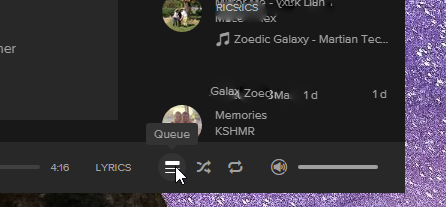

This button should be every where.
Im on mobile and cant find **bleep** around this app.
I'm not a retard, but I've been through every flipping menu and every playlist, I cant find Sh*t!
If I click on a radio station, it should at best notify I'm leaving the "Qeue", or it should just remove me from the "Qeue" entirely.
This has to be the dumbest app choice ever made to hide such a feature.........
Where is it on mobile?!


Can anyone clarify where to access the queue play list? As per the (slightly ranty) poster askers above? I’m talking about mobile version here not desktop. I can’t find it.
I had it earlier today. Seems my phone has upgraded or something. It used to be on the top right when I had the current song ‘up’. Now it’s disappeared.
Thanks a lot anyone in the know 🙂
Scrap that it’s reappeared.
on mobile it is top right. See pic


Hello there,
The play queue is now shown as an icon at the bottom right, between LYRICS and Shuffle icon.