Getting Access Error when playing Spotify Connect on Yamaha AV receiver

I having problems when playing Spotify Connect on my Yamaha AV receiver (RX-A1030).
It starts playing (from iPad and iPhone) as supposed. But after about 30-60 seconds it stops playing and the message "Access Error" shows in the receivers display. Then I must pause and start play again. Then it will play for about 5 seconds. I have had this problem since the first day the new firmware was released.
I have tried every solution with no luck. I have been in contact with the Yamaha store and they advised me to get in contact with the Spotify helpdesk.
I can however play music from Spotify by using Airplay without any problem. But the real reason I bought this receiver was to achieve the Connect function.
Appreciate all help to solve this problem.
Thanks.
Accepted answers

All comments

The problem seems to me to be Yamaha-specific and server-load-related.
I'm getting the "Access Error" on weekends and workday evenings, when presumably a lot of people are listening to music. On workday mornings and early afternoons everything is working fine. This pattern has been the same for weeks now.
The problem appears as follows:
- I switch my Yamaha MCR-N560D off and on, with Spotify selected as input method.
- On the Yamaha, I get the messages "Initializing" and then "Connected".
- In the Spotify app on my iPad, Android phone or notebook, I see the Spotify Connect icon in white (circled speaker).
- I click the Spotify Connect icon. I see my Yamaha device. I click it.
- The Yamaha flashes the message "Access Error".
- On the Spotify app, the Spotify Connect icon is circled, white, with flashing waves, i.e. showing it's trying to connect. It stays like this, i.e. does not turn green, and no connection occurs, even after some time. No music playing either, of course.
- If I click the icon again, the Yamaha device is no longer in the list of devices that can be connected. If I close the selection of connectable devices, the loudspeaker icon is no longer circled.
At other times, presumably low-load times, everything works as expected.
It's not a problem with Spotify itself, since the Spotify app itself works fine at all times on my iPad, Android phone and notebook, even when I swith to high bitrates ("Extreme").
The problem is not related to the Spotify app on the control device, as I can reproduce it with iPad, Android phone and notebook.
It's not a problem with the Yamaha not having internet access either. Internet radio on the Yamaha works fine at all times (although the Yamaha directory server is annoyingly slow). I have a stable, high-speed DSL connection. The Yamaha is directly connected to the WLAN router via LAN cable, no fancy network setup.
Based on the time pattern of the problem, I assume that to connect the control app to the Yamaha device, access to some Yamaha- or Spotify-Connect-related server is necessary (?), and that server has load-related problems. It would be great if you could elucidate.
It would be even greater, of course, if you could confirm that the problem is understood and actively being worked on.
P.S.: I live in Germany, so the times mentioned (morning, afternoon etc.) relate to European timezones.
I have the latest versions of the Spotify app on all three devices, and on the Yamaha, the latest firmware version.
P.P.S: If and when I get a connection (just as right now, because it's a workday morning here), the music will stream just fine. But I know that later in the day, if I try again, I will not be able to get that initial connection anymore. This pattern has been repeating itself for weeks now.

The problem you've described is pretty the same in my case but I ussually not using Spotify in the mornings so I experiance the problem every time I use it. Let me test it tomorrow morning and confirm your pattern.
Hello, I did the test today morning with Spotify running on the Laptop and Yamaha RX-V577 and I confirm what has written Phouk, Connect was working stable at least for 30 min (the time I was able to test it) which is normally not the case in the evenings.
Now the question is on which side is this bottleneck and how we can overcome this?
The problem persists. Spotify support says I should contact the Yamaha support (after first telling me my device wasn't supported, and then finding out they were working from outdated information). The Yamaha support doesn't answer. No helpful reaction on this forum so far either.
Is the customer supposed to work out technical problems that are between the two business partners Spotify and Yamaha?
I'm getting more and more frustrated with both of them...
I'll do the same and contact Yamaha support in my country.
Today morning I failed with Spotify Connect on my Yamaha as it always happen every evening.
Spotify was the main reason I have replaced my old amp. I'm also diapointed.

Hi,
Got the same issue. I have a Yamaha RX-A2030 that has been working fine. The fw in the receiver was last updated in November and I have made no changes whatsoever other than updating Spotify on the various devices I own. I get the list of Spotify Connect devices available, click the receiver and you get that beaming speaker until it stops and checking the list again the receiver is gone. After a short while it pops up again.
This is something that happened the last couple of weeks.
To me this clearly hints at some recent update on the Spotify side. My network set-up as well as fw version in the receiver has not changed at all, the only thing different is updated Spotify Clients.
How support can blame Yamaha is a mystery. Even if this is a hidden flaw in the Spotify Connect implementation made by Yamaha that hasn't surfaced until now they must have passed some quality assurance demanded by Spotify earlier.
Hopefully someone from Spotify is checking this forum as it is quite annoying to have a working feature wrecked by an update on their side.
/Jan
Same pattern for me again today: Worked in the morning (8:30 a.m.), doesn't work now (1:40 p.m.).
At least I'm not alone. Hope we can get some attention...
Cheers,
Phouk
The problem persists. Spotify support is pointing me to Yamaha, and Yamaha keeps not answering my mails. By now, I'm so frustrated...
This is something where Spotify and Yamaha should talk and work together to identify the problem. But the reality is, the customer is left to see if they can convince either side that the problem is on their side, and if they can't, bad luck, you are left out cold.
I don't know what else to do to get attention to this. Will anybody react, or is the only way to get attention to leave bad reviews on Yamaha and Spotify all over the internet? I'm so frustrated, I put a one-star review on amazon.de.
I mean, just the fact that when you search for Yamaha and Spotify Connect you find posts like this one should mean it is in the best interest of Yamaha and Spotify to protect their brand image, which takes millions and years to build up in the first place.
I used to be a loyal Yamaha customer, and Spotify Connect is great when it works... which it doesn't, most of the time.
Frustrated, frustrated, frustrated.

Phouk, your experience is consistent with mine. The problems are much more persistent on weekends. Since we're not hearing about the same problem with all the other brands, I think it is pretty clear that the responsibility lies with Yamaha.
If anybody has a network setup that permits sniffing the traffic from the receiver, it would be interesting to hear if you can figure out exactly what server the receiver is trying to contact. I wouldn't be surprised if it's some japanese server and that latency / packet loss due to the long distance. If that's the case then it probably works just fine for Yamaha in Japan.
Just to keep collecting more info, maybe it helps:
By now, spotify and yamaha support have at least answered me, although the problem isn't solved yet.
- Spotify sent me a test account to verify the problem is not account-related. It's not. Using the test account they sent me, I still get the "Access Error".
- Yamaha told me to take the device off the LAN, reset it, and take it off power for 30 secs. Did all that, plugged everything in again, didn't help. Still getting the "Access Error". To veryify the network connectivity, I tried out internet radio - that works.
- The morning-afternoon pattern is not fully consistent. Yesterday, Spotify Connect worked for me throughout the day. Today, it doesn't. But it definitely tends to have less problems on workday mornings and more problems on evenings and weekends. And it's still very unreliable.
Cheers,
Phouk
Still unreliable, doesn't work most of the time.
After the first "standard fix attempt" of letting me reboot my device, which didn't work, no further answer from Yamaha.
One more thing I noticed: In the Spotify app, when I click on the circled loudspeaker symbol, and the device name appears together with the text "Available on the Network", I tend not to be able to create the connection, as described above. If just the device name appears after clicking on the circled loudspeaker, without the text "Available on the Network", then when I click on that device name, the connection tends to work. I seem to remember that sometimes the text "Available on the Network" is there initially, then quickly disappears, and I just see the device name - then it works as well.
Just a conjecture: This looks to me as if "Available on the Network" points to some initializing step, and if that text does not disappear, that could be because that initializing process is hanging and can't proceed to the next step. Could it be?
Spotify and Yamaha only answered my mails after I created a 1-star rating on Amazon. I wonder, maybe more people have to do that, before they take a serious look at the issue?!
By the way, Yamaha support wrote me they were "not aware of any issues with Spotify Connect". But other people here on the forum are writing that they have the same issue. Have you tried to contact Yamaha support in your countries? What was the outcome?
Cheers,
Phouk
Hello,
Flodin has asked for logs from Yamaha interface. I've got two from wireshark, one when everything was fine and one with the problem active.
In the second case I can see lots of "TCP segments with reasembled PDU" but I'm not an expert in TCP/IP so if anyone could take a look on this I give information about IP of particular equipments:
192.168.2.206 - Yamaha RX-V577
192.168.2.218 - laptop
192.168.2.1 - gateway
192.168.2.33 - iPad
Logs can be reviewed on free version of wireshark SW.
Still unreliable - worked fine yesterday, doesn't work today at all. "Available on network" and "Access Error"...
Also, after I replied that just resetting the Yamaha device didn't solve the problem, still no answer with a new solution from Yamaha. Did anybody else succeed in getting any replies from Yamaha support?
Cheers,
Falk
Thank you for your efforts lesbul, but as far as I can tell this is just the traffic to/from your laptop (presumably because you ran Wireshark on the laptop?). I was looking for the traffic between the receiver and gateway / Internet. For that you would need to capture network data at the gateway, or possibly run the capture with the network card in promiscious mode. In fact I think I will try to see if I can do the latter myself.
In any case, I barely see any packets coming from the receiver, apart from those that request information from the laptop.
I have not contacted yamaha support yet, as it seemed like a last resort for me. Also it would be nice if I could first collect some hard evidence that shows it's their servers that are misbehaving. But I probably will contact them very soon.
After their respective one-shot, non-problem-specific one-size-fits-all attempts at problem solution (Spotify: try a test account; Yamaha: try resetting the device), neither of which changed anything, now both Yamaha support and Spotify support are ignoring my mails again.
Being completely ignored by their support when their solution doesn't work feels pretty **bleep**ty to me as a customer. 😞
Cheers,
Falk
In my desparation, I kept randomly trying around different things. The following steps seem to have helped this time, at least temporarily. I tried something similar in the past, and back then it didn't help, but then I probably didn't do exactly the same steps.
- Switch the device to a non-network source (e.g. CD player)
- Reset and restart the device
- Disconnect the network cable
- Disconnect the power cable
- Disconnect the power from the WLAN router etc. (all network gear)
- Wait a few minutes
- Reconnect power
- Wait a few minutes
- Reset the device again
- Wait a few minutes
- Reconnect the network cable
- Wait a few minutes before switching to a network source like Spotify
- Try Spotify Connect - for now, it works.
I can't guarantee that's a real fix and not a random event. If it is a fix, there's probably a simpler version of it that also works. Also, I don't know how long the "fix" holds. It's not something I want to have to repeat every couple of days.
What I know for sure is that neither Spotify support nor Yamaha support were of any help so far whatsoever. They shouldn't be named "support", as they are none.
I will keep you guys updated.
I'm curious to know if anybody can reproduce the same "solution", and if it is then stable for them.
Cheers,
Falk
Hello,
If anybody is using Laptop or Android for Spotify source the good work arround is to use Jamcast application. The sound quality I think is worse but connection is 100% reliable.
regards
So for so good. I've implemented your reset procedure and its working stable for already one hours. It wasn't the case never before.
Lets see.
Thanks a lot
Works somewhat more often after the reset, but still very unreliable.
So far, this is my history with Spotify support:
* February 4: They tell me my device is not supported, pointing me to an old press release.
* February 5: After I point to an up-to-date list, they apologize and agree the device is supported.
* February 11: They suggest I try a test account. Doesn't help.
* February 15-22: No answer to multiple mails by my side with additional info.
* February 23: They answer, "I'm afraid but the deice that you're trying to use does unsupported by Spotify."
This level of performance should be shameful to the Spotify brand. At the level of service I have experienced from Spotify support so far, it would actually be more honest to fire all support staff and sell the service as "unsupported".
Was I recommending Spotify to others before? Yes.
Am I still recommending Spotify? **** no.
To the other users out there who have problems: What routers are you using? Maybe there are some incompatibilities there, just guessing. Mine is an Arcor Easy Box A300, which is a pretty old one.
Cheers,
Falk
P.S.: Today, it didn't work on multiple attempts. Then I re-did the song-and-dance with the multiple resets I described in an earlier post. After that, it connected immediately. Which means, the theory that it's a server-side problem is out.
Hopefully the end of the story: Because it was the only remaining thing I could think of, I replaced my (very) old modem/router-combination with a new model. This seems to have fixed the problem (knock on wood).
BTW, Spotify support is still insisting that the device is not supported. I wonder what Yamaha thinks about that, given that Spotify Connect is part of the advertised features, printed documentation, and built-in device menu options...
My experience with the support on both sides (Spotify and Yamaha) could not have been worse. Fire them all and advertise the products as unsupported. Then at least I would not have wasted my time trying to get help from them.
Cheers,
Falk
Seems I had been optimistic too soon: The setup worked fine for a couple of days, and now I get the same, persistent "Access Error" with the new router/modem setup. Same behavior as before.
Hello,
In my case it also worked for a couple of days and that's all. I have wifi router Asus RT-N66 which is quite new.
Often, in the morning, I find the Spotify Connect feature has stopped working and displays the dreaded "Access Error". Through trial and error, I found out that the following sequence of steps usually fixes the problem for the day:
1. Switch off Yamaha device, and disconnect its LAN cable.
2. Power cycle DSL modem / router combination.
3. Wait a few minutes.
4. Reconnect LAN cable and switch on Yamaha device.
This sequence of steps is shorter than what I had described a few posts ago, and does not include a device reset. A couple of times, I needed multiple attempts to get the problem to go away. I suspect that in these cases, I just hadn't waited long enough before reconnecting the Yamaha device.

I think I have just figured this one out. It was annoying me since day one, contacted Yamaha support several times but never got a reply, but also didn't have the time to keep on it.
I had the same problem, RX V675 showed up in Spotify Connect, upon connecting I would get 'Access error'. Basically what you guys had, only that with me, it never worked, no matter what day or time.
Upon reading all your input and research, I first thought it might have to do with regional settings (I am in Holland, but bought the receiver from Amazon.de), but couldn't find anything about it. Then I stumbled upon the network settings (browser - System config - IP adress) and noticed that both DNS servers were set to 0.0.0.0 (left them like that during first setup because I assumed my router would do that work, which it usually does). Since it can do no harm, I changed that to the two standard google DNS servers, 8.8.8.8 and 8.8.4.4. Saved it, tried Spotify Connect again - and it works like a charm, upon first trial!
What makes me really curious: how can it be that Yamaha (and Spotify) support do not know this? And why is it not mentioned in the Yamaha Spotify Connect extra manual?
Anyway, it works, curious if it will solve the problem with you guys as well, let me know!
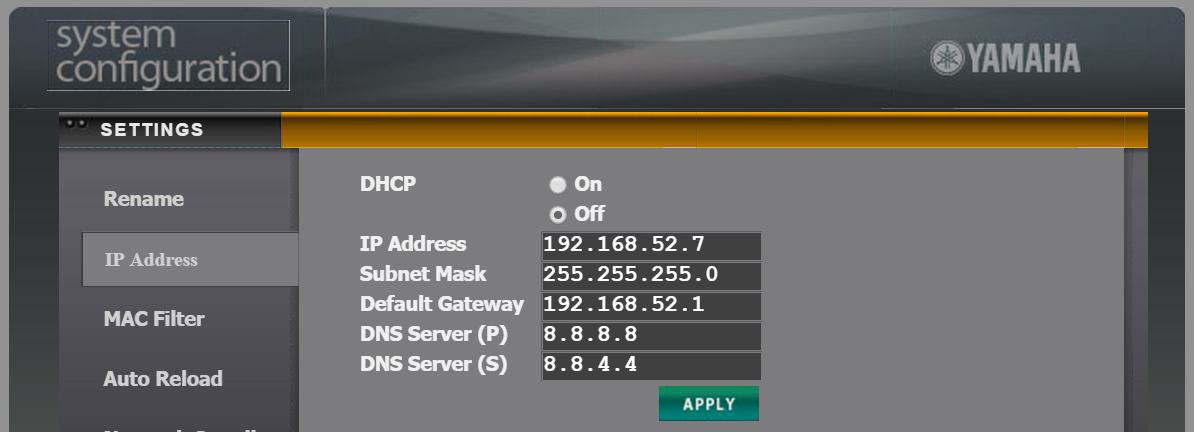
I set my device (the Yamaha MCR-N560D) up like this, and it has been working without problems for the last three days. Hard to be sure at this point, but this could be the solution. I will report back should the Access Error reoccur, but I am optimistic that this time, it won't.
Thanks a ton to you, Spotyguy! This has been bugging me for weeks now. You, sir, are a gentleman and a scholar! 🙂
Cheers,
Phouk


I basically tried everything there till found this post, Im in Costa Rica and as well got same model 675 from amazon. Changed nw dns settings and inmediatly worked.!! .Thanks Spotyguy, for those under that condition this works 200%.
I think I have just figured this one out. It was annoying me since day one, contacted Yamaha support several times but never got a reply, but also didn't have the time to keep on it.
I had the same problem, RX V675 showed up in Spotify Connect, upon connecting I would get 'Access error'. Basically what you guys had, only that with me, it never worked, no matter what day or time.
Upon reading all your input and research, I first thought it might have to do with regional settings (I am in Holland, but bought the receiver from Amazon.de), but couldn't find anything about it. Then I stumbled upon the network settings (browser - System config - IP adress) and noticed that both DNS servers were set to 0.0.0.0 (left them like that during first setup because I assumed my router would do that work, which it usually does). Since it can do no harm, I changed that to the two standard google DNS servers, 8.8.8.8 and 8.8.4.4. Saved it, tried Spotify Connect again - and it works like a charm, upon first trial!
What makes me really curious: how can it be that Yamaha (and Spotify) support do not know this? And why is it not mentioned in the Yamaha Spotify Connect extra manual?
Anyway, it works, curious if it will solve the problem with you guys as well, let me know!