[All Platforms] Consolidate duplicates

It would be nice if Spotify can recognize identical songs to avoid duplicates in your Liked songs and playlists.
This is pretty common for songs released first as a single then within an album.
For example, if you like the single one, the UI will not show the song as liked when you browse the album. And if you like the song in the album, you'll end up with a duplicated version in your library.
This also happens a lot for songs that you listen in Daily Mix or Discover weekly. If it's not the exact same song you have already liked before, the UI is inconsistent and you can save a duplicate.
Apparently, there is already an internal merge mechanism as the play counter is not split between the different versions of the songs. Maybe this can also be used to consolidate the UI.
Repost of https://community.spotify.com/t5/Closed-Ideas/Your-Music-Remove-Duplicated-Songs/idi-p/4546787 which didn't get enough kudos.
Comments


I love it. This would greatly improve my spotify experience, such as making playlist-creating much more fun. This is probably one of the best things spotify can do right now.

As far as I know they already have something similar. If a song is present on multiple albums than they become "connected", the little chain icon is meant to show that. The problem that it quite often doesn't work correctly, probably it is a lot of work to administrate.

@ SPQR3
That system seems to be mostly used to link singles with the albums they later appear on or albums with deluxe versions or something like that, and there only seems to be one link per song, which is inadequate.
What I'm suggesting is an automated system using audio fingerprint technology and metadata analysis then the questionable (less than 90% match or thereabouts) connections are sent to the label/artist to confirm the change to make sure things aren't done incorrectly, offloading the admin work from Spotify. And of course a 'report incorrect association' option in the context menu just in case.
My idea could replace that link icon with an "Appears On" column with "X Albums" and "X Playlists" each of which can be clicked to access the relevant page. I was going to mockup a 'Track' Page which details the original artist, popular covers and alternate versions of each, lists of mixes/samples and less popular covers/tributes. But haven't got around to it yet.

On a related note it would be nice to click an artist and below the "popular tracks" section it would be cool to see a section for "starred by you".

I added my starred songs to the saved song list. They now display when I click "Songs" under My Music. If I go to an artist page or an album page for one of the songs I have saved the song does not have the check by it to show that it is in the saved song list. So if I am looking at an artist page I can't see which songs I have already saved to My Music. This happened to some but not all of the songs I moved over to the saved list. Some songs appear twice on the Songs list even thought they only exist once in Spotify (no alternates exist). This really messes up the utility of Saved music if it is possible to duplicate songes like a playlist rather than have it be a database of saved tracks.

I've seen some issues too with multiple versions of tracks causing issues.
Totally agree, this would be great. Showing the original album, release, and re-mastered-re-re-release is totally unenecessary. Consolidate them all into one.

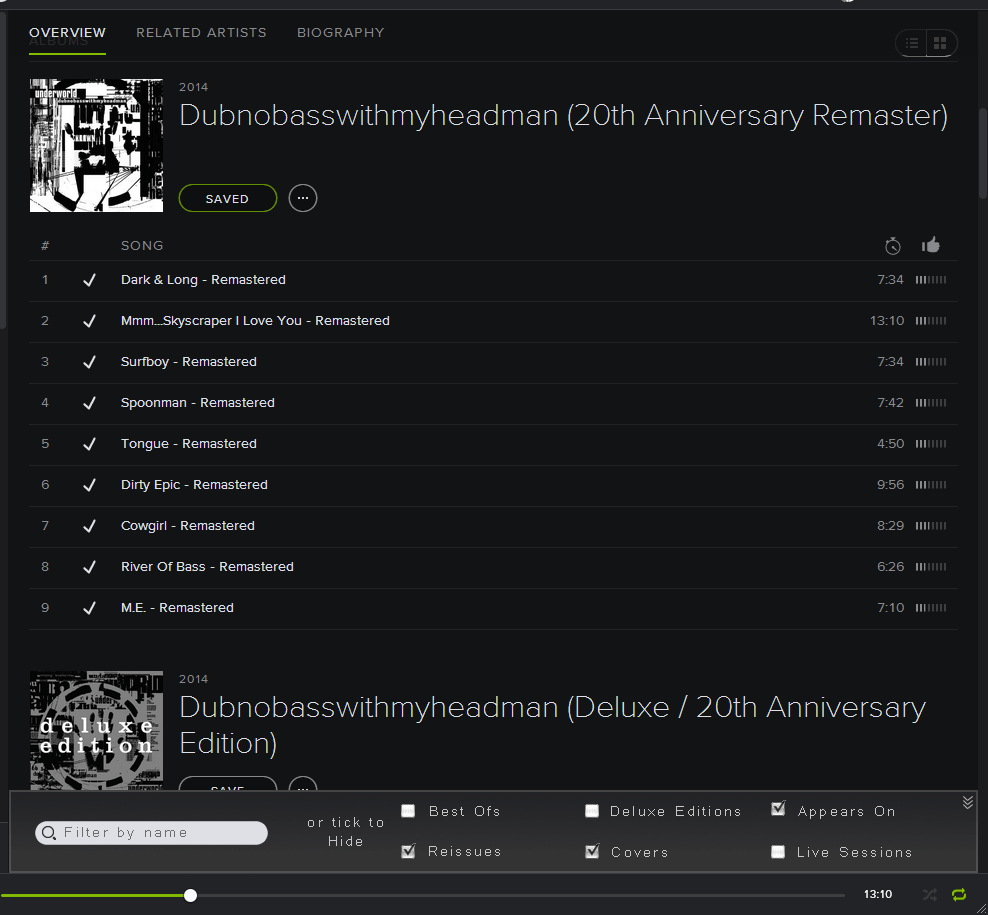
my personal take on it it similar, but allows a little more granularity.
a per artist inline filter, similar to the one shown on playlists, but with more options. You could have global options, and then artist specific options that override global ones.
so eg, you could automatically hide all reissues and best ofs globally, but for a particular artist that you want to see them for, set them to be visible in the artists filter.
i made a crappy picture to convey the idea
This exact same thing happens to me, it's extremely confusing. Glad I'm not the only one with this issue. Has anyone figured out a fix for this? Sometimes I notice it on deluxe albums that are no longer offered but I saved when they came out.

Simple would be quicker. Just DeDuplicate by TrackName-- by clicking "DeDuplicate" that developers would add to the RightClick menu of both 1) Folder and 2) Playlist.
Here is an example playlist to be DeDuplicated; here are the songs in that playlist.
Billie Holiday – I'll be Seeing You
Billie Holiday – I'll Be Seeing You - Live (1956/Carnegie Hall)
Billie Holiday – I'll Be Seeing You - Bonus Track
Billie Holiday – I'LL BE SEEING YOU - Original
Billie Holiday – I'll Be Seeing You - Remastered
DeDuplicate steps:
- Cut Artist from the beginning.
- Cut everything after the TrackName, including "Live", "Bonus Track", "Original", "Remastered".
- Reduce the TrackName to all lower case so that "I'll be Seeing You" will be recognized as a duplicate of "I'LL BE SEEING YOU".
- Cut off everything in parentheses ( ) or brackets [ ] after the first position-- thus removing the editorial comments that have nothing to do with the name of the song.
- Delete all punctuation such as ', ?, / -- because if you scan playlists ordered by Track, you will see that "duplicates" often have different punctuation.
- Delete all spaces -- because often "duplicates" have extra spaces-- or missing spaces-- between words.
- What is left is a NormalizedTrackName, URL_Index.
- Order by NormalizedTrackName.
- Delete all but one record from each group with duplicate NormalizedTrackName. I have done all of these above steps in an Excel spreadsheet if anyone is interested. DeDuplication makes my playlists ten times more impressive-- particularly at parties.
Where you will want some "duplicates"-- such as brilliant covers and even more exciting "live" performances-- the simple solution would be to add the desired duplicates to a separate playlist that you would then combine with the DeDuplicated big playlist in a Folder that you would "Play."
Also into this "duplicates" playlist you would add those rare tracks where completely different songs end up having the same NormalizedTrackName by the above process.
No Spotify database clean-up of bad data is required; no database restructuring is involved.
The above DeDuplication process removes 99.9% of the hated duplicates that drive you nuts when you are in the middle of the pleasantries.
Your suggested system is treating the symptoms, not the problem. Also, spotify want to keep their client thin and have all the logic being done server side, so architecture-wise it wouldn't fit. The idea of my system is to allow people to find ONE VERSION of the song they want, but support all the variations in a structured manner. It would then accurately be able to reflect the popularity of songs, as well as whether an artist is any good live, and provide better association of cover songs (decluttering 'as made famous by' and 'in the style of' from their track names).
The digital fingerprinting in my suggestion is done as a last resort to reinforce the decisions made by analysing the metadata of the song to reduce the number of comparisons that need to be made.
The benefit of this optimisation is not only good for users, but it would probably halve the number of songs spotify need to keep on their servers.
A good example is Sunday Girl by Blondie. there are about 40 tracks listed when searching 'spotify:search:title:"Sunday Girl" artist:Blondie'. Just looking through these manually, there appears to be about 10 versions, which are:
- The original
- 3 remasters
- the french version
- the live version
- 2014 re-recording
- 2 BBC radio 1 recordings
- 1 mix
About half of these seem to be the original, but without fingerprinting you can't be sure. 3 are 10 seconds shorter, and may be the french one, while one other is 15 seconds longer and is live - but I could only tell by listening. This is a potential 75% saving in required storage space, assuming spotify doesn't have any file system based compression. Less popular artists will have fewer duplicates, as their tracks won't keep getting re-released...another metric to measure popularity by.

Peter, that's exactly the problem: multiple track album version. Logging off and on will not solve this problem. And it's annoying.
F.e. I marked some tracks from this album as "Saved" some time ago: spotify:album:3uocz31s0fmZ8SRP1rCM8e
But it seems this album got replaced in the mean time by this version: spotify:album:7o8Pkxy7OmloQ1atWwlfBX
So when I navigate to this album using search, I won't see my "Saved" marks. This is not a exception. It occured already multiple times to me.
Please consolidate album versions if it's really the same album, or show different realeases if they really are different.
There's a similar request: https://community.spotify.com/t5/Spotify-Ideas/Consolidating-duplicate-tracks-which-appear-on-multiple-albums/idi-p/662920

This spring there apparently was implemented a function to prevent duplicates in playlists.
And it works!!!
But when is a duplicate not?
It only works if you try to add a song, that is completely the same as another in the playlist. That means same song, same artist, same album. And maybe same something more.
I frequently take all songs from all albums from a certain artist or group and put them into a playlist. And the "duplicate function" does not work here. Only if i take the same album twice. And i would not do that.
I have not any answer for how to do the trick automaticly.
The only cure i found was to sort the songs alphabetical and then browse thu them an remove the unwanted.
But i have a dream. That it will be possible to do it automaticly.
How about
* Song
and
* Song - Live
and
* Song - Remaster
Are these Duplicate? Should the automated DeDuplication keep only one of the above?
Dear rednblu
Excatcly
I dont know how to do this, so i agree that it is almost impossible to program.
In the old days classic music had BWV and köchel numbers and in that way they were unique regardless whom played it.
Maybe that is the only way for modern music as well.
But we dont have these numbers, so i cant see the solution.
If it is possible to do the thing you suggest, it might be a step on the way.
But thanks for considering
Best regards
Poul Erik
Weidick and rednblu - I've moved your discussion over here to have that in one place. 😉
Dear Weidick,
Of course, Spotify could give us an automated solution-- but they won't. 🙂
Thanks for helping me improve my *design and *implementation of my programming Workarounds to remove Duplicates so that I don't get ticked off at Spotify. Most of the obvious duplicates I now remove with a programming workaround-- then I have an acceptably easy Workaround way to use the 0.9.x version of Desktop Windows Spotify to remove the other duplicates that I don't want.
What I end up with is a >> *Randomized playlist-- << that you can copy, @Weidick, to your own PlaylistName and run the following routine yourself. I repeatedly Cut and Paste batches of 300-400 tracks from that *Randomized playlist to the "yellow" editable PlaylistQueue in 0.9.x Desktop Windows Spotify by the following.
* Select a "nice place to start" in that playlist.
* Do Shift-PgDn-- maybe 6 to 15 times-- depending on my mood-- to highlight a bunch of tracks.
* Then I do the "Cut and Paste to the Queue" operation by the following: 1) Right click on the highlighted bunch of tracks; click on Queue from the dropdown to do the Paste; then hit the Delete key to complete the Cut of the highlighted tracks.
The programming to generate the *Randomized playlist I have designed, with your thoughtful assistance, @Weidick, to work inside Excel 2007-- just for a convenient Workaround. The only "duplicates" in that *Randomized playlist are the "duplicates" that I want-- for example, I have everything by Thea Gilmore and Phillipe Herreweghe even if the performance is a "cover"-- but with the Excel "program" I have removed 99% of the unwanted duplicates that originate from Spotify copies *on different CDs or *Spotify data errors from misspellings in TrackTitle or crazy variations of Unicode apostrophes, Escape code clauses, or missing spaces between words.
If you try "Cut and Paste to the Queue" from your own 0.9.x copy of that *Randomized playlist, you will get a wide range of every kind of music that there is. I operate from an >> automated DeDuplicated MasterFolder << with 60,000 and growing numbers of tracks, which MasterFolder contains Zero unwanted Duplicates-- by my own wishes-- and made possible with the Workaround programming-- suggested by you, @Weidick-- to make the *DeDuplication and *Randomization mainly automated so that Spotify with all of its peculiarities, irrationalities, and "What! What where you thinking!" destructive Spotify release cycles makes me smile with 99% Customer satisfaction-- because Spotify now gives me the music what I want *Truly Randomized and *DeDuplicated by my personal criteria.
@Marco-- Thanks for moving the fragments of this conversation to a centralized and useful "library" location!

good idea. you've got my kudos
Update: This idea has been reposted here.
Updated: 2016-01-27
Hello!
Your idea has been submitted a while ago but unfortunately hasn't gathered enough kudos (50 per year). In order to keep an overview of the active & recent ideas in this forum, we will close this idea for now. However this does not mean that your idea has been declined by Spotify.
If you still feel strongly about your request, we encourage you to post your idea in a little different form again! Maybe now is the right time to receive the support of our community for your suggestion! 😉
Do you have any further questions on how the idea exchange is managed? Just click here!
This has not been resolved yet (2016 already). It is confusing going into an artist and seeing your songs (which are actually saved) NOT checked... I have to go into my music and look up for the song to make sure I have it.

*BUMP*
Can this PLEASE be picked up by one the moderators and passed onto the dev team to find a way to patch this bug. It frustrates me so much, it renders the whole notion of having a saved library/collection useless. What is the point of this community or Spotify soundwave if Spotify doesn't deliver. Please rectify otherwise us premium users will have to leave 😞
FYI, on my android this issue is not a problem, saved songs are indicated on artist pages and albums alike.
It has to do with the way the songs are saved on the desktop client and also not unifying the metadata of 'apparently' different versions of albums/songs.

Same issue here. For a while I was saving entire albums that I thought I'd added, and had, but didn't show the check because they were different versions (or just different spotify addresses for whatever reason), and now I have to go through and delete TONS of songs/albums because I now have two versions in my library. Drives me nuts nuts nutty McNutterpants NutMeister and now, with lyrics gone, I have next to nothing to keep me paying..

Premium membership is getting useless with this non sense issue

I have the same problem and it drives me crazy.
As an example, my Your Top Songs 2016 playlist... all the tracks are saved in my Songs. And I know they are the same versions because the playlist is tracks I listen to most. Yet probably 10% of them, if not more, show as not being saved. They also don't have 'Saved' written in search results, and don't show as saved on the album/artist pages. Yet when I go to Songs they show up fine and have the tick.
It makes me nervous as I worry they could remove themselves from my Save list and I wouldn't notice. But I don't want to remove and re-add them to fix it because:
1. There are so many it would take hours and I wouldn't be able to find them all anyway
2. I like listening by date added and this would bump them all to the top.
For reference, I have the same issue on mobile and desktop, both at home and at work. I've attached screenshots to show the issue... all the same song.
I guess I shouldn't have much hope if this has been going on since 2014 and nothing has been done...
On Your Top Songs 2016

Normal Search
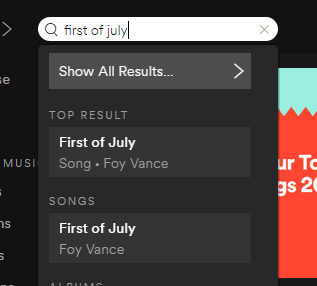
Filtering Songs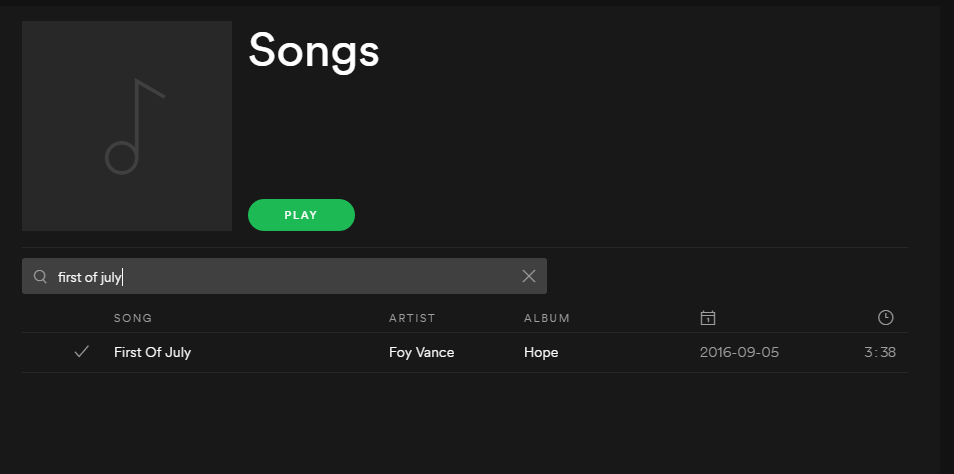

Still not fixed. Even if the song is "unique" and not part of multiple albums. Got this issue on many tracks and it gets really confusing because i start to like songs multiple times and i got the same song (with the same id) in my Songs playlist.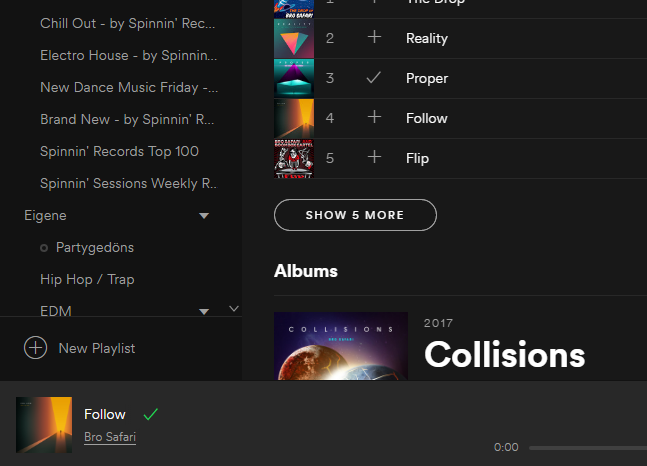

I´ve been experiencing the same problem and it's extremely annoying. I thought it was just me being picky but it´s good to know I'm not the only one.
First post about this issue is from 2014... Four years ago and still no solution.

This is pretty bad. I'm having this problem too.
Is sad to see this thread opened in 2014 and in 2018 this problem still not resolved by Spotify dev.
I really love spotify as a concept but, as usual with anything, people do things which clutter up the system and make it harder to use.
What I am suggesting is using the same sort of software shazam and soundhound use to identify the fingerprints of songs and group together duplicate tracks. This has many benefits:
- People can star the song once and it can now refer those people to all the albums it appears on, improving discover suggestions.
- Song popularity will be more accurate as it can add up the popularity from all albums, not just the original one (I have found duplicates can have quite varying ratings despite being the same)
- Spotify have to store less songs in their database, saving costly storage space and search times!
- People find the songs they want faster and more accurately because there's only one version.
- New albums would get instant popularity ratings from any pre-released tracks, giving them a head start.
- Album Artwork can be cycled while the track plays, so it's a bit more fun to watch.
Some extensions to this I have thought of include:
- Having labels for genuine duplicates which should be kept like 'Mono' 'Live', 'Radio Edit', 'Karaoke' rather than it being part of the track name.
- Similarly labelling 'Cover', 'Tribute' etc for songs being sung by unknown groups or cover bands (this can then be used to list associated cover/tribute bands on band pages)
- Validating artists of songs using the fingerprint software on segments of the track rather than the whole thing to give credit to the original artists when people remix or sample songs.
- Disallowing 'as made famous by' and other references in album titles and track names to the original band when it's a cover.
I am a little OCD, so that's where this mostly stems from, but I do think all of these things would genuinely make spotify better.
Hopefully this resonates with some people and we can see this happen!