Windowsphone - app won't start

I have problem with the Spotify app since one week (Lumia 925). I want to start the app but it won't start. It shows the loading screen and is loading and loading and loading...nothing more happens. When I delete the app and re-install it, it works for a day and then the problem reoccured. Does anyone have the same problem and knows a solution?
thanks!
Alina
Accepted answers

All comments

Suddenly my Spotify started not to start... after logging in; spotfiy logo comes ant nothing more happens. I even hard reseted the phone and it did not help. Did you find any solution?
Thanks.

Hi there,
same problem here (lumia 930). App wont log in. After reinstalling the same.
greetings

On my Lumia 1020 Spotify keeps crashing when I try to open it, but it starts working if I keep trying like 5-10 minutes. So I would say that at the moment Spotify app for Windows phones is piece of ****...no, it's PIECE OF S-H-I-T!.

Same here... tried various solutions offered in another topic (see link) but nothing helps... SOLUTION NEEDED !!!!

What's really funny, is that my son has a free spotify acct and a Lumia 630 with no problems with the app loading and playback albeit w/out
all the "perks" a premium acct allows.
I have spotify premium and a Lumia 1020 and it will load but crash after about 5-10 seconds of playback,
While I realised when I switched to a Windows phone there would be apps that would be unavailable or
didn't "perform" as expected I never thought spotify would be one of them. Idk where the fault is but I also
I have the moblie Deezer app and it works great and I can import my spotify playlists with very few "grey-outs".
I think issue is related with Facebook login. I was using Facebook login. Then someday as I mentioned it started not to work. I tried everything including Hard Reset. Nothing helped. Then I gave up and created a new account using a manually created username and password and it started to work. So I believe it's something wrong with Facebook login. I wrote to Spotify support. They keep asking same dummy questions and sending template responses! Like asking me to format my SD card which clearly does not exist on my Lumia 925!

THE PROBLEM IS WITH THE PHONE ITSELF
TIRED OF LOADINGG AND LOADING (PREMIUM CUSTOMER) I DECIDED TO REGISTER AS A FREE USER , THIS IS THE ONLY WAY IV GOT SPOTIFY WORJKING RIGHT ON MY LUMIA 630.THE PROBLEM IS THAT MY DATA BASE MUSIC ,PLAYLIST AND MUSIC IS QUITE IMPORTANT, SIO I HAVE NO CHOICE BEFGORE SAY GOOD BY SPOTIFY ON MY PHONE UNLESS.TRY TO AUTOSEND THE LINKS OF YOUR MUSIC ,ALBUMS,STARRED VLIST, SONGS AND OPEN THEM ON SPOTIFY FREE , YOU WILL SEE IT WORKS WITH THE KNOWN LIMITATIONS, BAD FOR NOKIA!!!
first stop yelling and it NOT with not with phone.
i have Deezer and have no problems.
& to have to "work around" a service b/c spotify devolpers are not invested
well...
It's a shame that a company like Spotify isn't able to make a good app... One would start to wonder if Google and Apple pay Spotify to produce a half baked Windows Phone app.
Same problem for me on a Lumia 925.
After uninstall/reinstall the app works fine but a few days later the issue comes back.
The apps launchs well starts then goes in a loop trying indefinitely to upload something.
Eventually it's possible to get back control by tryin to select another title than the current one.
The problem occurs even after a reboot of the phone and if no other app than Spotify is running
I think the app makes a web request that fails for some reason (update on server side an not on our WindowsPhone App ?).
Please debug our Spotify app for the windows phone users.
The windows phone app was the main reason for me to choose Spotify.
Thanks.
Rom.
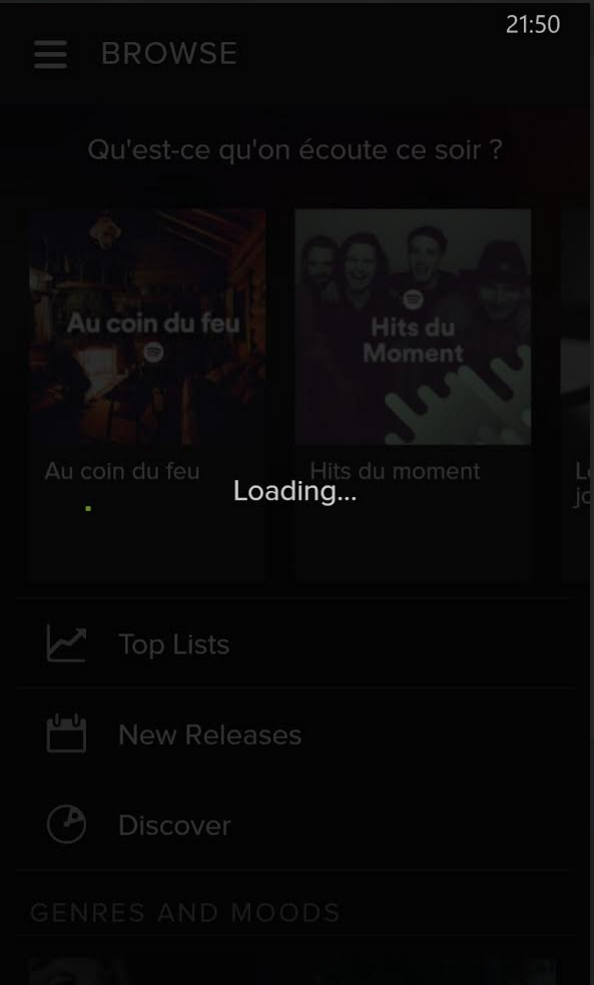

It might be to do with the size of your Spotify account. People who have a lot of music saved in their Your Music have seen the same problem. That is why you can log in with a new free account but maybe your larger Premium account is having trouble loading in the app.

I'm Brazilian, im sorry about my bad English, I'm trying do my best.
Well, I'm Microsoft's Lumia 435 user and my Spotify client started to crash suddenly when I click to open it. And the solution with my case was simple: I uninstalled the app, changed the option "save new apps in SD card" to "save new apps in this device", then I reinstalled the Spotify and it worked!!!
I hope it works with you too.
Bye!

tecomaatheus - You Sir are my savior! It works! Thanks for posting this!

THIS WORKS DO IT
I think issue is related with Facebook login. I was using Facebook login. Then someday as I mentioned it started not to work. I tried everything including Hard Reset. Nothing helped. Then I gave up and created a new account using a manually created username and password and it started to work. So I believe it's something wrong with Facebook login. I wrote to Spotify support. They keep asking same dummy questions and sending template responses! Like asking me to format my SD card which clearly does not exist on my Lumia 925!