High CPU usage on OSX

Hi guys
When I'm listening to Spotify from time to time the fans on my MacBook spin up and CPU usage of Spotify Helper rises up to 40%.
Apart from that CPU usage is around 3-7%
Is that normal??
Specs:
MacBook Pro Retina 13" Late 2013
2.4Ghz
8Gb RAM
OSX Yosemite 10.10.3
Spotify 1.0.5.186.ga9c24d6a
Accepted answers
All comments

(I have similar specs — a more recent MBP retina and with 16gb ram)
That's insane! 😮
I added two screenshots where you can see the CPU load when the ad for premium played... Everytime the ad plays cpu usage shoots up.. 😕
Today the CPU usage went up to 40% and I wasn't even listening to music...
It's really anoying. I can't use Spotify anymore because CPU usage stays at 50-80% now...
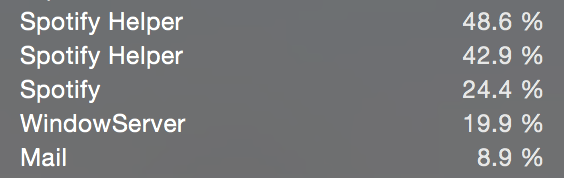

I have exactly the same problem: Spotify Helper is eating away at least 30-40% of CPU. Other people recommend disabling "local files", but that did not help me either. Instead i had to disable crossfading of tracks and setting the same volumne level for all tracks. After that, Spotify Helper is down to 0.1% 🙂
Turning on any other option except high quality streaming (yes, i'm paying for this), results in high CPU load.

This thread seems to be located in the wrong forum. 😉
Furthermore I have read from another Mac user yesterday evening with the same problem that updating to 1.0.10 and to Yosemite finally helped her.


Hello. What were all of the preferences that you tweaked or turned off? I would love to know. I'm having great Spotify Helper CPU issues. Thanks.

Try turning off Crossfade Tracks and the volume level thing under Advanced Settings.

Seems like Spotify Helper was constantly evaluating the volume level or what not.
Thanks!

Thanks, but this is still a workaround, sacrifacing features is not a solution. I do want to use "set the same volume level for all tracks" option and don't tell me that crossfading is that unpopular feature no one wants to use. Spotify should look into this, I'm not paying for buggy app that heats my ordinarily silently running Mac for obviously no important reason. Feel free to correct me, if I am wrong. Thanks
P.S. This is not a hate speech guys, don't get me wrong. I just think that problems should be solved.

Sorry, no did not help in my case.
Still 90% without playing any song...
Would be great to find a permanent solution
thanks
tommaso

I turned off all available offline content and Spotify Helper cpu utilization seems normal now. It's unfortunate that Spotify development team could not fix the bug.

How did you do that? I don't know how to do that haha
How do you do that? I don't know how to haha

Happy birthday to this issue, more than a year later and it still exists.
Thankfully google pointed me here and turning off the volume preference fixed it.
Seriously Spotify, ****? Either set the darn thing off by default or plain remove it from the preferences.

Looks like I'm getting some crazy high CPU usage when Spotify is closed?
USER PID %CPU %MEM VSZ RSS TT STAT STARTED TIME COMMAND
henry 44875 214.6 2.5 3754452 412432 ?? R 4:09PM 78:01.88
Crossfade isn't even on.

windows 10 64 bit
8gb of ram
i5 4460
ALL settings are turned off, even in advanced settings. Only getting high CPU usage when at the "browsing tab"
currently at 95% cpu usage.
I do not have a "spotify helper" in my task manager, only 2 spotify 32bits, one sitting at 83% one sitting at 3.9%
This is absurd.

99% CPU on OS X, while the track is paused.
Will we see the 2nd anniversary for this bug?

Wake up to find the laptop very warm which is odd.
Open activity monitor, and Spotify (which I didn't even use in days) is using 100% of cpu.
This happens all the time and the only option is to kill it in the activity monitor.
Turning off all the options in settings including volume and local files doesn't help at all.
This has been a very well known problem for a long time and there are tons of results in google about this. There's no way Spotify doesn't know about it, they just doesn't care enough to solve it.

Let me declare a second anniversary of 100% sportify cpu usage bug/issue in OSX.
Im using the top 2015 15'mbp. For me, its the Spotify app, not Spotify helper.
Whenever i hear my fan spinning, i know its spotify again. I will force quit it.
CrossFading was off, now I also turned off the volumn sync setting.
Lets see what happens.

Time to time Spotify Helper starts to eat 25-40% CPU. Does not matter does it play music or not. A Spotify restart solves the problem. BUT it is not a solution it is a workaround. I pay the 100% of the fee. So, I would like to use the 100% of the software, not turn off some of the features. It is not acceptable as a "solved" problem.


This app is unusable. Launch it and do nothing and it starts hitting the CPU, spinning up the fans and draining the battery. I'll keep using iTunes and my 800 ripped CDs thanks!
I did find one way to stop it using the CPU: use a firewall tool like Radio Silence to block its outgoing network connections. This is a bit crude, so of course this means Spotify is running in offline mode. Maybe there's a more finessed way of doing this, although simply adding youtu.be to /etc/hosts wasn't good enough. I suspect it's their autoplay videos and advertising that's the culprit, so don't ever expect Spotify to resolve this issue.
Try turning off Crossfade Tracks and the volume level thing under Advanced Settings.