Green "available offline" arrow not displaying next to most tracks after sync

The only other thread I found that mentioned this problem was already marked "solved" even though this particular issue hadn't been acknowledged. So, new thread.
For now, the songs seem to play offline, even if some of the individual tracks don't indicate they're available offline. By this, I mean it'**** or miss. And today it's "hit." But yesterday it was "miss." I have tried logging out and back in, and have done a clean install of the Spotify app, neither of which fixed the issue.
Description
On the Spotify iOS app (and even the Mac desktop), when the "available offline" toggle is clicked, the UI does not appear to respond at all. Some songs will display the "available offline" green arrow immediately after the toggle is switched (possibly because I have that specific track already available offline through a different, operating-as-expected offline playlist), but the rest of the tracks remain the same (no grey "waiting to be synced" indicator either). I'm now able to put the phone in airplane mode (or Spotify in "offline mode"), and these tracks (which don't have the green arrow indicator) still play. A few days ago, every playlist I had selected to be availble offline wasn't able to play at all, and an error message with "track list unavailable" would show up instead. The lack of consistency, in regards to labeling tracks that are available offline, has been present since the June 2nd update to the iOS app. I'm not sure how long the issue has been present in the desktop app (would guess approx. 2 months); it's so unbearably slow that I tend to not even bother with it.
A more detailed description, using numbered steps
1. toggle playlist to "available offline"
2. no activity within the UI
3. playlists show they're available offline** even if the tracks themselves don't show the green arrow
**Under your music > playlists, these playlists (screencapped below) display the green "available offline" arrow, however only some of the tracks within the playlist display the same. Sometimes these tracks will play offline, sometimes they won't.
What I expected to happen
Clarity, responsiveness, and consistency. The same I'd expect from any other UI.
What actually happens
Having to guess if my playlists are actually available offline.
My iPad/iPhone model
iPhone 5C 16GB (7.2 GB currently available) / Macbook 13 inch, mid 2010
Device’s Operating System
7.0.6 iOS / 10.9.2 OSX
Is your device jailbroken?
Yes, but this is an issue with Spotify on desktop as well. And it's an issue completely localized to the Spotify UI, which I am 99.9% certain my jailbreak doesn't interfere with. I would say 100%, but I hate putting my foot in my mouth, so...
Approximately how many playlists do you have?
Less than 30 playlists. Currently two playlists are selected for offline use (17 tracks total, and only 5 tracks are "flagged" as being available offline).
My mobile Spotify version
1.2.0.3344
My desktop Spotify version (if applicable)
0.9.10.14
My provider and country
Verizon, US
My username
Won't this be listed right next to my post?
edit: or is the user ID # you're looking for here? 124207596
Do you have any screenshots you can attach to more clearly explain your issue?

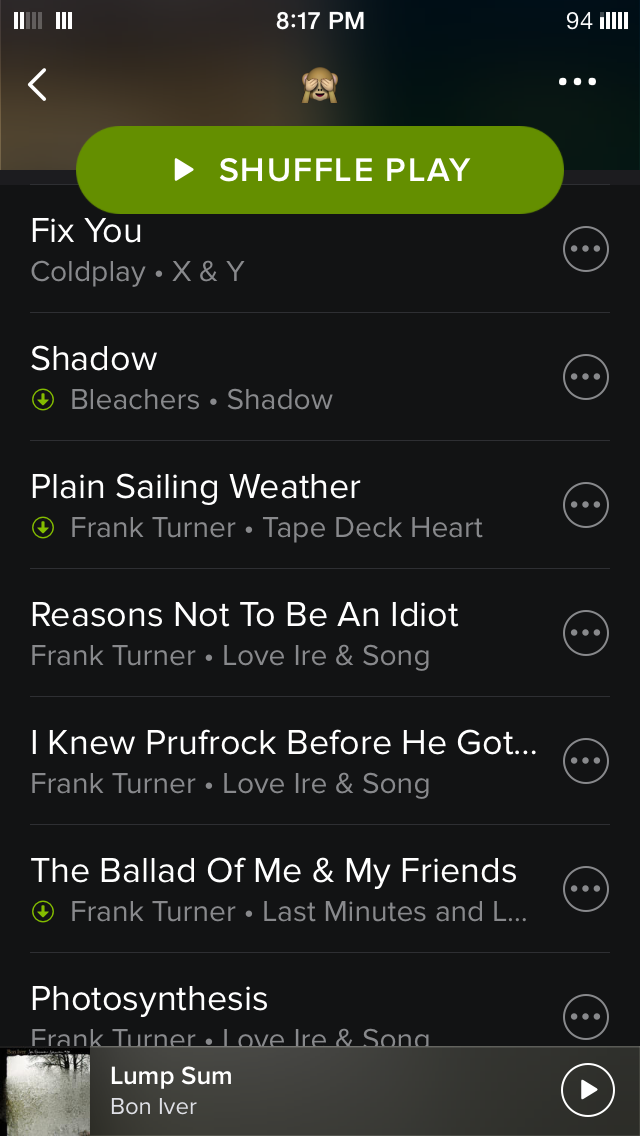
Accepted answers
All comments
 Peter__
before this started? yes, i had several. i then toggled off "available offline" for all of my playlists. since then, i've made one of my go-to playlists (70ish tracks) available offline again with no issue (all tracks are displaying the green arrow next to them). but the two playlists that i screencapped are still having the same issues.

Hope the pbms will be solved soon.
And thx concert regular for the detailed description, that should help the spotify team

Pertaining your issue, that seems like it shouldn't happen given what you’ve described (I've tried on my end and it works perfectly fine), I guess your music cache is corrupted, kindly do a clean reinstallation following the steps below:
Click into your Spotify App -> Logout from Spotify (Spotify app Settings -> Logout) -> [If you are on premium and have songs that are on available offline, click here: https://www.spotify.com/sg-en/account/offline-devices/ and remove all devices -> Go to iPhone Settings, General, Usage and Delete the app -> Go to App Store and download the Spotify app again.
Also clear off Safari’s Cache under iPhone/iPad Settings > Safari and Clear all of the caches.

I have the same problem. I just tried deleting and reinstalling the app, and it actually made it worse! There's now one more track in my offline playlist that doesn't have the green arrow. It's really annoying. Please help.


I'm using premium on an iPhone 4s and about 30/200 tracks on my playlist have no green arrow. [Incidentally,some of these tracks also show up in 'local', but they are definitely not synced to my phone through iTunes. All I have in iTunes on my phone is two books.]


If you have less than 200-300MB of storage left, Spotify usally won't sync. I think this is because it tries to save enough room so the device has enough space left to do normal activities and things that might need to use the space.

I had the same issue with this as well. I noticed that when syncing music to my iPhone whilst I have my desktop program open it stops showing the green arrow for some reason. When I close Spotify on my computer and resync my playlists on my iPhone 5C (iOS 8.2), the green arrow reapears. Strange...


I'm having this same issue, and can confirm that I've tried the same solutions as launchparty and have had no luck fixing the issue. I have signifcant free space on my device as well. For the most part songs without the green downloaded arrow will play in offline mode, but not all.

I have this same issue, my entire playlist is available offline except some songs dont have the green arrow? I've made the albums of those songs available offline as well and the green arrow still wont show up but if i put my phone on airplane mode it will play those songs?


And all of this just suddenly started happening.

What I did to solve this problem was to do the following:
1. Shut down Spotify on my Mac
2. Re-install Spotify on my iPhone
3. Now it appears to download the songs again.
Hope it helps, regards!

I've started getting this issue in the past two/three weeks. Complete albums are downloaded and play perfectly fine offline, but the green offline arrow no longer shows up.
I think it started occuring after I turning the "Available Offline" filter on and off, the one in the Filter/Sort menu, that you can access by pulling down from the top of the Album list and then hitting the Three Lines icon to the right of the text box.

My iPhone has just started doing the exact same thing. I had a playlist of about 600 songs, all of which had the GREEN arrow next to them. I stated a new playlist yesterday (someone asked me to do one for a party) and I noticed only half the songs had the GREEN arrow. Then, I noticed that some of the newer additions to the old playlist had the GREY arrow. I then (perhaps stupidly) toggled the 'Available Ofline' cursor, and now NONE of the songs have a GREEN arrow. I have turned the device off, restarted the App 1000 times. Nothing seems to make any difference.
This is particually annoying considering I am a Premium user.
If I go to Airplane Mode, none of the songs are available. But for some reason, when I went for a walk earlier, I could listen to all tracks, even though there is no GREEN arrow present, and I wasn't anywhere near my internet connection (does it work off 4G?)
So, I'm not really fussed about the green arrow, but I'm not convinced I have actually succesfully synced these songs. The party where I'm going is on a remote island, and I do not want to get there to find I cannot listen to the playlist I created.
I would be very grateful for any help anyone can offer. Sorry if I'm not being very descriptive or elequent, I'm not a very techy person.
Thanks

what worked for me is to QUIT DESKTOP SPOTIFY. i believe when on same wifi it does not download on both devices just plays via wifi. and push the available offlin button twice, wait after first so songs completely delete from iphone, then after hitting it again iphone will download songs from internet not the desktop pc.
QUIT DESKTOP PC SPOTIFY, or just unconnect it from iphones wifi.
the best step next would be to UNINSTALL SPOTIFY IN IPHONE GENERAL SETTINGS STORAGE
DELETE SAFARI CACHE COOKIES AND HISTORY IN IPHONE SAFARI SETTINGS
REINSTALL SPOTIFY ON IPHONE
HIT THAT AVAILABLE OFFLINE SLIDER AGAIN
VOILA

i can play all my songs with or without green arrow on my phone.the last songs didnt download it said i didnt have enough space but it doesnt matter cause they play anyway.


Same issue here, thanks @launchparty for the complete and accurate description.
The playlists I have this issue with contain a mix of Spotify and local files. Wonder if that has anything to do with it...though if it does, it isn't obvious. If I toggle the "Available Offline" switch, the tracks with/without the green arrow can and do change on each refresh/resync. For me, however, all the tracks on these playlists DO play, regardless of whether the green arrow is showing or not.
So my question to the community is, does the absence of a green arrow on certain tracks of your "Available Offline" playlists actually prevent playback of those tracks, i.e., has anyone actually experienced tracks WITHOUT the green arrow being SKIPPED when playing an offline-enabled playlist (in order)?
If yes, then we have a real problem; if no, it's more of an annoyance, especially for OCD folks like me. 😉