Playlists 'Loading'

Never had any issues before but I today created a new playlist on my Mac however it seems to not want to sync to my iPhone with a playlist called 'Loading' appearing. Any help greatly appreciated. Have reinstalled Spotify app on iPhone and cleared cache on Mac.
Accepted answers
All comments
Also occuring with iPad playlists


and same problem here.
running a MacBook Pro and an Iphone, premium subscription

Also happening to me. Been trying for ages to get my playlists synced, but they are either not syncing or stuck on loading. Crazy frustrating.
 .

Same probem since yesterday, It's really anoying, please a solution soon.
All back working fine

I have this problem too. It started in the last 6 weeks I think. It only seems to happen on my more recent playlist at the top of the list. The weird thing is that it also affects playlists that are fully synced for offline use. Everytime I open the app from scratch it does this; all the newer playlists have no title and instead they say "Loading...". Older playlists are all fine. Sometimes the newer playlists are not visible at all, and then after some time they start to appear.
I am also using a macbook pro and an iphone.
When I switch to offline mode, NONE of the offline playlists I created in the last 6 weeks are visible at all. This seems to indicate that the config for my more recent playlists is being stored on the spotify server or somehwere else online??! That's not right. It occurred to me that this might be something to do with an apple icloud setting that allows you to "store documents and app data in iCloud". But I turned off that setting in iCloud on the iphone and the problem is still happening. Does anyone have any idea what is causing this?
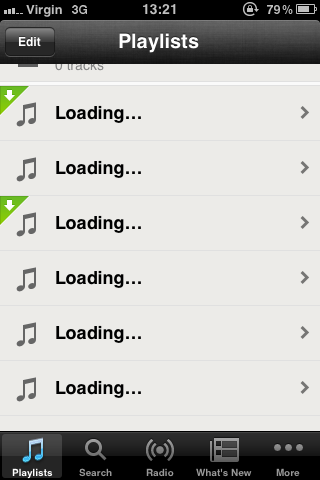
Also I get this popping up at the smae time, even though I just opened the app and never requested any new offline syncs...
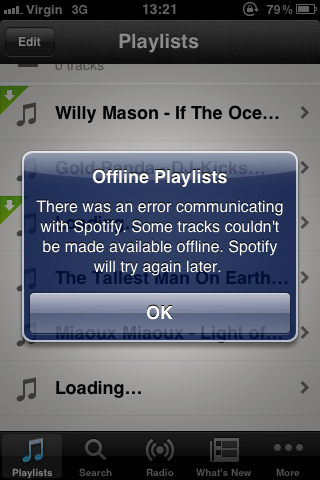

Same problem here. Every time i start Spotify on my iPhone it sais "Loading" on all playlists created in the last 6 weeks or so. And if I don't have any connection or if I am in offline mode, the playlists don't show at all, even if they are synced. Extremely frustrating!

I had this same problem on my iphone 3gs, syncing with a macbook. I recently bought myself an iphone 4s and everything works fine now (still using the same macbook).
I've got a feeling that this is a problem with iphone 3gs's and nothing else...
sorry if this post doesnt help much but i thought id let you guys know, since I know exactly how fustrating this problem can be.
basically the only 'proper' fix I can suggest is to buy a newer iphone.
good luck

Anyone any ideas?

I'm having the same exact problem.
Including songs not throughly playing through. They stop about 1 minute in.
Working now, I just left iPhone on for 20 mins. Now I will try on iPad as well.
What do you mean by "left on". ?
I've been keeping it open and it still doesn't work. My playlists aren't even showing at all now.

@Kermikkel @JarvisCocker (cool username) @Cindy_Suz @Deion89
I've just done a bit of maintenance on all your accounts. Please sign out and sign back in. If you keep having trouble please give me a shout.
Reinstalled the app and now it's working again, thanks a lot Meredith, you made my day 🙂
Thanks, my playlists seem to be in working order now.
But, songs still are not playing.
Songs are stopping about 2 minutes in from the radio app, and they aren't even playing at all on the playlist.
@Meredith, Hi, thanks for giving this your attention. However, I still have the problem. Hope you can help. Thanks
Hi kemikkel - Thanks for getting back to us. We're currently looking into this for you all.
In the meantime, the more info we can gather the better.
If you're experiencing this please head over to this template: http://community.spotify.com/t5/Mobile-iOS-iPhone-iPad-iPod/Troubleshooting-Spotify-on-iPhone-iPad/td-p/105341
Sharing those answers on this thread would be a great help. As soon as there's an update I'll be posting here.
Thanks, but mine is all good now since you last fixed it and I did a hard restore to get my playlists to play.
All good now. No need to adjust mine!
It seems my more recent playlists are being stored in the cloud instead of locally. This is highlighted by the fact that they NEVER appear if I am in offline mode. A full problem description is available in my previous post. There are also screen-grabs there for you. The following info might be useful for you. Please note that the problem exists only on the mobile app and NOT on the desktop.
Mobile Hardware: iPhone 3GS
My device is NOT jailbroken
iOS: 5.0 (9A334)
Mobile Spotify Version: 0.5.4.13
Username: kemikkel
Provider: Virgin U.K. (via T-Mobile and Orange)
Desktop Hardware: Macbook Pro 13 (Late 2011)
Mac OS: OS X Mountain Lion 10.8 (12A269)
Desktop Spotify Version: 0.8.4.107
I have not deleted and reinstalled the app. That is an unacceptable propostiion for me since I have about 10 GB of offline synced media. I await your feedback. Thanks

I have the problem now as well. I have an iphone 4 and all my playlists are showing Loading ... and I delete the app and re-install and it makes no difference. I leave the app on for a while and it doesnt seem to be loading anything as nothing updates. None of my playlists show up but the folder names do includung new folder names. Very frustrating. I use a win7 pc to sunc with but also use a mac pro with the account at work. What is the issue, cant use spotify on the go now for past few weeks!!
David

However, there might be something we could do our end. In doing so, you may need to resync any offline playlists you have - Would you be okay to let us try at all?
I was wondering if the number of playlists might be an issue. I am sure it makes it slower so I shoudl clean that up, especially for mobile, but not sure that is entirely the issue so I would say please go ahead and give that a try on your end. Thanks a lot.
David
I wasn wondering if the number of playlists are an issue. I figured I shoudl cut down on the playlists, mostly for mobile purposes as on the pc/mac it doesnt seem to matter. I can do some more of that but I dont think thats entirely the issue. I have no problem resyncing any offline playlists as I dont have much of that, so please go ahead and see what fix you can try on your end. I appreciate it. Thanks
David
Please try to fix my account if you can as I still get the playlist loading messages on the iphone and it just sits there.
Thanks
dwl711

@dwl711 wrote:Please try to fix my account if you can as I still get the playlist loading messages on the iphone and it just sits there.
Thanks
dwl711
I've tried a manual fix on your account to flush out and corruption with the playlists (can happen when there's a lot of them).
Any better?

I have the same problem, could my account be looked at too please?
TIA,
PK.
I just keep on re-trying and it finally worked, I remember leaving it all night connected to power and wifi.