Stuck in Full Screen

Hello,
A while ago, Spotify decided that it should be in Full-Screen (taskbar not visible anymore) and I cannot figure out how to undo this. I tried F11 and Alt-Enter, but nothing seems to work.
Can anyone help me with this annoyance please? Thank you very much in advance.
Anna
Accepted answers

In my case, wmctrl solved. However, you have to give it the name of the window you want to toggle fullscreen. You can see the name of the screen by using:
wmctrl -l
In my case, it listed Spotify as "Lynyrd Skynyrd - Freebird". Then I did:
wmctrl -r "Lynyrd Skynyrd - Freebird" -b toggle,fullscreen
And it solved it.
All comments
I am sorry for the inconvenience, it has fixed itself allready.

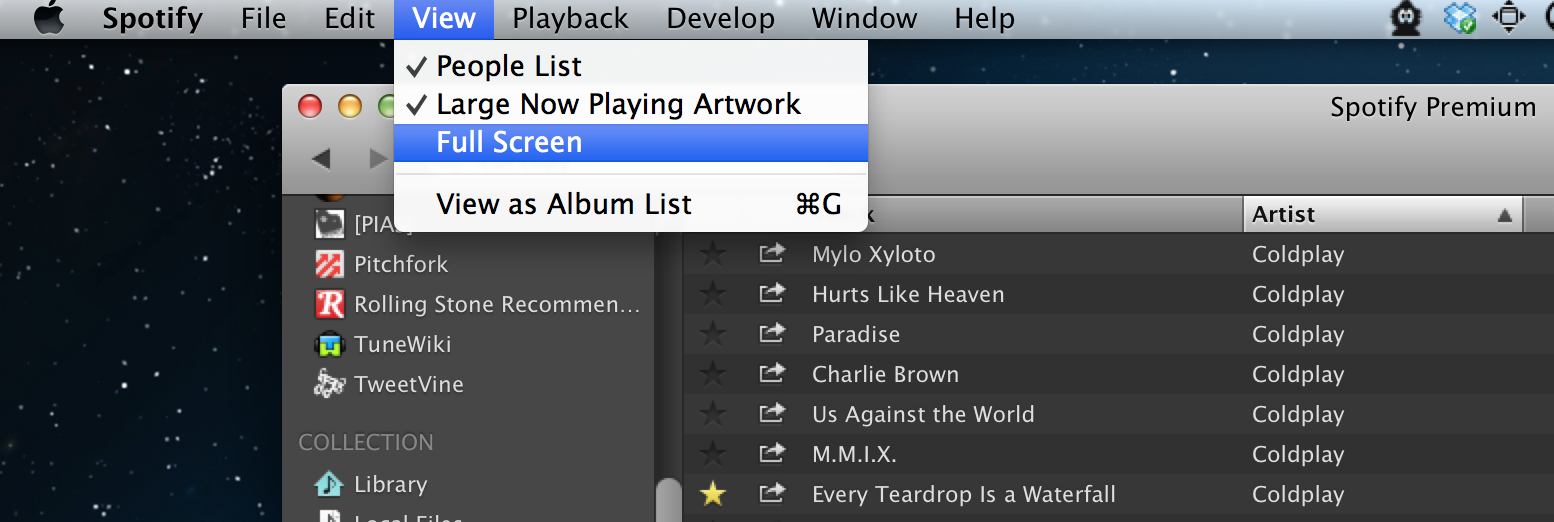
I had to do View -> Full Screen (see above screen shot).

Hi, I'm stuck in full screen also. I use Windows 7. When I click on the 'View' dropdown as mentioned above, I don't even have a 'full screen' option on the list. I've never had this problem before, and it seems to have started about a week ago. Any suggestions? Thanks!

This happens on MAC OS Lion continually. The software is a bit buggy and this version of MAC OS is particularly frustrating.
Only useful tip I have found is to press Cmd + Shift + F to toggle in and out of full screen mode. Note that this is different and more controllable than pressing F11 to toggle full screen mode.

Did you ever find out how to get out of Full Screen mode? I see the user that suggested hot keys to get in and out for Mac, but what about Windows 7??

There are some arcane key combinations for this and I think you can assign your own in Win 7 but it's so much easier to double-click the top of the application screen 🙂

Well, I was fiddling around with the mouse, and when you take the mouse to the top of the monitor, the Spotify drop down menu pops up. Select View, then Full Screen. Works like a charm.
(I am running Mac OS 10.8.5.)

In my PC with Windows 7 this Full Screen Option es absent. I have other PC with the same situation. I have the last black version but not works. In the Web Player this is not a problem, but in the PC version not works.
The dropdown view menu doesn't include "full screen" any more but are you saying you're missing the usual maximize window button in the top right? Any chance of a screen capture to show this?

I had the same problem, tried everything, even logging in again didn't work. But there is a fix!
My problem was that the buttons where all just outside of screen-space. This means that if you click and hold on the space next to the drop-down menu's, and drag your mouse, spotify will move with your mouse.
Aka -- You are not in full screen mode! You simply cant see the buttons anymore because you eather switched displays, changed resolution, or made a mistake by making it too large. Dragging spotify to the left, and resizing the screen will fix this.
Hope this helps,
- Sjoerd

I'm running into an issure on RHEL 7.1 where after upgrading to spotify-client-1.0.17.75.g8f111100-2.el7.x86_64, it launches in full screen mode and I haven't found a way to get out. My quick fix is to launch spotify with the '--minimized' option: /usr/bin/spotify --minimized &

Install wmctrl if you don't have it.
Then pause the music and run "wmctrl -r spotify -b toggle,fullscreen" while spotify is running.

This solution worked on Antergos with Gnome

The config files are in $HOME/.config/spotify
I deleted that folder and the application started with its window decorations as expected.


lol. in my case, the spotify wasn't called "spotify" because the window title is by the name of the song ( list all windows using wmctrl -l ). so in my case i had to run wmctrl -r "Immolation - Passion Kill" -b toggle,fullscreen. Thany you very much 😄


Did NOT work under Mint Mate 64 bit 17.3

ubuntu 16.04:
ALT + F11
Linux Mint 17.3, this does not work. Spotify is in full screen and refuses to switch to windowed mode.
Sorry, this did not work either. I clicked and dragged all around the border. Still full screen. I -CAN- use Alt-Tab to change to other windows, read mail and surf while Spotify is playing in the backgroud. But I can do these things correctly in windowed mode by using Treacle and Pandora.
/usr/bin/spotify --minimized &
I tried the above. Got a string of errors about GPU and then it launched full screen once more. Phooey!
No. Music playing or music paused, neither do any good.

@MikeH2 wrote:Linux Mint 17.3, this does not work. Spotify is in full screen and refuses to switch to windowed mode.
I could not work around this issue with Alt-F11 either in Unity or Gnome on my Ubuntu installation. In Unity on Ubuntu you can hold alt and grab the window with the mouse and drag it make it windowed again. In Gnome this does not work for me.
I treat this as a bug in the Spotify client and it is tracked in our bug tracker and will be fixed eventually.
The only workaround that I know that always work is removing the window prefs and restarting the client.
rm $HOME/.config/spotify/window_position.prefs

Worked on Mint w/ Cinnamon 3.0.7. Thank you so much!

I got a situation were my Spotify window was invisible due to a size of 1x1 (width and height). The music was playing and I did not know how to stop that. I noticed the window title was changing with each song using:
wmctrl -l
So I could do something like: wmctrl -r Sting -e 0,45,62,800,800
Restoring to a window 800x800 nearly top left on my screen. Obviously a song by Sting was playing.

In fact, you just need to delete window_position.prefs, doing
rm ~/.config/spotify/window_position.prefs
on Linux and restarting the aplication.
In my case, wmctrl solved. However, you have to give it the name of the window you want to toggle fullscreen. You can see the name of the screen by using:
wmctrl -l
In my case, it listed Spotify as "Lynyrd Skynyrd - Freebird". Then I did:
wmctrl -r "Lynyrd Skynyrd - Freebird" -b toggle,fullscreen
And it solved it.

This worked for me with Antergos/Arch:
Make your pref files look like this and restart spotify.
pref location: /home/john/.config/spotify/prefs
storage.last-location="/home/john/.cache/spotify/Storage"
#app.window.position.height=768
#app.autostart-configured=true
#app.window.position.saved=true
#app.autostart-mode=""
#app.window.position.width=1366
Install wmctrl if you don't have it.
Then pause the music and run "wmctrl -r spotify -b toggle,fullscreen" while spotify is running.