[Mobile] Screen always on Option

When the Spotify app is in focus keep the screen on and prevent it from locking. Just like in PowerAmp, this should be an optional setting.
It's really annoying to have to unlock the phone to skip tracks, or see the name of the current song or artist, especially when driving.
Comments

Until Spotify implements this feature, a semi-solution would be to enable Developer options and enable Stay awake while charging.
To enable Developer options, go to:
Settings > About phone > Build number and tap on the section 7 times.
After that you can go to:
Settings > Developer options > Stay awake > While charging
Another solution is to use an app if you'd like to have this feature while not charging as well, for example "Wakey", "Stay Alive! Keep screen awake", "Smart Screen On Off" from Google Play.


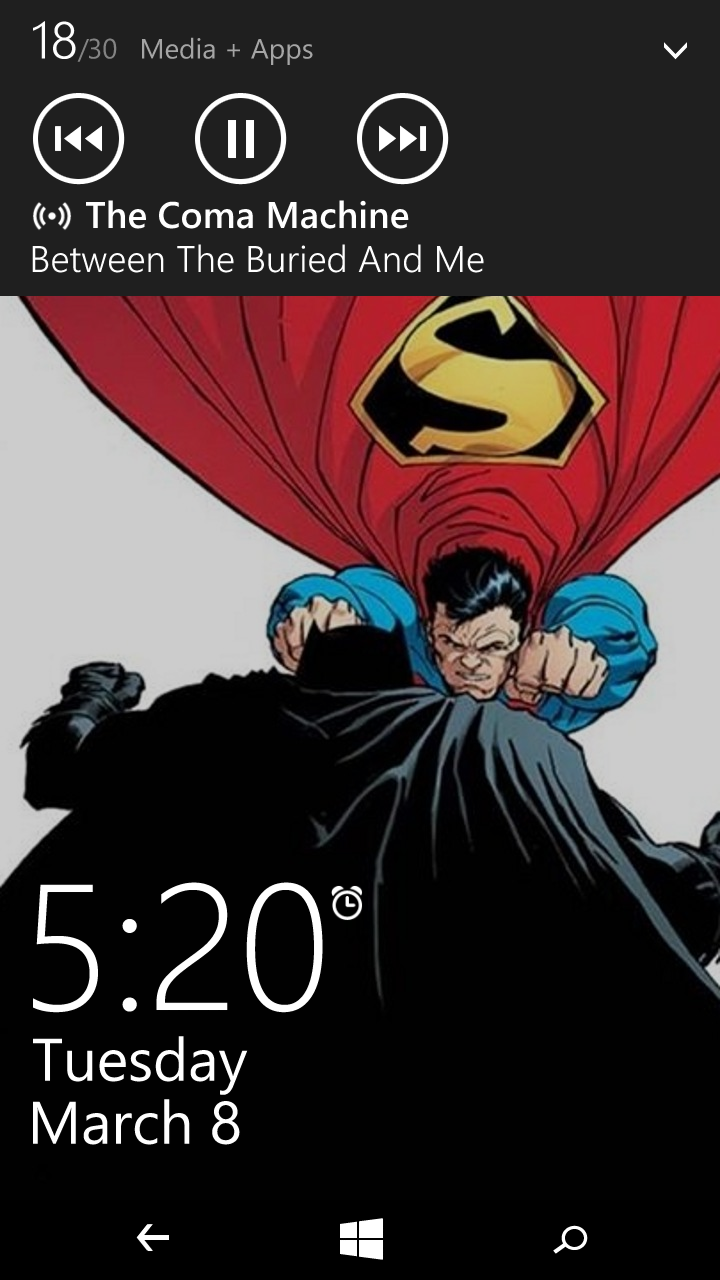
Windows Phone has options in the settings allowing the ablity to show the current playing artist and song over the lock screen whilst also allwoing you to change volume (media/app and ring/notification), pause, play, skip foward and sometimes back (can't skip back on radio). Try looking at your device's options for lock screen settings or see if you cant find app permissions (or someting of like).
Hope that helps.
- Sonic

This will drain my battery 😄 I am only limited to 4 hours of screen on time.. My phone's screen uses too much power

Pandora has this option for Android and iOS, doesn't seem like it would be hard to implement. Probably just an additional permission needed in the app store.

This feature has been available on Slacker for years. I use my phone for music in my car and on my motorcycle...both with charging ports. I don't want to have to unock/wake my phone just to be able to change the song.

Totally AGREE, this is the only feature missing to fully enjoy SPOTIFY!!! Gets old to have to unlock the phone everytime...

Actually you can skip tracks via lockscreen(if you have enable “widget” on lockscreen) or via notification bar.

While you can go to settings and alter the settings then go to Spotify, it does get annoying and it would nice for the option to be in Spotify.

This is a must-have feature.... please add it.
Been waiting years for the option to keep my phone unlocked while Spotify is playing. It's not about having controls on the lock screen, either. Those are nice, but if the screen is off I still have to wake my phone by manually pressing the button on the side, and even then it still can't do anything more than pause or go to the next track. Pretty much every other app I use while driving or working has this option, like PowerAmp/Doggcatcher/etc..., where all I have to do is reach up and swipe to change the track.
Going into the Developer settings and changing it to keep the screen on permanently when charging is a less than ideal solution, because 1) sometimes it isn't charging (e.g. someone else is using the charger in my car while my phone is playing) and 2) if I forget to turn it off before I go to sleep, the screen is on all night.

How this is not already a feature shows the microsoft syndrome is in full effect: the ppl at spotify do not use the software themselves (don't get me started on the desktop version)
While the discover feature is awesome, UI design is still regarded as something programmers can do. Which it is not. If a company can't bother to hire a proper UI designer or a product designer with an affinity to multiple disciplines, then at least listen to the customers
I have found a work around for android for this issue. It requires installing another app, but it works pretty neat.
For android this app is called "Stay Alive! Keep screen awake"
https://play.google.com/store/apps/details?id=com.synetics.stay.alive


Hey @osornios we're taking a look at this idea now that it has over 100 kudos. However I have a question about this comment: "It's really annoying to have to unlock the phone to skip tracks, or see the name of the current song or artist, especially when driving."
On your phone you should be able to skip tracks and see the name of the song when the screen is locked. Is this not happening already on your phone?
@meahtenoha the screen still goes dark. In some cases this means tapping the screen to wake it up or (worse) pushing the power button, which is sometimes on the back of the phone or hard to reach due to the phone holder
@hkok74 is exactly right. I previously had an LG G3, which has the power button on the back. Whenever I would attach it to my dashboard, it was basically impossible to wake the phone back up if the screen went to sleep without taking it out of the mount. It's less of an issue now that I have a Nexus 6p, but it's still not something I want to be doing while I'm driving. Plus, while the lock screen controls *work*, they definitely aren't ideal, especially with the phone mounted in landscape, and the small text/limited functionality.
Okay thank you for clarifying @user-removedand @hkok74, we'll pass this on to the teams for an update.
Hey @osornios and everyone that voted for this idea. We also like this idea so we're marking it as "Good Idea"--if we have any updates around keeping the play/pause/skip buttons always on the screen of your mobile device we'll post here first. Thanks!
Hey @meahtenoha @hkok74 @user-removed,
In my case, since Motorola uses their own lock screen thing, I need to wake it up first, like @hkok74 mentioned, to operate Spotify (or any other app).
Yes, especially now with the cell phones eliminating the home button to place fingerprint scanner on the rear of smart phones. Having to remove a cell phone from a dashboard mount to unlock the phone to operate Spotify could be deadly.
@meahtenohathanks for the update. I can't wait for the app update to see what the coders came up with.
Just wondering : will there be some sort of review? Would be a shame if something was implemented that didn't meet our expectation (and thus not used)
Marked as new idea and edited the title slightly to make it easier to find via search. 😉
This idea is a re-post of this inactive idea.