Spotify won't sync songs to offline mode

Accepted answers

Wifi - but I figured it out - although not clear in the instructions -
From the Playlist screen, click Edit then click the circled arrow on the right of the playlist you want to download. Then they started syncing. Thanks for the follow up though.

I spent hours and hours figuring this out and reading other answers. Disabling the firewall also did it for me.


Tony

I have about 3.5gb left and my local files are worth 1.8gb yet songs won't transfer to the phone. I can see the songs but can't play it on the phone. They used to play before but by mistake I removed download button and when I again try it, songs won't transfer


Ok after a few weeks of having the issue on my iPhone where my playlist would not show the green downward arrow as a sign that the songs were fully downloaded and also the indicatioun saying waiting to download being present I finally figured out a way to resolve. I tried everything from reinstaling app, deleting playlist, etc etc. Here is what fixed it for me.
I went on my desktop and created a playlist called TEST. I copied all the songs (266) on te other playlist with the issue to the one called TEST. I then completely deleted the original playlist with the issue. I then went to my phone and selected to download the new playlist called TEST which to my surprise only had (263) songs that downloaded. I then renamed that playlist what the other playlist was originally called. It seems that there were three songs that were causing the issue however it would show that all songs were downloaded on the original playlist and none were on green, perhaps these songs were removed by Spotify or something, either way I now have a fully downloaded playlist. I hope this helps someone and saves a lot of headaches as it did for me.


Now I finally found what helps!
=> www.deezer.com
All comments


I have the same issue i have 11.1 GB left and can't get songs to play offline which s what I am paying extra for! Also when i airplay it has Ads??? please help
@Hiklaq wrote:
I'm having the same problem, but I have about 40g of space on my phone. The gray arrow doesn't go away or change into any other icon, and I don't see that any data is moving.

It still wont sync for me, my computer is ethernet over the same network, does that make a difference? All i know is that the songs from my computers local files which i added to a play list to add over to my ipad arent downloading. Please help


Spotify uses too much battery i think. Its on 32% and i wish it would be lighter on the batterylife.
Also, why stop at 3333 songs available for offline mode? I have more than enough space.
But most of all: fix your app! If you dont fix it, someone else will find a solution, and may very well be another company.
Dont rest on your laurels.
Fix it.
It seems after that it has been buggy, as in not working.
Also, to clarify what i wrote above. If im going out i can turn wifi on and start an album, then turn wifi off and have that saved album still play.
Ive tried to turn the ipod on and off but it doesnt work.
I really wish for a solution to this as having spotify is just not as good without a good offline mode.
Also, if i open spotify with wifi off, even if it opens on an artist or an album i was playing earlier, it says "You dont have anything saved by this artist", eventhough i have 😕
Also, finally, could you have the small green icon identifying that you have music from an artist be static whenever youre browsing your music? Like, the standard green circle if you have everything downloaded from an album or artist, and another different icon in a different colour if you havent downloaded absolutely everything of an artist or album? Thatd be great.


Hint: Spotify... Change two basic things:
1: DONT have a storage capacity limit
&
2: DONT have a 3,333 downloaded song limit.
If its supposed to work offline it should work offline.
I have an IPOD. It has NO 3G/4G. It uses ONLY WIFI.
So, PLEASE UPDATE YOUR APP AND MAKE YOUR SERVICE MORE KICK ASS.
Because its a nice idea, really nice, though it just doesnt work right all of the time.
Oh, PS:
3: HAVE A COUNTER WHERE YOU CAN MONITER THE AMOUNT OF SONGS YOU HAVE DOWNLOADED OUT OF THE TOTAL (which should definitely be increased) I just think that would look good in caps.

Dear Support & Commulity,
I have same problem with offline sync. I use this on 3 deivices without problem 2 years ago. - 1 Android, 1 Windows, 1 Linux (Ubuntu)
The problems started when I added a 4th device to offline list, and the new droped out the latest (my Windows client). I have met whit this case, so I got the standard "offline access for this computer has been withdrawn" message, after thar I turned off, then on sync of all lists, what I synced before.
However this was not fixed my problem, the progressbar and percentage was not shown at top left, and the recycle icon is not spinning. (I have been atached a screenshot).
In other hand,
- this machine is a Windows 7 Ultimate 64bit , with the latest updates
- I have enough free space (36, 13, 93 GB on my 3pcs HDD)
- this machine is not sleeping
- this playlist is the only one, which I want to sync in first hand (it contains only 3 tracks).
- I have re-synced my linux offline cache, and this was worked, however the Windows instance could not after relogin, after reinstall
What can I do for I can fix this issue?
Thank you for your help!
Best,
Andras Tim

Dear Spotify Support,
I have the same problem with offline sync on the windows app. I have a windows 10 computer how run fine with a good network.
I never had any problem, I'm customer since 2 years and like some people here we need some answer from the support.
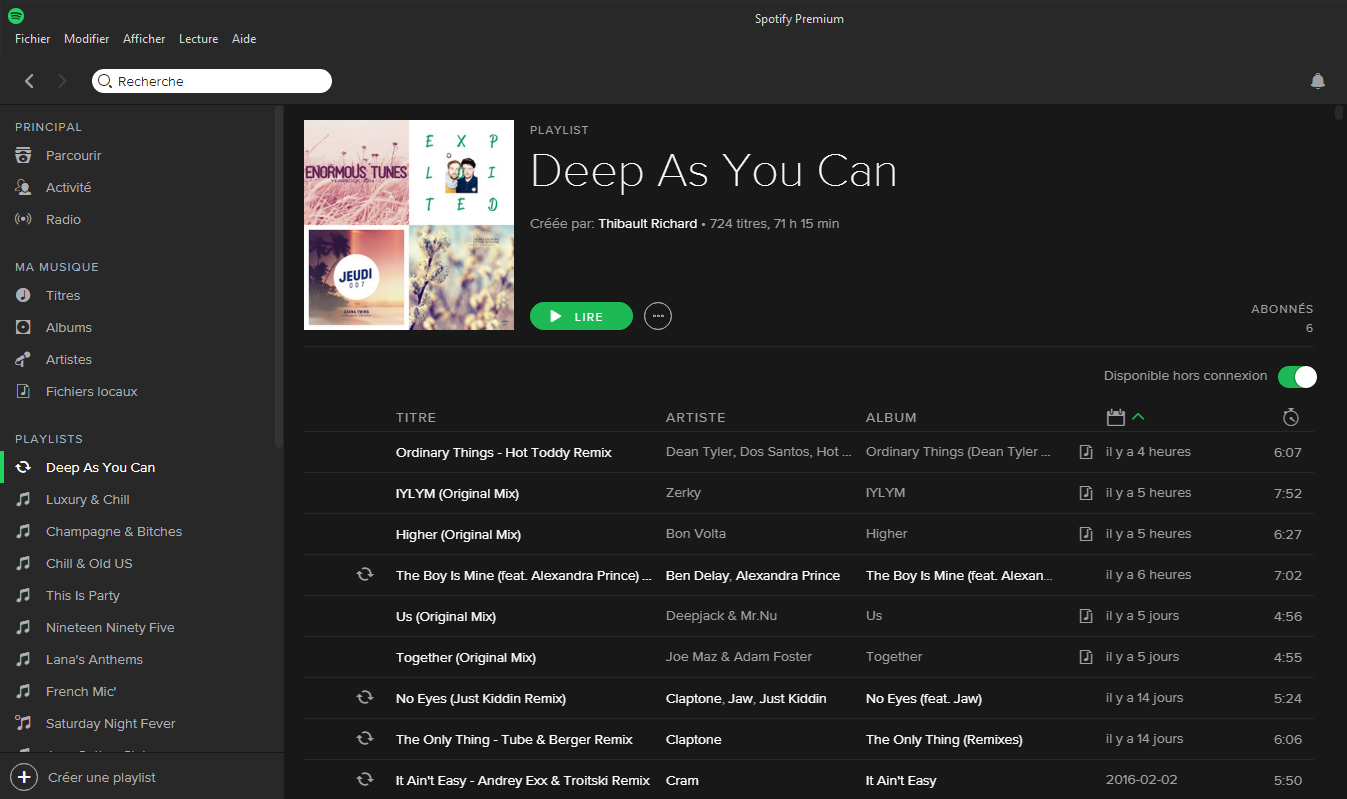
As support can see the playlist don't want to start the sync since 2 weeks. Also the sync from local files to iPhone is also broken.
Please support we don't need some basic answer ( do you have more than 3 devices... etc) we ever tryied all the solution.
So we just need someone answer, even to say spotify team is on the problem and we will make some speaking about with you.
Best regards.

Same problem here, since a few weeks. I'll have to look for different streaming service, if there won't be any patch for this soon...

I had the same problem. It was right after I updated the app. All I had to do was log out and log back in. Hopefully that helps!

having the same issue for about a week now....albums/playlists wont download to my phone...its just stuck on "waiting for download"...
i'm on ISO 8,3 on iphone 6, i have about 9 gigs of free space, i've tried to restart the phone, restart spotify, logging in and out...nothing seems to help...including the solutions earlier in this thread....any new data on this? comments from spotify? any suggestions....PLS!
so i think i narrowed down the problem. i think spotifz thinks i'm out of space on the phone, even though i have about 9 gb of free space (either that or there is some kind of limitation on the number of tracks u can have). any solution for this?

Today the client started to sync the offline playlists again. Since I hadn't changed anything on my part, I guess it was fixed by Spotify. Thanks!
Hi all!
Today Spotify got a new update, what was fixed my offline sync issue! 🙂
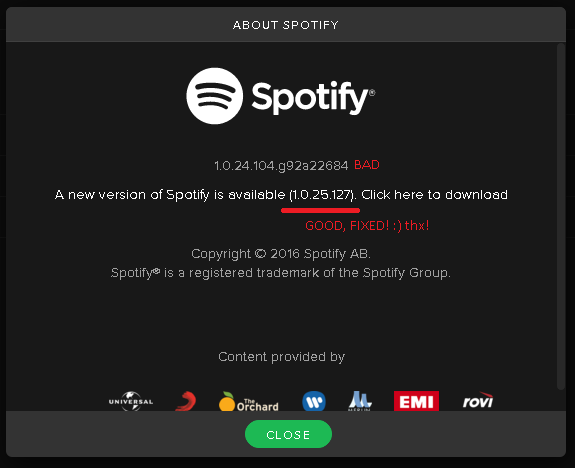 Versions
Thank you Spotify!
Best,
Andras

it's been like two years and this still doesn't work. it just says "waiting to download" forever
@neinmalDo you have enough free space?
I was greeted by the text: "You have not saved anything from <this album>. Save this album to keep it in Your Music."
AND THE AVAILABLE OFFLINE SWITCH WAS TURNED TO GREEN.
This means I have to access wifi to get access to my SAVED MUSIC, because Spotify doesnt just work like it should or how they say it does, and Im starting to believe they are incompetent. At handling their own software!
**bleep** this **bleep**. I might as well go back to pirating music. Or go with the hassle of ripping all my cds and have to deal with itunes and all the hassle that comes with that.
CAUSE RIGHT NOW IT SEEMS TO BE THE BETTER OPTION.
Hey! Welcome to the community 🙂
How much free storage space do you have on your device?
Spotify won't start synching normally unless you have 500MB-1GB of free space.
Peter