Very high data usage

Well, I have read in this topic that Spotify uses about 2,4MB per minute.That's about 144mb per hour, which is fine.
Today I drove about 30 minutes to work and 45 minutes back and listned to Spotify on max. quallity. My data usage? 790MB! How is this possible for only 75 minutes of streaming?
Accepted answers
All comments

Hey @daveb1,
I've found an older post from one of our fellow community members! The answer by one of the Rock Stars is very accurate, and I hope this will help you.
https://community.spotify.com/t5/Help-iOS-iPhone-iPad/Data-Usage/td-p/502830
Quote: @Peter__

Just doing some brief maths for you, this is assuming you have 1GB of data purely for Spotify just to make the calculations easier and ignores data caching which might occur if you listen to tracks more than once:

At 96kbps you can stream ~ 24 hours of content.
At 160kbps you can stream ~ 14.5 hours of content.
At 320kbps you can stream ~ 7.25 hours of content.

As Joe said above, synching tracks into offline mode whilst on WiFi is a good plan if you listen more than that!

Peter
- Jordy
Thanks for your reply. The post of Peter tells me that you can stream about 7.25 hours with 1GB of data usage. Now.. I used about 800MB, which tells me I should have streamed about 5,8 hours. That's where the problem is, I only streamed for at max 1,5 hour. Ofcoruse the solution is simple, save it offline. But since I have only a 16GB iPhone I don't have very much space left.
You are right! It is allot of usage.
The post from peter is just an indication. When you stream a song, Spotify will save them in the cache, so the next time you stream the song, it will use less data.
I suggest you track your data usage on your iPhone.
Option 1)
Go to settings -> Mobile data -> Here is an overview of your data usage per app. -> Scroll down and Reset Statistics. -> Try to stream Spotify for 30 min. or more. -> Now you have an overview of the data Spotify has used on your streaming settings.
Option 2)
Use a 3th party app
The problem is your high data usage can be from other apps who uses data. Let me know what the results are, if Spotify uses allot more data the some community members are saying, I'll forward your problem with the staff.
- Jordy
I already did that yesterday. Here you go:
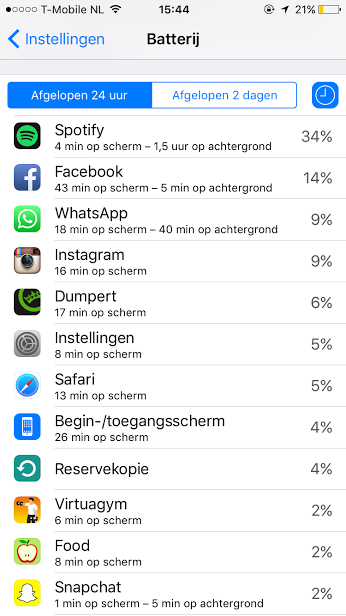
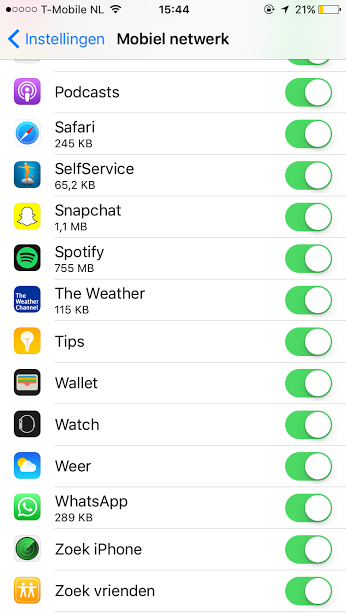
It used about 755MB while using it about 1,5 hours.
So some other Rockstars are saying to try re-instal Spotify. Some other people are encountering the same problems.
We think the problem is Spotify downloading the album art over and over, since it's not saved properly. This can be the reason why your data usage is so high!
The post about the problem, look there, post about your problem.
https://community.spotify.com/t5/Ongoing-Issues/iOS-Android-Offline-album-art-not-showing/idi-p/1203278
- Jordy
Thanks, I will post my issue over there. But before I do that, can it something have to do with forwarding songs? So instead of listning 30 minutes to the songs Spotify picks, skipping some songs? I'm not sure but I think it has the same way of downloading like on YouTube: you look at some video and YT buffers forward. Isn't Spotify doing the exact same thing?

I just switched from Apple Music to Spotify Premium, and have encountered an odd issue that I'm hoping to get help with.
When playing a song that I've set to be Available Offline, but don't have the app set to offline mode in the settings, it streams the song, using a ton of data (about 1 mb every 5 seconds).
Is this by design, or is this a bug with the latest version? It seems weird to me that it would stream the song when it has it downloaded to the device, but that's indeed what is happening for me. The only way to stop this from happening is to either turn cellular data off for the app in the iPhone settings, or to put the app to offline mode in the Spotify settings.
Is anyone else experiencing this? I don't want to have to switch the app to offline mode as there's a lot of functionally you lose when in this mode. I would prefer to keep the app online, but when playing songs to only access the downloads not to stream them, so that I don't use all my data in session lol.
Any help would be appreciated. Thanks.
David

I've just noticed that this week Spotify is consuming way more data over cellular than it used to when Streaming Quality is set to Automatic.
Last year when I first signed up for Spotify I was confused by how Automatic Quality would work when streaming on cellular vs Wifi. A google search showed many conflicting opinions on how it worked.
So I ended up playing it for an hour and watching how much data it consumed. Last year it used around 50-60MB for an hours streaming over 4G.
This week I noticed my data usage jumped up by a large amount. And the culprit seemed to be Spotify. I reran the test and found it was now consuming around 190-200MB an hour when streaming over 4G.
According to my telecoms usage history, it only jumped up in the last week, though my usage of Spotify hadn't changed.
So what gives? Has there been a change recently? Is this how Automatic Quality is supposed to work?


Hey @haaszilla, Welcome to the community! 🙂
We have created an ongoing issues post about your issue here 🙂
If you could comment with the information requested it would be greatly appreciated 🙂
Have An Awesome Day! 🙂

I never had this problem before. I could stay Online and play my already downloaded songs offline.
When I go in Offline mode I can luckily still play my downloaded songs and it doesn't consume data, but this needs to be fixed asap.
Not 'just a new font' since the last update I guess...

I have the same problem 😞

Thank's
Manel
Hi Manel
It's a known issue since one of the last updates. Spotify developers are looking into this issue right now.
If you don't want it to use data, put it in offline mode till it's fixed. If you want to be sure Spotify can't use any data when you're on celluar, go to settings --> mobile data and turn Spotify off.
Hope I helped you.
Ok so I got an answer back from support on the issue of Spotify, while in online mode, using a ton of data to play offline songs. He said:
"The Spotify application would still stream the tracks you saved and downloaded when your device if online and your Spotify is Online. The Available Offline will only work when your application is Offline."
So if the support guy is right, this behaviour is not a bug, but by design. I guess they decided to change things in the last update. I just can't seem to figure out why they would do something like this. To me it's confusing and to be honest a little deceiving.
But otherwise the app is great, I'll just have to remember to always turn offline mode on when I'm away from wifi. Annoying, but not a dealbreaker.
@haaszilla wrote:Ok so I got an answer back from support on the issue of Spotify, while in online mode, using a ton of data to play offline songs. He said:
"The Spotify application would still stream the tracks you saved and downloaded when your device if online and your Spotify is Online. The Available Offline will only work when your application is Offline."
Well that's certainly not the way it's been working since I signed up over a year ago.
Untli recently I had a very small cap on my phone. I got around it by syncing tracks when I was at home, which I would then play all day with essentially zero hit on my cellular data. I've never, ever put Spotify into offline mode.
I increased my data at the start of the year and have been streaming away with no surprises on my data usage. If anything I was suprised that Spotify used less data than I thought it would.
But I still make heavy use of downloaded playlists because I never bothered turning them off.
Then the last update comes out and suddenly I've used more data in two days than I did in the entire previous month. And that's with heavy use of downloaded tracks.
Last night while running tests for Spotify support it used up 800MB in under 1 1/2 hours. That's almost 1/2 what my allocation used to be.
edit: added quote cause I jumped top new page
Okay a new iOS update appeared. Does anyone have the changelog?
Sad... I used another 350MB today with about 30 minutes of streaming.
It's really weird that an issue like this stays unfixed for a whole week. I can't believe it, there must be so much users out there who don't know about this bug and are gonna end with an incredible high data bill end of this month.
Nah, it's still using a lot of data for me as well.
Do you guys have the same issue that I have?
If I download a playlist when I'm connected to WiFi, it ignores the WiFi and uses cellular for the download?

@clesser wrote:
I am having the same issue...my family plan's data cycle reset on the 11th and yesterday, the 18th, we got the text that we had used 75% of our 20 gb plan. The culprit? Me. In audio services. Aka Spotify. 22 days with only 5 gb of data to split between 4 people, 3 of whom are extremely angry with me, and me, very angry that I had NO IDEA this was happening because I have been using Spotify on the same settings since I got this phone in 2014. To make this even better, I have to pay for any overages on the bill, and I'm in a financial hole right now and don't have the extra cash, so my phone is a very expensive paperweight until May 11th. Safe to say I am fuming about it.
Supposedly this is not a bug, but by design. This is what Spotify Support told me directly:
"The Spotify application would still stream the tracks you saved and downloaded when your device if online and your Spotify is Online. The Available Offline will only work when your application is Offline."
So if the support guy is right then they decided to change the way Spotfy deals with Offline songs in the latest version.
I think whats more likely though is that the support guy didn't want to admit it was a bug so he just told me that. I think this because it took 5 different emails back and forth of me asking the same question to get an straight answer from him. He kept trying to dodge around the question for some reason. Very strange behaviour to be honest.

I just realised that this issue has caused £5+ worth of credit to be used up on my PAYG phone in the last 2 days (normally this amount lasts me a good month) since the last ios/spotify update. I reset my data statistics then realised that Spotify had unknowingly used a further 50mb despite the option to only use WiFi for downloads selected in less than 10 minutes!
This issue/bug what ever you call it needs to get fixed ASAP and those affected like myself reasonable compensated as this situation is unacceptable.

This is a huge problem that could land Spotify in some hot water, legally speaking.
Hey there folks,
Thanks for posting about this here in the Community!
You can have different settings for listening online (Streaming quality). You can find more info about the different options in this support site article.
Keep in mind that the higher the stream quality, the more data will be used.
You can reduce your data usage by toggling on Data Saver from the app's settings on your mobile device. To find out how you can do this, along with other tips, we'd recommend taking a look at this support site article.
Hope this helps clarify things! If you have any questions, don't hesitate to give us a shout.
Have a lovely day 🙂