spotify doesn`t save to sd card

Hello,
on my WIko Wax spotify is unable to save offline music to the sd card. Although the internal disk is full and there is plenty of space on the sd card spotify just says "disk is full". I also emtied the catch and deleted all data...doesn't help.
Thank you for your ideas!
Accepted answers

@Romantic626 wrote:After I uninstall and turn off my phone and turn it back on, the files are no longer there, and when I try to download the music again it once again downloads to my internal sd card instead of my mounnted external sd card which has over 59.64 GB available. Did I do something wrong? I followed your instructions to the best of my ability.
Please read the guide linked below for details on getting a completely clean install of the Spotify app. This should be the first step and can help resolve issues such as:
- Black screen on startup
- Offline data not storing on SD card
- Random crashes or FC's
- Track degradation or skipping
- Playlists and tracks no longer available
[GUIDE] First step of troubleshooting - Clean Install
@YpK wrote:Hi everyone,
I have now spent most of the day looking for a solution to get Spotify's offline files (Storage folder) on the SD card.
After running through many many threads here (even back to 2012) but no luck.
Running Android 4.4.4 which is the latest update of my Moto G (4G version). I also have a 64GB Micro SD.
I've tried many things today:
- Quit app, clear cache via android, clear app data via android, uninstall, (reboot sometimes), reinstall latest spotify version from the store
- Formatted MicroSD, resetted the Spotify app again
- Doing the same clear cache / data via Spotify app
But yet, Spotify still uses the internal memory to store everything. It creates a data folder on the sd card but it remains empty.
The Storage folder is only being populated on the internal memory.
My internal memory is on /storage/sdcard0
SD Card is mounted on /storage/sdcard1
I got the phone today, brand new, no customisation or dodgy apps.
Now if anyone has any tips, I'd love him for that 🙂
An old trick which may still work:
1. Clear the app cache
2. Log in
3. Change download quality to 'Extreme'
4. Mark something as 'Offline'
5. See if the SD Cache has some data
What makes you say its not saving to the SD? sometime's the system doesn't correctly show that the cache is properly on the SD card. Can you check to see if the folder Android/data/com.spotify.mobile on the SD card has data/folders in? if it does then it's correctly using the SD card.

I can confirm the the trick below still works with Spotify 3.5 on Android 5.0 Lollipop.
There really should be a pref there you can chose the location of the installation of files and downloads. As it is the app will be install them on the phone internally if it's fresh install but on sd if it has begun to fill up...
@Rodrigo wrote:Sorry, let's try a fully clean reinstallation.
- Go to System Settings
- Go to "Apps"
- Find Spotify there
- On Spotify's page, first, tap "Force Close"
- Then tap "Clear cache" if it's not greyed out.
- Then tap "Unninstall" and remove the app.
- After uninnstalling, power off your device.
- If you can, remove the battery now. Power back on.

For anybody still having this issue, I found a simple solution. Has worked for me every time now.
1) Follow the other procedure(s) to delete Spotify data from the phone and SD card. Very simple.
2) Fill up the phone's internal memory to about 95% full. I used audio tracks, but video would be even easier.
***This step is 100% necessary on my phone. I've tested it with a newly formatted phone and SD card 3 times now.
3) Install Spotify. Download songs. Finally, it works.


Hey guys!
GOOD NEWS!
Finally found a fix for HTC One M8 users. Could also be applied to others on Android 6.0 too.
Firstly, I am not a beta tester, I have the usual Google Play version.
1. Open your existing Spotify app and go to Settings >> press "Delete cache and saved data"
2. Uninstall App
3. Reinstall from Google Play (note the app description will say about fix for offline music on 6.0)
*****DO NOT OPEN SPOTIFY APP ONCE INSTALLED YET!!!!*****
4. Go to device settings >> 'Apps' >> 'Spotify' >> press 'Permissions' >> select 'Storage' (This allows app to read & write to external SD)
5. Go back until you see "Storage" -- note it doesn't look accessible but it is. Go into 'Storage' and press 'Change'
6. Select your external SD
7. Open Spotify and download as usual (I set extreme quality to streaming and download quality if anyone cares to follow exactly)
Happy offline external SD listening! 😉

Hey everyone,
Like many have already mentioned, with the roll out of 4.8.0, you can now select where to save your music: Go to Settings > Other > Storage and select where you want Spotify to store all your music. This option will be hidden if no SD Card is available or the SD Card is not accessible. You can find more info about these steps here.
Thanks for all your feedback on this!


How could i know if the sd card is not available or accessible? It works with other apps, and was working well until i updated to Android 6.0. Now it is adopted storage, which is suppossed to be good news, but there's no way i can make it work for spotify. I'm running v. 4.9.0.992.
Thank you
Adoptable storage is good for some use cases, however by converting the storage to internal it blocks applications from being able to use it for data. It also will affect the life of your sd card.
I'd recommend reading up more about the new adoptable storage and whether this is something that you want. If you want your sd card to act as removable storage then you'll need to convert it back.

The only solution I've found is the following steps:
- Format SD card as portable storage.
- Log out of Spotify
- Delete all Spotify data from Settings
- Uninstall Spotify
- Reinstall Spotify
- **Give Spotify Storage permission in the settings before opening the app**
- Storage option appears in Spotify settings

Tried everything above and didin't work.
What did really work was format SD card as "portable storage". Once I did it, Spotify automatically showed the "Storage" option in settings. No need to reinstall or delete anything.
Good luck!

THANK YOU SO MUCH!!! After trying all of the other possible options, thanks to this I realised what was wrong at last 🙂 I guess once the SD card was adopted as internal memory Spotify couldn't tell the difference, and when I changed it to portable the option finally appeared in the app itself. Thank you thank you!

I only found a folder that is called com.spotify.music and other that is called spotifycache, which one should I delete?

This, this fixed for me
All comments

Hi,
someone has tested the Thomas Beta solution ?
Bye.

Just got an official Google Play update that's supposed to fix this...

The fact Spotify doesn't put the release notes and fix descriptions on their Play Store page for each version is pretty annoying. Hopefully this one fixes the problem.
Also, they STILL don't give an option to choose the SD card as the storage location. They could have easily added that instead of making everyone guess as to whether their music is actually going to the SD card. It's so weird they continually omit this feature. Like, just straight up really really weird. It's an option in every other music streaming app. Tidal, Deezer, Apple Music for Android, Google Play Music, RDIO (rip), etc.
Seems to work (as it used to)
@ryanreitsma Actually in this case the "What's New" secton on Google Play says "Fixed: Use Android Marshmallow? You can download content onto SD card to play offline later.". As you say, no idea why this isn't a proper option though.
Hey guys!
GOOD NEWS!
Finally found a fix for HTC One M8 users. Could also be applied to others on Android 6.0 too.
Firstly, I am not a beta tester, I have the usual Google Play version.
1. Open your existing Spotify app and go to Settings >> press "Delete cache and saved data"
2. Uninstall App
3. Reinstall from Google Play (note the app description will say about fix for offline music on 6.0)
*****DO NOT OPEN SPOTIFY APP ONCE INSTALLED YET!!!!*****
4. Go to device settings >> 'Apps' >> 'Spotify' >> press 'Permissions' >> select 'Storage' (This allows app to read & write to external SD)
5. Go back until you see "Storage" -- note it doesn't look accessible but it is. Go into 'Storage' and press 'Change'
6. Select your external SD
7. Open Spotify and download as usual (I set extreme quality to streaming and download quality if anyone cares to follow exactly)
Happy offline external SD listening! 😉


today got premium account on spotify, and checked where the files were stored because i got an micro sd card with 200 gb in my lg v10. aparently it automaticely chose my sd card to store data. So maybe spotify changed it recently. succes to all who have troubles with this, i'm gonna enjoy some music now.
Don’t get too excited. You can only download 3333 songs and even at extreme quality you’ll only use about 40 gigs of that.
i've had spotify for about a year (free version) and mostly listened to the playlists that are available. Everytime i heard a song i really really really love i added it to a playlist. I just downloaded that list, these are only my all time favorite songs.
It's about 70 songs and take up around 800 mb, so 3333 songs will just be fine i guess 😉 maybe i will download a few other playlists but i don't think i'll ever get to that amount of songs. Loving spotify either way, really happy i went premium.
by the way, just found out shazam and spotify can be coupled together so when i hear a song i like, shazam it i can easily add it to my playlist without even opening spotify. just awesome. sorry don't use shazam that much lol.
thanks for the info though.
I will give credit where credit is due. They finally added the option to pick your storage location in the update that rolled out today. THANK YOU.

I have the new version.
Where in the settings of the App can I select the SD card for offline storage.
Go into the settings then scroll down to the bottom. It's under "OTHER", then right below is "Storage". Click on "Storage" and it's in there.

Here is a screenshot of my Settings page at the bottom .. I don't have a "Storage" option.
Also you will see my version number too (Android)
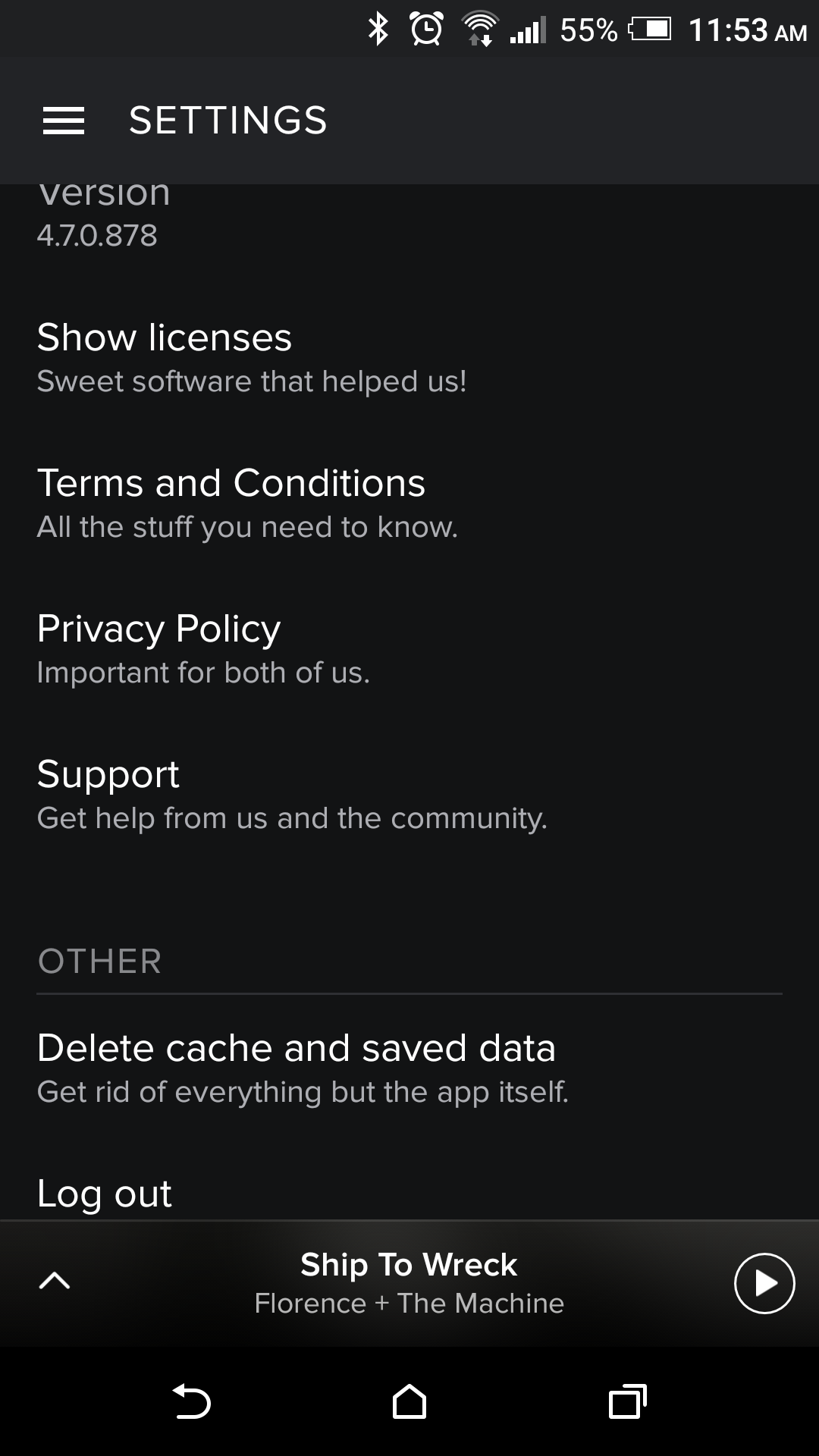
Oh wow. Mine looks like this.
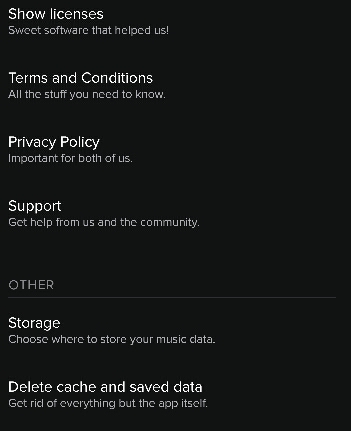
Your version is old. There should be a 4.8.0.1004 available. It was released for my Note 4 today.
My Spotify just updated .. must have just taken a while to filter down to Australia 🙂
All good now 🙂
Hey everyone,
Like many have already mentioned, with the roll out of 4.8.0, you can now select where to save your music: Go to Settings > Other > Storage and select where you want Spotify to store all your music. This option will be hidden if no SD Card is available or the SD Card is not accessible. You can find more info about these steps here.
Thanks for all your feedback on this!
How could i know if the sd card is not available or accessible? It works with other apps, and was working well until i updated to Android 6.0. Now it is adopted storage, which is suppossed to be good news, but there's no way i can make it work for spotify. I'm running v. 4.9.0.992.
Thank you
Adoptable storage is good for some use cases, however by converting the storage to internal it blocks applications from being able to use it for data. It also will affect the life of your sd card.
I'd recommend reading up more about the new adoptable storage and whether this is something that you want. If you want your sd card to act as removable storage then you'll need to convert it back.

How do you convert it back? I can´t make spotify read my SD Card I made it so my SD card acts like internal storage

That said. Try reformatting the card in a PC as a standard card, and then
reinsert it into your phone. Your phone should detect that a new card has
been inserted and ask what you want to do with it.

Hi
I have just removed my subscription to Spotify. It has corrupted my sd card one time too many. I have tried all the options offered here. My sd card works fine with Poweramp and anything else on my phone. I have wasted hours and also data on this issue. If this was a free app I would expect the odd bug but i'm paying monthy for this problem that isn't being fixed. Countless people have had this issue or something similar. As much as I love the vast array of music on Spotify I need to be able to use it offline and thats not possible.
Thanks Spotify.

Hi RosieGray22-us,
What is it you are trying to say. A blank message tells us nothing.

'We couldn't move your data.
There might be something wrong with your SD Card. Check permissions and try again.'
There's nothing that I can fix.. if anyone could help, I'd be greatly appreciative. 🙂

"No Storage Area Found - Check the device storage settings"
Yet it can see my SD Card and tell me how much storage has been used and how much is available. Ideas?
@mikeyboylfc wrote:
I tried changing my settings and all I get is:
"No Storage Area Found - Check the device storage settings"
Yet it can see my SD Card and tell me how much storage has been used and how much is available. Ideas?
What device do you have? Possibly part of the below bug if you can post your detail there and watch that thread for updates:
https://community.spotify.com/t5/Ongoing-Issues/Android-Storage-Area-Not-Found/idi-p/1316531
Sorry, let's try a fully clean reinstallation.
- Go to System Settings
- Go to "Apps"
- Find Spotify there
- On Spotify's page, first, tap "Force Close"
- Then tap "Clear cache" if it's not greyed out.
- Then tap "Unninstall" and remove the app.
- After uninnstalling, power off your device.
- If you can, remove the battery now. Power back on.
- Using a file manager on your phone or with your USB cable and your computer, go to Internal Storage > Android > Data and delete a folder called com.spotify.mobile.android.ui
- Reinstall Spotify from Google Play
If you do these steps correctly, you'll do a clean reinstallation of the app, with no piece of data to tell Spotify to save data to your internal storage.
Edit: corrected typos