Spotify could not be started (error 17)

For the past week, I've been un-installing and re-installing Spotify like crazy so I could access new music. This also leads to a problem saying that it "cannot initialize the storage of temporary files".
Accepted answers

There is a really simple fix to this problem. To fix it... follow these steps:
1. Uninstall spotify (*When uninstalling it, some registry files will not be deleted, therefore creating this problem)
2. Install Ccleaner (Computer cleaner software) to detect the broken or empty files in the registry
3. run the registry cleaner in the software after installing it (about 2-3 times just to be sure it cleans it completely)
4. Go to the Spotify website and download Spotify again.
Now, it should work like normal. By the way, after you get spotify to work, you could uninstall Ccleaner or leave it on your computer. (It is really helpful though!)

After trying all of the manual fixed I could find for this, and removing all of the directories related to Spotify, I realized that the launcher was still pulling saved data from some source that no one had listed. So I used CCleaner's uninstaller and then ran a full registry fix with CCleaner. Restart the installer, and everything worked just as it should. I should note that I still had the spotify.exe processes as an exclusion in Windows Defender (running Win10), though I don't believe that had any bearing on my issue.
All comments

Hello,
First of all wich OS are u using?
Windows 7,8.1 10?
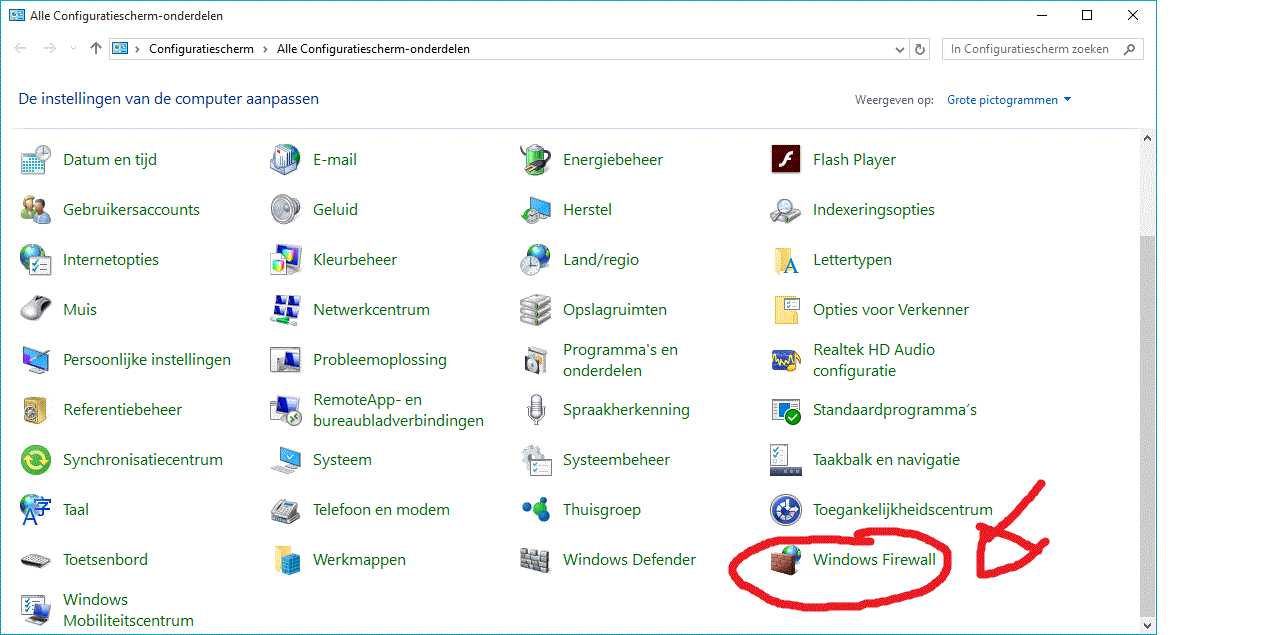
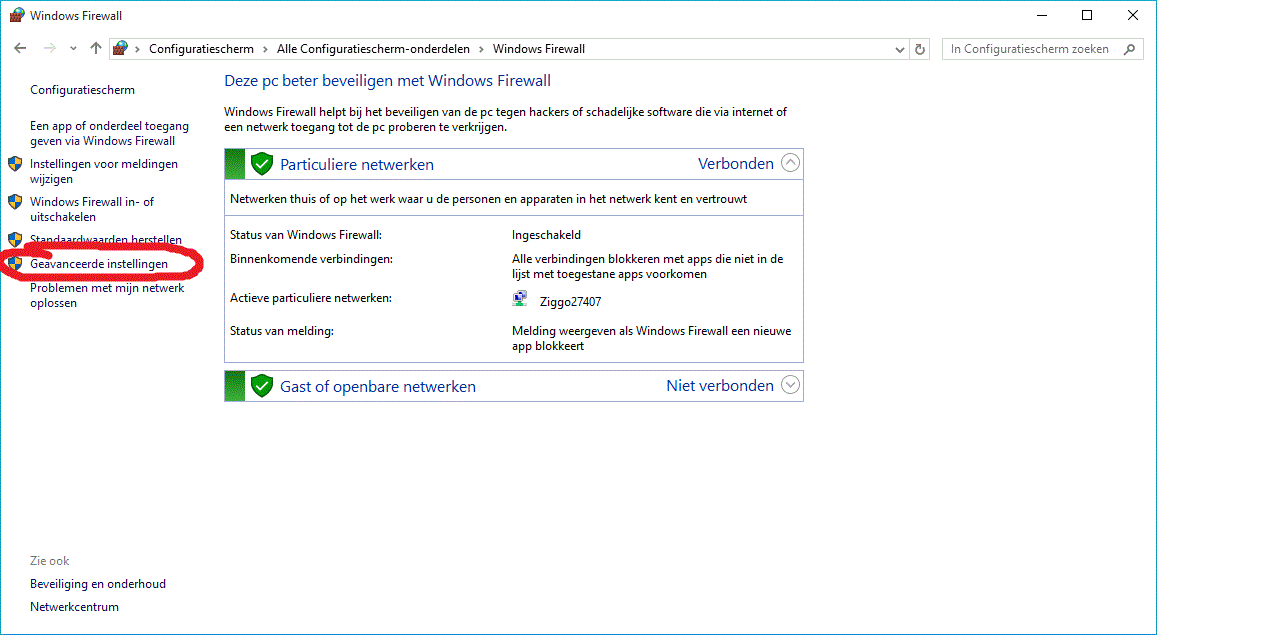
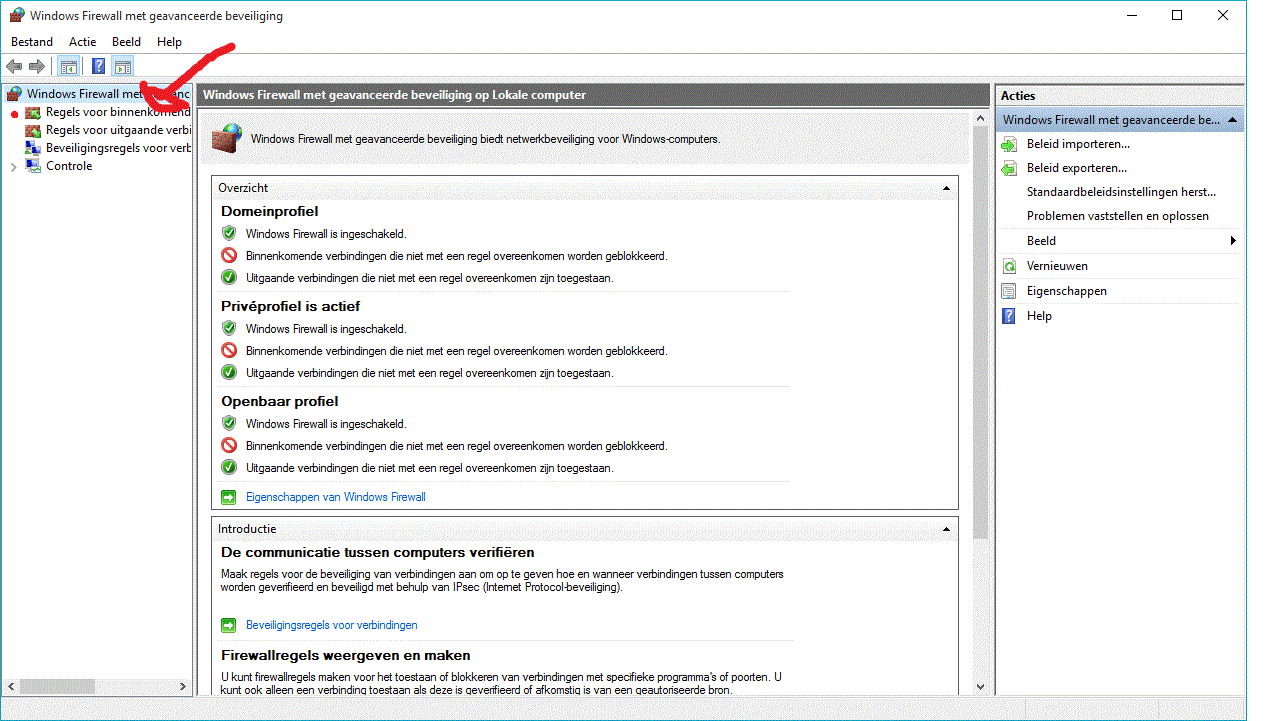
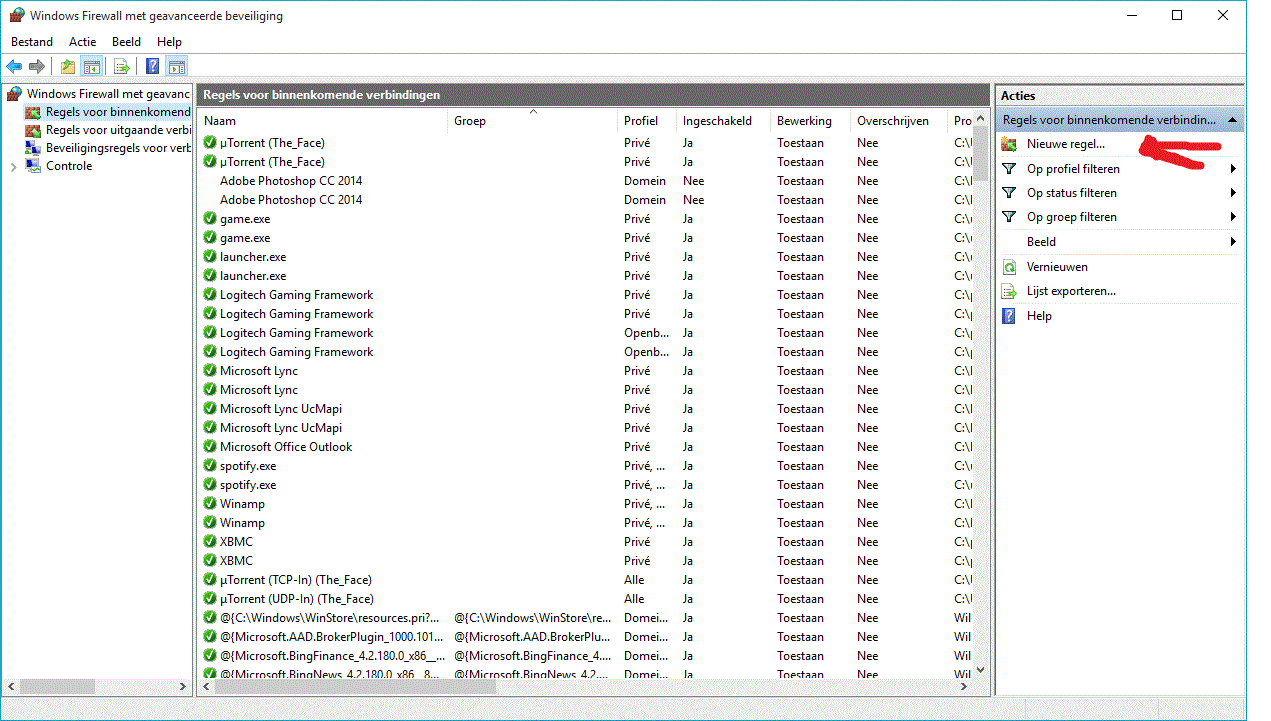
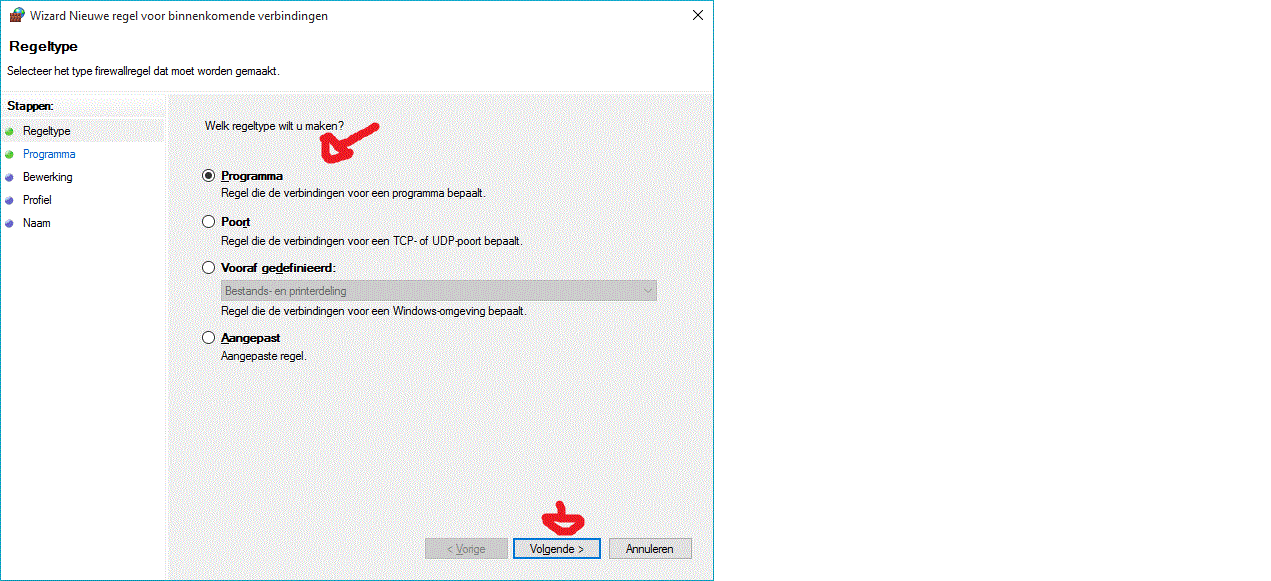
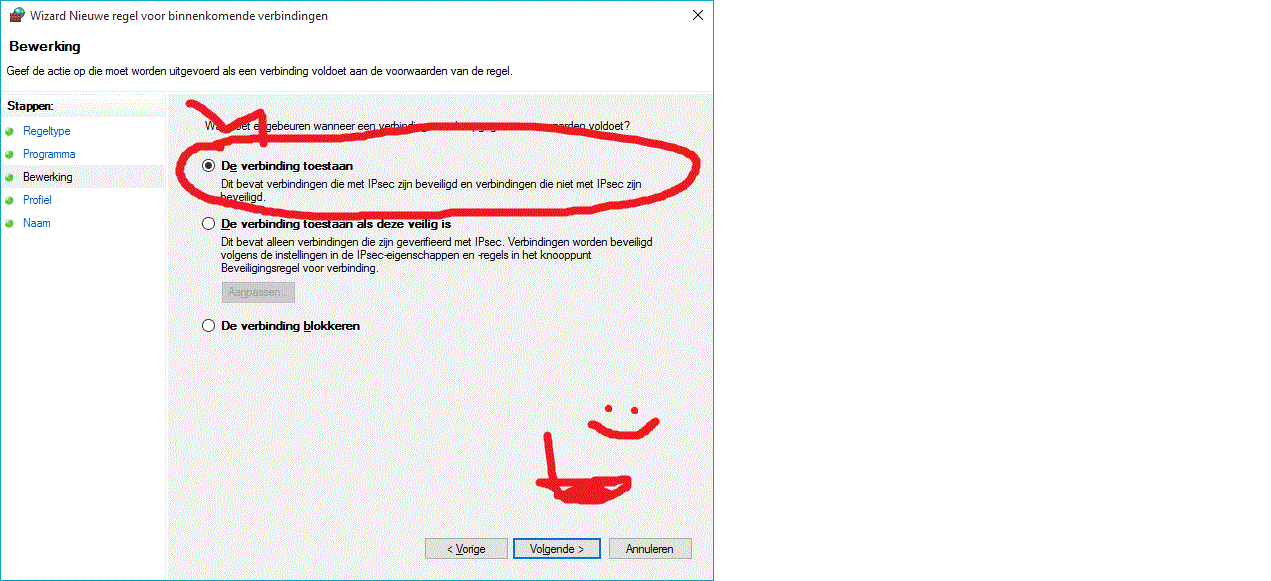
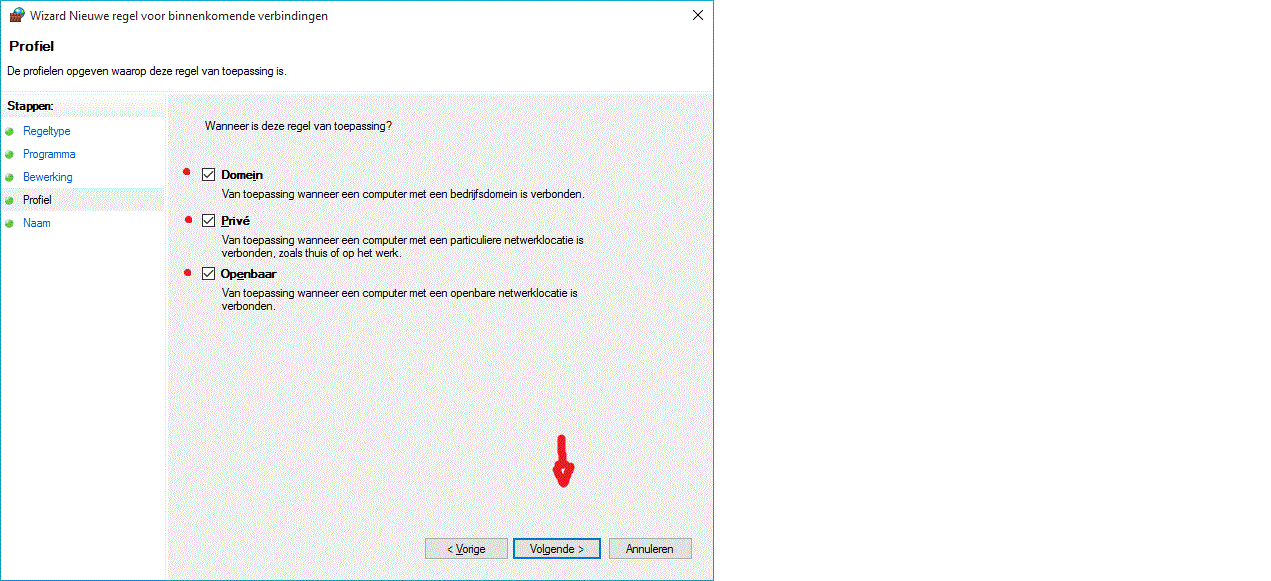
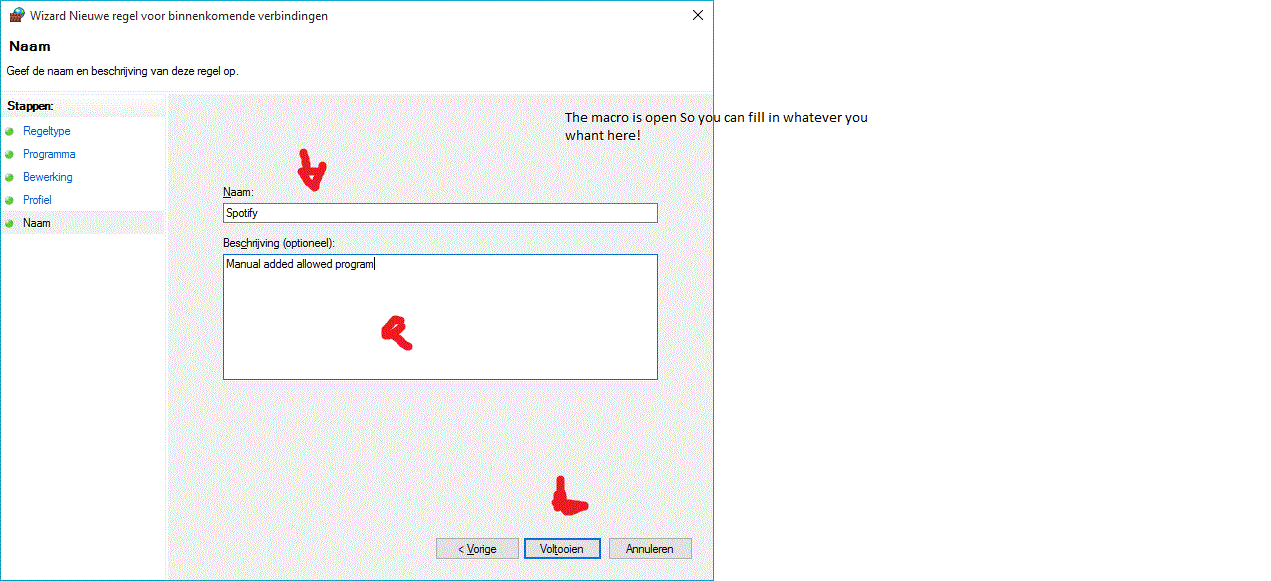
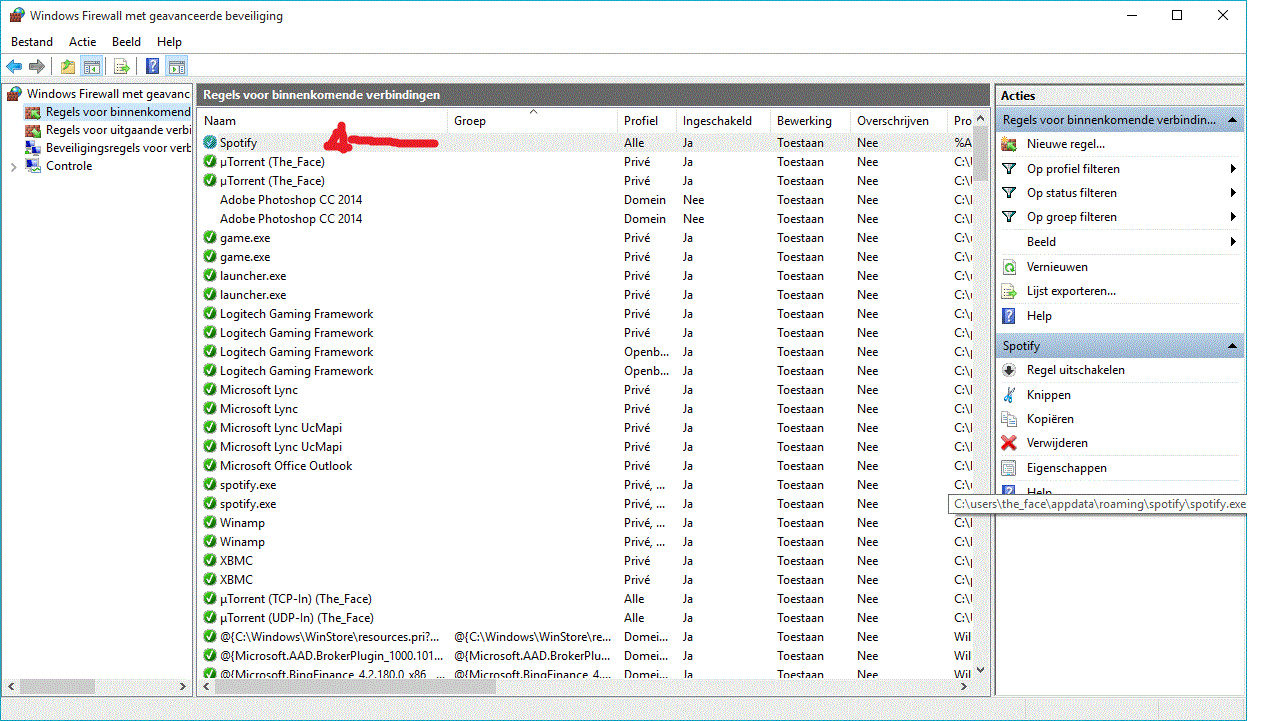
1: Normally if you install spotify, you get an automated message from firewall allow/disallow connection! just press allow!
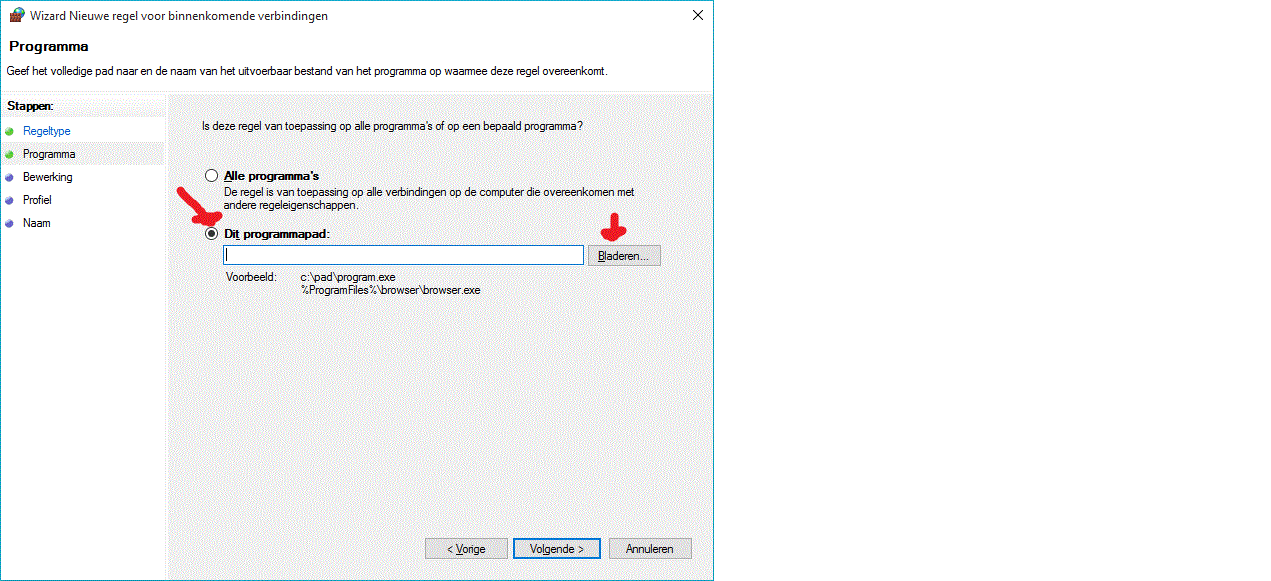
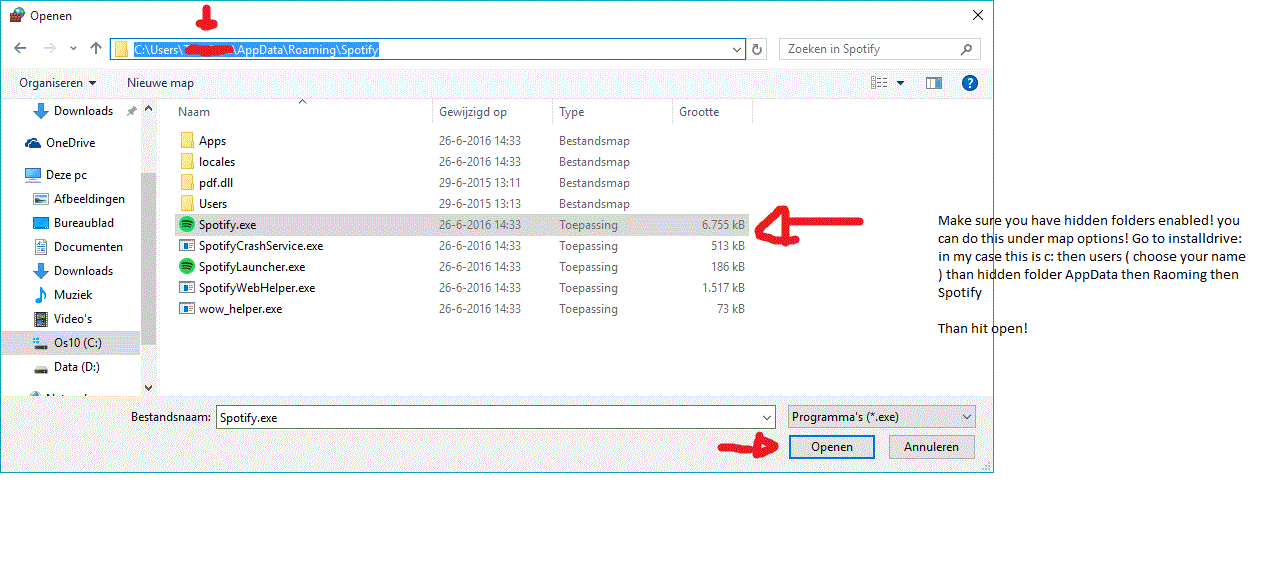
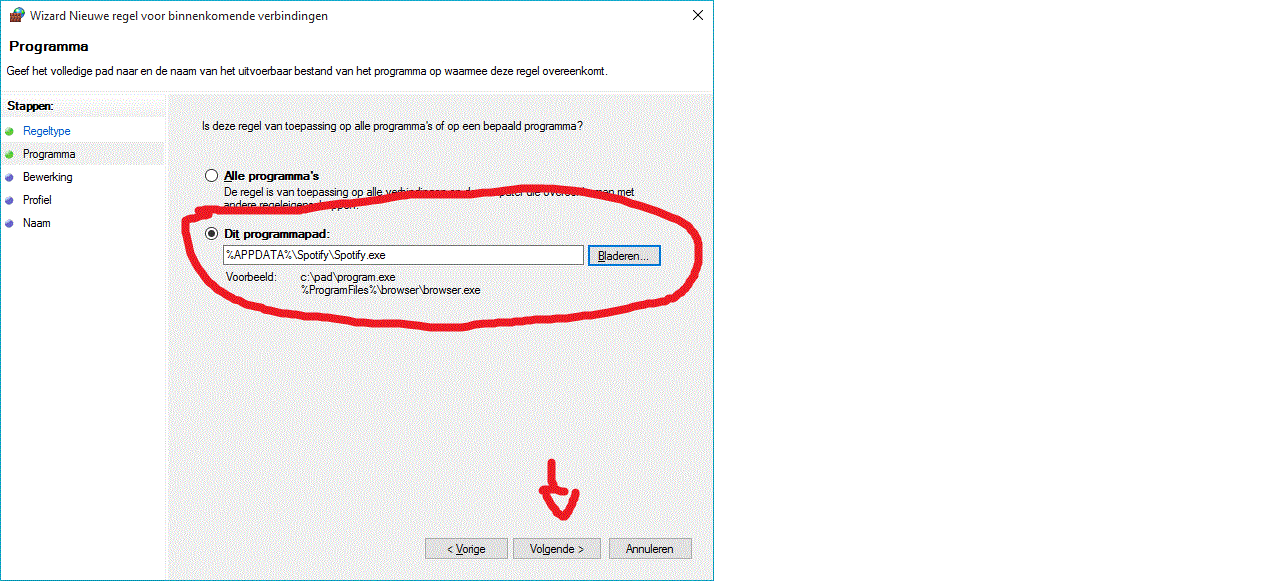
2: If you didnt get the message you can manually ad the program to youre firewall advance settings in and out!
I sent you 12 staps how to do this in windows 10 if you have hidden folders enabled in folder options!
Repeat the 12 steps for incoming and outgoing connection/ restart computer and see if program works! If you still having problems then try removing the install with piriform CCleaner!

want to thank all of you nice folks out there for putting up with us old guys...my pc is using windows 7 premium..in the past spotify would load up and work fine,although it seemed a little long in the tooth at loading...it stopped a couple of weeks ago..it would try to load,but would sit there with a black screen and seemed to freeze at that point..been using the web player recently and it would allow me to long in fine..yesterday I decided to reinstall spotify (3times),noticed one of you folks mention something about compatbility issues..after a few trys and loading in safe mode..I found I could it fixed by using not windows 7(not given as option)but (get this) windows vista(who new??) thanks all..great advice and help..Chris Calgary, Canda EH?

your solution is really working, thanks

I've had it...only going to use other sites from now on. No issues with any other music service, why only spotify? I have been able to download, only to have the next update send me into another error 17 situation. Why is this? Shame, I have several created playlists I would like to access, but I'm not willing to go thru the drill every time I get a sindows 10 upgrade?

Brill. Thanks. Top tip. Worked a treat.
D H Greer

Im still getiing the error code 17.. I´ve literally tried EVERYTHING! WHAT THE ACTUAL **bleep**.. I am getting so frustrated.. Just let me install the darn **bleep**in program..
able to get help from one of you fine folks by doing the following..I
restarted my machine in safe mode and was able to then install the
spotify install program..since then,I've had no issues..BUT.my machine
is now coming up on 8yrs old...it has windows 7 which have been
reinstalled..my daughter and I have just taken delivery of a new
computer with much more newer compoenents and windows 10..so I guess we
will see how it goes on the new one..thanks to all of you out there
trying to help old farts like me..thanks again..cb
After trying all of the manual fixed I could find for this, and removing all of the directories related to Spotify, I realized that the launcher was still pulling saved data from some source that no one had listed. So I used CCleaner's uninstaller and then ran a full registry fix with CCleaner. Restart the installer, and everything worked just as it should. I should note that I still had the spotify.exe processes as an exclusion in Windows Defender (running Win10), though I don't believe that had any bearing on my issue.

Still doesnt work. Are we supposed to do any follow up actions to that or just install it?

Hi there i am very disappointed with the service of Spotify right now, im paying for the service and all of the comments etc i have tried, it still does not work. It works on my phone no problem but why is there all these problems with just installing it on my computer. Just want a simple solution. If this is happening to a lot of customers thou what is the main thing that will fix it ?

You did it, moniquebf06! This was the solution for me. Now, I still encountered the dreaded Error 17, so I hit the properties tab and clicked on the previous versions tab, and it somehow magically worked. Thank you moniquebf06!
As for the Spotify programmers, this circuitous error is manageable on your end. I don't know how to fix it, but I'm a **bleep** when it comes to such matters. I've worked with enough IT guys to know now that these matters are not ALL my fault. If Spotify hopes to compete with Apple, their programmers will work to provide its users an easy fix to easy problems such as these. This whole matter was a ridiculous waste of my time.

Thank you soo much 😉
Under previous versions for me it says no previous versions. I just about give up

yeah dont work FUCL MAN
Here you go! didnt wanne do it, but this is the way i got it to work! Have fun! and enjoy 🙂
Orriginal poster for workarround error 17 Windows 7, 8*, 10!
Hello, thx for the warm welcome!
Ill give you mine sullution!
Download the latest spotify installer en put de exe file on your desktop.
1) right mouse click properties
2) remove blokkade
3) go to the upper tab compat*
4)check the box and choose install as windows xp service pack 2
5)Hit apply on the bottom and hit ok after this.
6)Now right mouse click on exe file ( spotify_installer.exe) and choose install as admin!
7)Spotify chould be installing and everything should work!

the attachment you put still gave me the error code

I did this and it found a fault. It removed the fault but then when I downloaded it code 17 still appeared.
Hi,
So i"m unhappy to hear that this doesnt work for some of you guys! Try this:
1) Install CCleaner ( piriform )and deinstall spotify!
2) Clean your registry
3) Restart computer or laptop
4) When the computer is restarted, disable your antivirus software. ( only as long is needed to reinstall spotify ) Also disable windows defender!
5) Reinstall spotify as shown above!
6) Try to run spotify and check if everything works!
7) Enable your antivirus
I hope this helps, if not than i dont know what to do anymore! This helped for me and everything works fine on my machine!

Finally, a solution that actually works. I tried for hours uninstalling and reinstalling Spotify in and out of safe mode and nothing worked. This COMBINED with jo23's response, below, worked for me, and I know NOTHING about computers, fyi.
1. I uninstalled Spotify completely from my desktop.
2. I deleted every "key" with the word "Spotify" in the description from the Registry using the instructions given by trexer1990.
3. I, then, downloaded CCcleaner and used the registry cleaner to also delete any corrupt registry files.
4. After doing all of this, I reinstalled Spotify, and I am no longer having issues.
Completely ridiculous, but it worked. And it took no time at all. I only wish I would have found this thread much earlier, because the combination of the two users suggestions is the only thing that worked for me.
Thanks guys!
Thank you!! Your suggestion combined with trexer1990's suggestion, above, FINALLY worked for me. I've been trying for 2 weeks to get Spotify back on my work desktop, and finally found a solution that actually works! So glad I found this thread!

It's work! Thanks alot:)


Thanks bro!! That worked fine for me I love you!!!
Brillient. Result. The issue was driving me demented. Your method worked for me. Thanks!
D H Greer
I've been reading some solutions in the forum, and we have different options to solve this problem... Hope they work with your issue "Code error 17"
1. In windows, you should try to execute the application with the compability tab checked (Right click in the Spotify Icon, properties, compatibility with Windows XP ).
2. (It worked with me), after any update or after unistall Spotify and to run a new Install it stay stacked, so just execute the Windows Registry (Type regedit in the text field that appears in the Start Menu in Windows 7/Vista), then just go to Edit, and Search... and then delete all the keys you can find with the word Spotify (be careful to don't delete any other that don't say exactly that) and then you also should try to delete the folder "Spotify" created under the user folder in this route C:\Users\CHANGETHISFORTHEUSERNAME\AppData\Roaming.
And it's done...
Hope it work for you.