The return of the libssl trouble on Linux

Running Debian testing/sid (stretch), spotify-client from Spotify's testing repository no longer works.
spotify: error while loading shared libraries: libssl.so.1.0.0: cannot open shared object file: No such file or directory
Looks like a recurring theme, as we have just recently survived the libssl0.9.8 to 1.0.0 transition, but we're going to have to enjoy 1.0.2. I doubt Debian will be easily persuated to stop upgrading their security related libraries so that we can run our favorite non-free software. Someone else will have to be flexible here 🙂
Accepted answers
All comments

Even with ln -s from the new library this problem persists.
Any news about this???

Same Problem here, clean install of Debian testing.
Just download & install the 1.0.0 version (https://packages.debian.org/jessie/libssl1.0.0) and it should work.

This is what I'm seeing on Gentoo... It would be nice if Spotify updated their libraries to something fairly modern, just to keep in sync with Linux distributions.
peter@skare ~ $ spotify
/opt/spotify/spotify-client/spotify: /usr/lib64/libssl.so.1.0.0: no version information available (required by /opt/spotify/spotify-client/spotify)
/opt/spotify/spotify-client/spotify: /usr/lib64/libcrypto.so.1.0.0: no version information available (required by /opt/spotify/spotify-client/spotify)
/opt/spotify/spotify-client/spotify: /usr/lib64/libcurl.so.4: version `CURL_OPENSSL_3' not found (required by /opt/spotify/spotify-client/spotify)
This is my Spotify package information:
[I] media-sound/spotify
     Available versions:  1.0.27^ms {gnome pax_kernel pulseaudio}
     Installed versions:  1.0.27^ms(14:27:35 2016-04-23)(gnome pulseaudio -pax_kernel)
     Homepage:            https://www.spotify.com/ch-de/download/previews/
     Description:         Spotify is a social music platform
It's working. Thanks a lot.

> Just download & install the 1.0.0 version (https://packages.debian.org/jessie/libssl1.0.0) and it should work.
This may work but it's not a recommended way, since you're downgrading to a version with security issues.
I'd rather expect a fix from the spotify team instead.

agreed, don't really want to subject my machine to known exploits just to use spotify...

I am using Kali and it works for me.
download:
http://security.ubuntu.com/ubuntu/pool/main/o/openssl/libssl1.0.0_1.0.2g-1ubuntu4.1_amd64.deb
run this on your terminal:
dpkg -i libssl1.0.0_1.0.2g-1ubuntu4.1_amd64.deb

As OpenSSL is not backwards compatible, I see that this problem will reoccur everytime there is a jump in the version... Had to downgrade to libssl1.0.0 in Debian to keep my spotify-client working. Not optimal.
Spotify probably is not interested in supporting Debian testing/Sid, or development versions of any other distribution, and I don't expect them to. Still, I wonder why Spotify always seems to "just work" on Arch Linux, which certainly keeps up with the latest versions of openssl and other libraries. For reference, here's the Spotify PKGBUILD in the AUR, and from what I see the maintainer changes nothing in the Debian package.
https://aur.archlinux.org/cgit/aur.git/tree/PKGBUILD?h=spotify

For those who reeaaallly don't want to blow up the system ssl library, what I did was:
- Download OpenSSL 1.0.0 source (ftp://ftp.openssl.org/source/, 1.0.0 latest patch is 1.0.0t)
- sudo aptitude install zlib1g-dev libssl-dev
- (You may also need build tools, like, make and gcc, I already have those installed here)
- Extract and get into openssl source directory
$ ./config --prefix=/opt/openssl1.0.0 threads shared
$ make
# make install
Now create a script and make it executable:
# $EDITOR /usr/local/bin/spotify-opt
------ Insert Content:
#!/bin/sh
export LD_LIBRARY_PATH=/opt/openssl1.0.0/lib
/usr/bin/spotify
------- END
# chmod +x /usr/local/bin/spotify-opt
And create a desktop entry (I copied the one that comes with spotify on /usr/share/applications, and modified it):
# $EDITOR /usr/local/share/applications/spotify-opt.desktop
----- Content
[Desktop Entry]
Name=Spotify - /opt SSL
GenericName=Music Player
Comment=Spotify streaming music client
Icon=spotify-client
Exec=/usr/local/bin/spotify-opt %U
TryExec=spotify-opt
Terminal=false
Type=Application
Categories=Audio;Music;Player;AudioVideo;
MimeType=x-scheme-handler/spotify;
---- END
Notice that I modified three options from the original:
The Name, so I can differentiate my desktop entry from the original,
Exec and TryExec, so this entry run /usr/local/bin/spotify-opt instead of /usr/bin/spotify.
I believe most people will find this complicated and not worth it, but if you are one that don't like messing up with your security libraries, that's a better fix than the Jessie package.
Hope it helps.
Oh... This was really stupid... There is an way more awesome/simple solution: Use flatpak.
flatpak and flatpak-builder are already available on debian stretch repos.
https://****/alexlarsson/spotify-app
Just Works ™

@anarcheano wrote:Oh... This was really stupid... There is an way more awesome/simple solution: Use flatpak.
flatpak and flatpak-builder are already available on debian stretch repos.
https://****/alexlarsson/spotify-app
Just Works ™
Looks nice. We should totally make an official flatpak distribution of Spotify for Linux.

It works man, I appreciate it. I am also using Kali Linux.

Not very useful when flatpak just dumps to terminal and not what it is supposed to do: download the Sdk and archive in the .local repository.
Debian Sid: Flatpak 0.6.8.
This is dumping to terminal has been a common problem with the flatpak.org site.

This worked perfectly for me. Thank you so much!
BTW, Debian Stretch is now stable, and the Spotify package still refuses to install.

using Debian Buster, I was able to install spotify by first installing dirmngr (needed for the key registration command on spotify's instructions page) and then adding Jessie-Backports:
deb http://ftp.debian.org/debian jessie-backports main
as an apt source (it's the last version supporting 1.0.0, but looks like it's actually a port of 1.0.2 providing 1.0.0 compatibility)
for other systems:
- the Arch Spotify AUR is modified to depend on `openssl-1.0` as opposed to a specific patch version, so that should work if you're AUR-based
- Ubuntu just calls all 1.0.x 1.0.0, which is probably the root of the problem. edit: root problem confirmed
- this thread has flatpaks, if you're into that
more details on the issue:
- noted as an issue with the Spotify Play Button (website thing) May 2016
- acknowledged and on Spotify's internal bugtracker October 2016
- this thread we're in now is the oldest reference to this issue I've found (February 2016)

Hi all,
I run into the same issue with debian stretch.
But found an repository for libssl1.0.0 on the package.debian.org webpage.
https://packages.debian.org/jessie/amd64/libssl1.0.0/download
Added to /etc/apt/sources.list or sources.list.d/... as you like.
apt-get update
apt-get install libssl1.0.0
DONE.
Rerun the apt-get install spotify-client and everything went smooth.
After almost two years, this has finally been "fixed".
Spotify 1.0.69 in the testing repository now (soon stable) can dynamically load different version of libcrypto.so (from the libssl* packages).

Nice that this is finally fixed—I can actually install it without having to install outdated, insecure old versions of openssl, and launching it actually works.
... sort of. It doesn't actually install a .desktop file. *facepalm* This is really easy to solve, it's just a matter of adding a file:
/usr/share/applications/spotify.desktop
to the package with content:
[Desktop Entry]
Name=Spotify
Comment=Access and play music from your Spotify account
Keywords=music;streaming
Version=1.0
Exec=spotify
Terminal=false
Type=Application
Categories=GTK;Music;Audio
Icon=/usr/share/spotify/icons/spotify-linux-256.png
(For a regular user, you'd add it to a new file ".local/share/applications/spotify.desktop"). And if you wanted to get really clever, you can add translations into it. With that installed (either locally or globally), I get a nicer icon, my desktop environment knows about the package, and, more importantly, I can actually launch the thing without having to open a terminal first.
While I can easily do that myself, I'm actually a bit shocked that the package doesn't have this to start with. It's like the people writing the Linux version are Windows users who have never interacted with a Linux machine outside of an SSH client. Is there really no one at spotify who actually uses Linux enough to know that install a GUI application without a way to launch it from a desktop environment is, you know, not actually the brightest idea? I'm not a Windows user, but I find it pretty hard to believe that Windows version requires users to hit Start->Run (or open a Command Prompt) and then type in "spotify-client" in order to launch the darn thing.
So why does Spotify think that that's acceptable behaviour for Linux users?
yay! Thanks jooon - this makes printers retake their rightful place as the most annoying part of a new setup for me 😉
@jagerman - as a heads-up, linux is not officially "supported" last I knew, although it looks like the forum got split out which is a good sign. From the sounds of things, a few employees use linux themselves and set up a build for the distro they use. The suggestion box (https://community.spotify.com/t5/Ideas/ct-p/newideas) may be a good place for this - I've never really seen anyone use desktop application links (as opposed to taskbars or hotkeys), but it sounds like it's a useful & simple addition.
@jagerman42 wrote:It doesn't actually install a .desktop file.
It should.
However, I have seen a few others complain about this as well. Other people does not seem to understand exactly what is wrong though, they just complain that the Spotify icon when they alt-tab is sometimes a question mark. I have reinstalled the client hundreds of times for testing purposes and sometimes the icon goes missing for me too, but I can't figure out why. The desktop file is always there.
Does it consistently not install a desktop file for you everytime you install the package?
Can you first make sure the client is updated:
sudo apt update
sudo apt install spotify-client
and then check the output of these commands:
spotify --version
cat /usr/share/applications/spotify.desktop
find /usr/share/icons/ | grep spotify-client
If you install the snap package instead, do you see icons and can start it like that?
There should be a slightly different looking desktop file in:
/var/lib/snapd/desktop/applications/spotify_spotify.desktop
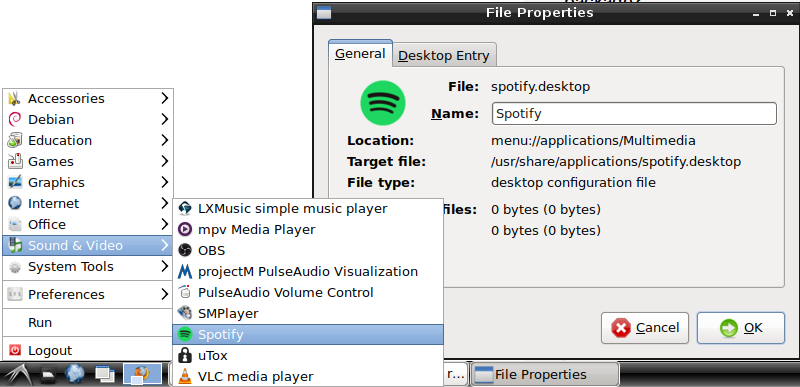
for what it's worth, it looks like I got a .desktop file from the package. I'm on Debian 9.4 with LXDE
After almost two years, this has finally been "fixed".
Spotify 1.0.69 in the testing repository now (soon stable) can dynamically load different version of libcrypto.so (from the libssl* packages).