[PSA] Samsung users please read!

Summary:
If you are using a Samsung device which has been updated (or running) Android 6.x Marshmallow it appears that they have introduced an agressive power saving option which is closing Spotify or stopping it accessing data when the application is sent to the background or the screen display turned off. The following are common symptoms caused by this:
Symptoms:
- Next song in an album/playlist is not played
- Lock Screen control vanishing
- Spotify notification disappears
- Tracks marked for offline listening fail to download
- Notifications for new followers, albums etc have not been coming up
Resolution:
If you are using a Samsung device and experiencing any of these symptoms please disable the Power Saver settings as follows:
Settings > Battery > Power Saving Mode> In the Power Saving Mode settings disable the "Restrict background data" setting
Kudos to @Cerda45 for the tip here
If it's still not working after doing the above then disable Power Saving Mode entirely:
Settings > Battery > Power Saving Mode
Settings > Battery > Detail > Spotify >Turned off
Further Info:
I believe Samsung are aware of the issues this is causing - not only to Spotify - and we can hope they improve the power saving feature in the next software update which is hinted at being sometime around June.
Still having the issue? This could be the Android 'Doze' feature taking effect. Read the section "Tracks stop playing when screen turned off or the Spotify application is in the background" in the [COMPLETE GUIDE] How to fix most Android issues
Accepted answers

Done all this, and it is still shutting off after two songs.. The strange thing is though it only does it while i am in radio, but if I am listening to my play list it's fine. Also the volume still goes up and down on it's own..


thanks this solved my issue.. but found this under info button for application battery saving (App strømsparing). and im running on android 6.0.1
All comments


Brilliant- all solved on my android edge 6+ . All colour has come back to life....been driving me crazy...


Still having problems with lock screen activating, nothing fixes this - Spotify, Android and Samsung don't want to know!!!


I use on Android 5.0.2 After last update on spotify got that issue.
So is a problem from spotify ...

On a Galaxy S7, Android build 6.0.1 with all the latest updates, Spotify version 6.1.0.1088 armV7 (latest build).
My issues still are:
- Random stop of playback several times a day
- No lockscreen control or lockscreen album art
Did the re-install, clear cache, battery savings off, reboot. But none of these did the trick.
Spotify should take more serious care of their customers, especially their Premium customers who keep them in business.

So did you actually read the first post in this thread which explains how to resolve your first issue @FriekoRieko? As for your second issue, you need to go into android settings>notifications>advanced>spotify and set the options there to suit you.
Since android 6, app developers have greatly restricted access to app permissions and they certainly can't access the phone's power settings.
Thanks Joe, for a moment there i thought i maybe missed something, but i actually did read the first post, very carefuly to be honoust, and followed every step of the way.
Same goes for your tip on the second issue, lockscreen controls.
Don't know if the settings menu in English is exactly like the one in Dutch, but these are and have been my notification settings for Spotify for a long time.
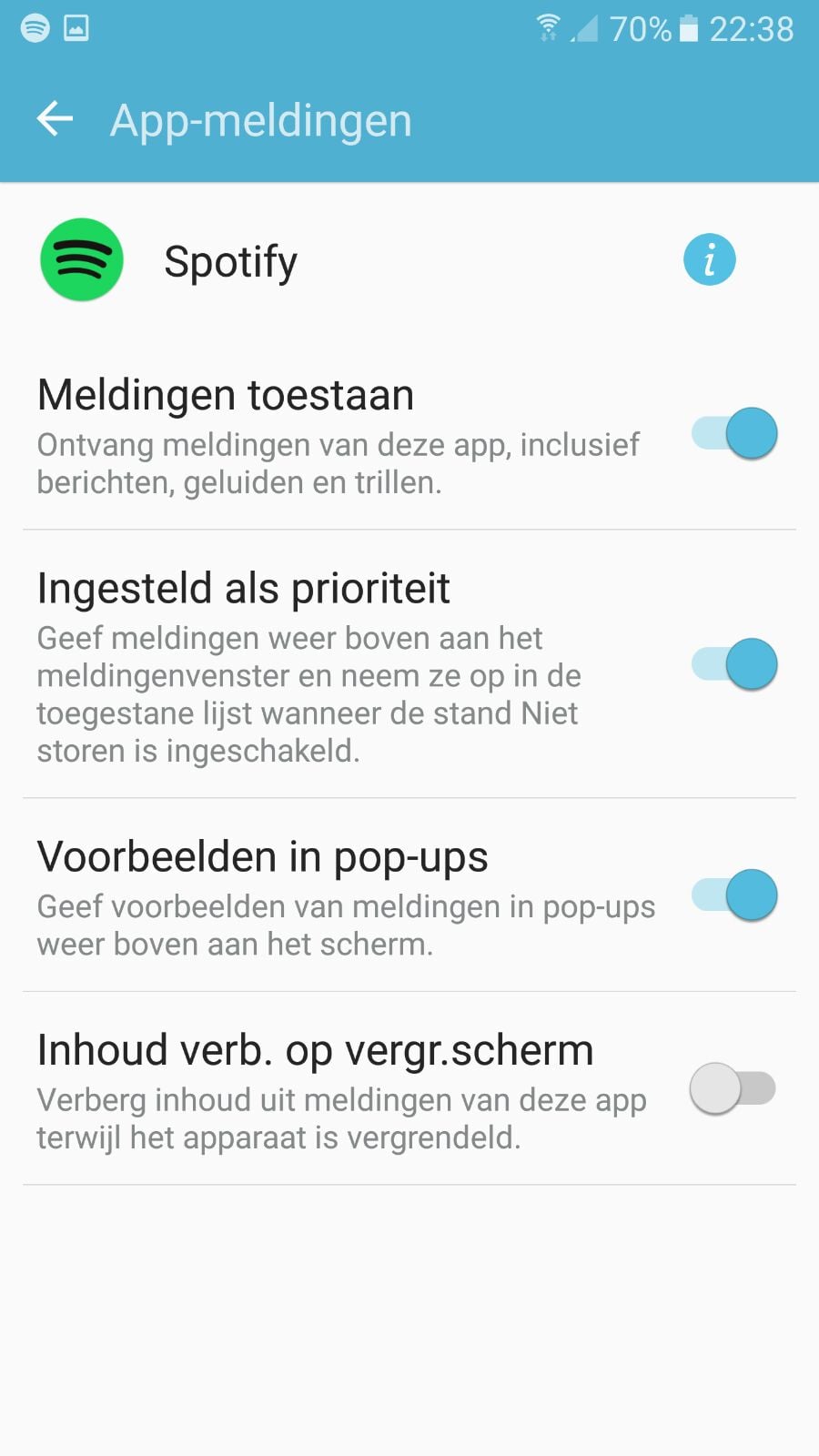
For me, there is no excuse for Spotify developers to not come with a suitable solution for this problem. Customers have the latest firmware and devices at their disposal, so do developers in their test farms. Preventing this kind of production issues should be a priority 1 item on the agenda.
I have an S7 edge and everything works fine for me. I rarely use powersaving mode but I have disabled the "background data" setting. I have also excluded spotify from app power saving - battery>app power saving>details>spotify>disabled.
Regarding lock screen notifications - your setting look pretty much the same as mine. Are you saying you don't get the spotify notification at all?
i figured out there was 1 setting i forgot about, in Android: Allow messages on lockscreen.. In there i allowed Spotify to display content on the lockscreen. That did the trick.
However, i did find out that this only works with my Standard Theme, not with any theme i choose to download, install and activate from the Android Theme Store.
So ultimately, i am stuck with working lockscreen album art and playback controls but without having a nice theme 🙂

battery menu of the phone's settings. Hit the show all apps option, scroll
down to Spotify and uncheck it.
new. Might just have to keep sending them info on what happens to the app
while you use it so they can still test for bugs.

I'm having an issue where the green check mark is next to songs I downloaded but when I got to play them offline the timer just stays at 00:00 and won't play. Very frustrating since I'm paying $15 a month for it. I don't have power saver active, never have. I don't have any of those options either. Please help, this is killing me.


Thanks


I have the same problem as Minksie above. As of yesterday I can no longer fastforward or rewind tracks via bluetooth on my car stereo. I am using Samsung S7 edge. I am hoping to find a solution to this problem. Any help much apreciated.


It's only just been happening but it gets rather annoying
I've not touched anything in settings just wondering if this is happening to anyone else and how to stop it 😕
Thanks
Hannah

Power saving mode completely off.
Spotify won't stay in notification bar most of the time, even when playing, also Lock screen controls work intermittently. Finally, it now starts playing music when making outgoing calls when the music was already paused. Also it will start music again when Bluetooth disconnects when streaming, after pausing for 30 seconds.
None of these issues happened prior to the Spotify update on the 5th of October. I have already uninstalled and reinstalled Spotify and of course restarted my device.
Edit: it also now stops putting music through on Android Auto in my vehicle sometimes. It will play in the app, but no sound while switching to another music app in Android Auto works just fine. If I unplug and switch to Bluetooth, the music also works with Spotify.
Edit Edit: For whatever reason, lock screen controls and Bluetooth control through a device work when streaming Daily Mixes, but with nothing else. Come on Spotify, you dropped the ball with this update!

But if this continues for another week or I'll be checking out the competitors.


I am also experiencing the exact same issues as PDXSnowboarder. The homescreen widget is generally frozen or unresponsive, I do not see the widget in notifications or on my lock screen, and because of that, I cannot use the next/previous buttons inn either of my cars when playing Spotify while driving.
That is a tremendous annoyance.
I've heard music playing in my ear during phone calls. Also a tremendous annoyance.
When my phone disconnects from any Bluetooth device, it no longer auto-pauses. It waits about 30 seconds and starts blasting whatever was playing, now in my pocket. This is how I ended up playing the Ying Yang Twins in the middle of a Robeks. Yet another tremendous annoyance.
Come on Spotify, you're better than this.
In addition to the powersaving tweaks suggested, I recommend also excluding spotify from android's optimisation as follows:
1. Open the Settings app on your phone (Pull down the notifications shade, and tap the gear in the upper right corner, or find “Settings” in the App Drawer.)
2. Tap Device Maintenance then Battery.
3. Tap Unmonitored Apps
4. Tap the dropdown menu at the top of the screen and select “Add apps.”
5. Scroll down to Spotify - select it
6. Tap Done
Thanks for posting this @Daniel