spotify connect not working on marantz

Accepted answers
 tngilmore

Change your DNS to google or open DNS. Try change to:
Primary 8.8.8.8
Second 8.8.4.4
Se what happens
All comments

I have had this problem twice now where Spotify would try to connect and it would just hang. I called Marantz and they blamed it on Spotify so I did further troubleshooting the next time it happened. I noticed that when it happened I could not connect to my Marantz SR60009 over the network with the iPhone App or Browser. Sometimes the Marantz would reacquire the network on its own and other times I would have to pull the plug. I finally learned that both times it happened I was able to fix the problem by going to the Marantz SR6009 - Setup/Network and configure the wireless network again.
I will give anything a try but what is the logic behind changing the DNS server to fix the issue. As a relatively savvy Network Engineer of 20 years I cannot see why this would solve the problem. Please enlighten me if you know the answer. Wondering if changing the DNS settings had the same affect as changing the Network settings. Thx.
Have you emailed them I hae had very good experiecne with their support group and they are very responsive. Have you spoken to Marantz?
The user who reported the soution had his DNS set to 0.0.0.0 which menas no DNS and if it is set to yoru rotuer it will be set like mine to 192.168.1.1 or whatever you routers adress is.

Hi there,
Thanks for your patience on this.
Due to various technical challenges, the Playlists feature has been removed from the Roku Spotify app.
We do understand your concerns and are working with Roku on how best to move forward with this app. In the meantime, you can search for and play artists, songs and albums, and your playlists are always available on your other devices with our desktop and mobile apps.
There are other ways to listen to Spotify on your TV too. Check out our guide at www.spotify.com/tv.
Please let us know if you have any further questions.
Take care,

Change your DNS to google or open DNS. Try change to:
Primary 8.8.8.8
Second 8.8.4.4
Se what happens


I rebooted my router/WiFi access point. That cleared up the issue. Wasn't able to find the Marantz from either the desktop app or the iPhone app. After router reboot, all is good.

I had an issue where Spotify Connect disappeared from my iPhone as a connection possibility. This was after months of working properly.
After restarting modem and and router aand the receiver which did not work, I went into the Marantz connection setup, turned DHCP off then back on which forced the receiver to reboot all the network services. Right after that connect showed up again on my iPhone.

@basem75 wrote:
Hello!
Change your DNS to google or open DNS. Try change to:
Primary 8.8.8.8
Second 8.8.4.4
Se what happens
Thank you so MUCH, basem75!
Spotify changed some server protocol so I had to flash a new Firmware on my Marantz SR7009 to continue using it. However, since this change I've been fighting with Spotify Connect and my Marantz SR7009, to no avail. Tried really everything (including factory resets of router and AVR and much much more). Then I read your post. Would have never tried it if I were not really desparate. I am an IT guy, so how should setting another DNS change here anything I asked myself? It did! Since I've set the new DNS and restarted the router my Receiver is shown as Spotify Connect device immediately in all my mobile Devices and reliably reacts nearly in real-time to each connect request. Even in the 'good times' there have always been some hickups and often I had to try several times until the connect worked. Never saw this again since the DNS change. Thank you so much again! 🙂

Thanks for the tip, changing the DHCP settings solved my issue!
Following up on my original post, the dhcp reset worked for a bit but the problem returned within a couple weeks. Rather than resetting each time I combined the other solutions on this thread.
I used a reserved ip (like 192.168.1.50) which I set in the setup menu for Marantz and then reserved it on my router as well. Make sure that you choose one that is in your router's configured range of acceptable ips. If you need the MAC address it should be shown on your router's connected devices page or on the Marantz network info page.
I then used the other suggestion of google dns servers 8.8.8.8, and 8.8.4.4.
So far no further issues...

Where and how do I need to set this.
Tried to add it into my router and Marantz Sr7008 , but it still does not appear.
DNS1 : 8.8.8.8
DNS2 : 8.8.4.4
Do I need to add some domain, or to open a port?
Saw the service port was somewhere 104xx
Currently looking in my edge router to get this Dns set.
I have done this, but no change.
It is a spotify-android issue I guess because The Marantz appears w/o a problem on my iPhone as Airplay device in spotify. Spotify does not support DNLA That's the point. They have spotify connect, but this FW is not on the Marantz as far as I found on all internet searches.
I found somewhere that Marantz is working on it, but cannot find it any more.
Attached the iPhone screenshot and the Android.
Received Marantz Sr7008 update wrt spotify connect today.
Currently updating...
Is this a 7009? Built in Spotify was replaced by Spotify connect a long time ago.
Sorry, typo, It is a sr7008
I'll correct the previous post.
It now works fluently 🙂

I have a Marantz sr5008 and just updated latest firmware. I no longer have Spotify connect working. Any ideas?



They've made changes to connect hardware support. I don't see your receiver listed on Spotify Gear but I may have missed it.
Did Spotify connect work before or do you mean that spotify is gone now on your Marantz?
Playing spotify music can be done from a spotify app from your PC or smartphone.
In this app you should be able to find your Marantz device and connect to it Marantz.
If this is still not working then fill in the next DNS values in you Marantz receiver:
Primary DNS: 008.008.008.008
Secondary DNS: 008.008.004.004
Might be that you need to fill this in in your router also.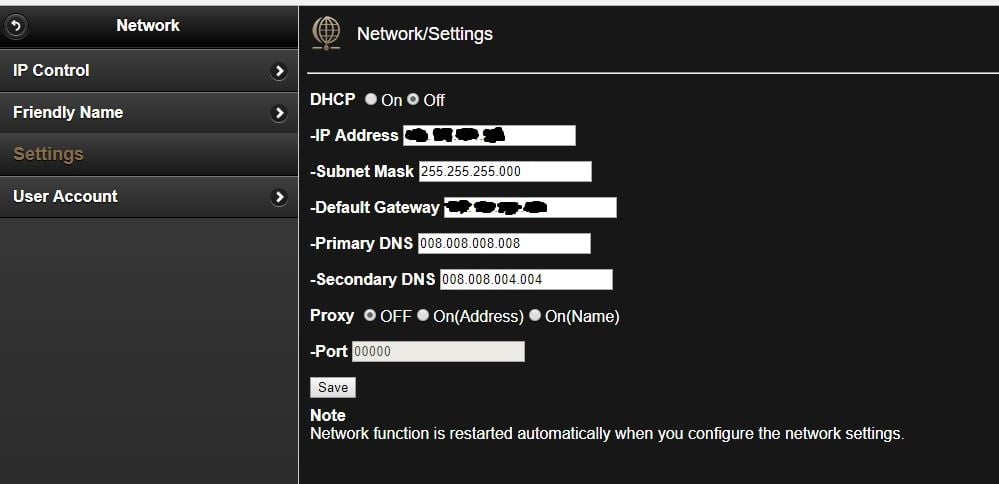 DNS