Select audio output device?

Dear Spotify Developers -
Firstly, thank you for such an awesome product!
I've got several audio outputs from my PC - my speakers, my headphone DAC+amp (optical out), and my TV (nVidia HDMI audio output). Please can you add an option to select which audio device Spotify will output to? Otherwise I have to keep changing the default playback device for the system. Skype has this feature, it's very useful.
Thank you!
Accepted answers

All comments

Spotiamp is another good workaround but can't be called a solution:
It only works for premium
It requires use of an add-on software and interface the user may not want
This thread is full of good workarounds. Whats missing is Spotify fixing the Spotiy PC app by adding an option to select the output device. Now that would be a solution!

I have been using an application called Equalify Pro in tandom with VoiceMeter Banana. I am able to use virtual cables for my spotify output without any issue. Also the Equalify Pro integrates perfectly within the Spotify application without any third app running and what not.

@benrl19 wrote:https://****/audiorouterdev/audio-router
This works for me.

Yea .... its not free....

So true!
So true!!

Awesome

it worked perfect little klunky but works nicely
now my spotify is on in every room of my house with a tv ... yeah!!!!!
and driven from my phone even better

Legend thank you! I Knew I should've skipped to the end of this thread instead of wading through all the other **bleep** first. Audio Router is the perfect solution (apart from a native option) and does exactly what it says it does. Nothing more, nothing less, and it's super simple.
It doesn't appear to be under develepment any longer, with the last update being about a year ago, but it's working flawlessly for me on Win10 at the moment.

This is a showstopper, unacceptable, Spotify. Fortunately Tidal desktop app allows audio output selection.

FIVE years later and there still isn't an option in the Spotify app to select a different output.
I won't go Premium until that option gets build in.

It should allows WASAPI output.

This might be considered a seperate issue but adding this functionality will solve the problem I am having.
A) it appears as though spotify isn't using the default audio stream and instead just outputing to the default device.
That's a problem because when the default device is no longer available, the audio stops working with no way to change the audio device. Even if the device gets reconnected, spotify struggles to resume playback. A simple restart of the program fixes this.
How I accomplished such breakage of the program:
1. Set default audio device to bluetooth speakers.
2. start spotify and play music
3. disconnect the bluetooth device by turning it off.
4. observe that changing the default audio device doesn't resume audio playback
5. redo steps 1-4
6. observe that reconnecting the device doesn't always make the audio resume playing.
I did verify that my headphones were working in each step by starting a secondary audio applicaiton.

Kind of sad really. I'm a Linux user and this has been a standard feature for a very long time. You just set each program to use the audio output YOU choose. Great, but in windoze this isn't the case. The audio router program listed above is just like the Linux default program. I dual boot between Linux and Windoze 7 and had a real problem figuring this out so I could listen to my stereo while gaming in windoze. Thanks for the link to the audio router program.

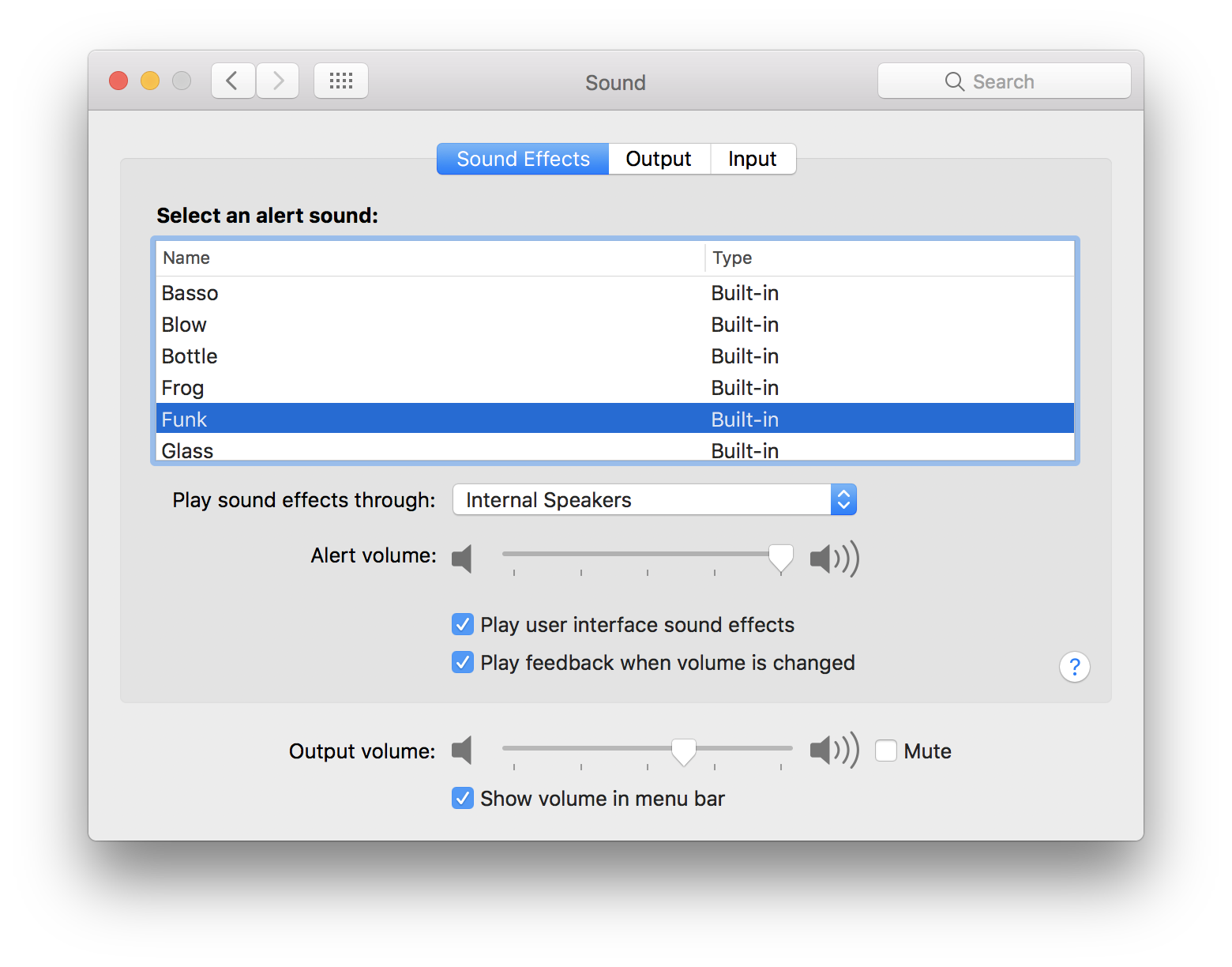
On MacOS Sierra, I can get almost to what you want. I'm able to send music only to the bluetooth speaker, and keep system sounds and alerts playing out may Macbook.
- First, pair the bluetooth to an external speaker.
- Then go to sound in System Preferences, under tab "Sound Effects" in the drop down "Play sound effect through" select "Interal Speakers"
- Next, to to tab "Output" and in the box with the title "Select a device for sound output:" pick the bluetooth speaker device you want.
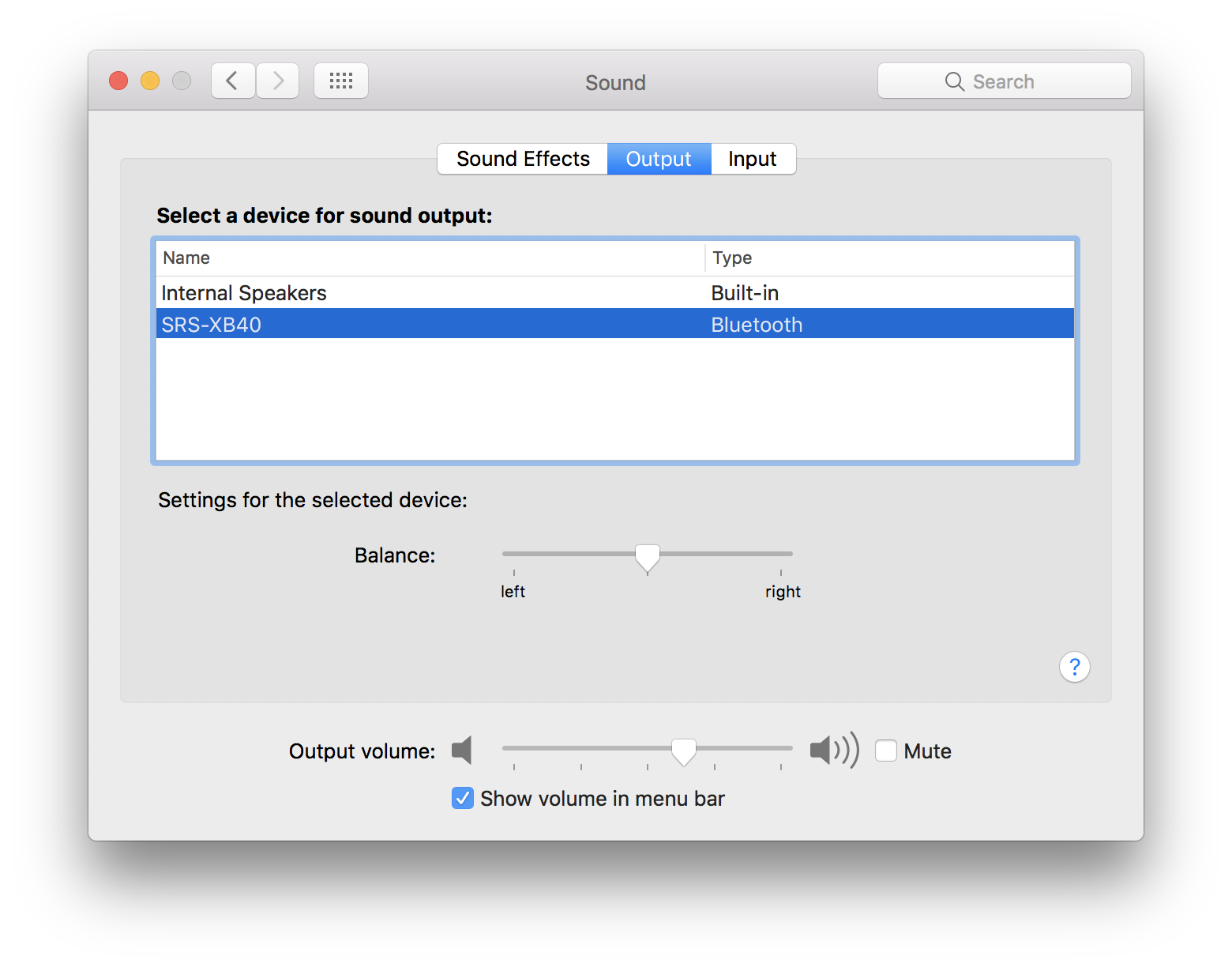
Viola, annoying system sounds still go through local speakers, sweet,sweet music through bluetooth

your dumb. We want to have spotify only play out of a certain speaker. So if i have headphones and speakers and my headphones are default, we want spotify to play out of the speakers that are not default

Hi Guys
I updated to premium expecting to have the feature to select the audio output (sound card) as I run a 8 channel mixer with several sound cards so would love to run Spotify through a spare channel on the mixer and have control over the volume etc.
I am in a 60 day free trail and will not be continuing the subscription until this feature is added.
It astounds me that an organisation the size of Spotify have not added this simple option.
I am getting around the problem by playing music through another device i.e. tablet, and pushing that through a spare channel on the mixer.

Didn't they just implement it on W10 version? Or you use different OS?
https://community.spotify.com/t5/Live-Ideas/Allow-user-to-select-default-sound-device/idi-p/5351
Yes they did in but worth noting:
-It's in the Win10 Desktop app, not the Windows Store version.
-this feature is for testing, not available automatically
-as per instructions in the link you gave you have to mess around creating a new shortcut with a command line switch.
That said it seems to work fine, allowing on the fly changing of output soundcard. When you are in settings enable "Show Advanced Settings" and under Playback theres a dropdown box of available output devices. Select and the change is immediate.
Finally!!!!!!! 🙂

Was coming here to post exactly this.

It’s a shame, that this option is not available with the Windows Store version. Now I have to download the other version just for this case. How hard can this be? They could just put an experimental flag on this selection and put it in the Windows Store version 😕
This feature now works with the Windows Store app (UWP) version, though the Spotify.exe file is in a different location:
C:\Users\<user>\AppData\Local\Microsoft\WindowsApps\SpotifyAB.SpotifyMusic_zpdnekdrzrea0

Just a heads-up: the Windows 10 April Update seems to cause Spotify to crash on startup with this flag.
Edit: Was an already reported bug; Spotify crashes if it tries to use a device that no longer exists in/on the system. To fix, go to the following:
%APPDATA%\Spotify\Users
enter the folder for your user, open "prefs" in notepad, then delete the line starting with "audio.output-device" and save the file (may be worth making a backup before you do this). With this line removed, Spotify goes back to Default for the audio device.

6 years later, and we still dont have this. I am on a mac and I need to switch audo out between Discord and Spotify. I am seriously considering changing to free mod, as I pay for this service,. I would excpet a little more thought behind the user experience. and the Product Manager needs a new job because he is**bleep**.
Only solution for a PC, not a mac Solution
Since the latest update, this randomly cuts out, causing some strange memory leak for me.
As an alternative, In the latest W10 update you can now manually assign any device to any program. While spotify is open and playing, if you right click the speaker in the system tray and click "Open Sound Settings", scroll to the bottom. Click "App volume and device preferences", find Spotify, you set it, sorted.

Yes, the solution came from Windows itself. It's much better, as it works for any program. Now it's as good as Linux for sound management (route any source to any output).
Y'all should put a vote here:
https://community.spotify.com/t5/Live-Ideas/Allow-user-to-select-default-sound-device/idi-p/5351