[Desktop][Mac] Touch bar integration

Those on macOS, may love this concept that was created prior to the new Macbook Pro release. I think it would be awesome if Spotify actually implemented it.
See pictures!
Comments

See you're still doing design for Apple products but you can't even do **bleep**ing horizontal mode on my iPhone, F you guys...Real nice to see how fast someone's idea becomes something under consideration but after over 3000 votes and four years you can't even do landscape mode on my iPhone? Get **bleep**ed and die.
Could you work on landscape mode between all the bs and lies?

Haha, Spotify doesn't have time for changelogs or additional playlist tools, but a touchbar on a laptop a minimal fraction of their userbase has?

Anyone else think that spotify should not go political? See this thread https://community.spotify.com/t5/Live-Ideas/Browse-Other-Don-t-Support-Political-Causes-in-Browse/idi-p/1390911/page/2#comments to voice your opinion and provide support!

Can we get the song and artist name displaying in the touchbar too please?

Touch bar support is great but the scrubber is just a lot of empty space, it would be awesome if it showed track info in the background!
Its blacklivesmatter, cop hating, and reverse racism season again and look what music company still refuses to even speak to its own concerned customers https://community.spotify.com/t5/Live-Ideas/Browse-Other-Don-t-Support-Political-Causes-in-Browse/idc-p/1579525#M104513

I am just one user, and therefore cannot talk for everyone. However, I do strongly think a scroll list taking two thirds of the touch bar space is unnecessary. How often do anyone use this function? I would prefere to see artist info, possibility to save the song or up/down-wote. The easy solution would be to have it optional (a editable touch bar).

Bettertouchtool and a bit of applescript works well for those wanting song descriptions...
tell application "Spotify"
set spotifyState to (player state as text)
if player state is equal to playing then
set currentName to (get name of current track)
set currentArtist to (get artist of current track)
set currentSongInfo to currentArtist & " - " & currentName
else
set currentSongInfo to "Spotify"
end if
end tell
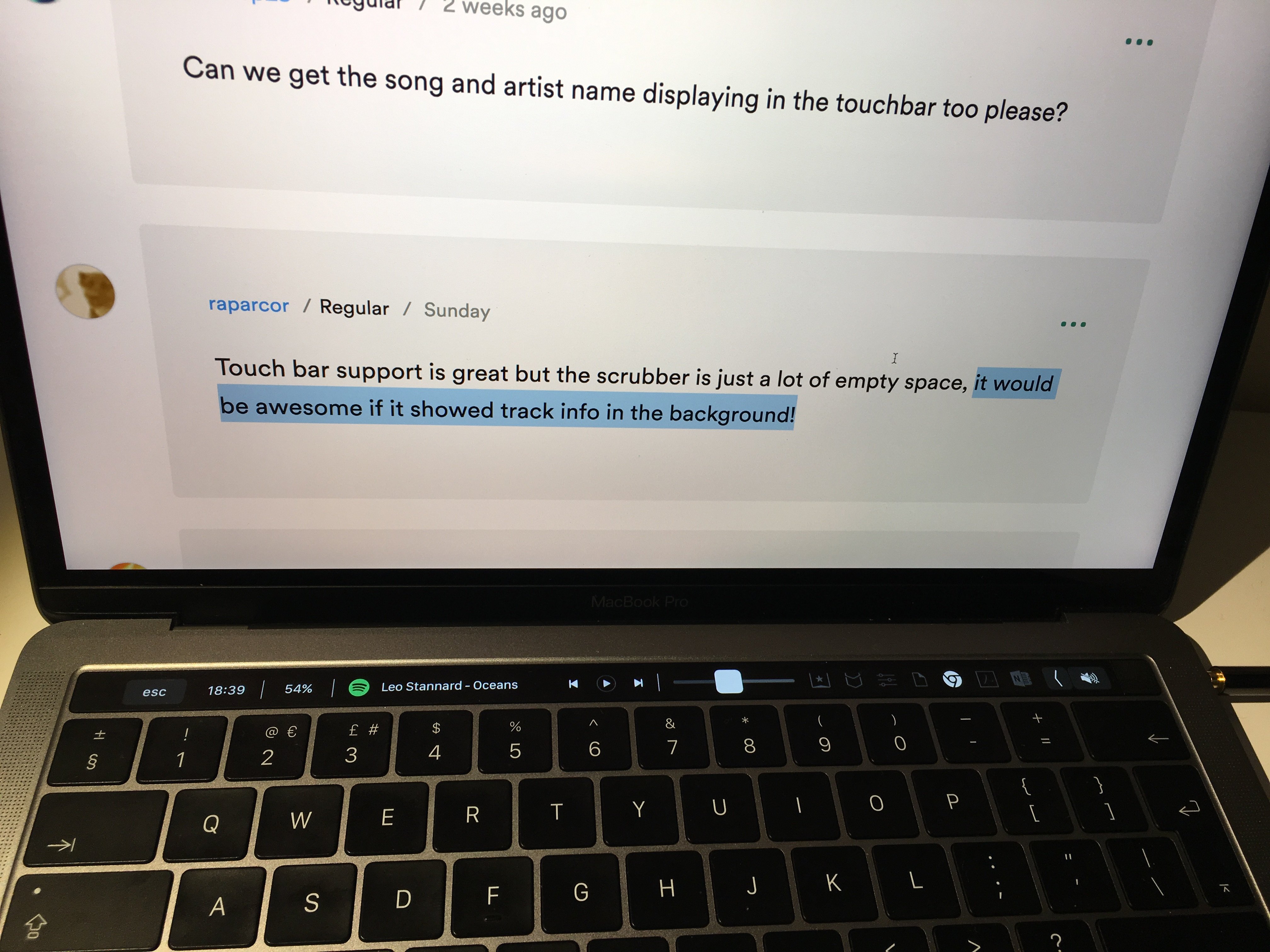

Thanks so much for including touchbar support on newer macbook pros. I know this is a pretty slender segment of users right now, so I appreciate the quick adoption. I especially enjoy beig able to control spotify from the touch bar while I'm using another app. I like that I don't have to go to spotify to control it.
I have one suggestion on how to improve this feature further, though. Rather than having a long scrub bar in this view, it would be much more useful to have quick access to my playlists. It would be excellent if I could quickly browse through my playlists on spotify while I'm working in another app.
Thanks for your attention! Hope you can implement something like this.

Hey folks, we've shipped Touch Bar support! Thanks for letting us know this something you wanted to see. Just so you know we won't be adding track info as it doesn't align with the guidelines for building Touch Bar features. (i.e. it isn’t a ‘button’). Please continue to leave your feedback around the Desktop app here and we'll keep sharing it with our internal teams. Thanks!

Not sure if this has been posted before, but this tool should give you what you're looking for with the track info: https://****/xzzz9097/Muse

So track info can't be added since it is "not a button". Would it be an idea to print this info on the background of the bar that shows the time slider of the track that is currently playing?
It would be nice to not have to switch windows every time I want to check what track is currently playing.

FYI, I have seen several other apps use text on their touchbar. Often times that text is clickable, which perhaps makes it a button, allowing it to get around the guidelines. In one of my other music apps, when you press the song info text or album art, it takes you to the music player that is playing that song. So it's both the information everybody in this thread is asking for, and also a functional button.


In addition to see the artist and track names when Spotify is not the active window, I'd like to be able to find out from which playlist the current track is playing from.
Currently, the green Spotify button only makes Spotify the active window. Could you include the artist and track names to this button and also make it take you to the respective playlist it is playing from?

I agree with others. Showing the track info should definitely be a thing. As others have said, just make the track info a button to open spotify or open spotify and take you to the playlist from which it's being played as @aremadeofthis suggested. There are ways around the "it's not a button" thing.
https://****/xzzz9097/Muse has just been updated to allow saving songs and removing songs from your library. I've been using it and it's awesome! It also gives the track info like I mentioned earlier. You can download it from here directly: https://****/xzzz9097/Muse/releases/tag/v2.0-beta.1 and/or watch a demo of the save song functionality here: https://www.youtube.com/watch?v=zW4QomjDNN8
Hey @Renzskas, it seems that you have to use a keystroke to activate Muse / the Touch Bar. Is that correct? Or, does it live in the touchbar next to the default set when it's not active?
@spliket, you have to hit cmd+ctrl+s to activate it. The way that Apple made the Touch Bar work requires that an app can only show specific Touch Bar UI when that app is in focus. As far as we know, so far there is no way to hijack the default music app button that gets added when Spotify is open.
My workflow now consists of the shortcut key, and then either "heart" to either save or remove a song from my music library; super easy and improves my library cleanup process in a huge way.
@matthewye I'm embarrassed to say I can't figure out how to reply to your question above, but the answer is that the Silico app provides track info on a clickable touchbar button.

But couldn't the track info be part of the existing slider bar for the sound? Pressing it (vs. sliding) could be a button to bring up the specific track details...

The fact that you can't add in the now playing track info because it's not a button, is sad.

Spotify Team you can make it a button, simply when pressing the track info bring up the artist's page on Spofity, or just a shortcut to the song location in the album/libary.

thats almost perfect! i cant believe apple is limiting the usefullness of this app by suggesting to not include non button things. this implementation would be PERFECT if only the track name was like overlaid behind the slider so i knew what was playing when im interacting with this slider. so close to perfect

Finding a way to integrate track info would be hugely useful. Spotify does a great job of bringing me new music, via the 'discover' and 'release radar' playlists, and it would be great to be able to glance down and see what track/artist I was being introduced to without having to bring up the app interface onscreen.
If apple's guidelines block information-only components in the touch bar, fair enough -- but there have been a couple of good suggestions already. Making the text a button which takes you to the artist/track page is one approach, but I rather like the idea of integrating the track text into the scrubber (or whatever the track progress control is called) where it could be a subtle as necessary behind the playhead control. That way the play controls retain all of their current usability and precision, and you're adding additional information to an existing control (vs adding an info-only component with an interaction purely as a pretext).

Since updating to 10.14 iTunes is bound to the play button again even if Spotify is already open, background or fourground doesn't matter. Anyway I can "steel" it back from iTunes?


This upgrade was great, but the buttons are fixed, there's no option to rearrange them.
So I gave this idea:
How about an App for Apple Watch first!