How to put "Your Top Songs 2016" in order of most played again?

I have had my "Your Top Songs 2016" on my Spotify since I downloaded it last December. I love it. And I loved how it was in order of most played songs. Welp, I accidentally sorted it by Artist or Album or something like that, and now I can't get it back to in order of most played. 😞 Any thoughts??
Accepted answers
All comments

Hey @hannahlaskey, thanks for posting!
All you need to do is to uncheck all the sorting options (make sure there are no green arrows), then the order will be the default for the playlist. (screenshot 1)
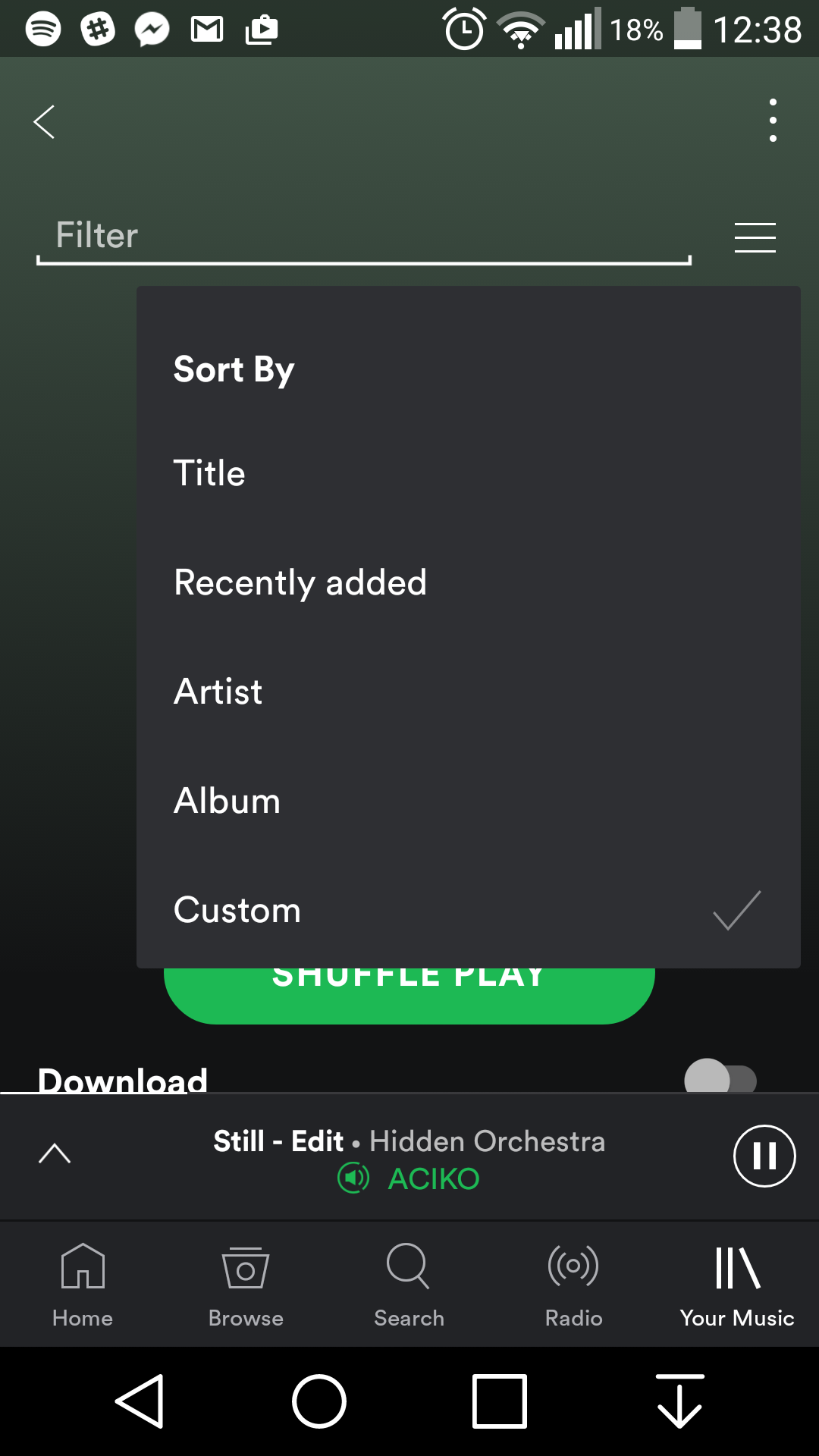
On your mobile app, scroll all the way up > click the menu (next to the filter) and select Custom (screenshot 2)


Any ideas how this is done on the Desktop version (for Mac)?
Hello @byDarren
Yes, just make sure all the sorting options are turned off (with no green arrows), this will sort the playlist by it default song order. (see my above reply and 1st screenshot) : )
@MartinStoichkov - Ah I never knew you could keep clicking on the column headers to remove, excellent thank you! Seems obvious when you know 🙂
Great, glad you're all set!
Enjoy your top songs : )
Hello @byDarren
Yes, just make sure all the sorting options are turned off (with no green arrows), this will sort the playlist by it default song order. (see my above reply and 1st screenshot) : )