Notification and lock screen controls not available on Android 7.0 Nougat

Also, streaming to my Chromecast Audio cuts out often. Streaming from my desktop works fine.
Accepted answers
All comments

I've been testing the permission resolution proposed by CarlosHenriqueG now for about a week, and have not been able to reproduce the issue. Can we please get a few more people to test and report back?
Thanks Carlos!

Just updated to last version 6.9.0.1212 a few minutes ago and so far everything is sorted out...But still testing....

Reporting back that the latest update has resolved the notification and locked screen display issue. Using Pixel with Android 7.1
There is still some buginess with the screen refresh after disconnecting from the Bluetooth devices and sometimes it keeps playing after disconnecting. Ideally, the music should pause if there is a sudden interruption to the audio device.

I might just stick to 6.2 indefinitely since it seems the new versions either don't fix these bugs or introduce new ones.

Any bug might be fixed in an update, but....
That update will bring back old (previously 'fixed') bugs, and....
The now-fixed bug will be back in the future.
All common bugs (lock screen, resume playing when removing headphone plug, continue playing during incoming call, etc etc) have and will continue to make regular reappearances after being fixed.
Poor programmers leave bugs in apps.
But only the particularly clueless muppets employed by Spotify can keep reintroducing the same bugs over and over again.

Running the latest update on my Pixel for the past 2 days and so far everything has been fixed (lock screen/notifications bug, bluetooth controls and playing after disconnecting headphones).
Using Android 6.0.1 and it's ok so far. Nothing to complain about and it seems to be faster with more than 10Gb of synced music than before. Let's hope they don't screw next update.



Mind that we're not talking about the presence of normal lock screen widget here, but that it is working badly, and totally missing from the window of smart covers.


I have the same issue on Honor 8 and EMUI 5. I know this is not EMUI fault as other music playing apps are working fine on lockscreen as well as built-in music player.
It is just plain annoying.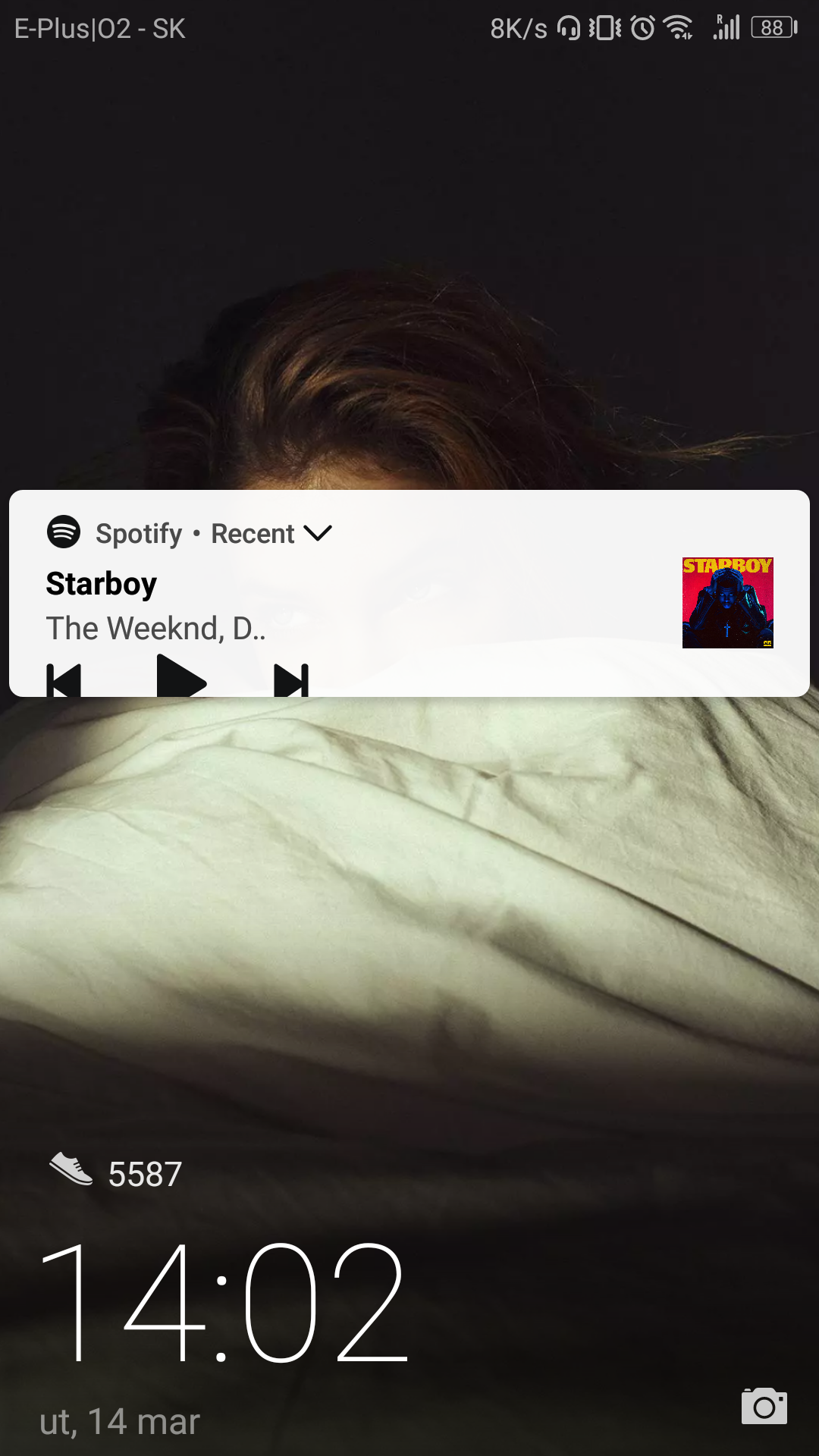 when looks like this, it doesn't react
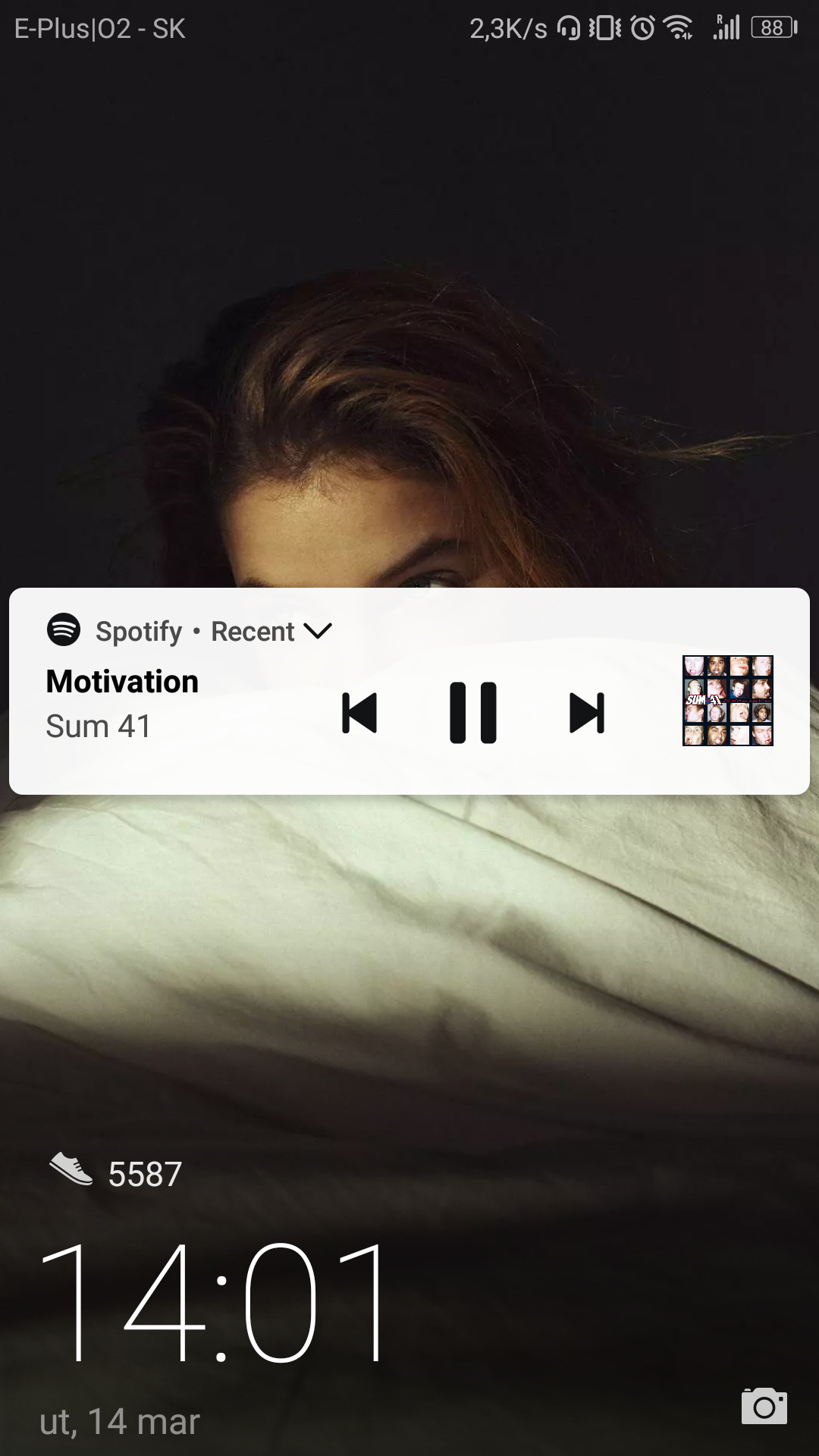 here it works ONLY when you hit the Pause button for going back, forward button as play/pause, and hitting art album will give you forward button
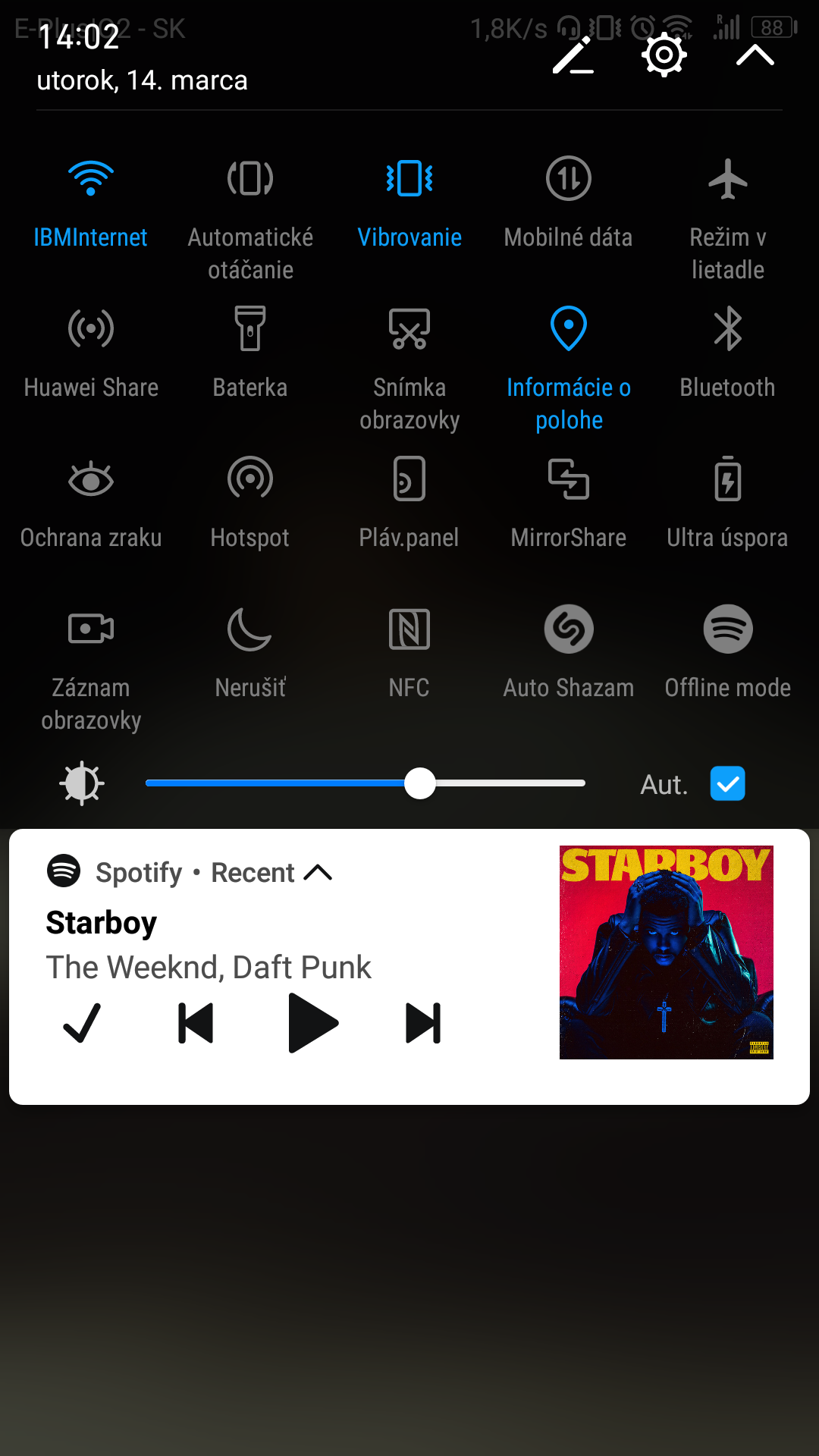 when like this, it works

Exactly ... as the EMUI 5 has Android 7, the Spotify needs to fix this lockscreen widget OR Huawei needs to allow other applications use lockscreen music player controls, so it will look like in the EMUI 4.1 (Android 6).

Same problem here (Huawei P9 Plus)...

I think that in your case (stopping playing music when locked screen), it seems more like the Huaweis battery saving options enabled. If you go to Settings -> Battery, you should turn off all things that are related to closing apps when they drain "too much energy" and stuff like that.

(Honor 8, EMUI 5.0)
The Problem: Using Lockscreen, Hitting "next song" stops the currently playing song. Hitting "next song" another time will then play the next song. Sometimes, if you hit the album / song picture it will play the next song.
What I found out:
Situation: A song is playing right now. The Screen is off. I turn the Screen on (Lockscreen), the spotify notification shows the song playing as usual. I hit the "next song" button -> The song stops (as if you would hit the "stop/play" button. I hit the "next song" button again and the next song then starts to play. AND NOW the thing I found out. IF you now hit the album / song picture it will play the next song. BUT: now if you hit the normal "next song" button, it will then work and the next songs starts again. And then you have to hit the picture again, then again the normal button, then the picture again and so on and so on.
I hope you understand what I mean. It seems as if the control panel moves to the right side at every second song. (But the seeable panel stays where it should be resulting in the song stopping, when you hit "next song" or the next song starting when you hit the "picture")
I uploaded a video of it: https://www.youtube.com/watch?v=DbVy8vFkJjw
(or search for it on youtube if you don't trust the link)
Name: Honor 8 (EMUI 5.0) Spotify: Lockscreen Bug
Uploader: Marco Schneider
@Striker1909 wrote:(Honor 8, EMUI 5.0)
The Problem: Using Lockscreen, Hitting "next song" stops the currently playing song. Hitting "next song" another time will then play the next song. Sometimes, if you hit the album / song picture it will play the next song.
What I found out:
Situation: A song is playing right now. The Screen is off. I turn the Screen on (Lockscreen), the spotify notification shows the song playing as usual. I hit the "next song" button -> The song stops (as if you would hit the "stop/play" button. I hit the "next song" button again and the next song then starts to play. AND NOW the thing I found out. IF you now hit the album / song picture it will play the next song. BUT: now if you hit the normal "next song" button, it will then work and the next songs starts again. And then you have to hit the picture again, then again the normal button, then the picture again and so on and so on.
I hope you understand what I mean. It seems as if the control panel moves to the right side at every second song. (But the seeable panel stays where it should be resulting in the song stopping, when you hit "next song" or the next song starting when you hit the "picture")
I uploaded a video of it: https://www.youtube.com/watch?v=DbVy8vFkJjw
(or search for it on youtube if you don't trust the link)
Name: Honor 8 (EMUI 5.0) Spotify: Lockscreen Bug
Uploader: Marco Schneider
Yes, exactly. I put a reply with some screenshots a page back, that shows the same behaviour.
And honestly, I don't know who to blame, if the Google for Android 7 and who knows what rules and policies enforces how widgets should operate, Huawei for the EMUI for this weird widget functions, or the Spotify for that lockscreen widget.

Same here on P9 Lite EMUI 5


Ugh.. Came here to find out if there's a solution, only saw that 6 pages of people have the same problem... Well, just hope that emui 5.1 will fix this... It starts to get more annoying every minute...
Have a Google Pixel on 7.1 and have been having this issue until today when I noticed the notification and lock screen controls look completely different. No app updates or Android updates have been downloaded. See screenshots below:
https://goo.gl/photos/JeY4GcBgqjRRQbd78
Seems to be working fine now and my bluetooth controls in my car are working again!