Spotify starts playing randomly on my Android device

Every now and then while listening to Spotify on my laptop, the Spotify app on my phone will launch and whatever song I was listening to will resume playing on there. My phone is locked when this happens. This is extremely annoying.
This started happening about 2 weeks ago. Not sure if the problem lies with the Android app or desktop client. Any idea why this is happening?
Accepted answers
All comments
Hello,
Great timing as it just happened right now 5 tracks into an album. As for your questions:
1. Which version of the Android Spotify were you using the last time this happened?
8.4.0.539
2. Were you using the Spotify Connect device picker (That would be the screen you see after tapping on "Devices Available") in the Android app before the issue (even if you used it many hours before)?
No
3. Did the sound come out of the Android device itself or it was connected to a Bluetooth A2DP device (Headphones or Speakers)?
Sound came out of my Android device, it was not connected to any Bluetooth devices. About an hour ago I had used Spotify in conjunction with my vehicle's Bluetooth radio, but it wasn't actively connected to any other Bluetooth devices at the time.
The desktop software detects my phone on the network and the app on my phone takes over. I'll be more than happy to fire up Android Studio and keep an eye on the logs - perhaps they can provide some useful info.

Thanks for the responses and your patience.
Regarding the Android logs: Thanks for your kind offer, but I'm afraid Logcat won't reveal much on a release build (We do log very little on release builds for the sake of security).
Certain piece of logic in the app would pull playback to the phone if a speaker or headphone (wired or bluetooth) is connected, but this does not seem to be your case. That was the reason of question 3.
Another possible explanation was a bug in the Android client that happened when using the device picker to transfer the playback to the local device and later restoring the app session. That was making the app to unexpectedly pull playback when restoring the session. That should be fixed in 8.4.1, but since you did not open the device picker, it doesn't sound like your issue either.
I will to analyze some Spotify Connect logs to find out what is happening.

This has been happening to me everyday for the last 2 weeks. It's very annoying

1. Which version of the Android Spotify were you using the last time this happened? (Version number, like 8.40)
Windows 10: 1.0.53.758.gde3fc4b2
Android Nougat: 8.4.0.539 armV7
2. Were you using the Spotify Connect device picker (That would be the screen you see after tapping on "Devices Available") in the Android app before the issue (even if you used it many hours before)?
The problem only happens when the spotify widget-thing is present from the pull-down menu. So when I open the app (while spotify playing on my computer) I choose "continue" and then exit the app. This leaves the widget thing there and it could switch at any moment. There seems to be problems where the widget is not synced (it shows a different song). Sometimes the app on my phone also shows a different song than the widget, when the pc-application is playing a totaly different song. So three different songs showing.
When I contacted support and logged in with the test account they provided me with, the widget still displayed the song that was last playing on my account. Which was logged out of before logging in with the test account.
3. Did the sound come out of the Android device itself or it was connected to a Bluetooth A2DP device (Headphones or Speakers)?
Only the device. It's not connected to any bluetooth device.
Screenshot is from when I tried to explain the problem to the support guy..

Also happens to me, started about 3-4 weeks ago. I'm using Spotify version 1.0.53.758.gde3fc4b2 on macOS Sierra and a Galaxy S7 Edge with Android 6.0.1 and Spotify version 8.4.0.539. It happens randomly from time to time but almost always when I add a song to a playlist.

These answers match those I would be giving to the questions related to this problem.
Hi all,
Once more, thanks for your responses and patience.
I'm still gathering some information to be able to confirm (or develop) the fix for the issue.
Of those affected by the issue and running the Spotify app version 8.4.0,
how many did see the following popup and selected "Listen on this phone" some time before the issue was experienced (minutes, hours)?
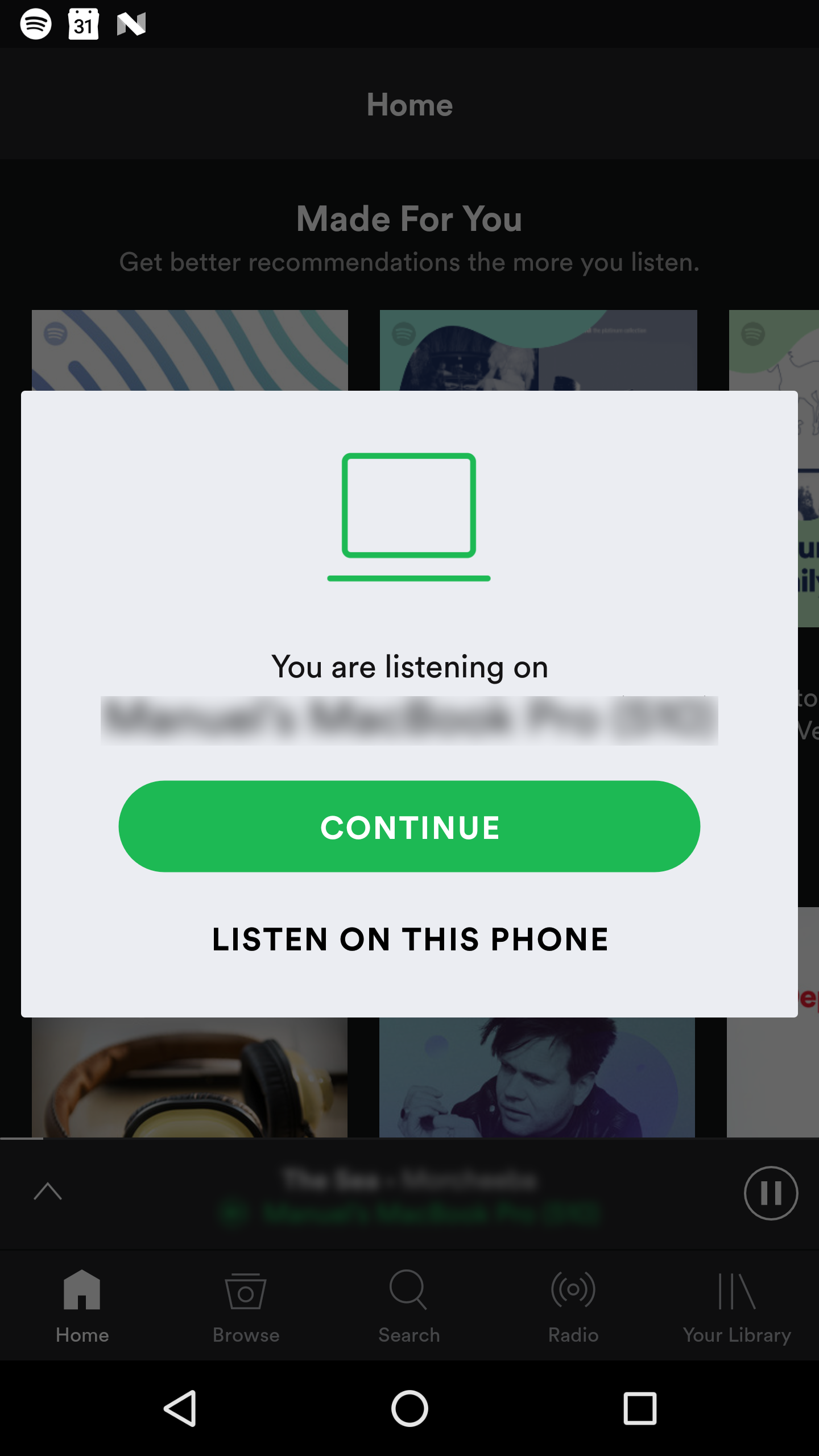
Best,
Manuel
Couple of minutes. But then it happened again several hours later without touching the phone
I haven't noticed any popups before the issue happens, usually my phone is idle (screen off) on the other side of the room. I will start to pay more attention to see if this happens and post again.
I don't recall seeing that pop up on my device when the issue occurs.

Hi,
I am also having this trouble with my Samsung S7 with Android 7.0
Been happening for the last month or three weeks but not very often.
I am pretty sure this only happens when I unlock my phone.
The last time this happened I was listening to music in my car trough bluetooth.
I shut off my car without pausing spotify. Went inside to listen on my pc, did so for an hour before I unlocked my phone and the playback device switched.
I suspect that me not pausing spotify and shutting of my car is what triggered it.
1. Which version of the Android Spotify were you using the last time this happened? 8.40.539 armV7
2. Were you using the Spotify Connect device picker (That would be the screen you see after tapping on "Devices Available") in the Android app before the issue (even if you used it many hours before)?
Not since the day before and I had been listening on two devices since then without incident.
3. Did the sound come out of the Android device itself or it was connected to a Bluetooth A2DP device (Headphones or Speakers)?
Sound came out of the phones speaker, no bluetooth device attached.
Happy to provide more info if needed, best regards Sindre

Not only has this been happening for a week, but today I keep on having Spotify switch from the tablet to phone and playing the same song out of sync on both at the same time. Last time I reinstalled was two days ago because I was hoping it would help.
I think the Twitter handle "spotifycares" is very funny in a not really funny way.

1. Which version of the Android Spotify were you using the last time this happened? (Version number, like 8.40)
8.4.0.539
2. Were you using the Spotify Connect device picker (That would be the screen you see after tapping on "Devices Available") in the Android app before the issue (even if you used it many hours before)?
I usually use the "play from device option" since I use spotify on my phone in my car and from several different desktops. Though I usually do not need to select the device I want to play from except for on a few occasions.
3. Did the sound come out of the Android device itself or it was connected to a Bluetooth A2DP device (Headphones or Speakers)?
The sound came out of the android device itself
4. Some other information
I've had the audio switch to my phone when I check a track to add it to my library. Though the far more frequent happening is me playing audio on my desktop at home and then my phone just starts playing. This can either be a fullswitch over or on a few occasions my phone started playing a separate song while my desktop continued to play. I've resorted to just force stopping the app on my phone in the mean time.

1. Which version of the Android Spotify were you using the last time this happened? (Version number, like 8.40)
8.4.0.539
2. Were you using the Spotify Connect device picker (That would be the screen you see after tapping on "Devices Available") in the Android app before the issue (even if you used it many hours before)?
No.
3. Did the sound come out of the Android device itself or it was connected to a Bluetooth A2DP device (Headphones or Speakers)?
From the device itself. No Bluetooth device was connected to the Android device at the time of the issue, but I had been using bluetooth headphones to listen to Spotify on that device some hours before the issue happened, during my commute to work. When I arrived at my workplace, I have paused Spotify on the android device, disconnected the bluetooth headphones and, after a while, started listening to Spotify on my work computer. After a while, the issue happened.
I have not seen the popup to switch the listening device to my Android device, but my Android device was idle at the desk, with the screen turned off. I have noticed that sometimes, when I'm listening on some other device, some notification controls appear on the Android device for controlling the playback and, even if I swipe this notification, it comes back after a while.
My workaround to avoid this issue is to set the android spotify app as offline, but I usually have to unset that to resync downloaded playlists, and I often forget to set it back.
Hi all,
Please stay tuned for the 8.4.1 update and please give feedback about the issue when you get the update.
While strictly speaking I can't promise the issue is fixed on 8.4.1 (Because I have not been able to reproduce the bug so far), I believe the issue is related to one defect in the Android client fixed in 8.4.1. I am basing that hypothesis on the responses I've got from you guys (Thanks!) and some session logs I analized.
Best,
Manuel

Hi Manuel,
Very much looking forward to the Android Spotify update to 8.4.1. Currently using 8.4.0.539 and it's driving me insane, Spotify has switched to my Android phone 3 times in 30 minutes now... Very annoying!

Hi,
You can read the background info in this thread: My orignally reported issue
To answer your 3 question:
Android version: 8.4.0.539 armV7
Did I use the Connect picker before?:
Maybe the day before, but this will have been in the range of 10 - 48 hours before the reported issue. Mostly it happens days after my last Connect usage.
Did the sound come from the Android device itself?:
Yes, always.
I am available for further details, just pm me.
Never selected "Listen on this phone" prior to the issue.

Happened just now out of the blue again.
To be more specific:
Spotify 8.4.0.539 on Android
Spotify 1.0.53.758.gde3fc4b2 on Windows 7 Pro 64bit
11:32AM (UTC-05:00) of this day, listening to Obstacle 1 by Interpol on the Daft Punk artist radio (in case a dev wants to check the logs). Music resumed on my Samsung Galaxy s6 phone which was charging on a wireless charging pad and had Spotify idle on the background apps. On the Spotify desktop app, my phone shows up as "Unavailable for listening on" but switched to it anyways.
I had an instance before where I cleared all active apps on my phone but still switched playback to it. Hope this helps.
My issue is exactly this.
The android device is shown as not available. Song will play for 1-2 seconds before suddenly jumped to the android device playing.
This is getting really annoying as it is happening almost always I try to use Spotify on other device (Windows desktop and iOS on my iPad)

+1, this is happening to me now repeatedly, it started in the last 3 weeks and previously to that had been working flawlessly.
Running 1.0.53.758.gde3fc4b2 on Windows 10
Running 8.4.0.539 on Android 6.0.1

1. Which version of the Android Spotify were you using the last time this happened? (Version number, like 8.40)
Android version 8.4.0.539 armV7
2. 2. Were you using the Spotify Connect device picker (That would be the screen you see after tapping on "Devices Available") in the Android app before the issue (even if you used it many hours before)?
I haven't used the Spotify Connect device picker for months. I did open it up after the second time my phone randomly started playing, and I noticed that it said my 6P was not available. That was about 20 minutes ago, and it's now available again.
3. Did the sound come out of the Android device itself or it was connected to a Bluetooth A2DP device (Headphones or Speakers)?
Sound came out of the phone speakers. There was no sound output device connected at the time.
And in case it helps, here are the answers to the previous questions:
Device and Spotify version (on both devices).
laptop: spotify 1.0.53.758.gde3fc4b2
android: spotify 8.4.0.539 armV7
Operating system (on both devices).
laptop: macOS 10.12.4
phone: Android 7.1.1
Is this happening over WiFi or 3G/4G?
wifi
When did this start happening exactly? Was it after an update?
Started happening today and happened twice in the past few hours. I haven't noticed an update. Google Play doesn't list it under "Recently Updated"
Have you tried reinstalling the app or device? Does it help?
I haven't reinstalled

I found a workaround . In Spotify Mobile settings you have to enable the option to list only Wifi Available devices, then deactivate wifi on your mobile, music will not switch again to the device.
In my case, music switched from computer to mobile about 4-5 times in one hour.
- Samsung Galaxy S7
- Max OS Sierra 10.12.4

This has started happening to me over the past 4-5 days. I already tried logging out all my devices and changing my password. I am certain nobody else is using the account.
I've had this happen both at work (where my Windows 10 pc was playing music when it suddenly switched to my android phone) and at home (also a windows 10 pc, same thing). In both cases the phone is not being handled, and I am not trying to change playback device myself. It just randomly happens mid song.
Phone: LG Nexus 5 running stock Android 6.0.1 and Spotify app version 8.4.0.539.armV7. The phone is not connected to speakers or headphones of any kind at this point and is connected to WIFI, as are the computers in question.
PCs: Windows 10 pcs (fully updated) running app 1.0.53.758.gde3fc4b2
Same happens with an Ipad Pro 12 and Spotify on Mac OS Sierra 10.12.4. This time the sound switched from the iPad to the Mac OS Sierra suddenly, without touching anything. Computer was not even being used at that moment.

This happens to me multiple times a day and is ridiclously annoying. Especially when my phone picks it up at the office and starts to play something at full volume. This has been happening for weeks now; any update, Spotify?!

Having the same problem everyone else is describing. It's quite annoying and embarrassing when this happens at work. Wish there was a solution other than not using Spotify on the computer because it would be pretty irritating to have to use a different program when I pay for Spotify...

Just submitting my experience with the 8.4.1.846.
So far i'm no longer having anymore issues with this (albeit it has been a few days; was updated on 2nd May 2017).
My issue at the time was the music was playing only on my partners mobile phone every day (never on my phone) when ever I tried to listen through the desktop application and selected the option "Listen on This Computer". The difference between our mobile devices is she always had it connected via Bluetooth (for the car). So this could have been somewhat related?
But as I reiterate,
with the Spotify update on android; my issue hasn't reoccurred; thankfully. Will keep you posted if this appears again.


1. Which version of the Android Spotify were you using the last time this happened? 8.40
2. Were you using the Spotify Connect device picker (That would be the screen you see after tapping on "Devices Available") in the Android app before the issue (even if you used it many hours before)?
No
3. Did the sound come out of the Android device itself or it was connected to a Bluetooth A2DP device (Headphones or Speakers)?
Listening on my PC for about 10-30 minutes without any interaction with either device, and then paused on my computer, and continued to play on my phone.
And I did not see this before the issue, only after I switched it back to my PC
Hey everyone, thanks for your patience with this.
If you're on the latest updates of the app this should be sorted for you since version 8.4.1.
If you're still having any trouble please confirm your app version and we'll continue to help. Thanks!