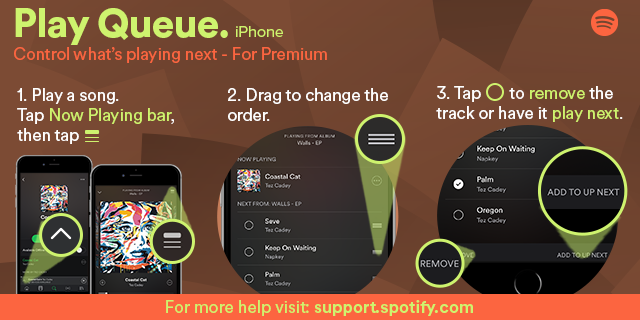
I can not view the Spotify Queue using the Spotify Android App as of 4/26/2017 when I updated the Spotify Android App. Now in the latest version of the App (Version 8.4.0.539 armV7), I can't find/see the Play Queue anymore.
I have a Samsung Galaxy S6 phone. The phone recently had a O/S update too, but the previous Spotify App worked the same after the O/S update. The change happened with the new Spotify App update.
How I used to be able to see and remove songs from my Queue using the previous Spotify App:
On the "song" page, the play queue used to be accessable (to view the queue and/or delete songs from the queue) in the upper right corner, a button that looks like 3 lines on top of each other. This button is now gone.
Now there's just text at the top of the screen that says "PLAYING FROM PLAY QUEUE". I can't figure out how to actually see or delete songs from the Play Queue now in this new app version. I've rebooted my phone to make sure it wasn't a glitch after the update. No luck. I can still ADD songs to the queue. But I'm stuck with them there until I either listen to them or skip past them.
Anyone have any tips? I can't imagine that seeing the Play Queue (and being able to delete items from it) has been totally removed from the app.
Thanks!