Unfortunately DRM is not enabled

I added Chromium today, the last version of it just to see if the Oooops issue has been fixed... i get "Unfortunately DRM is not enabled" and i do what Spotify Help Center says... the option was enabled by default, i restarted, cleared cache etc. but keep getting the same message... duh...
Accepted answers
All comments

Yup, I get the same issue.
elementary OS Loki, Chrome version 58.0.3029.110

Same, Chromium version 58.0.3029.96, running on Ubuntu 16.04 (64-bit)

Ditto - this is incredibly annoying and frustrating - Spotify are punishing paying users.

Me too.
I'm on Manjaro Linux with Chromium 58.0.3029.110 (64-bit).
When does someone fixes this?

I have the same problem on Chromium 58.0.3029.110 built on Ubuntu , running on Ubuntu 16.04 (64-bit).
I have DRM enabled so there's no reason at all for this message to be displayed and stopping me from using Spotify.

Running Antergos: Chromium (58.0.3029.110). Having the same issue.

I am also impacted by this
Chromium 58 on Ubuntu Linux

Same problem, Debian 64bit, Opera 42.0.2393.351 .

Same for me in Chromium. Probably the DRM is proprietary and therefore not in the open source version of Chrome. Google-chrome proper works without issues.
Tbh DRM reduces the usability which is the only benefit spotify would has over pirating music. Which is exactly what DRM is trying to avoid.
How about no DRM?

Same problem with Chromium and Firefox (last update).
Works barely with Seamonkey (not update) and the old web player (play.spotify.com). But lose connection after few minutes.

Same problem on Ubuntu. Spotify is no longer working for me. Have enabled protected content as per the instructions and still cannot get past this message.

Same problem. Antergos and Chromium 58.0.3029.110 (64-bit)

You need to install widewine to make it work. On Arch based distroes it's chromium-widevine from the AUR.
On Ubuntu the way to do this is to install Chrome and then link or copy the widevine object file so that Chromium can pick it up. This is the case with my install but still the issue persists.
says something like the can't lock the databse or the database is lock.
I resolved the database issue

I have the same problem - both in Firefox 51.01 and Chromium 58 on an otherwise vanilla ubuntu 16.04.
Did anybody find a solution?

@henrik242 wrote:I have the same problem - both in Firefox 51.01 and Chromium 58 on an otherwise vanilla ubuntu 16.04.
Did anybody find a solution?
Yes, for Chrome you need to install: widewine plugin
Just like kukrimate states:
> On Arch based distroes it's chromium-widevine from the AUR.

i recently had to restore my desktop back to factary just to clean (etc) and im having the same problem. but im using the free version of my account, come to think of it this shouldn't be happening at all it be great if we could get some f***king help here!!!

Also having problems. May have to cancel my other premium account if this keeps up.
What a mess.
Thanks!
It works on Google Chrome and Firefox (if you enable DRM content in content settings) on Linux. If you want to use Chromium or some other chrome based browser like Opera you have to install widevine for your specific browser.
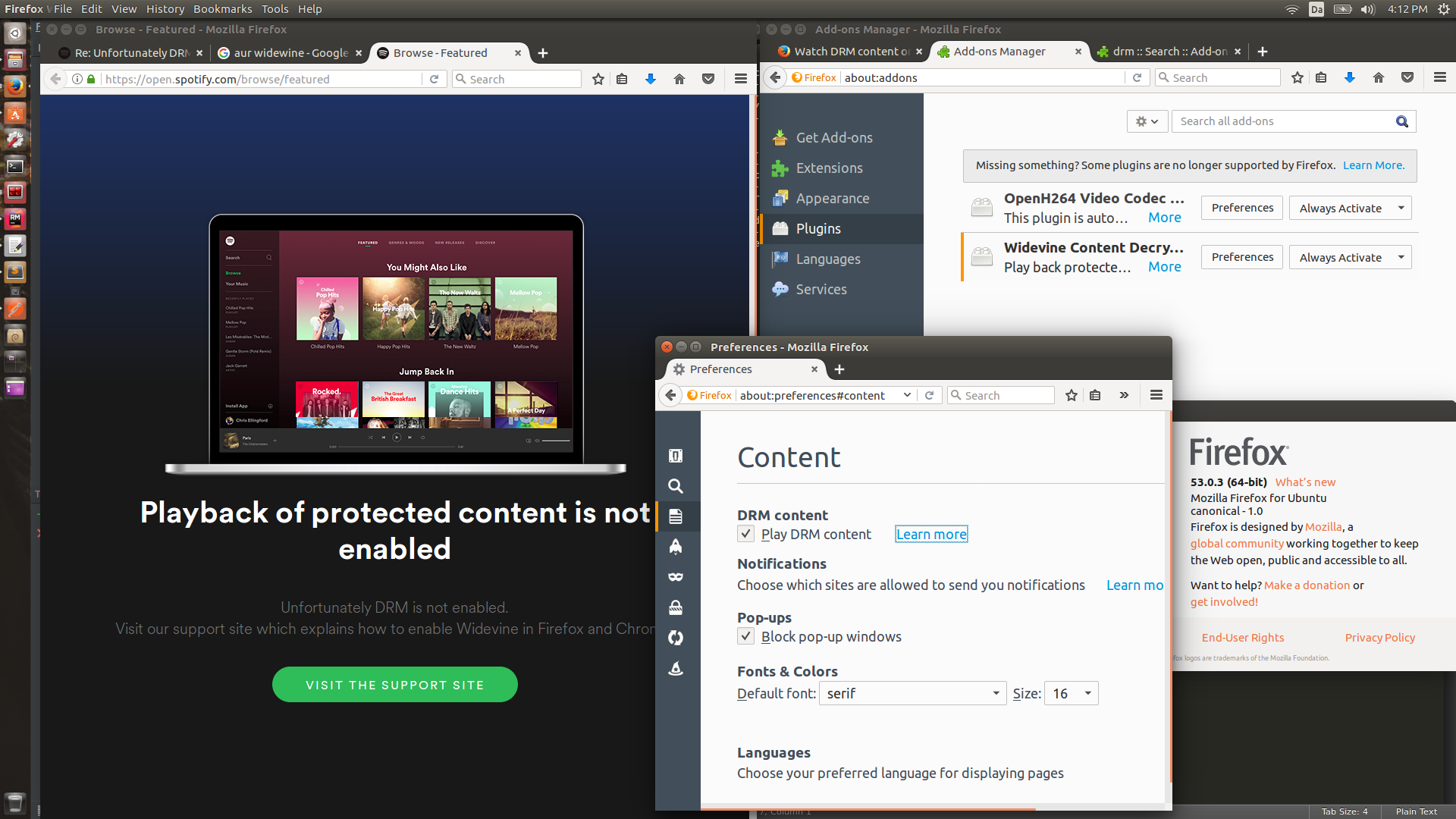
As it can be seen here, I've enabled DRM content playbac, and I have the widevine plugin installed and activated. Simply stating that it works when it doesn't is not very helpful. Clearly something else must be missing... Any help is appreciated.
/h

I've been unable to use the spotify web player for months now due to this DRM thing.
Chrome, Windows, options enabled, doesn't matter, can't use it.
Why was this forced on everyone, and why is it so broken?

It works on older versions of the browser, now I have different browser just for spotify!
This should really work and I have no idea why it doesn't, because I don't use Ubuntu, but it works for me on Windows 10, Fedora and Arch. I hope you tried fully closing Firefox and restarting it after ticking the DRM box. And it may ask you in the address bar do you really want to enable DRM playback.

Hey Spotify!
I've been paying you money for years, and now I'm getting messages saying that I can't play music because of DRM issues. DRM is the worst idea ever dreamt up. Why are you forcing this **bleep** on your users? Sadly, if you keep demanding I add broken, proprietary modules to my browser I guess I'm going to have to cancel my Premium subscription.
Easy solution, Firefox.
I did this on an Asus laptop.
Later on I did a very similar installation on a Macbook Pro, but if I remember correctly, I checked the "install third party software" which may have been why it worked flawlessly on this installation.
My theory is that the error message presented in the Spotify player is not due to missing drm support but another missing component.
https://askubuntu.com/questions/22285/clarification-of-the-third-party-software-options-during-system-installation
Same for me with Chromium Portable.
Version 58.0.3029.6 (Official Build) (64-bit)