Can I delete a Spotify Connect device from the list?

Last week I was at my neighbors and I made contact with their Spotify Connect speakers.
Everytime I open spotify it wil play the music from their speakers instead of my iPhone (Even when I'm on my own WiFi network or without a WiFi network). Please say there is an option to delete the speakers from my iPhone (and also my iPad now)!
Accepted answers

connect again with your Spotify connect account until Spotify fix this
UNBELIEVABLE issue...

John, I have just had the same discussion with support after finding this thread. I expressed to them what a bad idea this was and the security issues but found the exact same response you got, basically "stiff - thats how it works" and if you don't like it post a suggestion on our "ideas board". To clarify my issue was that my friends had connected to my wifi nework and with their own phone and own spotify account then played music to my spotify connect enabled spreakers. They were then able to play to those speakers any time they liked from anywhere they liked, they no longer had to be connected to my wifi network and I had absolutly no control to stop them. Working in the IT industry I cannot believe this is allowed and I have no control over this. Support told me to fix the issue I should factory reset my spotify connect enabled speakers which is absurd!
I have no problem with users being able to play to my speakers but it should only ever be available while they are on my LAN!
I have cancelled my spotify subscription and my IT collegues are doing the same. Probably won't make any difference but like you say, but everyone should be aware of how this works to make their own informed decision.
All comments

That is good news. But still it´s not the "owner" of the Spotify Connect enable device that has control. Just the Spotify Connect user. So if a friend of mine has played on my system it´s his or hers choise to do this setting on his or hers Spotify Account. I want it the other way around.
So close but not an working solution.
// Conny

Where is that? Using 1.0.52.725
on version 8.2.0.549 on IOS
my librairy/gearwheel(top right)/devices
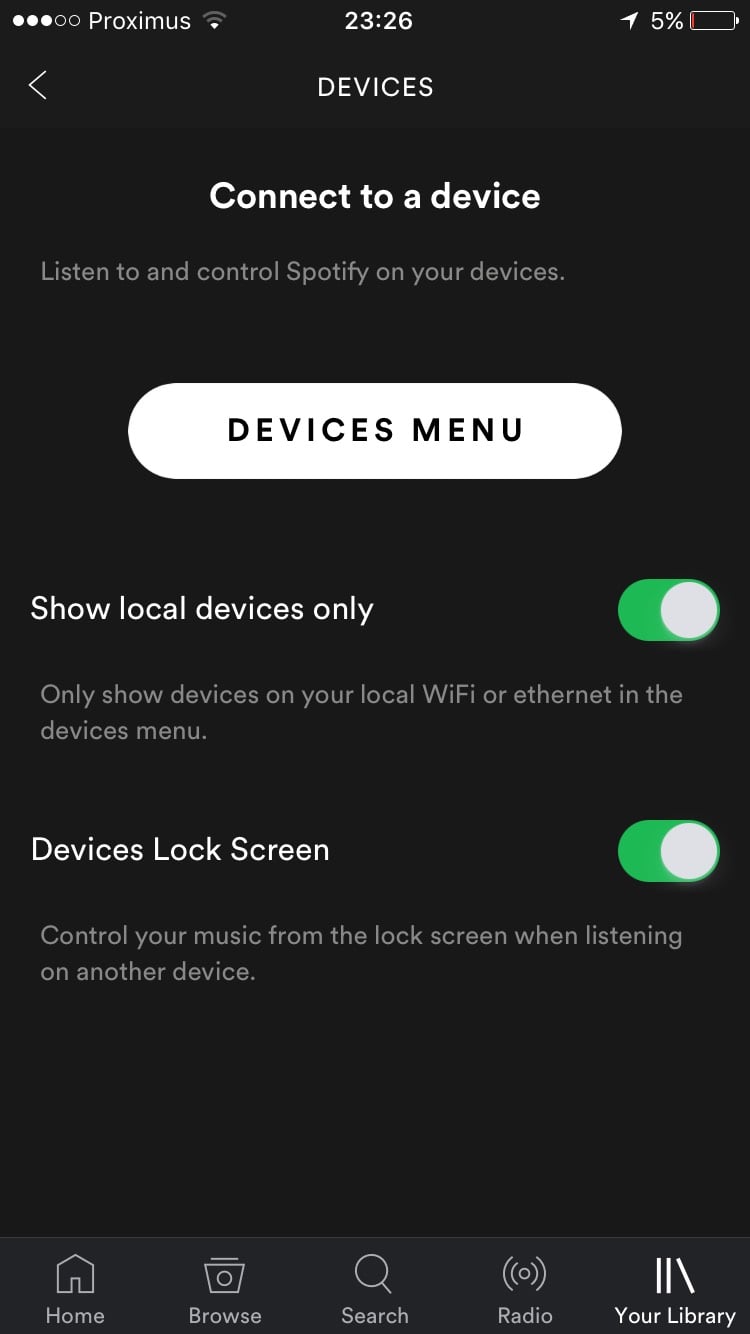

Yes, that's right!
I also discovered this a few weeks ago after visiting another house and logged into their WiFi and played music through their Yamaha A/V-receiver form Spotify Connect on my phone. Now I can play music in their house, 400km from my home at any time I want.
This also means that some people I know can play music on my system at any time, by misstake or as a joke and there is no way I can prohib it. I don't know if it helps to do a factory reset for all my Heos by Denon players and I don't have the time to do that after every time I have a friend over who have access to my WiFi.
I acutally considering about chaning to anohter music provider as Spotify is that insecure! I know it will not help to protect myself as this security issue occurs from other peoples Spotify accounts! But I became so annoyed at Spotify so I consider to leave them due to that.
I have sent a question about it to support@spotify.com and waiting or answer.
Start emailing them about it so they take this seriously!
spotfy replyed and first they tried to blame Denon as I'm a HEOS user and don't like that friends can play music from distance to my system.
I can't get some friends Yamaha A/V-receiver out of my account. I have tried "sign out everywhere" but it comes back.
I sent the link to this thread to spotify support, but I don't think they really care.
I got p****d and canceled my Premium subscription today.
Another answer from Spotify Support:
"We've now coordinated your case to our higher support and were told that it could be a possible account issue."
I have referred to this thread and still they think there is some trouble with my account!
They want me to create a new Spotify account...of cause the Yamaha A/V-receiver 450 km from my home will not be connected to that new account...until I go there again and play some music...
If you see this problem that you can start music to a player on a network you are no longer inside (some friends player from your home network or from mobile network) please email support@spotify.com and refer to my ticket ref:_00DD0pxIW._500571SrE4Y:ref and tell them this affects your account as well as mine.
I think there are two possible solution they have to choose from:
1: flush plyers on all accounts/apps every few hours
2: Remove the function to play music to players outside LAN (remove the option from settings and set it the variable to active for all accounts)
Who needs to play music on another network? If you can't connect to the LAN (WiFi) where the player is, you can probably not hear the music anyway, so what's the point?
Totally agree! Just music on your local LAN, no point of having it any other way.
Have tested both Deezer and Tidal on HEOS, works great. (And you can control everything in the native HEOS App). Just for info.
// Conny
I have thought about testing Tidal on my HEOS, as I don't like the Spotify
GUI (not even a function for "clear que" and if you start one album and
then add another one it goes in between song one and two in the first
album. I'm a bit old fashioned and like to listen album wise. The same
limitation causes another issue: Say I'm listening to some old nice hard
rock in the morning and then stop music. In the evening I start a soft
album for dinner. After one song of soft music there comes Iron Maiden
again...)
Anyhow, what music service I choose does not protect me from mistakes (and
jokes) by my friends who have access to my HEOS system through their
Spotify accounts. I can't do a full factory reset of three HEOS players
after every visit by a friend (and I'm not even sure a factory reset helps
as I have not had time to test as it is only a solution for short time
anyway.)
"We haven't forgotten about you.
Our best tech folks are still looking into this. We'll be in touch once we have some more information."
If you have players in your Connect list that are on other locations that you can't get rid of, please email Spotify support (email address and ticket number earlier in this thread) and tell them this bothers you too.

Do you think guys in Bang&Olufsen store in Dublin would like to listen jazz today from my account? 😉 Hey Spotify - seroiousy, fix that!
loud!
If stores starts to complain maybe Spotify will put in more efforts to
solve it 😀
I don't think they really care.
If a lot of people try to get access to equipment in stores and plays loud music there now and then... stores will probably be very restrictive to give access and then just tell them you won't by things without testing...
"Hey!
Thanks for coming back to us again. We hope you're well.
We've heard back from the tech guys and they are advising that right now we don’t have the ability for users to remove connect devices that are connected to their account. There just isn’t an interface to do this. It’s not a bug, we just don’t have the feature.
If that’s something that you’d like then they should upvote this idea on the community https://community.spotify.com/t5/Live-Ideas/Connect-Remove-connected-Devices/idi-p/156825
Please let us know if we can help with anything else.
All the best,
Geraldine
Spotify Customer Support"
to their existing app device interface which already offers the possibility
To "hide non local device".
I think connected players must be purged from all accounts in regular basis, like every 12 hour or so.

I connected to speakers from my phone /spotify to someone's speakers thru their wifi. Months later, the person with the speakers was able to mess with my Spotify playlist.
Has anyone had that happen?
Ive since changed my password and restricted access.
client software?
Tried to sign "out everywhere"?
I had Spotify premium and was using my iPhone and connected to Sonos speakers.
I had no idea that 5 months later I was still connected to those Sonos speakers when I was miles away. Then one day my playlist was messed with and I found that Sonos had been an active device. I signed out everywhere and restricted access.

It's just insane you haven't fixed this yet. It was, as far as I can see, a requested feature as well, causing severe problems to everyone else. From a security perspective, it is highly questionable that you do not purge "guest devices" on an account. And furthermore, are not providing a way to disconnect guests on my own account. The "log out on all devices" doesn't do the trick. People are still able to play music on my system while being hours away from my home.
Start emailing them directly. They don't read to much here.
If they start getting loads of emails it will be inconvenient and then
something might happen.
Try to get some newspaper write about it.

what to do about a family troll using your own wifi, but you cant change pw of the wifi? Basically youre **bleep**ed forever, because Spotify doesnt care at all.
At first it seemed perfect, but now i really hate Spotify connect.
Playing music at night with 100% volume? Yeah happened to me.
Nobody else is using my account, the spotify app on my android tv (sony) automatically switches via connect to another account! F U CK ME!

Just setup a Google home for someone with my account and now when I'm out and they play music it practically hijacks my phone or I hijack their speakers. This is awful. Only solution is to have them setup their own Spotify account so it stops using my cached version. That's awful that Spotify works like that.

Just wanted to throw in my contribution to this - The fact you can't remove a device association is terrible. I've just had that SpotIamb exploit happen on my phone as well as desktop. I've reset passwords, but any device I've ever played through took all the data from my account? HOW is that smart, safe or efficent coding, Spotify?

Except this doesn't work. Talk about a security hole

I still do NOT have a solution! Got a spotify premium account and someone, somewhere is also listening on my account. When I listen I can also press listen on Web player (chrome) "spotify connect". But I DO NOT have a clue who this is.
HOW can I DISCONNECT this device or listener from my premium account. The comments about "disconnect all devices" don't work.
Now when I listen someone plays polish and portugese music.........
Please come with a good solution
If someone else is using your account, it's probably another security issue
by Spotify.
This thread is regarding possibility to continue to use your own account
and play music to Sponsor Connect enabled players you have had access to.
Or do you mean that someone else is playing Polish and/or Portugal music on
Spotify Connect enabled devices in your home? In that case they don't
listen through your account. Then they are using your device. Maybe your
device is a returned unit that they have had access to previously? Or it
has for some reason got the same identifier for Spotify Connect...

My parents are going nuts because my kids keep accidentaly playing songs on their Heos Spotify Connect sound bar which I used once. The kids are at home of course and the sound bar is kilometers away. What a **bleep** of a feature.
connect again with your Spotify connect account until Spotify fix this
UNBELIEVABLE issue...

Amazed this hasn't been sorted yet. Spotify, perhaps there's a way that you can claim ownership of a device by connecting via your own WiFi, then any other Spotify connect account connected to this device can be disavowed? I'm guessing the device could be uniquely identifieable to make this possible???
Spotify doesn't read here and they obviously don't care about users security. I have been in contact with support and sent them a link to this forum and all they did was to recommend me to send in a "feature request" via some form and hope enough people like it to get it prioritized.
If everyone aware of this security problem start to contact Spotify support it might be inconvenient for them with a lot of support tickets. That's probably the only way. Or try to contact some news media to have it more widely published!
spotfy replyed and first they tried to blame Denon as I'm a HEOS user and don't like that friends can play music from distance to my system.
I can't get some friends Yamaha A/V-receiver out of my account. I have tried "sign out everywhere" but it comes back.
I sent the link to this thread to spotify support, but I don't think they really care.
I got p****d and canceled my Premium subscription today.