Spotify freezing on latest release? Report it here.

Hey everyone,
As we're rolling out a new release of Spotify for desktops - v0.8.4 - we're keen to stay on top of any bugs that may have crept in while we weren't looking. We hate bugs.
So if you're having problems please use the following template to report them in this thread. This will help our top tech boffins investigate the issue. And then we'll be able to whip out the bugspray.
Don't forget to try a reinstall first! So make sure you're on 0.8.4 before reporting this to us (check under Spotify > About Spotify)
=== START OF TEMPLATE ===
Description
When and where the crashing or freezing occurs
OSX Version
eg. Macbook Pro running OS X 10.5.8
Did a reinstall help?
Yes/No
Has anything else helped at all?
eg. turning off gapless playback made it crash less often, etc.
NB: Attach screenshots if possible and you're getting any messages/pop-ups.
=== END OF TEMPLATE ===
Thanks for helping us make Spotify the best it can be.
Update: We pushed a fix to the most recent version of Spotify. So please try redownloading from www.spotify.com/download before reporting any issues.
Accepted answers

Uncheck these boxes.
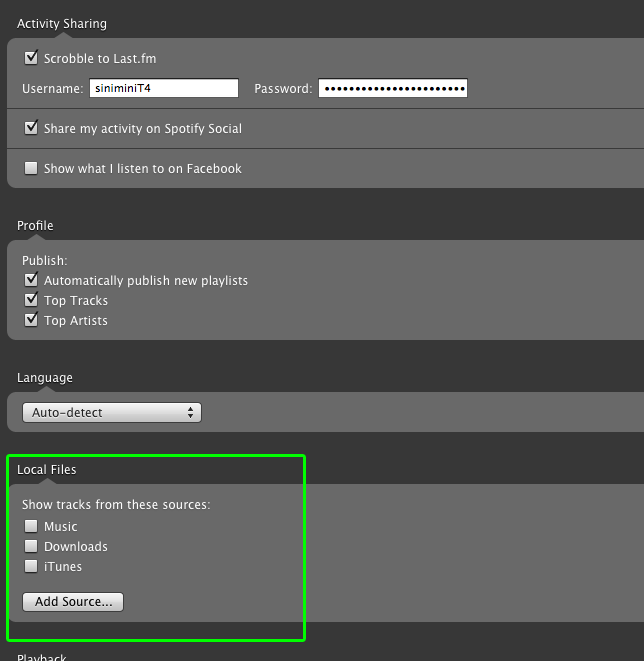
Hey all, as tagg said above, we've just pushed a new installer live which should fix this crashing issue.
Simply download Spotify again from the download page and everything should be better.
Let us know how you get on!

Just installed the new 0.8.4.93. Seems like the local file playback issue is resolved.
Never had the problem with streamed songs and with brief testing it seems I can
play consecutive local files without freezing.

This works for me:
Go to library/application support/SIMBL and delete the plugin-folder. Now login works every time!
Macbook pro running osx 10.8.2

SUCCESSFUL SOLUTION:
I went through the re-install routine again, as per Spotify web advice.
First time I could not find the two folders in Cache and Application Support to delete. Turns out I was looking in HDD rather than my home account. Found them this time and deleted them. Put Spotify app in Trash, reinstalled from .dmg...
Now enjoying Spotify again.
🙂
All comments

(At least) Mac version is f'ed up ATM.

Description
Songs freeze every 5 seconds during 5-20 seconds.
OSX Version
Macbook Pro running OS X 10.6.8
Did a reinstall help?
No
Has anything else helped at all?
Offline songs work fine, on-line is a disaster, just impossible

Description
Initially, on the last update, the program froze, died, and wouldn't reopen, crashing as soon as the icon was clicked. For a time, I could just delete and reinstall Spotify (including deletion of the Library>App support folder). Tried re-downloading the installer today just to triple-check that I had the latest, and now it just crashes at some point between the installer download completing and opening the program. I can't get it to open at all.
OSX Version
Macbook Pro, 10.5.8. I realise that I'm working on a "legacy" OS at this point, but I can't upgrade or I'd lose a good deal of software I use.
Did a reinstall help?
Initially, yes (but only in conjunction with manually deleting the Library folder), but not as of yesterday or today.
Has anything else helped at all?
No, I can't get the program to open.

Seems I'm in the same boat as QBOwl.
After the update, Spotify crashes on start/restart.
Is there a link to a previous version?

Just downloaded Spotify. But it seems very buggy for me as well.
It will very frequently crash – often instantly when I try and click something in the application, but at other times as well. The program just closes, no error message or anything. After it has thus crashed, it will not restart. The latter problem can be fixed by manually deleting those cache files that are named with some sort of code, e.g. F6B0B9E9-C021-4C41-BDE6-DC87CCB7B5E5.dmp or something like that.
Reinstalling did not help. I'm running OS X 10.7.5

Another rubbish release from Spotify. I can play one track, then freezes. Sometimes can't even play that. This is the last straw, I'm going elsewhere with my £10 a month.

Description
I have new Mac (see below) and tried to install Spotify. Either the installation didn't start or it crashed in the middle. After several tries I reached the login screen and could start the app. Spotify was super slow and not reactive and after starting the first song it crashed after 2 sec. After this spotify wouldn't even start. The app symbol starts bouncing in dock and than nothing happened.
OSX Version
Macbook Pro running OS X 10.6.8
Did a reinstall help?
No – it took several tries. Than the same problem.
Has anything else helped at all?
No

Exactly the same case as the one from QBOwl....
OSX Version
iMac, 10.7.1.
Did a reinstall help?
Initially, yes (but only in conjunction with manually deleting the Library folder), but not as of yesterday or today.
Has anything else helped at all?
No, I can't get the program to open.

Description
I start Spotify and as soon as I try to do something (search for music or play it, just basically anything will trigger it) the programm shuts down completely. If I try to re-start it it takes some minutes to open.
OSX Version
I have no clue. Not the newest one though
Did a reinstall help?
No
Don't know what else I should do?! Sorry, I'm a total computer-loser. So please make it work again! Oh and last time I managed to start Spotify, I found out I have version 0.8.5.1356.gd1d40f3a (if that helps anybody?!?)
Thanks a lot!

Description
after i start running a track on spotify it crashes!
OSX Version
eg. Macbook Pro running OS X 10.8.2
Did a reinstall help?
No
Has anything else helped at all?
no and im pretty ****!!!!

Description
After opening spotify, spotify freezes after a couple of seconds, then crashes. It takes ages to open it, too.
The older posts made me curious what to find out what would happen, if I inactivate the local data input like iTunes etc.
So after several tries I made it in the menu for five seconds. I was able to disable local data. But nothing changed.
More Details
1) Clean reinstall of spotify after a systemreboot
2) Uninstalling flash player and making a clean reinstall of spotify
3) Clean reinstalling for several times, nothing changed
What I expected to happen
I expected spotify to work properly. It worked for several hours on the Mac OS 10.8.2, but then suddenly the error occured
Operating System
Mac OS 10.8.2 with the latest updates
My spotify version
Latest version (wasn't able to chek the number, it crashed while trying...)
Country
Germany

Description
Upon start up, Spotify freezes immediately after it loads (which now takes much, much longer for it to do). It sits nonresponsive until I eventually have to force it to close.
OSX Version
Windows 7 Utilmate
Did a reinstall help?
No
Has anything else helped at all?
No. Occasionally it'll work better, but freezes up after an hour or two of use.

Description:
I run spotify on my laptop, which I connect to my Denon AVR 1913 reciever. Freezing happens whenever I go above vol. 40 and happens randomly during playback.
Windows Version
Hp pavillion DV7 running Windows 7 64 bit.
I tried reinstalling, but that didnt work
I've tried disabling the hardware accelator and gapless playback, still no luck.

I was really looking forward to my Premium trial... but constantly getting "Connection lost. Reconnecting error code 101 or 114 or whatever.
Removed and reinstalled several times.
Followed all suggestions posted in previous forums - wish I could get true tech support.
Can something called "mDNSResponder" effect it?
I saved an error log from one of the crashes - several pages long - will be happy to look for specific things if someone tells me what to look for...
Can't believe I have spent so much time on this - I thought my PC days were over!!!
Please help

Description
Since the most recent upgrade of Spotify for OS X, Spotify has been crashing. It seems the newest version does not support my version of OS X. If I attempt an uninstall/reinstall of suitable version, Spotify sets itself to auto upgrade on restart, so every time I restart I get greeted with a crash error. Is there any way to stop Spotify from autoupgrading?
OSX Version
Macbook running OS X 10.5.8
Did a reinstall help?
Yes and No. Uninstalling and reinstalling lets me run the previous version until I close the program and Spotify completes its autoupgrade.
Has anything else helped at all?
No.

Everytime I close and try to reopen spotify, it says it has closed unexpectedly - and will not relaunch.
Everytime I turn off my computer, spotify says it has closed unexpectedly - and will not relaunch.
Reinstalling allows me to open it again; but then I cannot open it after I close it.
Essentially, it doesn't work.
The trouble to reinstall it EVERYDAY or EVERYTIME I want to listen to music - is not acceptable.
Mac OS X - Version 10.5.8

exact same problem here

The 0.8.8 Spotify auto-update release does not work with Mac OS 10.5.8 at all.
Solution = restore both libraryfolder and app (to e.g 0.8.4) from TimeMachine and block further updates, more here:
okay - how about something easy for the non-super.into.the.hardware.of.a.mac- user.

Thank you jacobsteel! I tried your method and it worked! I had been looking for a solution for days and this is the only one that's worked so far 🙂
Still I would have preferred a legit legacy app from Spotify, but I'll take what I can get.

Description
every action i try to take/make
OSX Version
Windows 7
Did a reinstall help?
No
Has anything else helped at all?
nope
NB: Attach screenshots if possible and you're getting any messages/pop-ups.
i just turned the dang this off for the day

V 0.8.8.349.g3657a532
Description
Can navigate playlists, cannot play any track either normally or through apps, even when synced offline. Progress bar just stays still and song won't play.
OSX Version
Windows 7 SP1 64-bit
Did a reinstall help?
No
Has anything else helped at all?
No

EDIT:
Just found out my operating system version is not supported anymore.
Could you please make it clear on this sticky post since I'm not the only one with the same issue:
http://community.spotify.com/t5/Help-Desktop-Linux-Mac-and/Mac-Important-info-for-Mac-10-5-users/td-p/212618
"Will you be able to continue to be able to use Spotify ?
YES. For some time to come you will be able to use Spotify on your OS X 10.5. However, the Spotify application won't receive any more updates.
"Ultimately, Spotify will cease to be supported on 10.5, but NOT JUST YET "
*********
Description
Spotify crash/error occurs sometimes when my Mac boots and every time when I try to launch Spotify.
I'm not sure which Spotify version I currently have since Spotify is crashing before starting but I downloaded the latest Mac version on the 17th on March 2013. The crash report of my Mac (attached below) states version as 0.8.8.349.g3657a532 (80800349).
OSX Version
Macbook 10.5.8
Did a reinstall help?
No
Has anything else helped at all?
Before reinstalling I removed all Spotify related files (such as cache files) I could find and the Spotify application. Uninstalled Flash. => I was able to play 1 song and open my inbox messages. Spotify crashed when I was trying to add songs to a new playlist. Now Spotify is back in a state it has been for weeks, crashing immediately on launch.
MAC Crash Report:
"The application Spotify quit unexpectedly."
*******
Process: Spotify [227]
Path: /Applications/Spotify.app/Contents/MacOS/Spotify
Identifier: com.spotify.client
Version: 0.8.8.349.g3657a532 (80800349)
Code Type: X86 (Native)
Parent Process: launchd [70]
Interval Since Last Report: 2739 sec
Crashes Since Last Report: 5
Per-App Interval Since Last Report: 19 sec
Per-App Crashes Since Last Report: 4
Date/Time: 2013-03-17 09:57:56.981 +0200
OS Version: Mac OS X 10.5.8 (9L31a)
Report Version: 6
Anonymous UUID: 10EB5A90-4443-4ACD-8BDD-3D287AADDC43
Exception Type: EXC_CRASH (SIGABRT)
Exception Codes: 0x0000000000000000, 0x0000000000000000
Crashed Thread: 0
Thread 0 Crashed:
0 libSystem.B.dylib 0x951a3d52 __kill + 10
1 libSystem.B.dylib 0x95216242 raise + 26
2 libSystem.B.dylib 0x95222681 abort + 73
3 libSystem.B.dylib 0x952173e3 __assert_rtn + 101
4 com.spotify.client 0x00311b90 operator delete[](void*) + 3063664
5 com.spotify.client 0x00085d3b operator delete[](void*) + 393499
6 com.spotify.client 0x000c65e4 operator delete[](void*) + 657860
7 com.spotify.client 0x000c82ba operator delete[](void*) + 665242
8 com.spotify.client 0x0002dc62 operator delete[](void*) + 32834
9 com.spotify.client 0x00028b46 operator delete[](void*) + 12070
Thread 1:
0 libSystem.B.dylib 0x95136166 mach_msg_trap + 10
1 libSystem.B.dylib 0x9513d95c mach_msg + 72
2 com.apple.CoreFoundation 0x90f16e7e CFRunLoopRunSpecific + 1790
3 com.apple.CoreFoundation 0x90f17aa8 CFRunLoopRunInMode + 88
4 com.apple.audio.CoreAudio 0x9045b5f8 HALRunLoop::OwnThread(void*) + 160
5 com.apple.audio.CoreAudio 0x9045b480 CAPThread::Entry(CAPThread*) + 96
6 libSystem.B.dylib 0x95167055 _pthread_start + 321
7 libSystem.B.dylib 0x95166f12 thread_start + 34
Thread 2:
0 libSystem.B.dylib 0x95136166 mach_msg_trap + 10
1 libSystem.B.dylib 0x9513d95c mach_msg + 72
2 com.spotify.client 0x0076004e void google_breakpad::ReadImageInfo<google_breakpad::MachO32>(google_breakpad::DynamicImages&, unsigned long long) + 2606
3 libSystem.B.dylib 0x95167055 _pthread_start + 321
4 libSystem.B.dylib 0x95166f12 thread_start + 34
Thread 3:
0 libSystem.B.dylib 0x9513d34e __semwait_signal + 10
1 libSystem.B.dylib 0x95167ccd pthread_cond_wait$UNIX2003 + 73
2 com.spotify.client 0x0064b90a double base::TO_LE<double>(double const&) + 2854666
3 com.spotify.client 0x0041b61e double base::TO_LE<double>(double const&) + 560158
4 com.spotify.client 0x0064b6b4 double base::TO_LE<double>(double const&) + 2854068
5 libSystem.B.dylib 0x95167055 _pthread_start + 321
6 libSystem.B.dylib 0x95166f12 thread_start + 34
Thread 4:
0 libSystem.B.dylib 0x9519cd1e poll$UNIX2003 + 10
1 com.spotify.client 0x0042474b double base::TO_LE<double>(double const&) + 597323
2 com.spotify.client 0x0064b6b4 double base::TO_LE<double>(double const&) + 2854068
3 libSystem.B.dylib 0x95167055 _pthread_start + 321
4 libSystem.B.dylib 0x95166f12 thread_start + 34
Thread 5:
0 libSystem.B.dylib 0x951668c6 kevent + 10
1 libSystem.B.dylib 0x95167055 _pthread_start + 321
2 libSystem.B.dylib 0x95166f12 thread_start + 34
Thread 0 crashed with X86 Thread State (32-bit):
eax: 0x00000000 ebx: 0x95222641 ecx: 0xbffff79c edx: 0x951a3d52
edi: 0x00b108e0 esi: 0x007751dc ebp: 0xbffff7b8 esp: 0xbffff79c
ss: 0x0000001f efl: 0x00000286 eip: 0x951a3d52 cs: 0x00000007
ds: 0x0000001f es: 0x0000001f fs: 0x00000000 gs: 0x00000037
cr2: 0x007828a0
Binary Images:
.... REMOVED FROM THE POST SINCE CHARACTER LIMIT ON THE FORUM IS 20 000 ....
******

My Spotify is freezing too. It won't even let me into the application without force quitting it and then it will only let me on for 2 seconds and then completely freeze. It keeps saying Application Not Responding. I have never had this problem before.
Why do people change things and make them worse, it was fine before the update!!
Sorry, I didn't see that there was a template
Description
Whenever it is open, I have not been able to play music after I shut computer down last night after listening to music.
OSX Version
. Macbook Pro running OS X 10.6.8
Did a reinstall help?
No because I was afraid to lose all of my information
Has anything else helped at all?
Nothing, haven't been able to get into the application because it says Application Not Responding
NB: Attach screenshots if possible and you're getting any messages/pop-ups.
=== END OF TEMPLATE ===
Someone please help, I really did love Spotify!!
that is what mine is doing now
it is COMPLETELY useless and now a .P.O.S.
it really ticks me off

Description
I open Spotify, but the application is not responding and I have to force quit it.
OSX Version
iMac OSX 10.8.3
Did a reinstall help?
It did in the beginning, but not anymore.
Has anything else helped at all?
Nope..

Hello Spotify Community!
Here is my problem:
Platform
I have OSX 10.7.5 running on my MBP.
Description
For a while now - I would say like few weeks - my Spotify is killing the operating system. When I try to launch application, it's dock icon jumps but nothing more happens. Activity monitor says that Spotify is not reporting. Then my system freezes for good. Actually processor is not working like crazy or anything. I can only move my mouse cursor but can't interact with anything on the screen, in any app. Spotify UI never even appears. Only hard reboot of the computer helps. But then system tries to start previously closed apps and here we go again 😕
Tries attempted
I tried to remove Spotify, checked and fixed HDD and privileges, etc. Installed old version: 0.8.0.1035.g278cc85b and everything worked fine. Then auto update happens and problem comes back.
I do believe that it is problem with a new version of the software. I was using Spotify for few years now and never had such a problem.
Thank you,
Jacek

Description
It was crashing immediately when I tried to open it, so I deleted every Spotify file, restarted my computer, and tried reinstall it. Now it it says that an error is occuring when I try to install it.
OSX Version
Macbook Pro running OS X 10.5.8
Did a reinstall help?
No
Has anything else helped at all?
Negatory
[IMG]http://i1285.photobucket.com/albums/a585/Joel_Munson/Picture8_zps8ccc5202.png[/IMG]
[IMG]http://i1285.photobucket.com/albums/a585/Joel_Munson/Picture9_zps6ca3b2fd.png[/IMG]

@PensiveMind wrote:Description
It was crashing immediately when I tried to open it, so I deleted every Spotify file, restarted my computer, and tried reinstall it. Now it it says that an error is occuring when I try to install it.
OSX Version
Macbook Pro running OS X 10.5.8
Did a reinstall help?
No
Has anything else helped at all?
Negatory
[IMG]http://i1285.photobucket.com/albums/a585/Joel_Munson/Picture8_zps8ccc5202.png[/IMG]
[IMG]http://i1285.photobucket.com/albums/a585/Joel_Munson/Picture9_zps6ca3b2fd.png[/IMG]
Hey 🙂
Mac OS X 10.5.x is no longer being supported by Spotify, which is why I think you are having issues.
Have a read at my post here which outlines support details and how to get a working client again.
Peter
I'm turning off local files to see if that helps. Will return with an update.
UPDATE:
Over an hour later, so far so good. Will report back tomorrow.
UPDATE #2:
Went all night without any issues after disabling local files.