Daily Mix Not Showing in My Library

Accepted answers
All comments

I'm loving my mixes at the moment... really great!

I'm still waiting for these Daily Mix playlists 😞
Moto X Play, Android 6.0.1, Recent version of Spotify app.

Same here. Been a premium user for about 3 years and use it pretty much every single day, running the latest version of Spotify for iOS (6.5.0 I believe) and yet I still don't see the Daily Mixes anywhere. The press release said the new Daily Mixes were available to all users globally today, which is why I find it weird that I don't see them.

Logged out, logged in and still no Daily Mix...have been a Premium member for a couple of years...
Also just to be clear; Daily Mix is only available after approximately 2 weeks of listening...so if you are a new user or one that hasn't used Spotify much then you'll need to start listening to your favourite artists/playlists in order for the algorithm to be able to start offering you suggested mixes.
OK...have been using Spotify for a long time and use it daily for hours!!! 🙂
To be clear: I'm using Spotify for about 3 years; 2 years with premium
subscription, so I'm sure that algorithms are able to generate my Daily Mix
😉 playlists

Lucky you. Still no daily mixes. Everyone has it :E
Daily Mix has its own section under Your Library entitled ‘Your Daily Mix’, as well as a banner in Radio. It can take up to two weeks before new users see the feature. You will need to be on Spotify version Android 6.2.0 or above to see the feature.
If Daily Mix is still missing and you are a long-term existing user, try logging out and back in again then reboot your device to refresh your account status on the server.
Still missing after that? It may still be crawling through the servers to get to your account. Please allow 48hrs for it to show - if you still cannot see it after that then log a ticket using the support Contact Form
Spotify client version: 6.3.0.868 (android)
I don't have "Your library" forder, only "Your music" and there is no mixes.
Tryed to reinstall and clear cache of spotify app but its the same. Will wait for 48 hours, thank you.
Finally! "Your Daily Mix" has appeared in "Your Library" section.
So... the conclusion is that you should be patient and wait until it came to your device 🙂 (Assuming that you meet all the requirements for the app version and the time that has passed since you create your account)
It's there! Cool!!!

Logging in/out on desktop fixed my issue. Could see it on one computer but not the other and was miffed for a bit. Weird!

Right, well, I have two iMacs running. The big one does show the Daily Mix, but my MacBook Air doesn't.

Replying here because my issue is kinda related.
I'm on my new account (almost 3 weeks now) and Spotify said it'll only take 14 days or so. Should this take a month? I still don't have My Daily Mix.
That's good to know. How about your Time Capsule? Do you remember how long before you got it?
I see. Maybe your account existed and had enough data before the Time Capsule update.
I see. Thanks!

I have a new account on spotify. When I first opened the account the app asked me to select my favorite singers and bands, then showed me some songs and choose the ones I like, and there were my daily mixes. But today all of those daily mix lists are gone as well as my favorite songs list. Please help what should i do?
Is it gone also on other devices? How about searching for 'Your Daily Mix?' Or logging out and logging in again?

I have the exact same issue as SlaCan
I registered yesterday, chose my favorites, etc...
Had the "Daily Mix" for a few hours, with the "heart" symbol near each song.
Now both the daily mix and the heart symbol are gone... and when I try to open daily mix or look for it - it says:
"It's a bit empty here... Start by playing music in Browse and see Your Daily Mixes grow with your favourites and new discoveries."
Any ideas?

Not seeing my Daily Mix anymore. I've been a member and use Desktop Player (windows & mac) every day. Tried logging out and back it. When I search for it the link comes up but states I'm offline and I need to be in online mode to use. But I am online.
In app settings, the first setting is called "Offline mode", with a switch next to it.
Make sure this setting is off.
hope this helps.

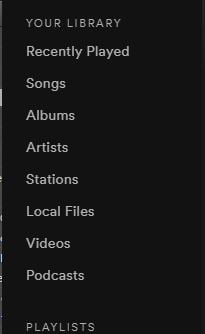
No. It doesn't
Daily Mix has its own section under Your Library entitled ‘Your Daily Mix’, as well as a banner in Radio. It can take up to two weeks before new users see the feature. You will need to be on Spotify version Android 6.2.0 or above to see the feature.
If Daily Mix is still missing and you are a long-term existing user, try logging out and back in again then reboot your device to refresh your account status on the server.
Still missing after that? It may still be crawling through the servers to get to your account. Please allow 48hrs for it to show - if you still cannot see it after that then log a ticket using the support Contact Form