[Mobile] 'All Offline Tracks' in Main Menu

It would be really easy and smart to have a single option in the main Mobile menu that says "All Downloads," and to allow users to filter this list by album, artist, label, compilation or playlist.
So much easier than the current method of having to find downloads via routes you already created. More importantly, your current avenues for seeing what has been downloaded does not always reveal all downloaded content -- even if it has been downloaded and marked "available offline."
Comments

Exactly Gabriel, what's the point now. Only reason I'm sticking around right now is because of years worth of playlists.
Could you tell us more on apple music? I never thought the selection would be bigger!

The "All Downloads" folder used to exist. I'm unclear why it was ever removed in the first place. It was a very convenient way to use downloads.
The option currently available is poor by comparison.

On Android it was never added.
And still no word on Spotify on their justification or future plans. Quite
frustrating!
Bendolph, I remember my nexus 9 have a downloads tab. That is android.
Are you sure about your last comment? It was rooted so don't know if that changes anything.
However we feel your pain...

Yes, please bring it back or make playlists somehow easier accessible if you are in offline mode.
If I am offline I had to go to LIBRARY / PLAYLISTS / MY FOLDER / PLAYLIST 😞
Guys that takes too long and is tiring.
It also does not make sense that Spotify starts with the HOME tab in offline mode.
What about a function to setup a starting tab ?
Thanks
P.S.: I am on Android.

Hello,
This idea was posted before, but didn't receive enough votes ([All Platforms] Shuffle All Music (Playlists and Your Music) with Offline Only Toggle
Submitted by jeremy-tm on 2016-06-14 11:40 PM). So I'm trying again, because I'm sure that more people need the Shuffle Function to work in offline mode, for all platforms, but I assume especially for mobile devices (phones/ wearables).
Right now the shuffle functions tries to play song which are not downloaded and the music stops playing, this is very annoying when traveling. If you have selected Offline, the Shuffle function should only play downloaded songs. And for Samsung Gear user the Shuffle and Repeat function should be available, when offline is selected.
I have read more idea's/ suggestions, which are almost the same, but miss the Offline mode. I actually think this is not an improvement (idea), but a bug and should be fixed.

Can this please be expanded toinclude the repeat feature also? They come hand in hand.
To clarify on the samsung gear sport both shuffle and repeat are completely disabled when offline!
Hi Ojacobs88,
I have updated the idea on your request.
Thanks Nocturno!

I am trying to vote for this but the vote button is not working what the heck
Oh oops got it now never used the community before ..... visited the community?

Knowing that the songs saved in Your Library in the folder 'Songs" can't be played offline, this can't be changed.
Only playlists are available to be played offline.
Were you thinking about something else ?
Hello Soundofus,
On my Iphone it is possible to play a song from the folder "Songs" which I have downloaded, offline. The shuffle function also works, in offline mode, but often tries to play songs which are not downloaded and then Spotity stops. I would like that the shuffle function, when selected offline mode, only shuffles through songs which are downloaded. I can play a whole album, which I have downloaded, in offline mode and also use the Shuffle function. But then Spotify only shuffle trough the (downloaded) songs of the album.
So it is possible, but the Shuffle function doesn't work intirely well in offline mode. I have included a screenshot, I hope this gives you beter input.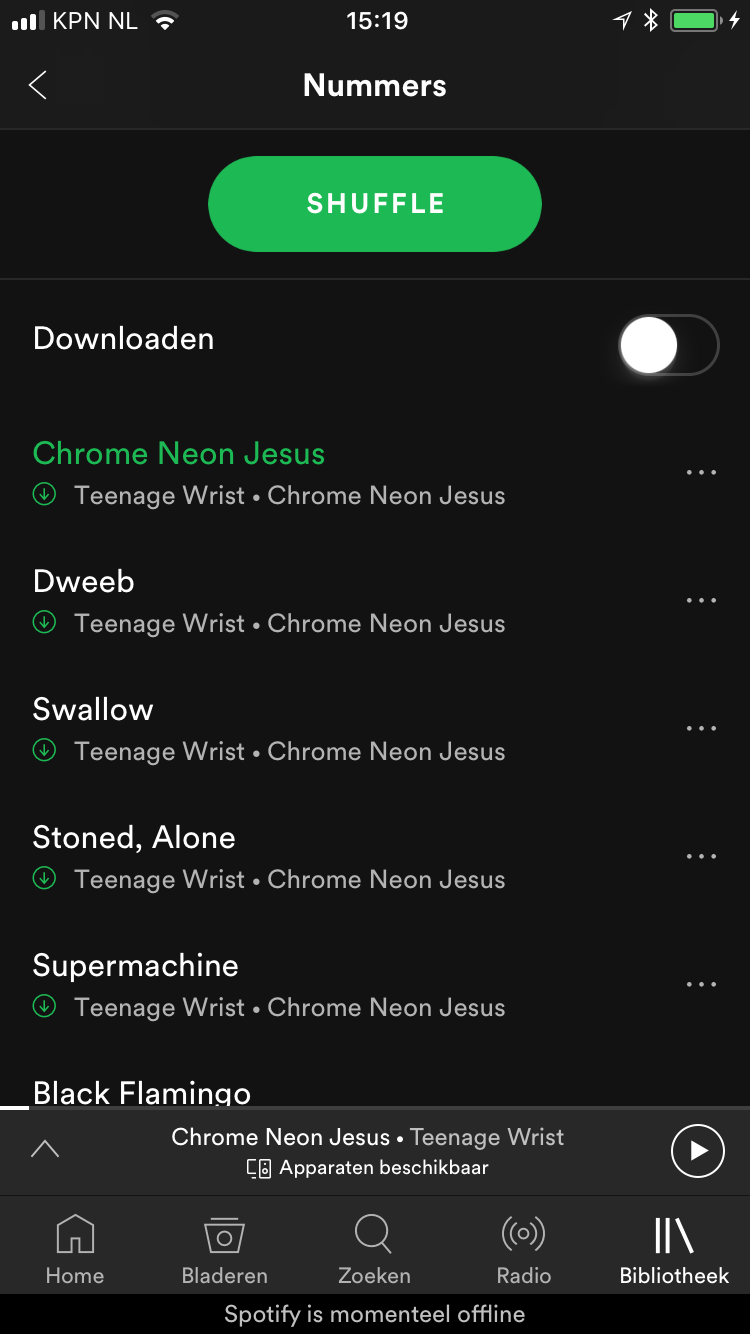

Makes too much sense, I am so frustrated with how unfriendly the UI is on Spotify looking for alternatives...hope their stocks crash and burn and maybe they will start taking us paying customers seriously.

Would make flying so much better
They've been running this as an A/B experiment for roughly a year - I have a friend who has Downloads as a "folder" like Artists and Playlists, but I don't 😡😡

Impressive! Just figured many people had the same idea I had. I used to be a deezer user, and I am really missing a "My Download" option.
I am the kind of person who likes to listen to albums, so everyday I'm downloading some album to listen to during my commute to work. I wish I could find easily my downloaded stuff.


This is hugely useful as I dont want to have to tick every song in every playlist i offline. Somtimes I'll just want a random mix of things and offline multiple playlists.

I want to play ALL DOWNLOADED songs randomly by click of a button. This is kind of working in "Your Library/Songs", BUT now, for example, i have downloaded the Eurovision song contests playlist songs, but it does not show up in there , for some reason it shows only one song. I have to go to the specific playlist to play it. Also a lot of earlier downloaded songs have disappeared from the list, even if they are still saved and cached in my (Android) phone.

Shuffle not working on the Samsung Gear Fit 2 Pro (watch) is extremely irritating. Having Spotify on your wrist as a runner/biker/athlete is a complete Godsend. However, NOT having the ability to shuffle the songs makes it 100% pointless. Using the "offline" feature you can take a playlist you've created and locally cache it on your watch; wonderful. Then to play it, you pair your bluetooth headphones and hit the "Shuffle Play" button. It will start playing but does NOT shuffle at all. You will listen to the same songs, in order, every time. Have a playlist of 100 songs? Too bad, you'll only get to the first couple songs workout after workout because although the button SAYS shuffle, it lies.
Why is this such a difficult thing? Why has this not been fixed?
PS: The documentation on the Spotify website says the following, "Note: If you have Spotify Free, it’s only possible to listen with Shuffle Play and skip tracks 6 times per hour." This means that people who aren't even paying for Spotify Premium get the innate ability to shuffle play but Premium users don't. How shitty is that?

Would be very nice if i could have a list with all downloaded songs. Everytime i have to search. And sometimes i want to hear all songs in shuffle. But until now its only in aylists.

Would be nice!
Just fire up the app, hit shuffle and songs flow

Just chiming in to say that I completely agree with this and it needs more visibility. My mobile device's storage space fills up quickly, and sometimes I don't even realize what stuff has been downloaded and is taking up space because it's so hard to located all of it in one convenient location. It blows my mind that there isn't a "downloaded content" item in the main menu.

Please, reinstate the download section. It doesn't make sense not to have it available for users.

Hello!
I was pointed by Marco to this idea, because mine was labeled as dublicate. However, I find my idea more complex and as extended version of yours. So I'll post it as comment here. I hope it will help to build a better functionality in result! Cheers!
Intro.
At the moment we have an offline mode switch and downloads filter. Neither gives you ability to use Spotify mobile app as a 100% regular portable old-school player. Yes, an attempt was made in this direction. But when I browse my library, in offline mode switch engaged and Wi-fi off I still see content that is not playable. "Downloads" filter works somehow: ok in Songs, still not perfect in Artists: I filter by Downloads and I can find an artist without any songs playable. Song number is irrelevant to playable songs.
Description of idea:
- Playable=Displayable. You see what you can play in every tab (Artists/Songs/Playlists/etc.) without a need for Downloads filter setting. Let's call it "Portable player" mode. Should be a sub-setting of offline mode switch, cause one still may like to see the structure of his library while in offline.
- Song quantity shows available offline tracks quantity in "Portable player" mode setting engaged.
- Switch between online and offline mode automatically depending on network setting/condition and cellular data usage setting (Spotify mobile app setting). Separate setting: "Switch online/offline automatically".
- Don't switch to online mode if the setting for "Switch online/offline automatically" is OFF even if Wi-fi or cellular data connection is available. One might like to use his "Portable player" mode and still browsing on the Internet.
- "Switch online/offline automatically" should be easy reachable.
- Graphical indicator of modes:
- Online mode
- Offline mode
- Portable player mode (which is actually a sub-mode of offline mode).

Exactly. There could be tracks downloaded in playlists, albums, songs, etc. To complex to track all them down if you have a big structure.

Completely agree. It’s one of the things I miss from Apple Music.
Maje it it simple to find all downloaded songs
Yes, the fact that Spotify support claims this feature was only being A/B tested and never a core feature feels like a cop out and not the whole truth. Might need to reconsider Apple Music because of this, they already have a bigger music library. If Spotify can't prioritize their best music listenting Premium UX features, then what's the point in paying them for Premium?