Spotify's taskbar icon on the wrong monitor every single time (dual monitors)

We had a five page thread; Spotify closed it because "nobody responded in a long time". That's because, Spotify, ya never fixed it.
How to reproduce (you need two monitors):
1. Open Spotify and close it on the second monitor.
2. Open Spotify again. The icon will be on the primary monitor, but the window will be on the secondary monitor.
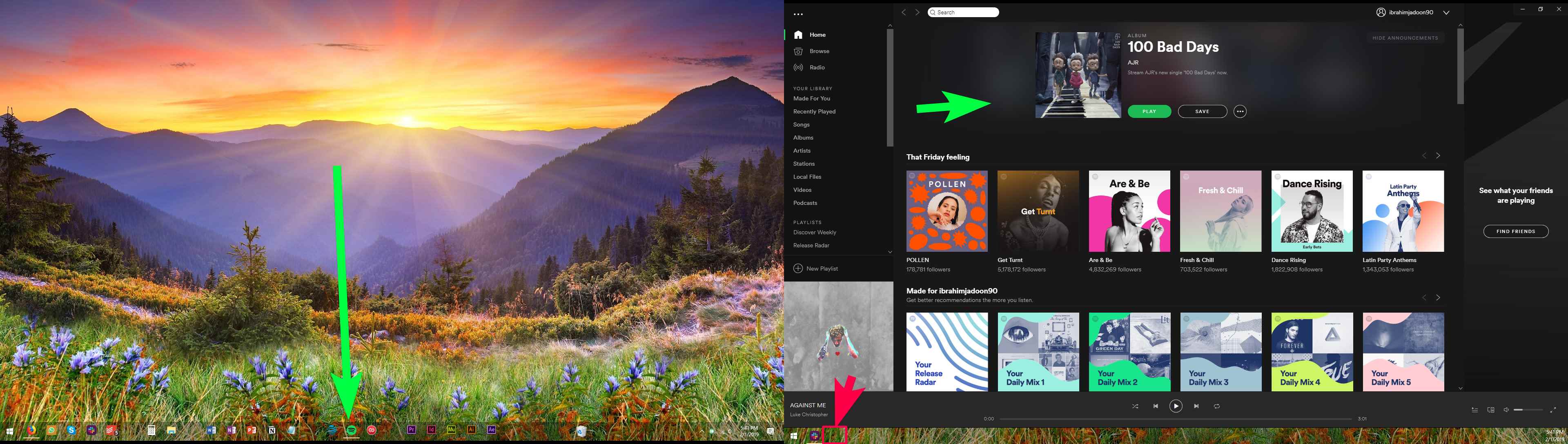
Windows 10 Pro x64, version 1803 (April 2018 update).
Spotify version 1.0.99.250.g936eab8d (Windows Store version).
See this 45 second video for the full walkthrough (see a normal application vs Spotify). Put the icon on the correct taskbar, Spotify.
// IGNORE THE TOP ANSWER BELOW: THERE IS NO ANSWER NOR SOLUTION. SPOTIFY COMMUNITY MODS BARELY UNDERSTAND WINDOWS.

// IGNORE "Top Answer" BELOW:
Accepted answers
All comments

Hey,
Ever since the design update a few days ago (titlebar removal) Spotify's icon appears on the main monitor's taskbar despite the window opening on my second monitor.
This was not the case before the titlebar removing update.
If I drag the window to main monitor and then back, the icon carries over properly.
Using Spotify Desktop (1.0.75.483.g7ff4a0dc) on Windows 10 (1709).

Same issue myself, only recently started happening.

Same thing here...just have to move it to the main monitor and back and the icon fixes itself, but still annoying.
Windows 10 1709 and Spotify 1.0.75.483.g7ff4a0dc

Same issue! Please fix Spotify!

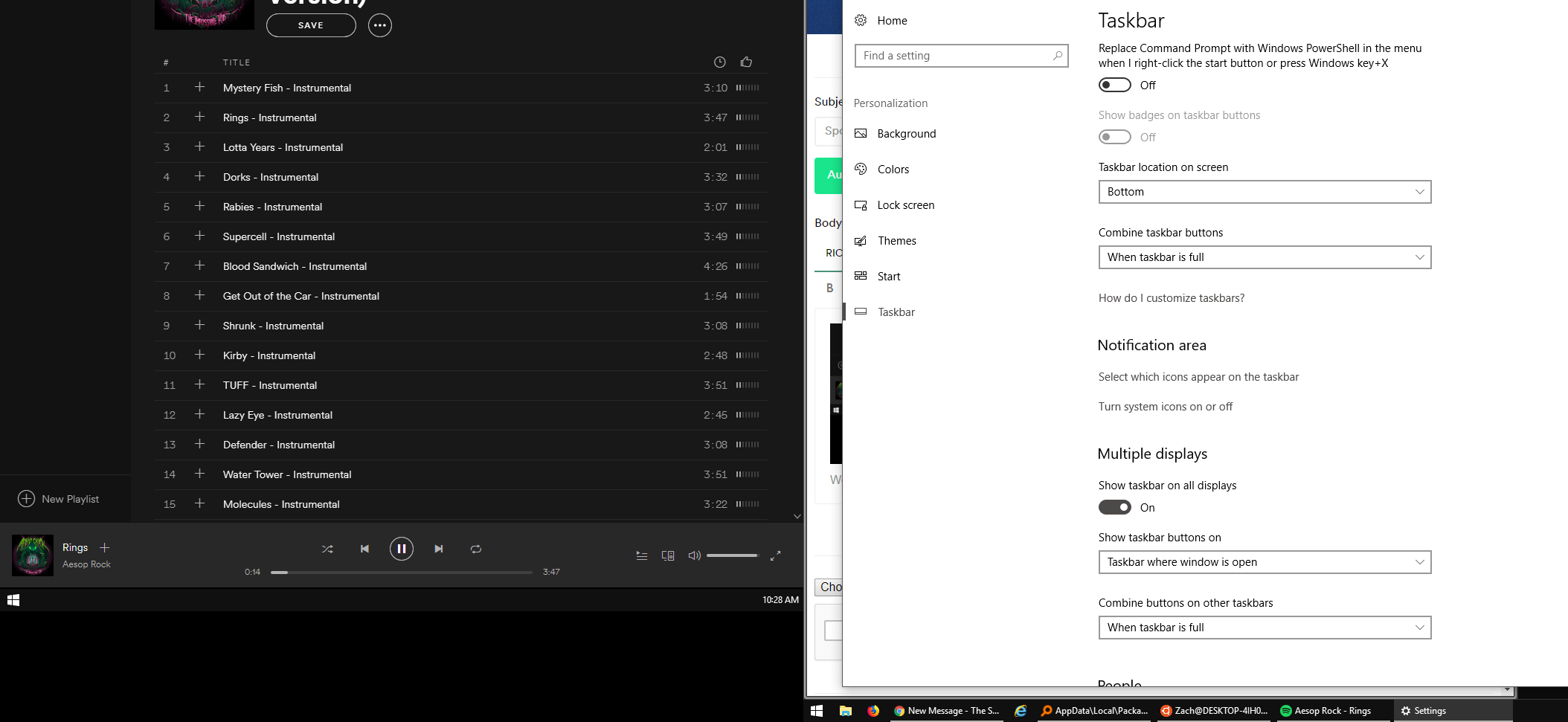
Working across five monitors, and all programs are able to properly display in the task bar on the monitor it belongs to except for Spotify.

Same issue here.
Windows 10 1709
Spotify 1.0.77.338.g758ebd78

Same issue here as well on my normal computer and my work computer.
I actually found a fix. I disabled hardware acceleration and the problem no longer occurs. Hopefully it works for you guys!
Disabling hardware acceleration didn't fix it for me. It appears fixed after disabling and click the restart link but after a full exit of Spotify after that and reopen the problem appears again.
Issue still exists on Win 1803.
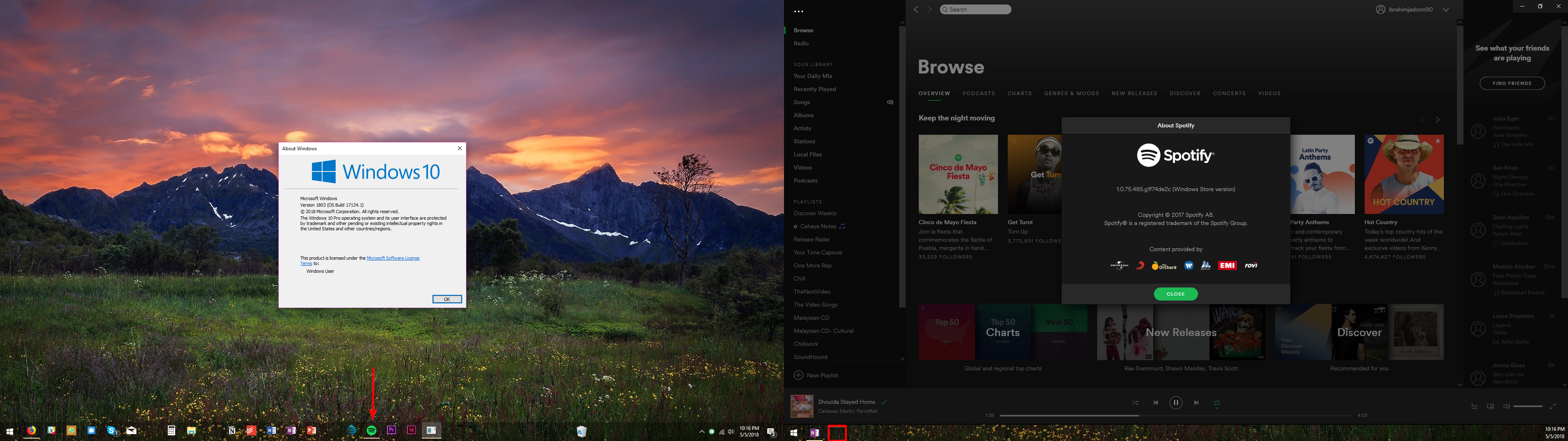 I'm almost sure all of us are using the Windows Store version, right?
It happened on 1709 and now 1803, too. Spotify UWP team, yo--what's up? 😞
Desktop Apps from my cold dead hands before I'll use a windows store
version of something.
Ah, **bleep**, you're right. Same here:
Alas. I chatted with Spotify Support and after 45 minutes of unsuccessful troubleshooting, they decided to move it to the "Escalations Team", who supposedly are to email me in the coming days.
I'll update if anything happens. Otherwise, I think we're just going to wait it out until Spotify dogfoods its applications enough to acknowledge this bug.
An update from the "Escalations Team":

So...fingers crossed this lands in the next update.
actually entered as a bug for development to look at. Hopefully they have a
good product manager that will prioritize it in the next sprint so we get
the fix semi soon.
Sure--I'll take whatever progress and communication we can get, though. It's been going on weeks now...
Let's see if it's a "quick fix" or "it's been six years--why does this bug still exist?" situations.

Hello all,
I have noticed that when I have spotify open and move the window to my secondary monitor, the icon in the taskbar stays on the primary monitor's tasbar. This is not what I have set my taskbar to.
Windows 10 Version 1803
Spotify 1.0.80.474.gef6b503e
Anybody know a fix? Thanks!
Red line divides monitors in attached picture.

Same issue here

Same here. I'd also just like to make it clear that (I think we all, tell me if not) chose the Windows taskbar setting to only show the icons for windows on the monitor that they are active.
(Hardware acceleration -> off) This worked for me, but I hope that Spotify provides an actual fix. Thanks anyway!

Hey @DJN
Just checked a couple of things out for you and I think I've narrowed it down. I think you could be running the windows store app version of Spotify which only seems to stay in the main desktop taskbar due to the windows environment settings.
If you press the windows button you should see the spotify logo as white in a green square if you do have that version.
So the way to solve your problem is to uninstall the app under windows > settings then install the desktop version found here.
Use the same login details and you should find that the logo switches taskbar when you switch display.
Hope that helps!
Andy

I've noticed this too. Very annoying - but can be worked around by dragging the Spotify Window to your primary monitor and back every single time Spotify opens.
This wasn't an issue with the Windows Store version of Spotify prior to the UI Redesign earlier this year though. Seems to be a problem with the Spotify Application itself now.
Might be worth noting how your Secondary Taskbars are configured in Windows 10 however, although I've not tested. For Reference: My Secondary Monitor Taskbar is set to: Show taskbar buttons on: "Taskbar where window is open".
Sidenote: If someone from Spotify actually sees this and is after feedback on that UI Redesign; personal preference favours the old version over the current as the new look just doesn't fit nice with the design and feel of the OS (Doesn't even animate to the Taskbar and back anymore).
I just try to avoid windows store at all costs. I don't want a phone, there is a reason I have a desktop. I just hate the idea of installing via a "third-party" rather than the vendor themselves...
I've noticed this too. Very annoying - but can be worked around by dragging the Spotify Window to your primary monitor and back every single time you open Spotify.
This wasn't an issue with the Windows Store version of Spotify prior to the UI Redesign earlier this year though. Seems to be a problem with the Spotify Application itself now.
Might be worth noting how your Secondary Taskbars are configured in Windows 10 however, although I've not tested. For Reference: My Secondary Monitor Taskbar is set to: Show taskbar buttons on: "Taskbar where window is open".
Sidenote: If someone from Spotify actually sees this and is after feedback on that UI Redesign; personal preference favours the old version over the current as the new look just doesn't fit nice with the design and feel of the OS (Doesn't even animate to the Taskbar and back anymore).
(I posted this earlier today, but for some reason it got deleted. Think that was my wrongdoing though, oops!).

Still have the same issue. Disabling the 'hardware acceleration' doesn't seem to work. Would be great if it is fixed.
Details:
Windows 10, version 1803, build 17134.48
Spotify 1.0.83.318.g6c07039d (Windows Store version)
Just got an update to the Deskto version and seems to have been fixed!
Windows 10 1709, Spotify version 1.0.84.344.gfc674f6f
Ignore....it came back.
For the store version it still seems to be an isssue.
1.0.84.344.gfc674f6f (Windows Store version)
I was too quick to think it was fixed...only worked the first 2 times after updating...now it's back to it's old tricks.... *sigh*
I had another update recently; did not fix it.
The only workaround that only works SOME OF THE TIME is to disable Hardware Acceleration. I'm not quite sure why a music player even needs hardware acceleration, but Spotify performs identically with it on vs off as far as I can tell.

Same here, please fix.


Plan
Premium
Country
GER
Device
PC
Operating System
Windows 10 1809 x64
My Question or Issue
I'm using a multi-monitor environment with Spotify on my secondary screen. Spotify remembers the position it was opened the last time. Now, when I close the Spotify app and start it again, the taskbar icon will show up on my main screen but the Spotify app will show up on the secondary screen (see screenshot). I configured my taskbar to only show the apps on the screen in the taskbar (Taskbar with open window).
The taskbar icon, in this case, should only be shown up on my secondary screen. The taskbar icon will switch the bars when I move the app to the main screen and then move it back to the secondary screen.


Hello everyone,
We really appreciate your reporting this to us and providing all this info.
We've decided to take another look at things and are gathering more details in this ongoing issue thread.
If you're affected by this, we suggest you head over there to add your +VOTE and subscribe so you'll be notified if there are any updates.
We'll be keeping an eye out for your replies, thanks!