Media Overlay keeps reappearing

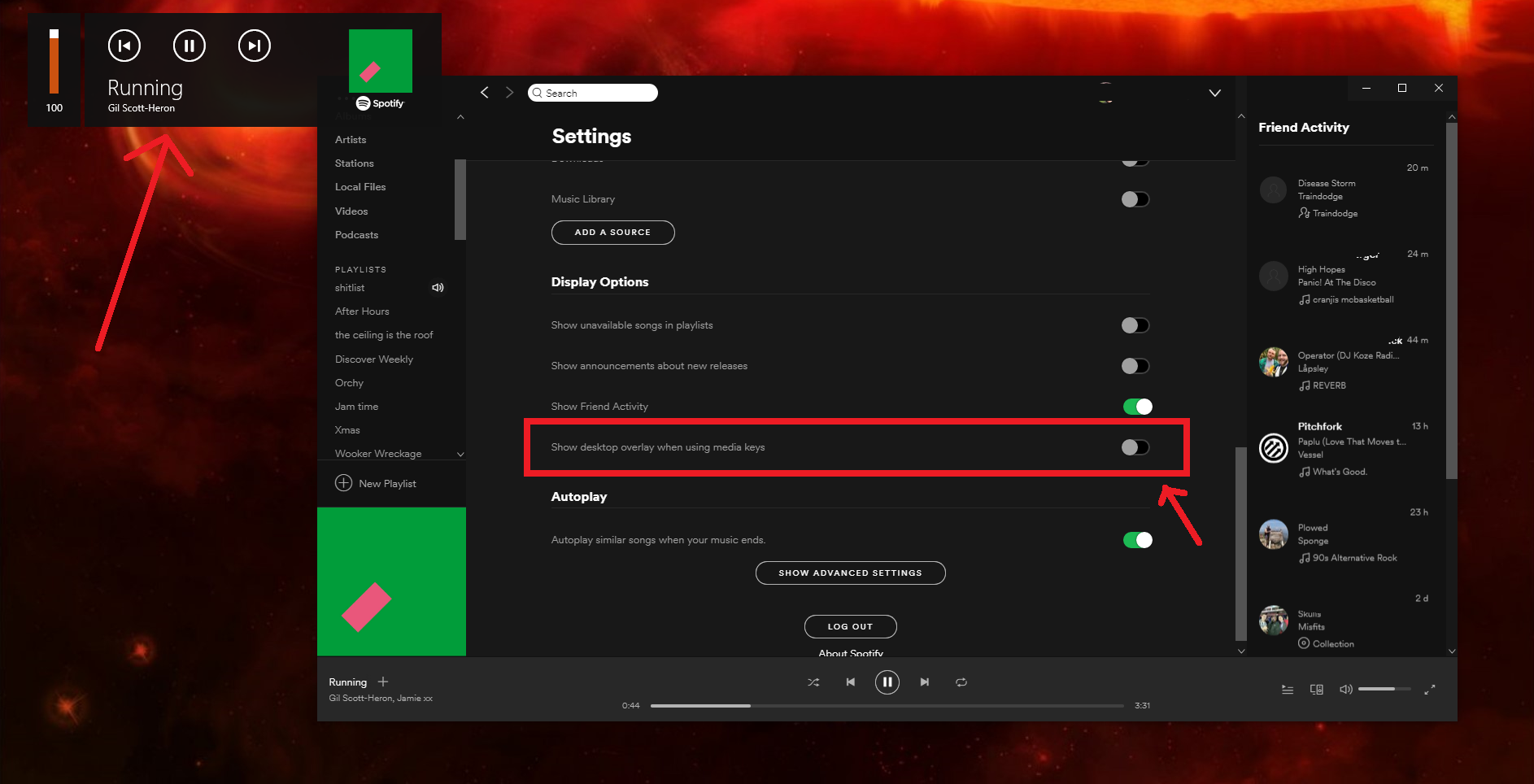
Me and many other people that I have seen on the Community have been faced with the same bug: the 'Show desktop overlay while using media keys' option on Spotify isn't working correctly. When I open Spotify, the client acts as if the option is checked, but in Preferences it is unchecked. Enabling and disabling the setting turns it off for that session, but upon closing and opening Spotify, the media overlay turns on again.
Accepted answers
All comments

Agreed. Please fix this, it's very irritating.

Hey @Jollof, @gb79a and @didii2311, welcome to the Spotify Community!
Could you let us know which Spotify version you're currently using? Also, did this start happening after a specific update or event?
You could try a clean reinstall with these steps to see if it makes any difference.
If you’re having this issue, be sure to click +VOTE at the top of this thread.
I'm currently on 1.0.84.344.gfc674f6f and I've not had the issue for at least a few days, although I'm not really sure if it stopped with my most recent update which I believe was around 4 or 5 days ago. I had re-installed a few times for unrelated reasons so I don't think that solves it. Fingers crossed it stays that way 🙂
I also don't recall a certain event/update triggering it but it had been a while so my memory could be a bit hazy.

I cannot tell you when it started happening. Version: 1.0.83.318.g6c07039d has the issue for me.
I now did a fresh reïnstall (standalone client, not from Windows store) and the issue seems to be resolved. Current version that is now on my machine installed: 1.0.84.344.gfc674f6f.
Hey @Jollof and @didii2311, that's awesome news!
We're glad everything worked out for you. We're still waiting on an update from @gb79a, how's everything on your end?
Hope to hear from you soon 🙂

Hey guys,
We see a few people voted. Could you please send us over the following so we can look into this?
What device(s) this happens on
OS and version
Spotify version
Thanks!

Hey @Jollof, @gb79a and @didii2311,
Are you still experiencing this issue? If so, we need the following to proceed with the investigation:
- What device(s) this happens on
- OS and version
- Spotify version
This also applies for everyone else who are experiencing this.
Thanks! 🙂

Hey there everyone!
We haven't heard any updates in a while so we're moving this back to the Help boards.
However, if you're still having troubles, make sure to leave a comment and we'll be happy to look into this.
@Jollof Thanks for letting us know that everything is working as it should now!
/K

The problem was fixed in version 1.0.84.344.gfc674f6f but yesterday, since I updated to version 1.0.93.242.gc2341a27 it has been happening again. For the sake of what is Holy, fix this **bleep** bug at some point.

I have the same bug, even if I disable it in the settings, it shows up again when i restart spotify, have to disable it everytime. Software version is 1.0.93.242.gc2341a27
Hey there @Jollof, @user-removedand @ntgism,
Thanks for keeping us up to speed.
We'd first suggest performing a clean reinstall of the app by following the steps below:
- Open Spotify and click File in the menu bar. Select Exit.
- Click the Start button. Select Settings.
- Open System.
- Click Apps & features, then select Spotify.
- Click Uninstall. Click Uninstall again in the pop-up to confirm.
- Make sure to head here and remove all offline devices.
- On the Start search bar, type %AppData% and hit enter. This should open up AppData\Roaming.
- In the new window that opens up make sure there's no Spotify folder showing up. If there is, you can delete it.
- Make sure that there is no Spotify folder left in AppData\Local as well.
- Download and install Spotify from the Windows Apps store.
Let us know how you get on 🙂
Yes, that may work but I suspect that you understand that's not a good practice, right? Having to reinstall every-now and then. And what you described is a complete hassle. I'd rather just stay with the bug. Sorry.
Also, isn't there any non Windows Store version anymore?


Same here, the Media overlay shows up now even if it is disabled in Spotify settings. Please fix this bug since it i really annyoing.

The issue was solved before but its back now.

This issue is not resolved and many ppl experience it.
I think it can be manually reproduced by restarting Spotify, sometimes it doesn't load settings (or uses default settings, which shows the overlay.) in memory while displaying it unchecked.

Still happens. I already perform a clean installation.
Spotify version: 1.0.93.244.g1e3a05e7
SO version: Windows 10 Pro x64

Spotify Version: 1.0.93.244.g1e3a05e7
OS: Windows 10 Pro
It would be really nice if you stopped this bug from reappearing. I'm no expert, but before an update rolls out, it wouldn't be that hard to test... It's really annoying to have to deal with this bug constantly.

Same here! Really annoying.
It opens also when I open Microsoft mail or Microsoft Calender or even the Windows settings!
Veriosn. 1.0.93.244.g1e3a05e7
Happens to me as well, very irritating. Bug occured after an update around 2-3 weeks ago.
Current Spotify version: 1.0.94.262.g3d5c231c
OS: Windows 10

Only happens on Windows 10 Desktop
OS: Windows 10 1809
Spotify version: 1.0.93.244.g1e3a05e7

Device: Desktop PC
OS: Windows 10 Version 1803 (OS Build 17134.407)
Spotify version: 1.0.93.244.g1e3a05e7
Overlay off in settings, still popping up.

Having the same problem. Version 1.0.93.244.g1e3a05e7
Please fix this, it's so annoying. The banner stays on screen too long and it covers up the screen, and if you mouse over it by accident, it stays on screen even longer. I just want to change the volume, I don't need extraneous information.......
Hey there folks!
Thanks for keeping us up to speed regarding this.
In this case, we'd recommend heading to this Ongoing Issue report and adding your +VOTE.
It'd be also helpful if you could leave a comment in that thread with the requested info so that we can pass it on to the right folks.

I'm experiencing this as well. Exactly as described in the OP. Re-toggling the setting only lasts for the session. Should be an easy fix (just persisting the setting/reloading at startup or first read)
Windows 10 (Ver 1803) on Desktop
Spotify version 1.0.93.244.g1e3a05e7

Hi, I began having this problem about a week ago. It has the same description, in that I the media overlay turns on while the option is turned off, and I can turn off the media overlay again by turning on and off the option.
This issue is occurring on my desktop.
Spotify version: 1.0.93.244.g1e3a05e7
OS Name: Microsoft Windows 10 Pro N
Version: 10.0.17134 Build 17134


Same issue here on my end. The "Show desktop overlay when using media keys" toggle is disabled in desktop app/program settings and yet it still shows, upon a restart of the machine it shows up again (even after toggling on and off again). Only fix is to enable and disable it for that session. Super annoying. Should be a simple fix though, hopefully the devs can push out an update quickly.
This bug showed up for me a few months back and was fixed, now it's back again, time to call pest control.
O.S W10 Pro
1.0.93.244.g1e3a05e7
I have exactly the same behavior. Added a screenshot of this bug below.