Bug: IOS Chromecast device list truncated

Tried posting this here:
Thread was almost immediately closed rather than considered, with directions to post it in "Other Issues" which nobody is allowed to post in - or at least I'm not able to.
Please consider reading this thread and notifying spotify engineering of the issue.
Copy/paste from that thread:
The chromecast device list in "devices" is truncated to five entries. I have five chromecast audio devices in my home, and using the Google Home app I've created two chromecast streaming groups. The groups contain my devices - for example, my "home" group allows me to play my spotify music on all five devices.
The spotify app on IOS only lists up to five chromecast options, and in my setup, I have seven options: five devices, plus two groups.
Reproducing this issue is easy.
Step 1: Use the google home app on IOS to create chromecast groups until there are more than five chromecast groups + devices available.
Step 2: Using the google music app, select the chromecast streaming button on the top right of the app, note that you see all of your groups + devices listed.
Step 3: In the Spotify IOS app, select the "devices available" button at the bottom of the screen. Note that only five chromecast device + group options are listed.
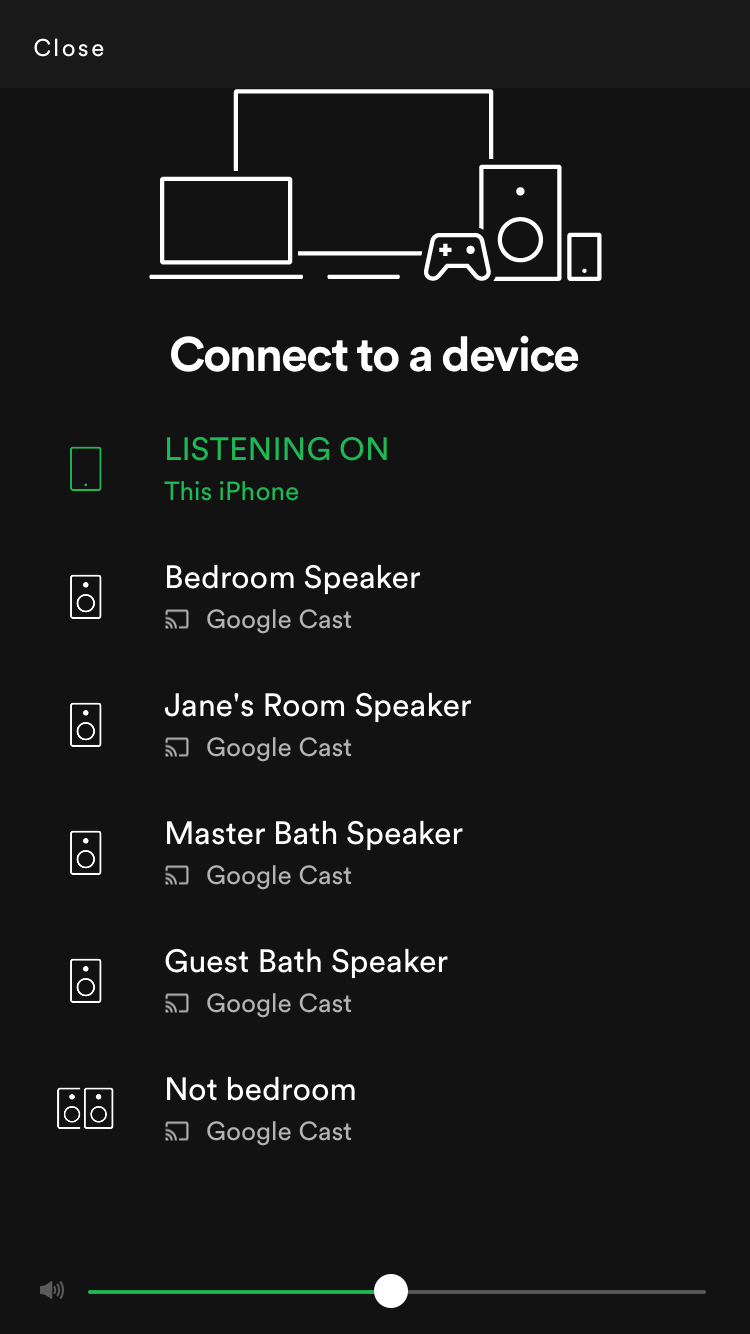
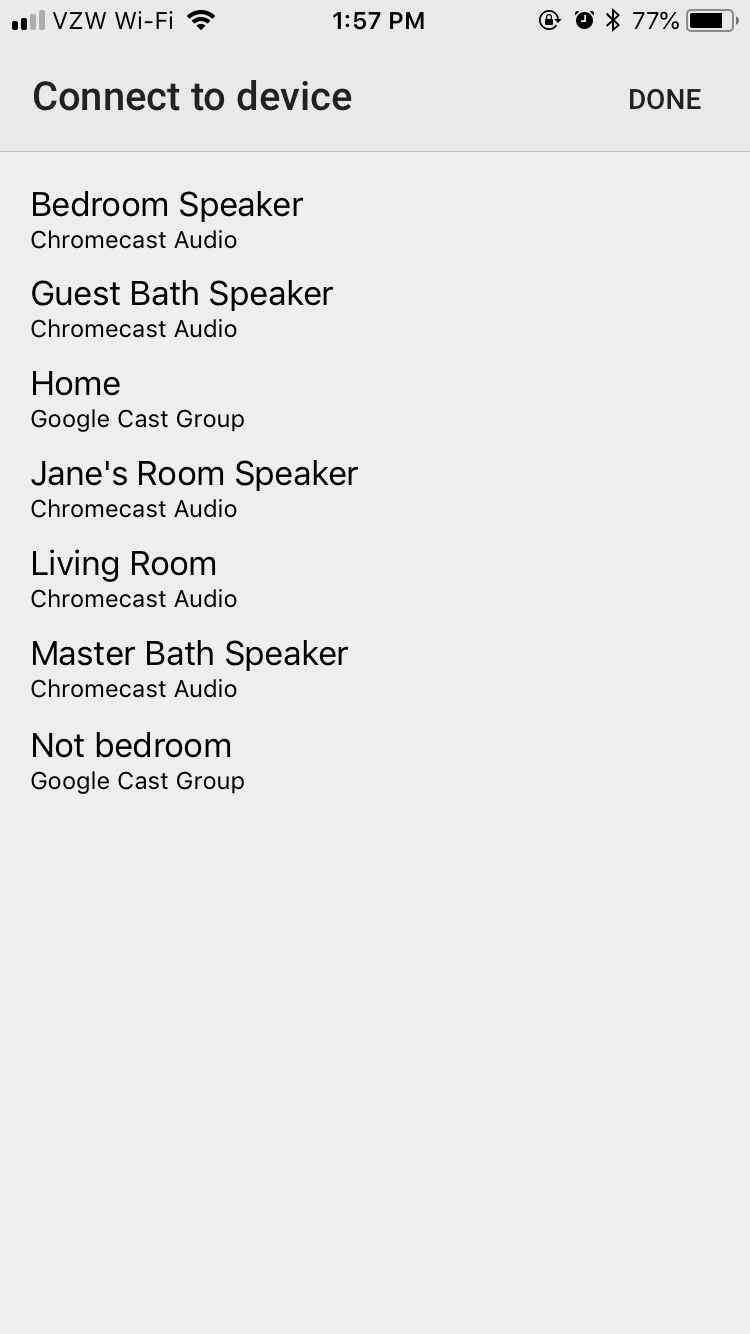
Screenshots exemplifing my issue follow.
In my home setup I have five chromecast devices: "Janes Room", "Guest Bath", "Living Room", "Master Bedroom", and "Master Bath".
I have two chromecast groups: Group "Home" contains all of my chromecast devices listed above, and group "Not Bedroom" contains all devices except for the "Master Bedroom" and "Master Bath" devices.
In the first screenshot shown below, Spotify shows five items, note that the "Home" chromecast group, and "Living Room" chromecast device are missing from the list.
In the second screenshot taken at the same time, the Google Music app shows all seven items (two groups, and five devices).
After the second screenshot. I removed the "Not bedroom" chromecast group from my setup using the "Google Home" app on my IOS device. I then returned to Spotify's devices list.
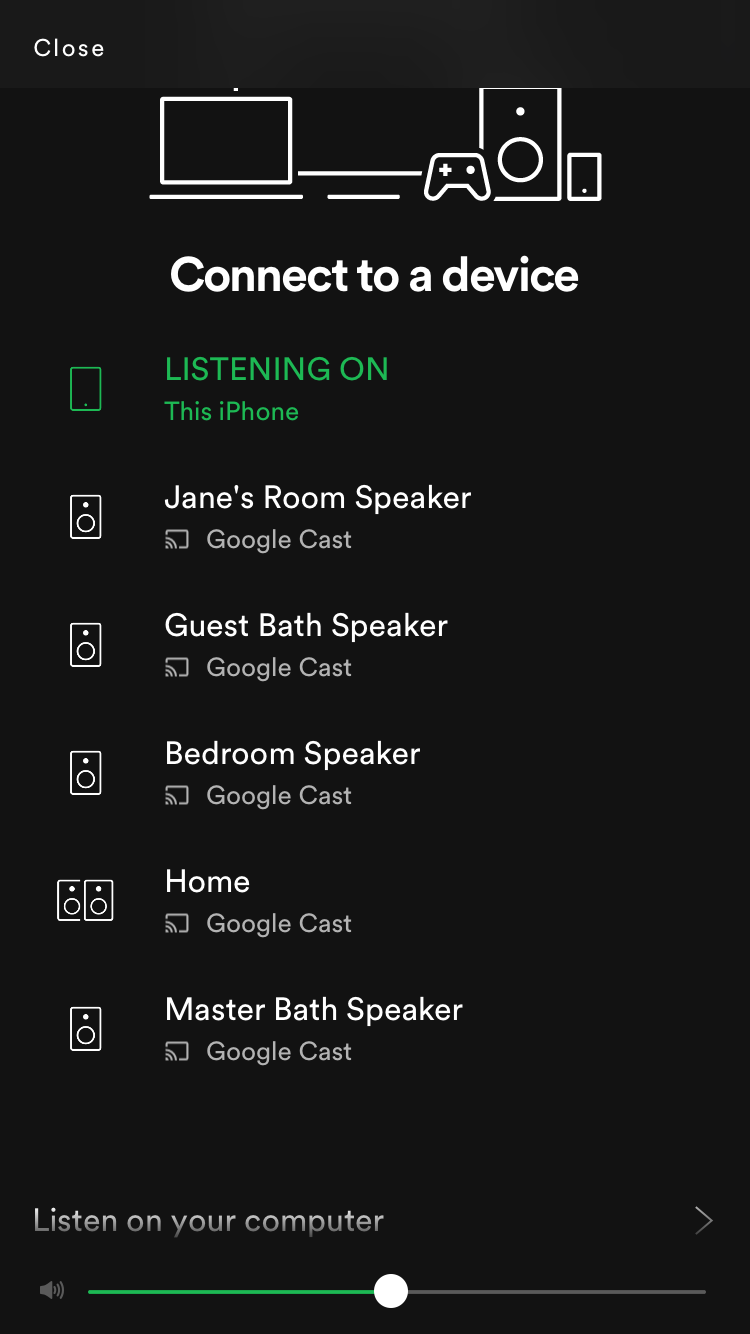
The third screenshot shows spotify's device list now shows the "Home" chromecast streaming group, but still "Living Room" is missing.
Note that no matter how many times I restart my IOS device, the devices list remains constant as shown in the third screenshot below.
Accepted answers
All comments

After fiddling around a bit in the google home app creating and deleting groups and also powering off chromcast devices I might lean towards groups being the issue here. Groups works, however the total number of devices + groups shown in the app never exceeds the number of devices I have turned on. I have 3 devices. If no groups are present all 3 devices show. If I create a group that group show but one devices disappear, so now 1 group and 2 devices. Powering off one device of course makes that device disappear but it doesn’t allow any other device show. Only 1 group and 1 device now show. I have not investigated what makes a device or group show only concluded no more than the total number of devices show. This was not the case when I started using the chromecasts but some change made this appear sometime April-May.
If Spotify say groups are not supported then yes, I guess we need to add a feature request.

Have you had any connection with support at Spotify?
Emails? Facebook? In these forums?
Know of any others with the same issue?
Groups are supported by Spotify. They work on mine and other users who have offered their feedback on this topic.
I have a group working on mine.
Many other apps not only support group playback but have no issues with truncated lists as we are finding with Spotify.
Unfortunately, it seems to be completely useless bringing up this topic in these forums. Despite 1,000’s of views on this topic over months, NOT ONE Spotify team representative has commented or offered any support or light to this issue. Nothing.
Same issue here. Groups work, however the list gets truncated as soon as the group is created and one of the devices goes missing from the list.
No word from any support team member despite 1,000’s of post views over months.

I know that groups do work. The chat support just told, they don't officially support multiroom playback.
Can anyone contact the chat from another country again and ask for this?

Same issue here.
Posted a few days ago and just figured out that you guys already filled a thread for the same: https://community.spotify.com/t5/iOS-iPhone-iPad/Chromecast-Not-all-devices-listed-in-device-list/m-p/4531743/highlight/true#M103205
Really anoying issue and from my perspective the "Spotify is not supporting groups" statement is not valid at all. Either Spotify supports Chromecast or not. If they support they also need to support groups.
Is there some sort of process to fill product bugs to get at least a ticket number to be able to track if somebody is working on this obvious bug?
Thanks,
Andreas

might not like this level of Chromecast support by Spotify either. Although
they might be happy for customers switching to Play Music 😉
Hi all,
Just got the following response via Spotify Cares on Facebook:
Hey Andreas! It’s not currently possible to see more than 5 devices when using Spotify Connect, but we’ll pass your feedback onto the right folks. You could try disconnecting one of your other devices in order to see the Chromecast Audio device in the list of available devices. We´ll be here if you need any further help.
This underlines what you guys figured out earlier and from my perspective it is really not acceptable if I promote Chromecast support and then limit it done to 5 devices...what kind of multiroom is that?
@Nyarly: Maybe that is a good idea as Google might have an interest in having sufficient support for their products if advertised acordingly.
I created a post in the Google community: https://productforums.google.com/forum/#!topic/chromecast/SCExpfzcqkU
Thanks,
Andreas
The 5 devices limit can't be the whole problem. I have only to Google homes and get the problem as soon as I add a group.
I've contacted Google via Twitter (@madebygoogle) and we're currently exchanging messages. Will report later.
This is the last reply I got:
"Thanks for letting us know. We'll have our team take a look on all the information you've provided — we'll get back to you once we have any updates."
I sent links to this thread, my original thread with screenshots and some general information. Fingers crossed!
@Nyarly: Did you get any response or information if somebody will pick this up and will work on it?
I raised an Idea (bug) for this issue now: https://community.spotify.com/t5/Idea-Submissions/iOS-Fix-bug-which-limits-number-of-visible-Chromecast-devices/idi-p/4537219
Please vote for it!
Thanks,
Andy
Any luck with the connecting with Google through Twitter?
I've had ZERO connection from the Spotify team! No response to ANY and ALL comments made on multiple posts on this forum and no news from the 'SpotifyCares' gang on Facebook.
#PayingFullPrice
I think Google is actually looking into this. Two days after my initial exchange, they contacted me again with a few questions regarding my setup. We'll see...
It's not a Google issue, it's an issue with Spotify. A bug.
Google Home (app) and all the Google Chromecast Audio devices are working just fine with MANY other apps. Hence, it's a Spotify Bug.
@AussieRo wrote:It's not a Google issue, it's an issue with Spotify. A bug.
Google Home (app) and all the Google Chromecast Audio devices are working just fine with MANY other apps. Hence, it's a Spotify Bug.
I think that's clear for everyone here. However, Google might ask Spotify what they're doing to all the good CCA customers/users 😉
Totally agree! Look forward to feedback.

Just bought chromecast audio thingys for all the stereos in my house and discovered this issue. I'm sorry to see it's been around so long with no official word from Spotify because one of the main reasons I bought the chromecasts was because of alleged spotify compatibility. I'm glad to see so many recent posts here though! It gives me hope that something might happen.
Yes, it is really a shame. Unfortunately there is no official reaction to this from Spotify.
I filled a bug to create more fisibility. Would be great if you can vote it up: https://community.spotify.com/t5/Idea-Submissions/iOS-Fix-bug-which-limits-number-of-visible-Chromecast-devices/idi-p/4537219
I have spoken to Google today.
I have also posted on the Google Chromecast Help Forum....
https://productforums.google.com/forum/#!topic/chromecast/Bxo4wKwf_jA;context-place=forum/chromecast
I suggest that perhaps others do the same.
Cheers
https://productforums.google.com/forum/#!topic/chromecast/Bxo4wKwf_jA;context-place=forum/chromecast
Report the issue on Google Chromecast Help Forum. I have spoken to them too.
This might help. I have heard NOTHING from Spotify.
I have recontacted Spotify on their Facebook page (spotifycares) but they have no news nor updates at all.
I get promises of following up, but nothing has ever come.
Thank you for posting this to Google. Not sure if there will be any luck though.
I just signed up to Deezer today to figure out if this would be an alternative to Spotify. Instead of spending time in monologs with Spotify why not just moving to another service which is supporting Chromecast as it should be.
Maybe Spotify is even happy about getting rid of some paying but complaining subscribers.
I downloaded and opened up VLC player on my iPhone today... Guess what? even THAT works properly.... and it's FREE!

I have a similar / the same issue. My conclusion is that it is not (only) truncated to 5 items, but also that groups are hiding a speaker inside the group.
Steps to reproduce for me:
(0) Have two Chromecast Audio on the same network as my iPhone.
(1) Create a home group with the two Chromecast devices.
(2) Try to play from Spotify, Spotify will show only one Chromecast Audio and the group. One of the Chromecast Audio devices is not visible from Spotify.
I've particularly turned off all other Spotify compatible devices during this test, to avoid any truncation issues. That doesn't mean that truncation is not an issue, too.
I've also tried TuneIn Radio, and it shows both Chromecast Audio devices as well as the home group properly. It also has much nicer volume controls, showing controls for the group as well as each speaker.
An Android device on the same network was able to show both Chromecast Audio devices and the home group just fine, too.
Same for me, as I write before. I think we are discussing 2 different (potentially overlapping) issues here.
1) Chromecast audio bug with truncated list
2) Google cast audio groups hiding individual speakers in group

I have a similar problem but I don't even use groups. My Chromecast Audio simply doesn't show up on my iPad. It does show up in my Android app however and once I use that to play something, the Chromecast will immediately show up on the iPad app, except that the volume control doesn't work. Frustrating.
Hey Mattled...
It's an ongoing issue that Spotify has not responded to in any way at all, unfortunately. Regardless of the fact that there have been thousands of views about this topic spread over the forum, not one Spotify team member has commented regarding this.
In the meantime, consumers are going out and buying Google Chromecast Audio devices, subscribing to to Spotify for their monthly fees and are not getting what they anticipate.
Spotify's support team on Facebook have provided no answers.
Their support on Twitter is the same.
There is no way of talking over the phone to anyone from Spotify, and it'd seem that there's a shortage of being able to email them directly regarding bugs, etc...
Unfortunately it is even getting worse.
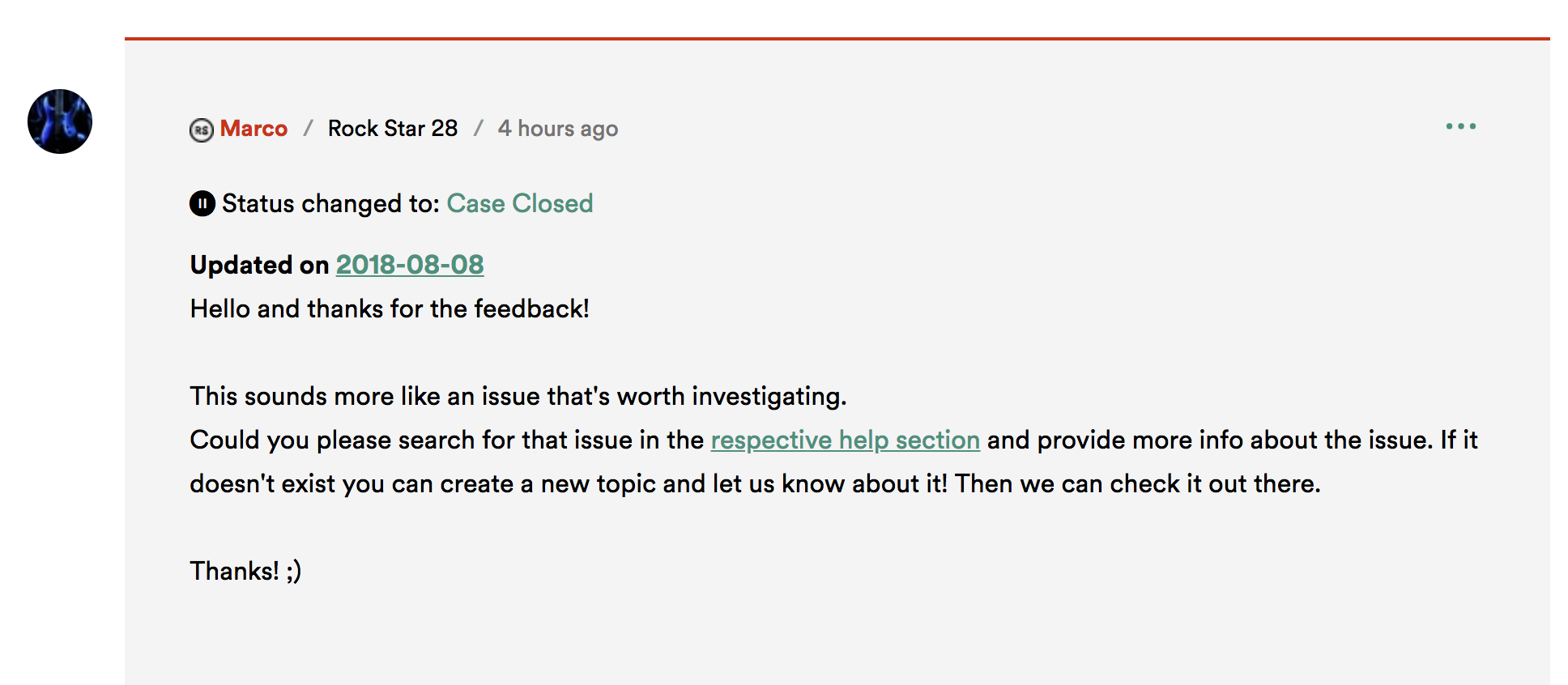
I posted the bug in the Idea Exchange Area some days ago (because this was the only feedback given via facebook chat). This idea was now closed with the comment that this sounds rather like and issue then an idea (agree!) and that I should please check in the Help Forum which is basically this page. If the problem does not exist I should raise it here and they will pick it up (why didn't they pick it up in the first place if it is here since weeks? I even mentioned the links to this help threads in the idea).
I dont know how to mention people here but @Marco: I would like to let you know that two posts already exist for the issue and I would like that somebody checks those issues and gives us qualified feedback on the situation itself and if and by when we can expect a fix. Below the two posts for your convenience:
- https://community.spotify.com/t5/iOS-iPhone-iPad/Chromecast-Not-all-devices-listed-in-device-list/td-p/4531743
- https://community.spotify.com/t5/iOS-iPhone-iPad/Bug-IOS-Chromecast-device-list-truncated/td-p/4495305
Thanks,
Andreas
The groups I create in the google home app works fine on iOS. It’s in the number of groups and devices visible where my problem is, though the underlying problem might be related to something else. Seems strange not to support groups since it’s the major benefit of using chromecast audio.