[All Platforms] Consolidate duplicates

It would be nice if Spotify can recognize identical songs to avoid duplicates in your Liked songs and playlists.
This is pretty common for songs released first as a single then within an album.
For example, if you like the single one, the UI will not show the song as liked when you browse the album. And if you like the song in the album, you'll end up with a duplicated version in your library.
This also happens a lot for songs that you listen in Daily Mix or Discover weekly. If it's not the exact same song you have already liked before, the UI is inconsistent and you can save a duplicate.
Apparently, there is already an internal merge mechanism as the play counter is not split between the different versions of the songs. Maybe this can also be used to consolidate the UI.
Repost of https://community.spotify.com/t5/Closed-Ideas/Your-Music-Remove-Duplicated-Songs/idi-p/4546787 which didn't get enough kudos.
Comments

Also still having this issue. 4 years without a resolution, and barely even an acknowledgement is pretty shocking. Really hope this gets picked up soon as its the only problem I have with Spotify, this bug ruins an otherwise perfect service.

It's 2018 and this is still happening to me. Did anyone find a solution?

Plan
All
Country
All
Device
All
Operating System
All
My Question or Issue
Songs that have already been added to library appear as unadded in artist pages (and elsewhere). Either Spotify has a terrible data model or they don't care about their users. Or perhaps it's both? How is it that it's been 4 years and this bug is still in the platform...
https://community.spotify.com/t5/Desktop-Windows/Saved-songs-do-not-show-as-saved-on-Album-or-Artist-pages/td-p/766509

I have recently discovered that if I press Heart in my Daily Mix song and I have pressed plus in the artist page. Songs appear as duplicates in my songs folder. Can there be feature that if I have liked the song already in the artist page, the same song that I will encounter in Daily Mix will already have this heart "on", so it will not put the duplicate in songs list. I do have short memory and I sometimes wonder that did I already "liked" the song on Daily Mix or artist page and now I'm having these duplicates.
And those Collection songs that are Already same as the ones in normal album, can those duplicates have been removed as well?
I have the Premium subscriber for a while and I still Love Spotify so much 😄

Hey @watertank.
Thanks for reaching out 🙂
Could you send us a screenshot to show us how it looks on your end? That would be really useful.
Thanks,
P

Yup same issue here. Just encountered it few days ago when I was going over my saved albums. I had many such albums. Just for example Cypress Hill - III. I had it in my library but if I then went to the artist's page it showed Save button instead of Saved. So if I then pressed Save I got duplicate albums.
It's like the albums in my library "lose connection" to the ones at artist pages after some time.
It looks exactly like it was reported years ago...
https://community.spotify.com/t5/Desktop-Windows/Saved-songs-do-not-show-as-saved-on-Album-or-Artist-pages/m-p/1524812/highlight/true#M12843

Updated on 2018-08-29
Marked as new idea.
Hey folks,
Thank you for your feedback. We're filing this issue under "Needs more info".
Could you provide us with a few more details, including:
- Spotify version,
- Device model and OS version,
- How long you've been experiencing this issue for?
- Do you experience this with all songs, or just certain songs?
Important: don't forget to add your vote in the top-right corner - that way the issue can get escalated.
P
I noticed this last feek. But as it appears this bug is years old...?
At the time I used my Mac Spotify client:
- 1.0.88.353.g15c26ea1
- Macbook Pro mid-2012, macOS 10.11.6
- Hard to tell for how long since I don't regularly check artist pages
I got an example for you.
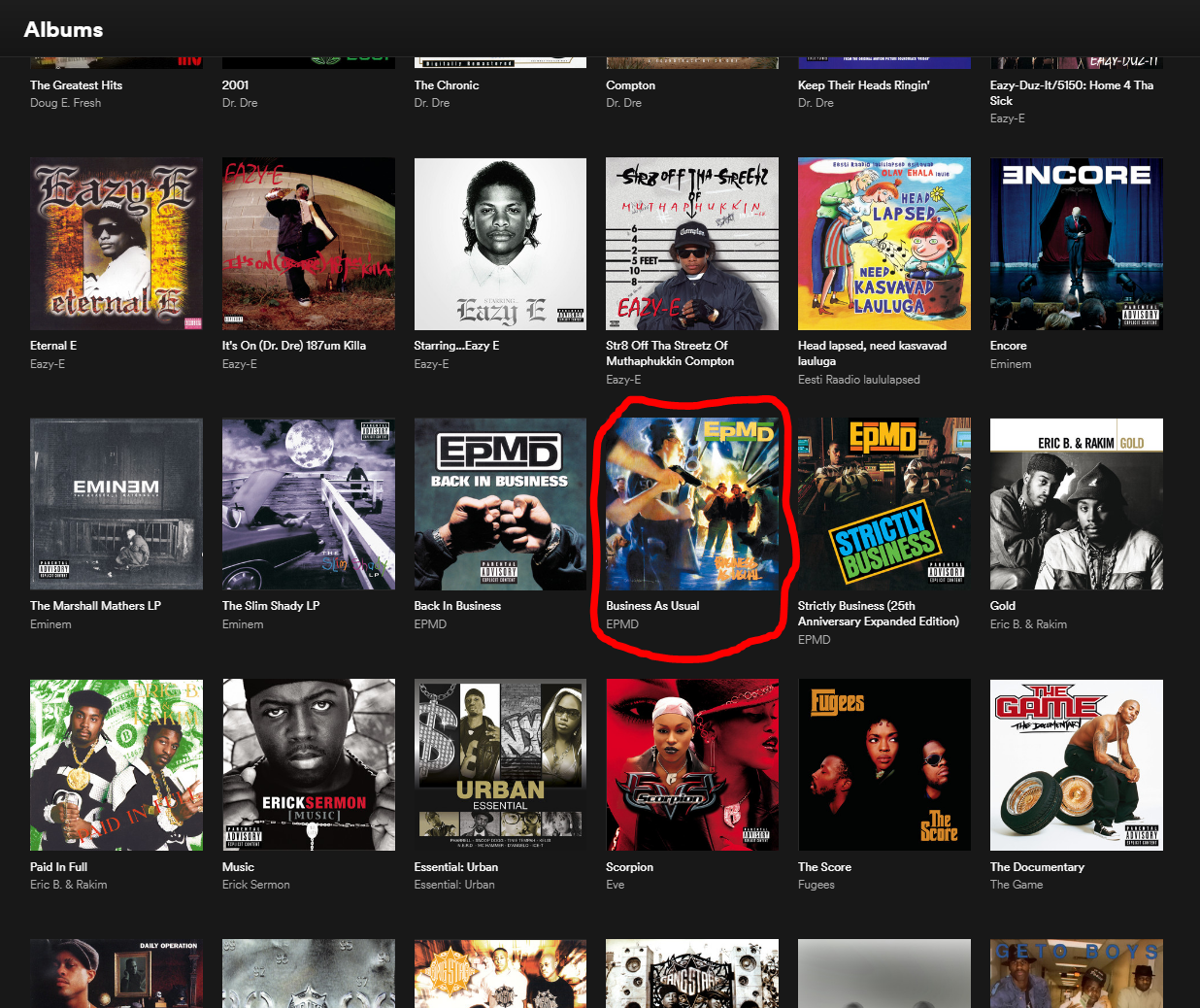 Albums list
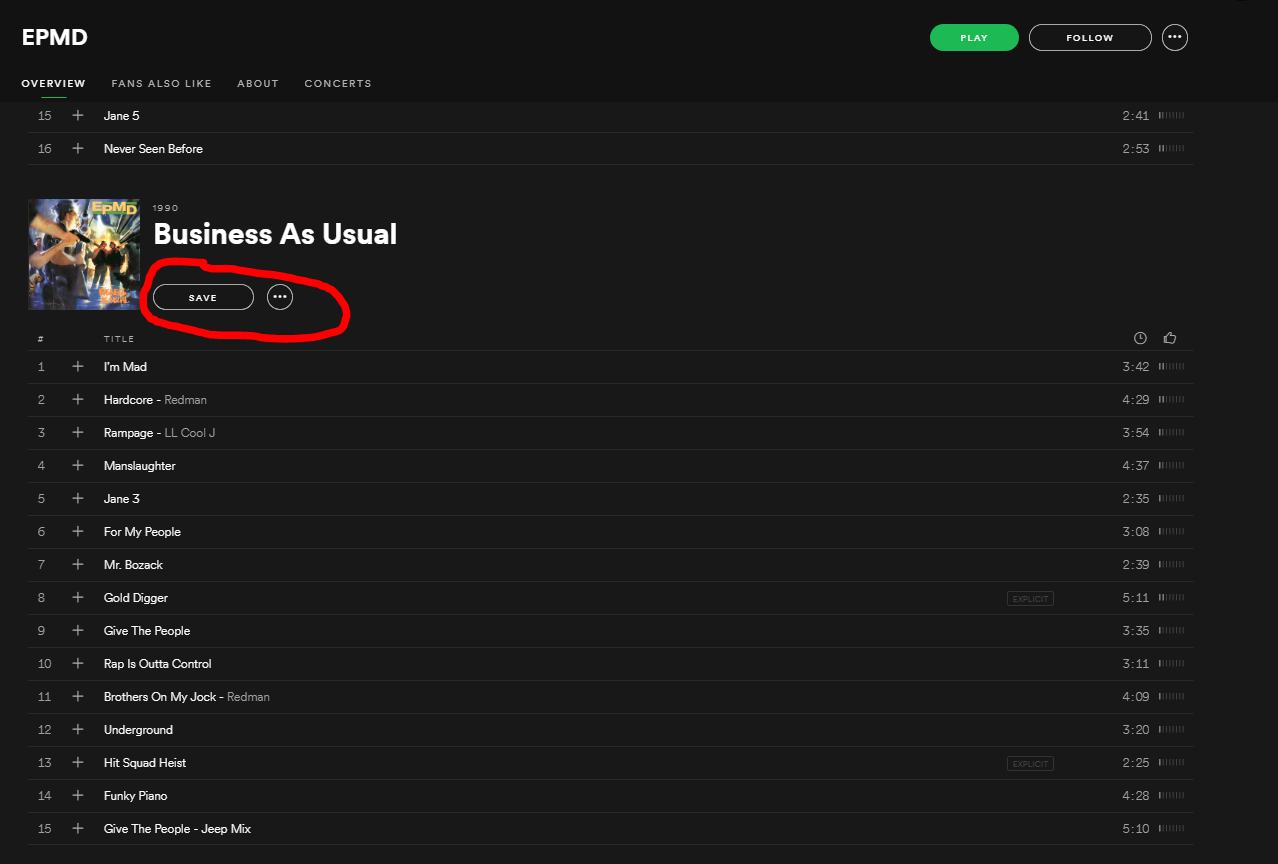 Artist page

Hey guys,
Just a kind reminder: Please vote for this issue in the top-right corner if you are experiencing it. We have more info from some of you, but we need more votes to escalate this 🙂
Hey everyone,
For anyone still experiencing this:
Please check out this thread https://community.spotify.com/t5/Ongoing-Issues/4-year-old-bug-still-not-resolved/idi-p/4518478
We are trying to solve this, thank you for your patience 🙂
If you require Votes to investigate an issue then it's probably going to fail and we're both wasting our time here. How many people use the forums? How many people check the Ongoing issues forums? How many people check all the different tags under Ongoing issues forum? Few at best.
Hey @AeroZ,
Don't worry, we are constantly following up on these threads and we can assure you we'll escalate this once we reach enough votes. I also linked this thread in an older one.

Spotify version: 1.0.88.353.g15c26ea1 But it occured more than 4 years back. It was a completely different Spotify version back then.
Device model and OS version: The issue is device independent.
How long you've been experiencing this issue for?: At least 4 years! Probably longer. Can't tell.
Here are some more details. Every developer will be able to understand the problem using them:
The Spotify songs database contains duplicates. These two Spotify URIs point to tho same album (from the consumers point of view)
spotify:album:3uocz31s0fmZ8SRP1rCM8e
spotify:album:7o8Pkxy7OmloQ1atWwlfBX
The first one was available first. I "saved" some of the album tracks. Then the second copy of the album appread and "hid" the first one. "Hid" means, searching for the album title will always return the second version of the album (which does not have the "saved" flags, I applied to the first version). But looking up the album in my "Library" will lead me to the first version of the album.
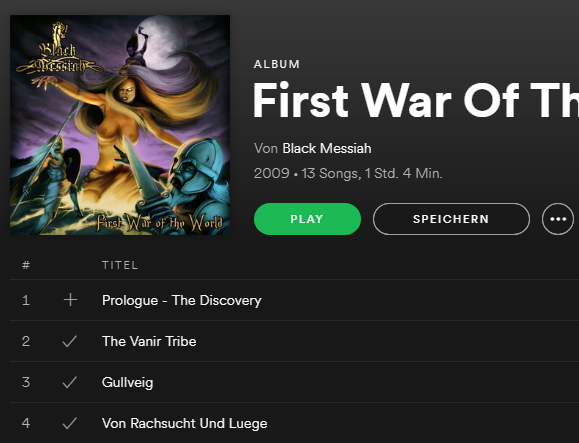
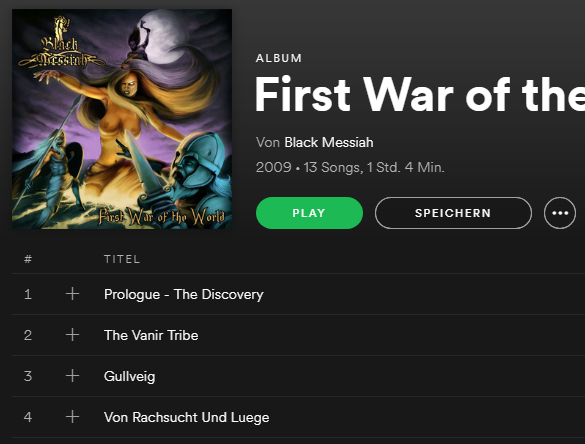
Spotify version: 1.0.88.353.g15c26ea1 But it occured more than 4 years back. It was a completely different Spotify version back then.
Device model and OS version: The issue is device independent.
How long you've been experiencing this issue for?: At least 4 years! Probably longer. Can't tell.
Here are some more details. Every developer will be able to understand the problem using them:
The Spotify songs database contains duplicates. These two Spotify URIs point to tho same album (from the consumers point of view)
spotify:album:3uocz31s0fmZ8SRP1rCM8e
spotify:album:7o8Pkxy7OmloQ1atWwlfBX
The first one was available first. I "saved" some of the album tracks. Then the second copy of the album appread and "hid" the first one. "Hid" means, searching for the album title will always return the second version of the album, which does not have the "saved" flags, I applied to the first version. But looking up the album in my "Library" will lead me to the first version of the album.
URI's from my example:
spotify:album:3Eqz2RcwydoERHGIyh7AWw
spotify:album:4InIe7DN4J5mIXYVlxDD7r
and another one:
spotify:album:4ZO8i8JRijLxRvWRRj0zL0
spotify:album:71HM1CMYWeZzws8pyiEn46
and another one:
spotify:album:1bzukuBkqeueF5HC5yHPxn
spotify:album:7p7kcsrdoJ8DKQIMouujcb
I'm sure there are more.
Hello everyone,
We were able to escalate the thread. Our teams are looking into this now and we will keep you posted.
Thanks for your patience!
@delaethank you for putting this issue in terms they can understand. Maybe it will finally be fixed. Kinda doubt it tho.

I've been experiencing this issue as well, for as long as I've had spotify. Please get this fixed asap.

Im still having this problem.
For someone who is meticulous and obsessive about their music collection, as most of us permium subscribers are, it is very annoying and disheartening. A lot of us spent years building our spotify collection. I started in 2012.
oh yeah another thing: End the song cap! makes saved songs unlimited! please.

You listen to music. You want to add a song to your playlist. If you already have the exact same song in your playlist a tip comes up that says if you want to add the duplicated song. That is good.
But there are often very much different versions of a song. So there are different version Songsname (radio edit), Songsname (disco edit), Songsname (vocal edit), and so on. It would be great if Spotify would warn you there too. So that there would comes a tip that says something like: There is a similar song called Songsname (djs edit) in your playlist….
Same is when you listen to music and the song is in your song catalogue you have in the mobil app the green hook. If the song is nott in your catalogue you have the white plus. So far so good. Now it would be great to add a new symbol that symbolizes if you have a song in your catalogue that is like the song you listen to.
Thank you for reading my idea.
If I can rewrite something for better understanding, please let me know and I will change it. English is not my mother tongue.

You mean like:
-Original
-Accoustic
-Remix
Good idea! Check out my suggestions too so we can make Spotify a better place. 🙂
Hey everyone,
Thanks for your patience!
As the saved version is not the same version saved under The Artist/Album, this is currently expected behavior. We'll make sure to let the right team know this is something you'd like to see different in the future.
Thanks again for your reports, we appreciate your feedback.

Interesting idea. Espacially now, when the tendency is to multiply the versions of a songs as original version, acoustic version, album version, edit version, stripped version and the different remixes...
You got my vote.

deleted.
@Daisy"As the saved version is not the same version saved under The Artist/Album, this is currently expected behavior."
What does that mean it's not the same version? For all intents and purposes, it is the same song that came out the same year on the same album... how is that not the same song?
Just today I experienced this incredibly annoying issue again.
I'm also having this issue. Would love to see a resolution soon.