[All Platforms] Consolidate duplicates

It would be nice if Spotify can recognize identical songs to avoid duplicates in your Liked songs and playlists.
This is pretty common for songs released first as a single then within an album.
For example, if you like the single one, the UI will not show the song as liked when you browse the album. And if you like the song in the album, you'll end up with a duplicated version in your library.
This also happens a lot for songs that you listen in Daily Mix or Discover weekly. If it's not the exact same song you have already liked before, the UI is inconsistent and you can save a duplicate.
Apparently, there is already an internal merge mechanism as the play counter is not split between the different versions of the songs. Maybe this can also be used to consolidate the UI.
Repost of https://community.spotify.com/t5/Closed-Ideas/Your-Music-Remove-Duplicated-Songs/idi-p/4546787 which didn't get enough kudos.
Comments

To that I would like to add that sometimes a song may be in more than one album. For example, the official release by the artist, a compilation album, or a remastered edition and so on. And it has happened to me, adding pretty much the exact same song to a playlist, only difference being the album. But the song is the same

@Daisy wrote:Hey everyone,
Thanks for your patience!
As the saved version is not the same version saved under The Artist/Album, this is currently expected behavior. We'll make sure to let the right team know this is something you'd like to see different in the future.
Thanks again for your reports, we appreciate your feedback.
Hello...

this is extemely annoying. Also because the library is fixed to maximum 10.000 songs (which is the most shitty thing ever - https://community.spotify.com/t5/Live-Ideas/Your-Music-Increase-maximum-Songs-allowed-in-Your-Music/idc-p/4577468). I've added some albums multiple times - because I though they weren't added. Now I have to find all the duplicates..

As others have said, they are the same version of the same song from the same album, so although the file may be labelled as different, it's this labelling that's incorrect.
I don't expect it to apply to e.g. the bonus version Vs normal version of an album, or the single Vs album version of a song. Those, I accept that they are not the same even if they do happen to be the same track, because sometimes the versions do vary.
However, when it's literally the same song, and the saved version is for some reason not visible on the artist page or search any more yet somehow still on Spotify, this just makes no sense at all.
Also, there's a limit on songs 😱 why?! When the limit is reached it then makes the feature, in essence, useless!! Why would you do this?!

>As the saved version is not the same version saved under The Artist/Album, this is currently expected behavior.
Of course it's expected behavior, given the system that Spotify uses. The point of this thread is that the system itself, where there are different versions of albums that are not "connected" in any intelligent way, leads to a terrible user experience where one might end up with many "versions" of the same album in their library, and where a user has to search through their library if they're ever unsure of whether they've already added an album or not. (Since they can't tell by looking at it, since they might have a different version!)
The fact that you're calling this "expected behavior", as if the problems we're experiencing were some sort of feature introduced on purpose by your dev team that we just turned out to have problems with, is embarrassingly defensive. It might not be a "bug", but it is, at the very least, a design problem on Spotify's part. There seem to me to be several obvious solutions.
1. Connect interchangeable versions under the hood, and just list both as "in your library" whenever you see them, when really, underneath, only one is.
2. Keep versions visually separate, but allow users to set whether to be prompted by Spotify when adding duplicate versions of albums to their library. (The prompt could give the option to "Replace", "Cancel", or "Add Both")
3. Connect different versions of the same albums via a "versions" tab on the album page itself, and allow a user to pick which one is included in their library (or multiple versions, if they really want.)
This last option would be amazing because sometimes different releases are different enough that a listener might actually prefer one or the other. Coldplay's "Parachutes" has two versions, and I much prefer one, but I lost it on spotify after trying to rebuild my library, and could only find the other. Same with Claude Bolling's "Suite for Flute and Jazz Piano".
Additionally, Spotify could add a feature where shuffled libraries that include different versions of the same song (on purpose) can ignore duplicates so that the flow of the shuffle isn't broken by a repeat.
I canceled my Spotify subscription since my last post in this thread (ended up using my own library and plex, which has worked ok), but maybe Spotify could retain itself some loyal customers by fixing obvious problems like this, especially since it seems like this problem will come up for the users that use Spotify most.
Cheers

Yes, there can be multiple versions and it's ludicrous to expect this to happen. AND It happens with the same version too!
Same issue in:
macOS High Sierra 10.13, macOS Mojave 10.14, Windows 10 Pro 1803, Windows 10 Pro 1809, Windows 10 Pro 1709, Windows 10 Pro 1703 and Windows 7 Service Pack 1, iOS 11 (All versions), iOS 12, iOS 12.1, Android 7.1.1 and Android 6.0.1
 Saved on my Songs folder
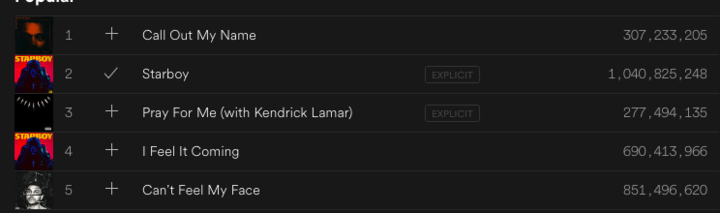 " />Appearing as not saved in artists page, and if I save it I'll get a duplicate of this song 😞
 Same here
 Again, same
I've got other cases as well and it has started a while ago like 5 versions or more, currently I'm on version 1.0.90 and 8.4.73 in all the mentioned platforms

What the **bleep** does it mean “it’s expected behaviour”?! Not a single song is supposed to be displayed as saved in the artist page? Well, then a good 80% of my library has unexpected behaviour because they’re usually shown as saved. I wanted to change that 20% or less of my library that had what I thought was a problem, but apparently it’s the other 80% who must be fixed then. 🤔

This is one of things about spotify that annoys me the most. One thing is different albums (eg . "remasterd 2018", "best of", etc), but some albums exist multiple times. Eg. spotify:track:1tsTrRqHpmOy8CzA385ezM and spotify:track:519ZkNbtI2B9pC6rhGhbs9 - same album/song, but it seems to published twice. I would _expect_ spotify to handle cases like that seamlessly!
Another example: spotify:album:7GfjVvF6WCVKZBe0UZli1v and spotify:album:0D7iYOSQ1pnJwjDyPdYfzk - in this case spotify even _knows_ that the albums are the same! It show a little menu bottom-right with "one more release" (but only on one of the albums.. (wth?)) - but the liked song is only marked in one of them.
Note that the open-source (mostly volunteer I assume) https://musicbrainz.org/ project solves this problem
- Spotify version
- 1.0.91.183.g259b84fa - Device model and OS version
- MacBook Pro macOS 10.13.6 - How long you've been experiencing this issue for?
- Can't really tell since when I'm having this issue. But there are some albums I added end of 2016 which are now a duplicates - Do you experience this with all songs, or just certain songs?
- Usually I'm saving the whole LP/EP, it is not happening for every album. But I reached the 10.000 songs limit and this is a real pain. Hope you can escallate this as well, because for some reasons this gets more or less ignored (with more than 400 pages of comments and over 8000 votes). There is no moderator commenting since ages. I'm talking about that one:
https://community.spotify.com/t5/Live-Ideas/Your-Music-Increase-maximum-Songs-allowed-in-Your-Music/idc-p/4591249#M163122

I had already posted suggested something similar, but it didn't gain enough traction. I upvoted and I hope we make it this time!

How is this issue not solved yet? I've been having the same problem since a couple of months and it is really annoying, it totally interferes with the user experience, making it not very pleasant, I thought this problem was recent, but it's been four years and somehow the Spotify team hasn't solved it yet?
Another example if the Spotify Team need more info:
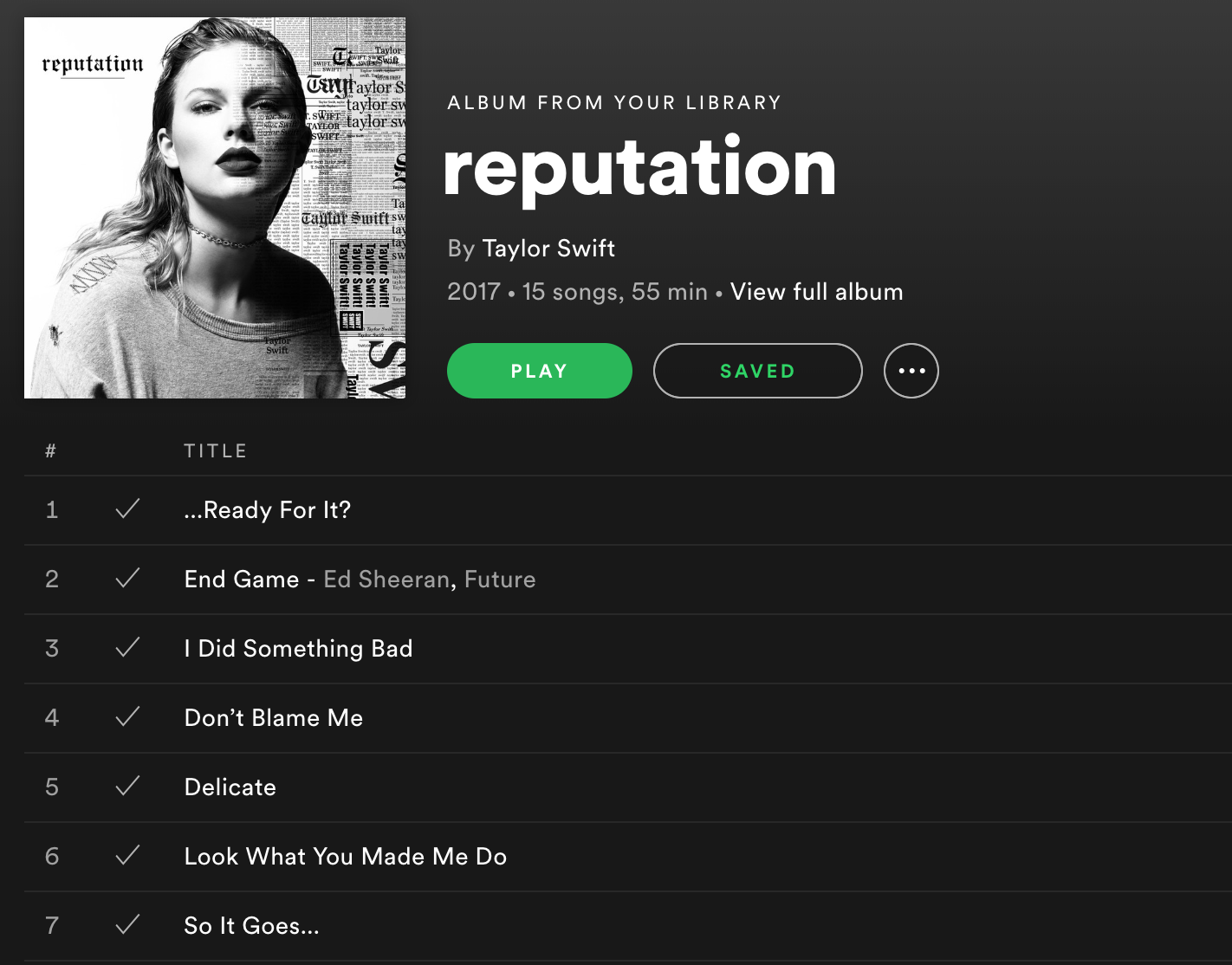
As you can see, this is a screenshot of the album "reputation" by Taylor Swift saved in my library
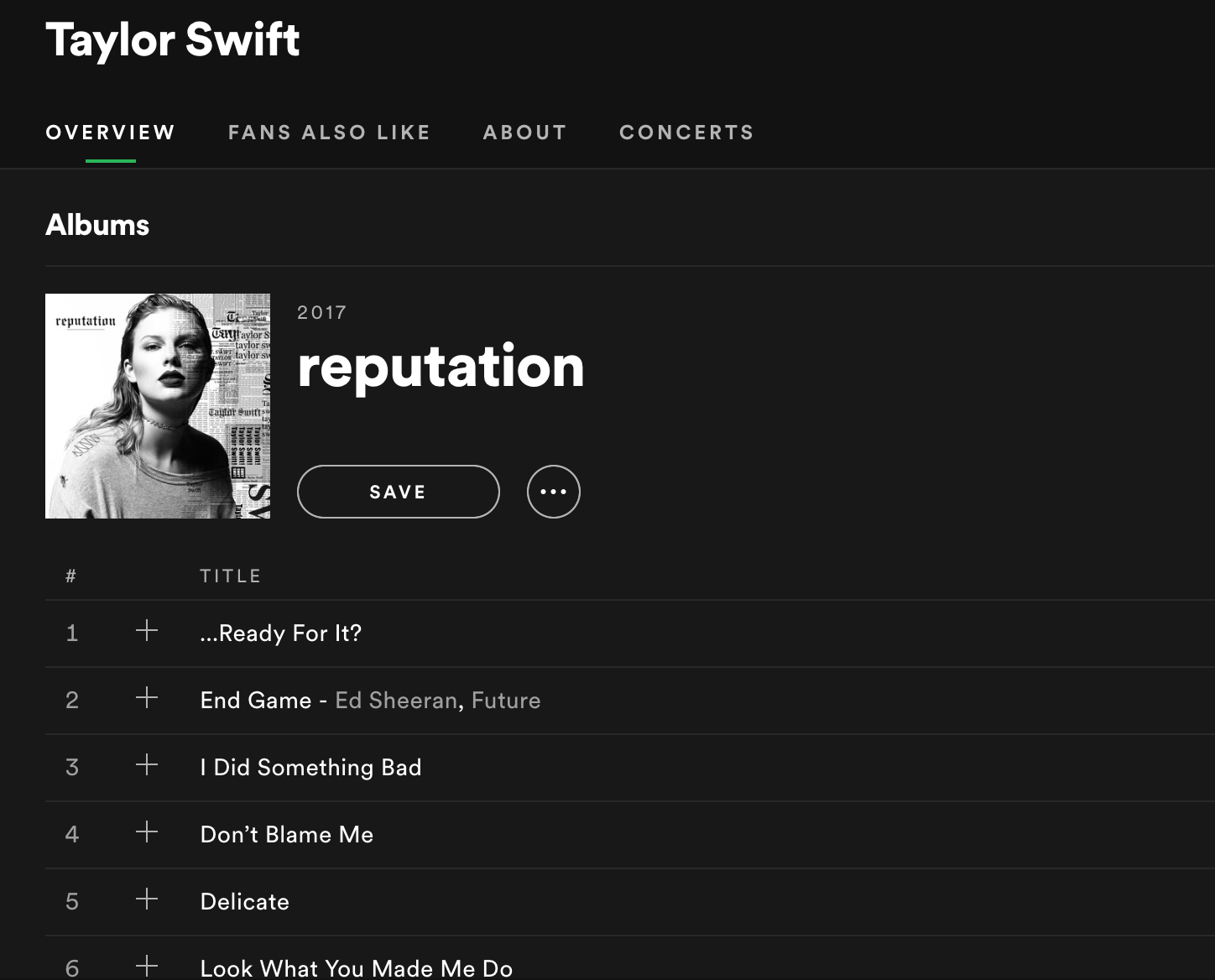
And this is a screenshot of the album in the artist page, which shows as not saved.
And for more info:
- Spotify version:
1.0.94.262.g3d5c231c - Device model and OS version:
Every device!!
- Huawei Mate SE, android version 8.0
- MacBook Pro mid-2015 macOS Mojave 10.14.1
- iPad mini 4 iOS 12.1.1. - How long you've been experiencing this issue for?
Several months now, but it seems the issue started long before - Do you experience this with all songs, or just certain songs?
Just certain songs/albums/artists
I really hope this design problem gets addressed.

It turns out I'm not the only one with such a problem.
I have a similar situation with the display of songs. I do not understand how this problem cannot be solved in years?

Been having this issue for months. Only workaround I've found is to remove the old one in your songs list and re-save the new one. This issue is almost 4 years old?! Seriously Spotify get some devs on this issue right now. It completely ruins the user experience. I'm sitting here thinking why isn't this album saved, I saved the ENTIRE album. I then search in my songs list and sure enough it is saved. This happens at least once a week if not more, it is driving me insane!! This might be YOUR expected behavior because you programmed it that way but obviously NO ONE likes this behavior and no one is expecting it.

Issue still exists in 2019 - I'm finding this with singles that are the exact same version (no different versions of the song released).
Will the status for this indefinitely remain "Not right now"?

When I save a cd from a band in my mobile app and than after, when I open my desktop app, this cd doesn't shows as saved. So if I click on save button, my playlist of the artist shows this cd duplicate. I believe that this is a bug and you should take a look at this.

How about individual songs not showing up under their album in albums anymore unless you like the whole album ?
Why has this since been changed ?

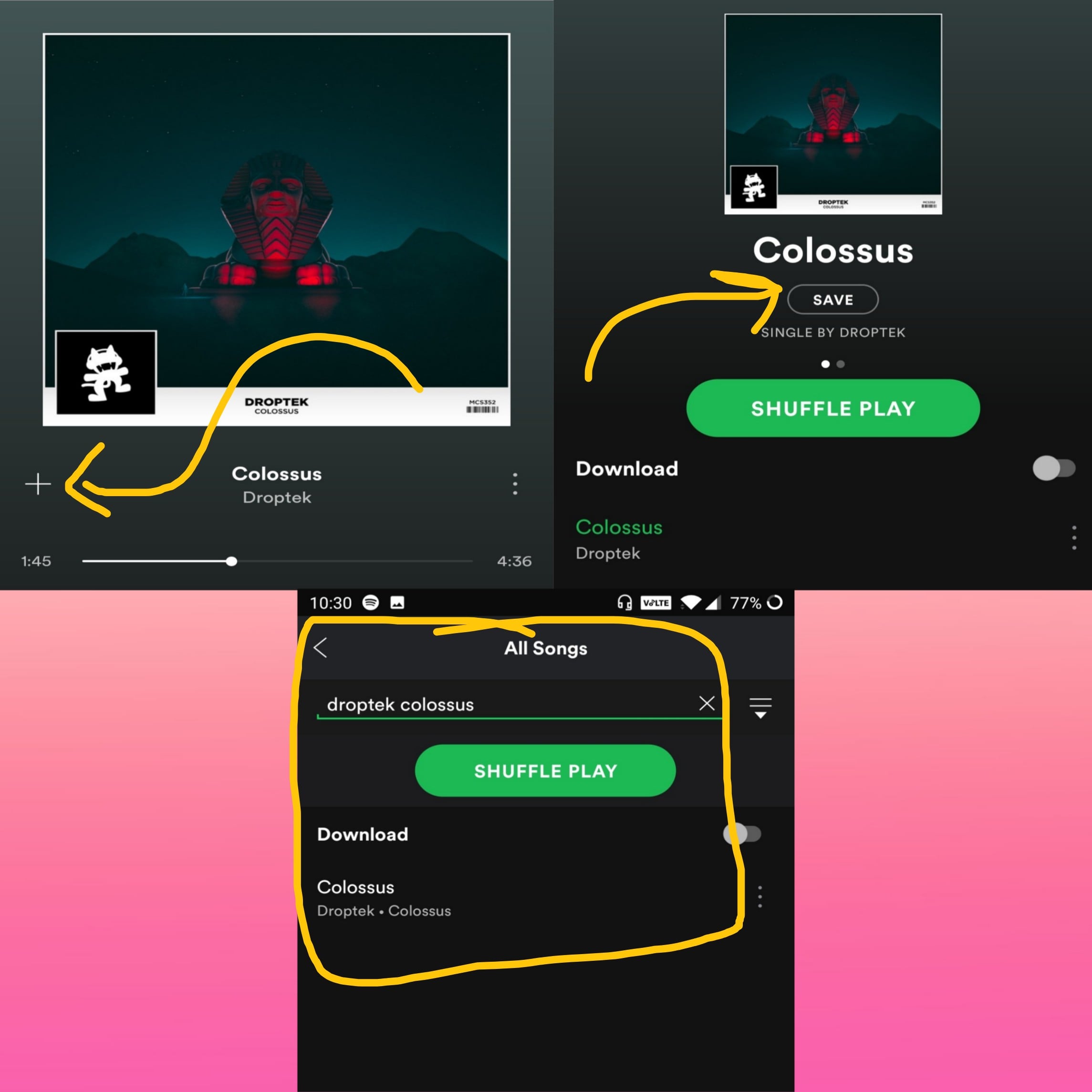 So it's literally 2019 and this issue still hasn't been fixed? Almost 3 years after this thread was made...

This would be invaluable as I've been a premium member since day one, and since I've been saving music for that long, I keep hitting their bogus 8,000 saved song library limit. I know there are a ton of duplicates saved in my library, and if I was able to review duplicate saves and select the one I'd like to keep, I could remove all the rest and free up space to save more music. I understand this isn't high on Spotify's list of priorities because in a capitalist society, that which doesn't move the revenue needle is not deemed important, but please think about your long time users.

I agree, this is very frustrating as I do not want duplicates in my library and as I have over 4000 songs I like to save space for songs I dont have . I have reported this so many times with a very basic reply saying the same thing
This needs sorting I dont want to ha e duplicates in my library it's such a basic function why do we not have it

Edit: This idea has been reposted here.
Updated on 2019-08-15
Hey!
Your idea was submitted a while ago and unfortunately didn't receive the amount of kudos needed to stay active in the ideas board (100 Kudos per year).
In order to keep the Ideas Exchange clearer I'll close this idea for now, but this doesn't mean Spotify rejected this idea.
If you think this is an idea which needs to be implemented, you're welcome to post it in a slightly different form 🙂
Have a nice day!
Luke

Theres already a web app for this if it helps. Heres the link, it works great.

Generally I like this idea. However, imho this should only work if the single and album version are really the same. Oftentimes, either the single or the album are some sort of extend version. Also, this recognition is heavily based on how Spotify stores identical songs.

Updated on 2019-09-26
Marked as new idea, which is a repost of this inactive idea.

Yeah, it happens to me all the time, then later I realize that I have twice the same track in the Playlist so would be nice if Spotify helps us with this.

This problem has existed for as long as I remeber on Spotify. It's especially annoying for artists such as Kanye West who can't seem to help themselves by constantly fiddling with their back-catalogue.
It's especially prominent since with the new 'like song' system replced the old 'save song' system. When a song comes up on a playlist and you think "hey, I like this song", you're supposed to hit that like button. But there is always that nagging voice in the back of your head which says "hey, didn't I like this song before?" You press the button anyway, and then go to your library to see if your suspicion was true... low and behold: two songs in your library that are exactly the same! (Same reason why merging singles with album versions has become even more needed recently.)
I'd have no problem with a system where the act of liking an album just creates a mirror to the artist page/latest version of that album, so that any changes to said album are automatically reflected in your library. Maybe with a small banner to indicate that this has occured like a previous poster suggested.

This would help a lot. I sometimes search through playlists for new songs. I will listen to whatever is not liked by me. A duplicate song gets added. Later I can sort my list by name and remove them again, but I stopped doing so, since it just leads to listening again to that song in another playlist. If you could create somethink like a link/relation to other identical songs, then you could show song properties from the one user liked/added properties. If both liked then does not matter, just show current song property, if none exist then properties from any linked identical song. Album/logo/picture does not matter for me, as long as same song.
if connection is too hard then try spotify at beginning middle and end of songs, or allow users to mark/connect with songs with exact same length.

Sometimes an album is "shadowed" by another album of the same name by the same artist in Spotify (different publishers).
I figured this out when I noticed that my liked songs were not visible when opening the Album from certain elements in the Spotify GUI.
This album: https://open.spotify.com/album/2b1FnOpvqqMY6B3mAA7R6r
Is shadowed by this album: https://open.spotify.com/album/3zTgTkuv0Qnd2MOREf2jXl
My liked songs (the hearts) only appear in the first album, which is only accessible by following the links in the "Liked songs" list. That album is not present under the artist page. I would of course prefer if the hearts were present in both albums.
This is far from the only example.
It would really good if you could execute that. It is really annoying if i have the same song twice or more in my playlist
Let's make us Spotify better 🙂