Proxy not working since 1.0.83.318

Plan
Premium
Country
Germany
Device
Lenovo Thinkpad T540p
Operating System
Windows 10
My Question or Issue
Update 1.0.83.318 broke the proxy function completely (on Windows 10).
I have set the proxy properly, tried a reinstall, cleared and re-entered the proxy.
I have to rely on a proxy and can't use spotify since the update.
There is a similar thread regarding the MacOS client in this forum: https://community.spotify.com/t5/Desktop-Mac/App-always-offline-even-with-correct-proxy-settings/m-p/4513436#M533233
Please fix this asap.
Accepted answers
All comments

Older working version Spotify 1.0.82.447 can be found on FileHippo
https://filehippo.com/download_spotify/download/b8b4699b53059276aa931dc5516aeb58/

I'm on Mac and am having the same issue.
I'm also the admin of our proxy and tried allowing port tcp/4070 from the proxy to the Internet. No dice, even after restarting the client.
I did notice that against those weird IP-addresses (104.199.x.y), the ports tcp/80 and tcp/443 were also tried, but never sent to the request to the proxy.
I might try more tomorrow.
Edit: heh, just updated from 1.0.42.something to 1.0.84.344.gfc674f6f, same issue.
Yesterday I found out that 1.0.85 was released, but our problem is still not fixed 😞

The new client app on windows and osx now needs to talk to port 4070 as someone previously mentioned. If it can't connect to port 4070 it says that the app is offline.
If you are behind a proxy server, then the proxy server needs to be able to connect to port 4070 via SSL. By default only port 443 and 563 are in the allowed list for SSL, at least for Squid.
To add port 4070 to squid you need to add it to this line:
acl SSL_ports port 443 563 4070
If you are running pfsense with squid it's in:
Services=>Squid Proxy Server=>ACLs=>Squid Allowed ports=>ACL SSLPorts
I hope this helps someone as a workaround.
But it would be better if spotify could fix it in the first place by using the standard SSL port 443.

1.0.86 was released, still not fixed...

thanx this fixed my issue i was openning port on safe ports but i had to open the ssl port now i can listen via the app

There is only one way left to go for me and a bunch of my colleagues. We quit Spotify and move to iTunes. This bug is here since weeks now. No fix and the officials just suggest bullsh*t. Bye. That is enough. I am a long time customer and this is not the first time such things happend.

1.0.87 released
... still not fixed

Still using an old version of spotify here. Wondering what I did right to make sure it doesn't auto-update...

Thank you togenshi
Subscribed!

Same problem here since weeks.
Still with new Client 1.0.88.353.g15c26ea1 on Mac

I have an old version, but have to keep reinstalling it every time. If you understand what you did to stop from autoupdating I'll be glad to hear about it.

Edit2: It just updated to 1.0.88.353 and it is still working
Edit: My bad, actually I still have version 1.0.68.407 and am certainly not going to update it 😉
Hey guys I do have the exact same problem and it's not been working since months. However today I checked again and it did not seem to work either at first.
I am using CNTLM proxy and did set http as proxytype in the spotify client using localhost as the server address and the CNTLMN port without username and password. After logging in the client was in offline mode as per usual.
But after a few minutes suddenly the app found a connection. Not sure why it took so long as I definitely had internet (web app was working) connection. Maybe the spotify client just takes an awful long time to actually authorize through CNTLMN.
It's been working for an hour now 🙂
fyi: Depending on you company settings you might need admin rights to actually start the CNTLMN service, just open your task manager and check under services for "cntlmn" and status should be running, however you probably need admin rights to restart the service if it stopped

3 months later... still using 1.0.82.447.g975ad224 at the company... this really sucks. Why do we have to open a "weird" port in our firewall just to use the newest Spotify? Why don't you give us the possibility to switch to the standard port with a small radio button somewhere inside the settings?

I know right... When will we finally get back the old Ports? I mean the ports still work because we can still use old Spotify versions. why not just switching back to the old ports? I have to reinstall spotify every day I go to work... Because none of the "Anti-Update" methods seem to work for me.
I am not sure if you guys are aware of what ports actually are and how they work 😕
The proxy settings are definitely working in the latest spotify version. It is up to you to set them up properly and provide correct authentication to your company proxy. Which can be quite hard if you have no idea of what I'm talking about. But there's loads of guide in the internet 😉
Sorry to say this, but you are badly mistaken.
Spotify introduced a non-standard port in version 1.0.83, which is not allowed by default in a standard corporate firewall / proxy.
This is the "only" technical issue besides the fact that Spotify does not communicate such a change at all.
I could allow that non-standard port in my corporate environment but I am not willing to, since it is inherently unnecessary and generally speaking bad practice to open a port for every application. 443 should be more than enough.
It seem like you are talking about something comletely different than the topic of this thread which is labeled "proxy not working".
What I am talking about is people that have to use the corporate proxy settings of their company anyway, it doesn't matter which port spotify is using as long as you cannot bypass the proxy.
All I'm stating is that the proxy option is actually working. I really don't care about the spotify standard port as long as I get past my corporate proxy. If you do not have a corporate proxy whith authentification then you could still use a local proxy fowarding to your open port. But I guess that a different problem.
As this thread was created by me, I know that I am talking about this exact problem.
First, there was update 1.0.83 which seemed to have broken proxy functionality for me and lots of other users, which is why I created this thread.
Later on, somebody in this thread discovered, that Spotify now requires a non-standard port to work via proxy.
The matter of Spotify choosing a different non-standard port is a huge issue, because it is usually blocked by default (especially using the CONNECT method).

Today, i've updated my windows client to version 1.0.90.268.ga8a0ceb4, and seems, its working just fine through proxy..
Great! I will check it on Wednesday when I am back at the office.
Woh. I'll check tommorow. I am exited. Would be about time...

Any reason it has to use 4070
seems like this has been an issue for quite a while.
can't use my spotify at work . ssl proxy and work blocks non standard ports.
Why is it so hard for spotify to go by standards
False alarm!
Still not working...
I doubt we will get it working. This can't be a bug, they have probably changed some standard.
If this was a bug, then it would be fixed a long time ago. A company this size cannot ignore a bug of this magnitude.
Second that. Not working.
Oh man...
Sorry then, maybe our policy has been changed about the ports... Still working for me.
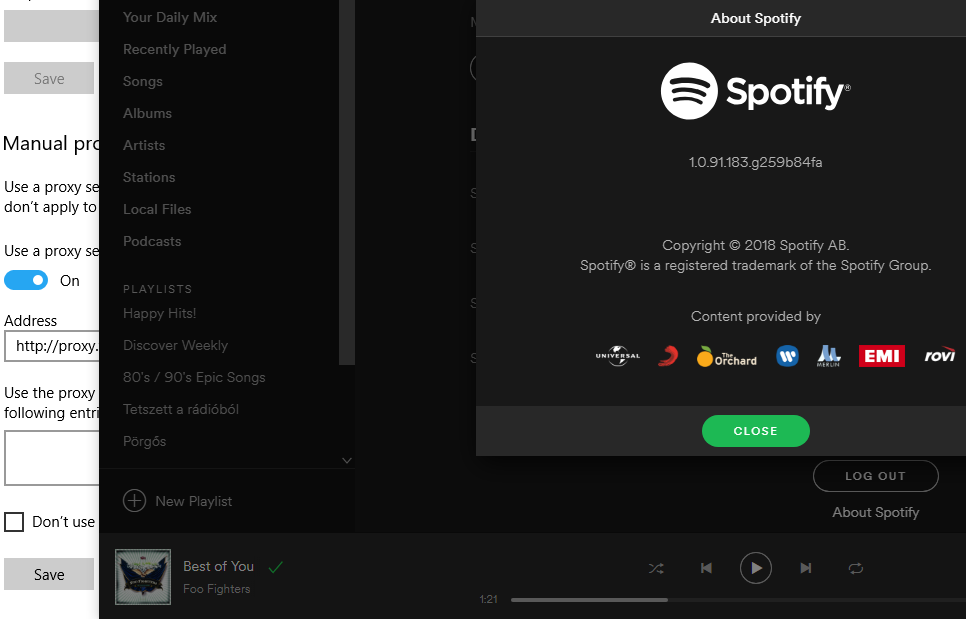
@Spotify Team:
Could you please comment on this issue?
I doubt that this thread has never been seen by any Spotify Developer/Responsible.

Post removed - post testing
I just received a reply from an actual human being: