Spotify can't play this right now. Why not?

Plan
Premium
Country
United States of America
Device
Desktop Computer
Operating System
Windows 8.1
My Question or Issue
I'm trying to listen to a song, it's actually a rendition of a song made by another artist. I've listened to it before, but I can't listen to it now. It says; 'Spotify can't play this right now. If you have the file on your computer you can import it.'
I don't have the file on my computer, but would still like to listen to it. Why is this happening? I'd love to share the URL, however I can't access it at all.
The title is, "Or Nah Rendition" by SoMo
Accepted answers
All comments

Same here. I used to be able to solve the problem, but things changed, for about 6 months, when I accidentally succeed in solving the problem, it starts all over again within a few days or weeks. Extremely annoying by now..

Try favoriting the songs that won't work then hitting play. It worked for me, even after I unfavourited them.
Thanks, but doesn't work for me.

The solution that worked for me is to reconnect my hifi-system that was set to default audio output for spotify. Or I think you can just reset the audio configuration by default. 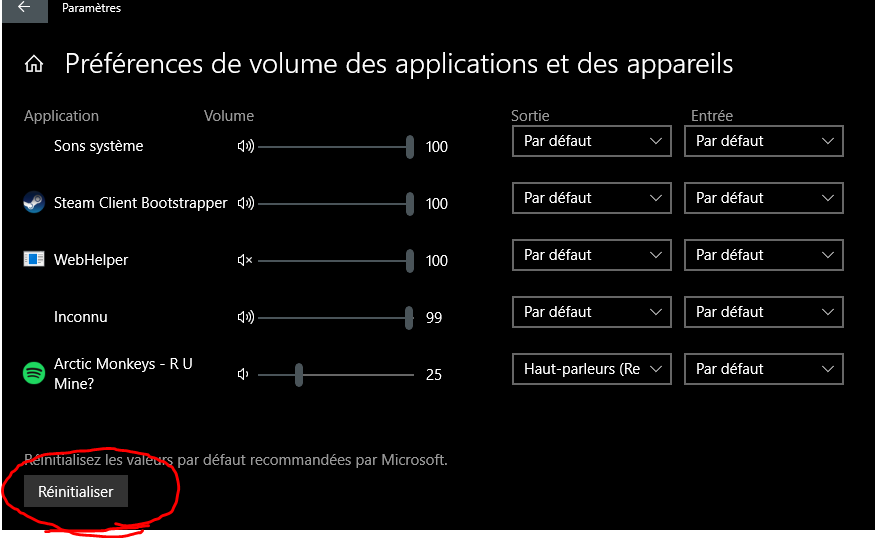

I had this exact same issue, I got in touch with spotifys live support and it turned out to be that my account was having connection issues with my device, they were able to fix it on their end within minutes

My G.

I had this problem on Windows 10. It was because I was using Sibelius music-scoring program with the Sibelius Audio Engine (software setting) set to ASIO4 All instead of set to Primary Sound Driver (the Sibelius default). Switching Sibelius back to the default fixed the problem. This suggests to me that anyone getting the 'Spotify can't play this right now', message should look for other programs that might be diverting audio signals in software.

This was exactly my issue. I use Voice Meter Banana for mixing. I happened to buy a set of Sony BT ANC headphones. Whenever I connect them to my PC, Windows changes my default playback and default capture devices away from VMB and this seems to upset Spotify.
I would suggest that people check their system audio device defaults.

Songs play fine on my Windows 10 computer, but I get this message on Win 8.1. Odd

when I do that and press local files its just a playlist

I went to:
Library/Application Support/Spotify
Then deleted everything in that Spotify folder and restarted the Spotify app. It made me sign back in but everything played and worked!
From what I've read the issue can be songs that are saved locally, either the file is corrupted or not communicating with the app.
PS: To get to the hidden library where these files are located (on Mac) click your desktop then click "GO" in the top menu. Once it drops down, hold the option/alt key and you will see Library appear, then navigate to the file path Library/Application Support/Spotify.
Hope this helps some people!
--
Excellent!
For Mac users, this is the correct solution.
Actually, there are 3 libraries in macOS. System, Main and User Libraries. You are speaking of the User library and that is the correct path.
Thanks!

Try to run the windows audio troubleshooter. Right-Click Audio tray > Troubleshoot sound problems. For me my problem was "Audio Service crashed".
Hope this helps! 🙂
- LoganOMG
a.k.a.
- LoganTCP

Same problem all of my music for two days. Any thoughts?

Im having the same problem on Windows 10 on my Dell XPS 15 9570 laptop

I managed to half-fix the problem - my spotify destkop app will allow to play music only if I am simultainously logged into spotify web (https://open.spotify.com) in the browser?
Doesent work for me with local files, have 3 different soundcards, used them all... (PC)
So far:
New Codecs
Mediaplayer
QuickTime
Realtek reinstall
Restart
Spotify Reinstall
Spotify Switch (Store / Web)
Deleting Local Files
Deleting Reg Keys
Downloading Everything
Hardware ac.
Offline mode
Speaker Switch
...
None of this worked... 🙂
So im getting really frustrated... Best thing is that i can play those files on my phone which doesent have them "Local"... PC does but "Spotify can't play this right now" cos whatever reason....