Radio feature missing or not working properly

Plan
Premium
Country
USA
Device
Computer
Operating System
Win 10
My Question or Issue
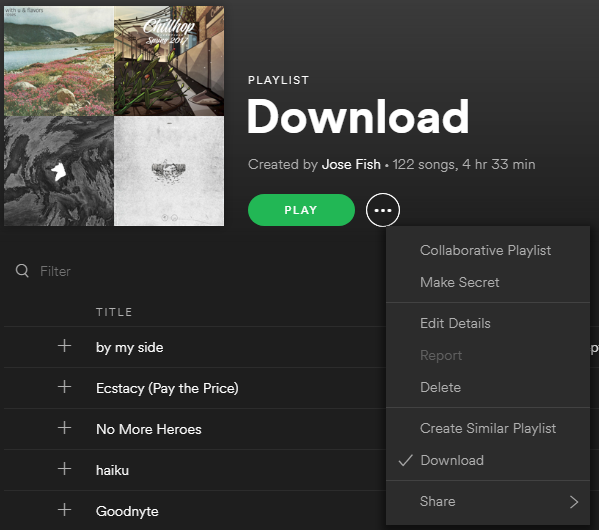
I like to use the playlist radio feature to find new songs for my playlist, but recently I can't find the option anymore on my computer. I used to just press the ellipses to the right of the 'play/pause' button on the playlist, then I would press the 'go to playlist radio' button. But now I don't see that option, while I do still it on my android phone. Where is it?

Accepted answers
All comments

All the missing features are working fine on Linux (Desktop application) :
Version: 1.0.94.262.g3d5c231c

For those that have the issue of having limits on your radio, on Page 3 in this thread, Sebasty found a temporary workaround "It's not possible to go to Playlist Radio anymore when rightclicking/ using the three dot menu on any playlist. Also, artist radio looks like a regular playlist with ~50 songs.
All radio stations look functional when I use the 'Create New Station' button under the Radio menu, searching for a playlist/artist etc."
@thefish11099 wrote:For those that have the issue of having limits on your radio, on Page 3 in this thread, Sebasty found a temporary workaround "It's not possible to go to Playlist Radio anymore when rightclicking/ using the three dot menu on any playlist. Also, artist radio looks like a regular playlist with ~50 songs.
All radio stations look functional when I use the 'Create New Station' button under the Radio menu, searching for a playlist/artist etc."
I am not seeing that !
I have only my old radios, but can't create new one. (Android Version 8.4.84.874)

After you click on it, on the right will be a search bar where you can search for your playlist (song or artist) like I did and you can click on it.
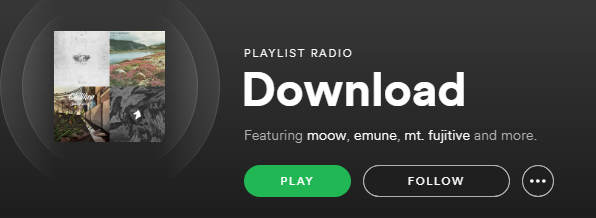
Now you have your radio based on whatever playlist, artist, or song you want.
It's the exact same thing on the app, except for instead of doing this with a tab called "Radio" like I showed here, you do it with "Stations" and it'll give you a radio the exact same way.
Go to "Your Library" (far bottom right icon) > Stations > Create New Station > Search whatever > Click > Now you have your radio station for whatever you want
@MohamedB wrote:I am not seeing that !
I have only my old radios, but can't create new one. (Android Version 8.4.84.874)
Yees I confirme this work on Desktop version, but not on the app (Android).
So first I need to create a new radio on PC, start listening, and then contunie on the android app.
@thefish11099 wrote:
Try to create a radio off of a playlist? Can't do that.
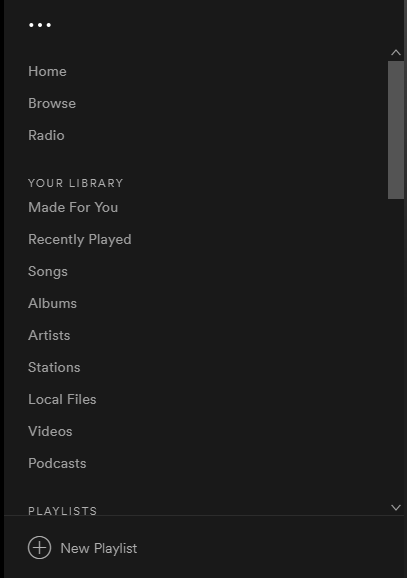
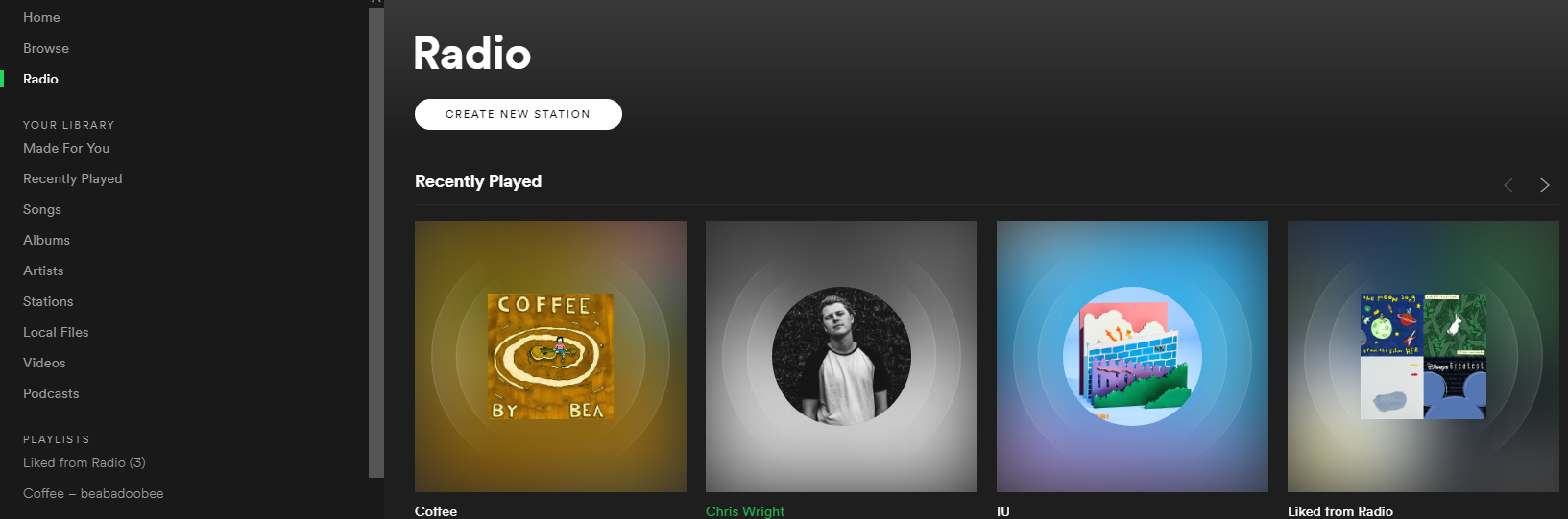
Instead, on the left side of the app, scroll up to "Radio" and click on it
It'll bring you to a page with all of your radios and at the top right, it'll have all the radios you've recently made, recommended ones, and the option to "CREATE NEW STATION". Click on it
After you click on it, on the right will be a search bar where you can search for your playlist (song or artist) like I did and you can click on it.
Now you have your radio based on whatever playlist, artist, or song you want.
It's the exact same thing on the app, except for instead of doing this with a tab called "Radio" like I showed here, you do it with "Stations" and it'll give you a radio the exact same way.
Go to "Your Library" (far bottom right icon) > Stations > Create New Station > Search whatever > Click > Now you have your radio station for whatever you want
@MohamedB wrote:I am not seeing that !
I have only my old radios, but can't create new one. (Android Version 8.4.84.874)

- Device/OS.
- MacBook Pro 2012, macOS 10.14 (Mohave)
- Spotify version.
- 1.0.95.289.g342899da
- Which Radio feature is missing/not working for you.
- Starting Radio from a playlist; I can start Radio from an artist, song or album.
- Steps on how you get to the missing feature.
- Right-click ([ctrl]+click) on a playlist - the menu doesn't provide the option to start Radio.

Hi all,
Thanks for your patience.
We've checked it out, and the reason why you're currently missing some features is explained here. We're always testing things in order to improve the overall experience on Spotify.
You should still be able to start a Radio station based on other content, for example an Artist or Album. The music will keep on playing if you have Autoplay enabled.
Be sure to leave any feedback about changes in the Ideas section.
Thanks and have a nice day.

"Not an issue"?!
Thank you for removing a very useful feature, thereby making it worse, while having the nerve to file it as improvement.
A playlist is a carefully collected list of musical preferences to suit a personal taste and/or situation. Using Song/Album/Artist does not provide the same. A Radio based on Playlist is a much more powerful tool for tailoring the musical experience than any other option in Spotify.
Thank you for your arrogance. The new "Search" functionality is not an improvement. I guess I'll use more Netflix Downloads and less Spotify when I need variation while traveling from now on.
R.I.P. Playlist Radio. You're sorely missed.
It was THE feature that made many users pass to premium !
Probably. You should vote for this:

So basically your developers removed a well-used feature (or at least made it more difficult to find) for what benefit? The only thing it appears to have done is disillusion a lot of listeners. This was very useful and allowed us to find new music that was similar to what we had already saved. Radio based on an artist or album is nowhere near as useful because it only provides the radio algorithm with a very small example of what you actually want to hear. In my experience this almost always results in me downvoting most of the suggested songs.
You say that you're "always testing things in order to improve the overall experience on Spotify" but this has only made my, and I'm guessing many others', experience worse. I've been really pleased with my Premium subscription up until this point, but when features are removed without any apparent reasoning or evidence that they are underused, people are going to be driven away.
Let's make sure that this feature is reinstated.

Raised idea here https://community.spotify.com/t5/Idea-Submissions/All-Platforms-Radio-Bring-back-Playlist-Radio-context-menu/idc-p/4637744
Please upvote.

To say the truth the Playlistradio was one of the greatest features in spotify. so now that is gone, i think about canceling my Premium membership. Apart from this the Android App is getting worse and worse. sorting and Filterung Playlists is now more complicated and Performance is getting lower and lower. what is the matter with spotify? do they Not need their premium customers any more? I think i'll Change to deezer.

Playlist radio is a feature that i use extensively. Removing it IS an issue for me! Bring it back.

@joejoinerr wrote: This was very useful and allowed us to find new music that was similar to what we had already saved. Radio based on an artist or album is nowhere near as useful because it only provides the radio algorithm with a very small example of what you actually want to hear.
This. Some playlists are short or just boring after the 4th listening. Playlist radio kept the music similar and I could keep it on all day.

This was the only radio feature I used. I also don't know why you would remove a feature that worked really well and didn't, as far as I know, affect any other function of the program negatively.
And as others already said, it feels like features come and go all the time without any warning and there's no consistency.

return the old radio!

One of the main ways I used Spotify was to seed a playlist with a few songs and then make a 'playlist radio' station out of it.
It is a really bad decision to remove this functionality from Spotify.
It is really annoying when a multi-billion dollar company removes functionality from a product, when that functionality is one of the primary reasons I use that product.

These new changes are have been awful. My account was briefly hacked several months ago. I didn't understand at first what was happening when I'd be playing music to find it repeatedly being interrupted by latin cumbia music which is a genre I've never played in any form whatsoever on my account. By the time I realized this was happening due to my account being compromised, I logged out of all computers, changed password, deleted all the history, playlists, etc. that the hacker created so that it would no longer ruin my daily mixes and discover weekly. I've been a paying Spotify subscriber for YEARS, but in the short amount of time that my account was hacked, it seems that I cannot get spotify back to recognizing MY music taste. 5 out of 6 of my daily mixes continue to serve music I can't stand ... Discover Weekly still only gives me the hacked Latin music I have never, and would never listen to. How is it that I have literally thousands of artists and songs saved in my library, I have tons of playliusts, and YEARS of listenng history that spotify's algorithms should base my music tastes around, yet none of that is enough to erase the stench the hacker left behind? I have spent countless hours "banning" songs in every "made for you" list that comes up, and I used radio to help re-train spotify on my music tastes by using the like/dislike/heart/block features. I also went into a "new" feature to help Spotify improve it's music selection by rating about 1000 songs that came up on the survey, banning every song "hacker" song hoping this would have some impact.... the help menus keep saying to just keep doing this, and playing music and eventually spotify will start going back to my music preferences, but its been months and my account is still contaminated with cumbia. Since my "made for you" playlists have been corrupted, I relied on radio more and more, and now Spotify is ruining radio too. After years of being a subscriber, this is about enough to make me stop paying for this... it's become useless and has cost me so much time trying to "train" the system that it's just not worth it if I can't even use the radio feature anymore.... the**bleep**-stain I couldn't delete was a couple radio stations the hacker made. Not only can't I delete them because that feature is gone, there is no longer a way to make playlist radio and some of the radio stations I actually liked are missing... but there are so many shitty ones I can't get rid of. wth Spotify? How on earth do you think that these are improvements? You've completely ruined my user experience in so many ways!

Hi @Guido, haven't tested in the desktop, but in android app is a stupid change, it does not improve the APP in any way, it just removes functionality.
My use case was to choose 10 songs or so and create a new playlist, then play the radio for that playlist and while listening to songs keep adding them to the playlist. After that from time to time I listened to the "radio of the playlist" to keep growing it, right now I just can't do this.
So just give us this functionality back, I don't see any drawback on having the functionality.
By the way, doing changes so freely and then just leaving the option for the users to "open new ideas" to bring back basic functionality is VERY ANNOYING.

Who are these "geniuses" who decided to remove "playlist radio" feature? This is even more stupid thing to do than removing "Autoplay" feature (which is back now, thanks for that!). I dont want "Artist radio" and "Song Radio" - Apple Music has it too! I want exactly "Playlist Radio" feature!!! Please bring it back!

There is 0 point to paying for spotify premium if it doesnt have the "playlist radio" feature. I'm better off going back to Pandora at this point. Please add this feature back or I will be forced to drop my renewal. I'm sure theres quite a bit of folks who feel the same way.

Removing playlist radio is unforgivable! The stations I've created earlier doesn't work as expected either. When I play my beloved playlist stations, all sorts of **bleep** music is being played that's got nothing to do with the content of the playlist. And bleeping me for sayin c-r-a-p is really lame and Apple behaviour! Get your act together! This is almost as bad as removing the playlists! (Dare I say bad without being bleeped?)
I wouldn't be surprised if the playlist radio is considered to be a "real" radio station and therefore should broadcasting fees etc. be paid, according to the radio organisations? I vaguely remember a similar discussion a few years ago...

I just renewed my membership with Spotify the other day for the first time in years. I mostly use it on my Android phone. I was only able to create a radio station from one of the playlists I made a few days now thru the search bar. Unfortunately when I try to do it for my other playlists I can't find the feature for it or in the search bar. That's just ridiculous; that feature needs to return ASAP. Its not fair that a playlist can be made from songs or albums but not a playlist.

Please please please undo this change! Creating a radio station from a playlist is essential to my spotify experence.

That's a terrible change. I hate it. This was my main way of discovering new music and lesser-known artists. Likely, this is just your attempt to appease corporate music over smaller artists.

I really don't understand why this feature has been removed from the popup menu on playlist page. On PC we can use the workaround of going to Radio and then searching for the playlist, so the functionality is all there, just hidden away and much harder to use, and not available at all on Android.
Sometimes you make a reasonable argument that you remove a little-used feature because these cost money to maintain, but given that the feature is still there, albeit hidden away, this argument doesn't wash. Have voted for: https://community.spotify.com/t5/Live-Ideas/All-Platforms-Radio-Bring-back-Playlist-Radio-context-menu/idi-p/4637742. Please bring it back!

Changing this to "not an issue" is a great way of demonstrating the complete lack of respect Spotify has for its users.
You've removed my favouite feature and want to goad me further by calling it an improvement. **bleep** you.

What is the deal with this dissapearing and then being marked as not an issue?
Please return this functionality thx
Hey folks,
We just wanted to let you know that we have rolled out a new Radio experience to all users.
To find out more about how the new Radio works, head on over to this thread, where we've given a breakdown of the feature, as well as including a link for leaving any feedback that you might have about the feature.
Thanks!