"We can't play this until you allow this track in the Spotify phone app" issue.

Plan
Free
Country
America
Device
Inspiron 15 7000 Gaming
Operating System
Windows 10
My Question or Issue
So, I click play on the song, it doesn't play and that message shows up at the top in a blue box. Before, the song was greyed out. Now I get this message. It isn't greyed out now.
Accepted answers

Oh man this has been bugging me for ages. I finally figured out why this didn't work for me and why none of the 'fixes' worked.
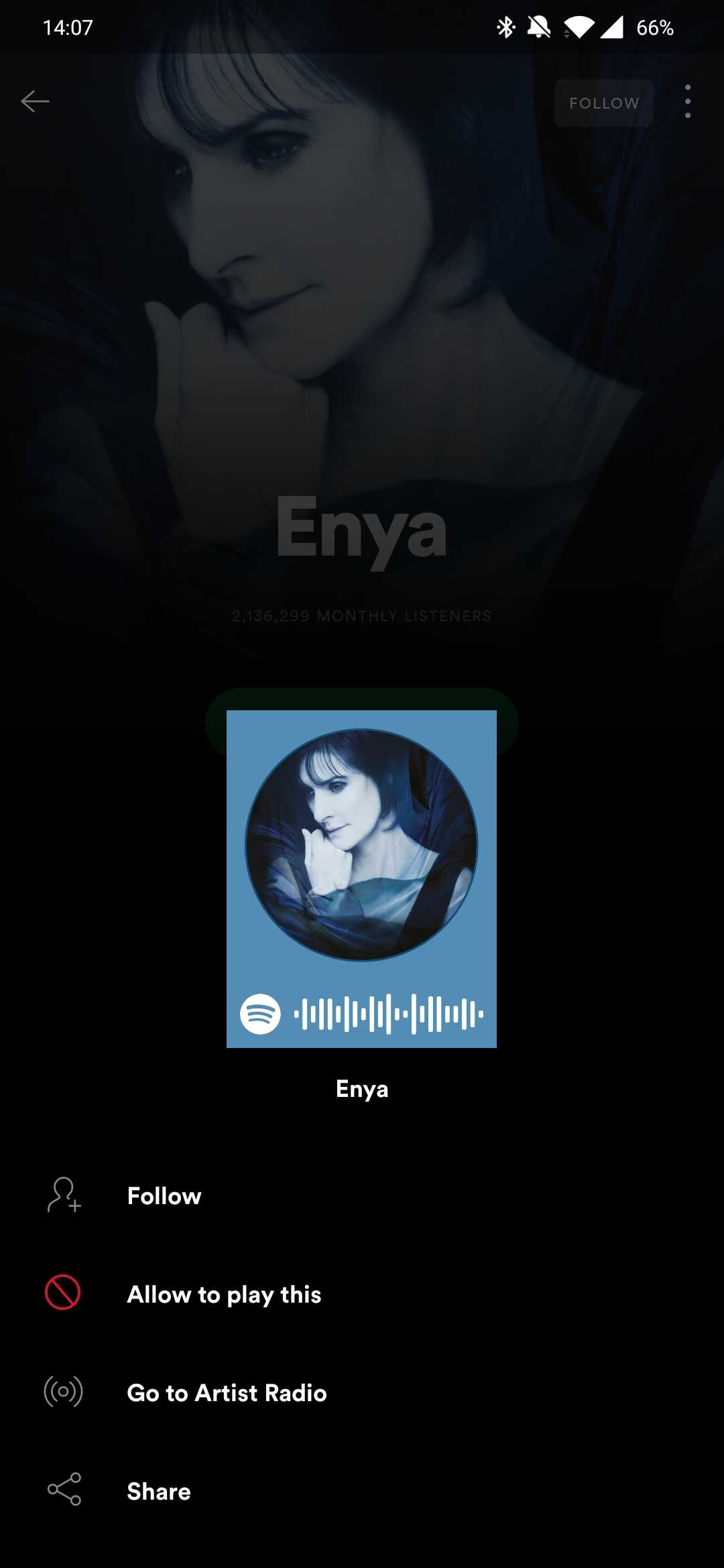
I also didn't see any 'allow to play this' option on any of the songs i couldnt play. I figured out that this is due to the entire artist somehow being blocked from playing.
If you search for your artist and then show the artist page, in the top right you again have the three dots to indicate options. Here I finally found this weird option that shouldn't be a feature anyway.
Hope this helps anyone out there!
All comments

Hey @Blacknin833 , thanks for writing!
Is this song a local file? Does it happen with other songs as well?
Do you get this message when you try to play it on your phone?
Okay, so I found it on my phone it had the red negative thingy next to it. I pressed it and now I can play it. That's the hide song button? I 100% am absolutely sure I didn't press it. I love this song. I'm just puzzled on how that could happen. I'm happy I can listen to it now. Thanks for trying, sorry for wasting your time.
-Me, Blacknin833

Where do you find the red minus on your phone?
Hey @kevinsimpson_,
In your phone, choose a playlist created by you, then tap the three dotted icon on the top right corner and then choose Edit.
You'll see the red minus icons on the left side of the songs.
Let me know if you need further help!

Hi!
I'm having the same issue where the message pops up in a blue box on top but I can't find a red negative sign anywhere. The only one I can find is the delete sign when I edit my playlist but that just deletes the song from my playlist, it doesn't play the actual song.
Hey @starbursts523, thanks for writing.
What's your device and OS?
Have you tried reinstalling the app?

I don't understand why every site I look at claims "solved" but I cannot accomplish what others are. There is no red dash, only a delete song icon. Swiping right does not like the song or even do anything at all.
Android, latest OS, LG V30 smarphone and, of course, the PC won't play the song which is how this all started in the first place.
I have removed all traces of the app, rebooted the phone, hard reset the phone, and then reinstalled but nothing has changed. I'm still having the issue.

Maybe a screen capture? Because, NO, we don't find the red "whatever" that make the song unplayable

For all of those who couldn't find the red sign thing when they went to edit their playlist.
I also couldn't find anything like they described so idk what that's about.
Instead, you have to just search your song in the search tab. Tap the correct one, and then tap the three dots on the top right. There's a little circle with a line through it that says "Allow to play this" Press it. That's what worked for me.
They won't let me type anything at all...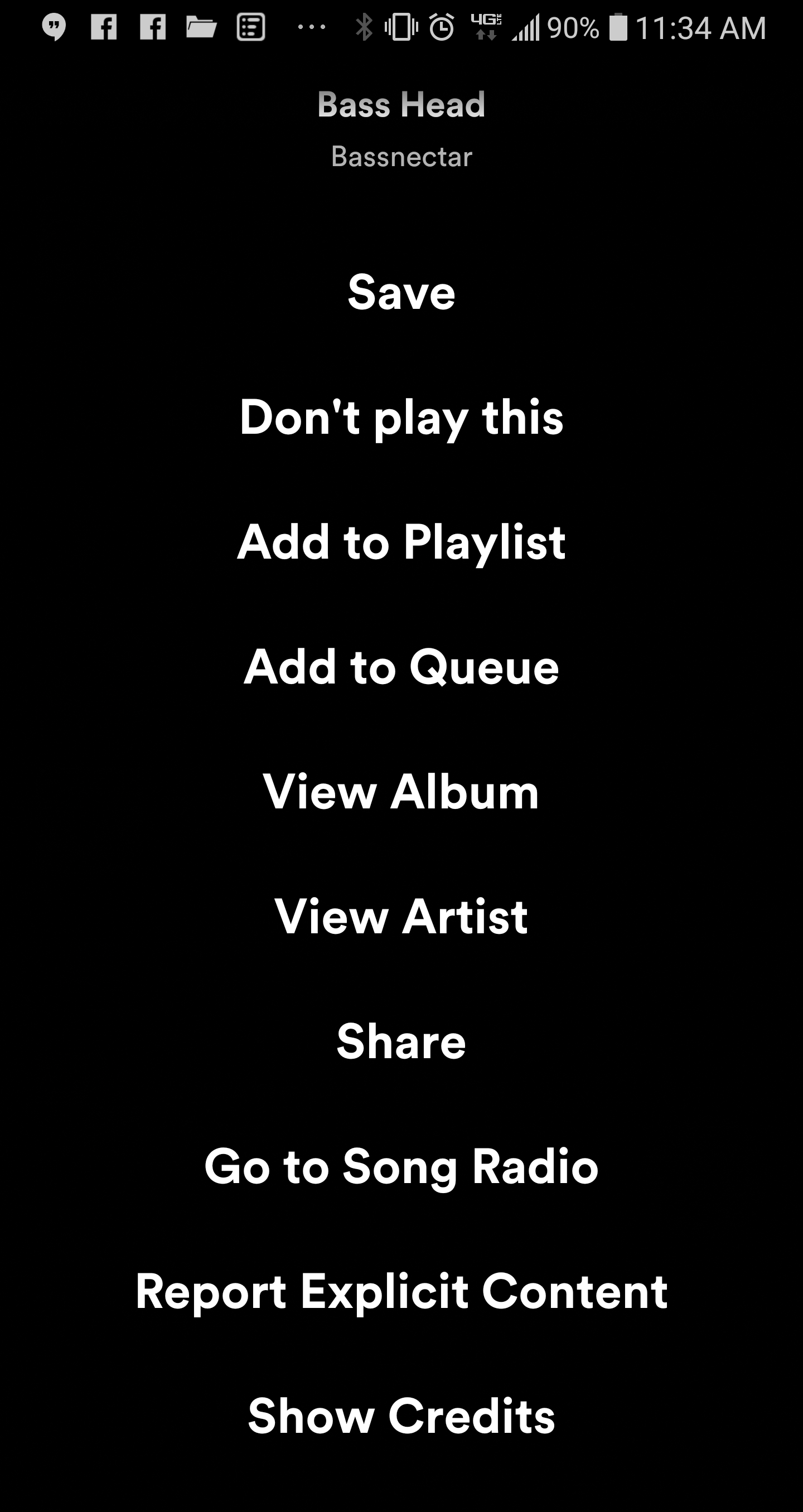 This is all the 3 dots shows...
Doesn't work for me, that red thingy doesn't appear next to the song I want to listen and can't listen to it anywhere...

Here is what fixed it for me: I found the song that I wanted to play on my phone and I tapped on the three dots. Then, I liked the song with the little heart button. After that, I was able to play it. Super weird but it worked for me (on iPhone with Spotify Premium)
Oh man this has been bugging me for ages. I finally figured out why this didn't work for me and why none of the 'fixes' worked.
I also didn't see any 'allow to play this' option on any of the songs i couldnt play. I figured out that this is due to the entire artist somehow being blocked from playing.
If you search for your artist and then show the artist page, in the top right you again have the three dots to indicate options. Here I finally found this weird option that shouldn't be a feature anyway.
Hope this helps anyone out there!

Having this problem too... I tried the solution, clicked the red thing, then pressed show song... didnt work...

Hey there @tideygaming,
If you're still having difficulties playing hidden songs, I'd first off suggest visiting this support page to get them back. Should this not do the trick already you can also check your hidden contents on your phone. They can be found by heading to the Artist section in Your Library and swiping up till you reach the bottom of the page.
Hope this helps. Give us a shout if you have any other questions.

I had to like the song and then unlike it and it took the red circle off of it

The song I have is not hidden. I can't play ANY song from an entire artist. I can clearly see that none of the song's are set as hidden. And from what I can tell, there are no other artists that this is happening for.
I'm a few minutes away from canceling my premium membership because this is ridiculous.

Ok so for me I tried all of the below including the official spotify reply. None worked (at least not immediately correlated) Mine started working after I (perhaps accidentally) performed these actions on my desktop, you decide:
- going to open a ticket I was required to login to spotify.com. I did so. This required 2fa via mobile text, which i did
- I liked/unliked/queed the artist on my mobile, bunch of times
- I reconnected to my google home to play music
- I re-found the artist
- hit play and i started playing
I'm on a macbook catalina 10.15.5 2013, and iOS XS max 13.6
good luck

Unfortunately the suggested fix for this (Going to artist page on my iphone (SE - iOS 13.6.1) , clicking on the three dots and clicking on “Allow to play this artist" ) doesn't work for me, because the "Allow" option doesn't show unless I click it on and off.

Hey @jomo3,
Thanks for reaching out about this in the Community.
We'd first recommend performing a clean reinstall of the app on both devices. This is different than simply reinstalling and helps clearing any cache that might be causing issues.
If possible, could you log into your account using a different device and let us know if the issue persists? This will help us take a better look.
Keep us posted. We'll be on the lookout for your reply.
The clean reinstall of the mac app worked,
https://support.spotify.com/us/article/reinstallation-of-spotify/
(I'd already clean reinstalled the ios app yesterday)
thank you.

Hey @jomo3,
Thanks for keeping us posted.
We're glad to know that the clean reinstall worked and we hope it continues to work smoothly.
If you have any questions or need a hand with anything else, remember that we're just a post away.
Cheers. Take care 🙂

Good day.
I have tried this already but the problem still keeps happening and wont allow my to listen to my favorite songs


follow the artist. and try to play. unfollow and follow
Okay, so I found it on my phone it had the red negative thingy next to it. I pressed it and now I can play it. That's the hide song button? I 100% am absolutely sure I didn't press it. I love this song. I'm just puzzled on how that could happen. I'm happy I can listen to it now. Thanks for trying, sorry for wasting your time.
-Me, Blacknin833