Spotify's taskbar icon on the wrong monitor every single time (dual monitors)

We had a five page thread; Spotify closed it because "nobody responded in a long time". That's because, Spotify, ya never fixed it.
How to reproduce (you need two monitors):
1. Open Spotify and close it on the second monitor.
2. Open Spotify again. The icon will be on the primary monitor, but the window will be on the secondary monitor.
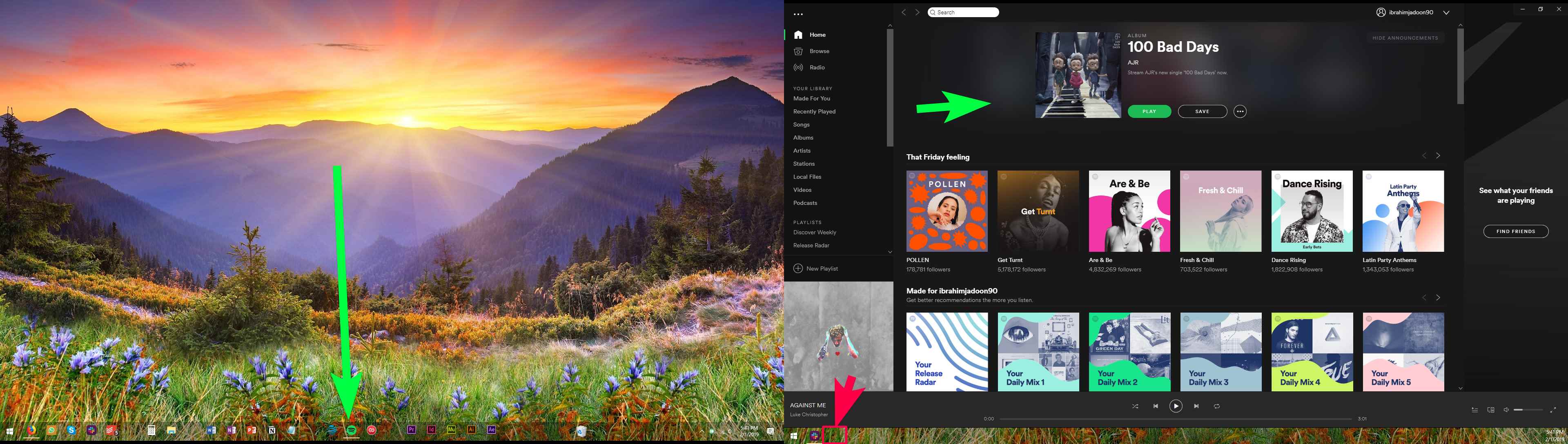
Windows 10 Pro x64, version 1803 (April 2018 update).
Spotify version 1.0.99.250.g936eab8d (Windows Store version).
See this 45 second video for the full walkthrough (see a normal application vs Spotify). Put the icon on the correct taskbar, Spotify.
// IGNORE THE TOP ANSWER BELOW: THERE IS NO ANSWER NOR SOLUTION. SPOTIFY COMMUNITY MODS BARELY UNDERSTAND WINDOWS.

// IGNORE "Top Answer" BELOW:
Accepted answers
All comments
I've just checked. No luck on that same 1.1.4.197.g92d52c4f version (Windows 10 Pro x64 / 1803):

I think the bug has always done that: it might work 10% of the time, but after a few uses/restarts, it always goes back to this broken state. I don't think anyone has made it work consistently, but almost everyone has it in the broken state.
Thus, I think the issue is just dilligence and working through thirty layers of bureaucracy: anyone with dual monitors on Windows can reproduce this within an hour, tops, as far as I can see.
Unforuntately, every Spotify representative I've spoken with remarked they'd never tested with dual monitors.
In other news, the Twitter team finally replied back and now our bug has moved from "the right folks" to "the tech folks".
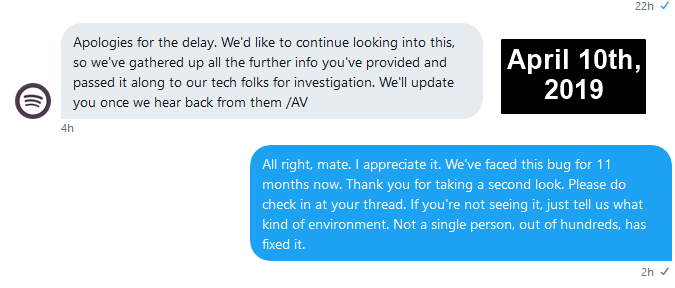
I think we're almost there: just the "the development folks" and "the Windows folks" left, with perhaps a stop at "the icon folks" in between. And then a final hello to "the actually right folks" and it'll be fixed.
While I was researching, I found a humorous and hope-draining subreddit: https://www.reddit.com/r/spotifygore

I've noticed that whenever it glitches and shows Spotify on the wrong taskbar window, I can manually "fix it" by dragging Spotify to the main taskbar and maximizing it, then dragging it back to the original window. The icon then shows up on the correct taskbar.
@theITfactor wrote:I've noticed that whenever it glitches and shows Spotify on the wrong taskbar window, I can manually "fix it" by dragging Spotify to the main taskbar and maximizing it, then dragging it back to the original window. The icon then shows up on the correct taskbar.
Yes, exactly: you just need to do it each time. This bug is just Spotify's silly launch behavior; Spotify is fundamentally capable of being used on a secondary monitor, thankfully, which would be the most inane bug.
They just can't put the icon on the correct monitor upon launching.

Anoying issue

From time to time I'll get back to Spotify from other music streaming services, but it's annoyances like this that make me want to stop using it again. I don't buy Premium because everytime there's some big issue that just makes it not enjoyable
Yes, there was a Spotify update today.
No, the bug was not fixed (except for your very first launch. Launch Spotify a few more times and it'll break right back).
We're now on Spotify 1.1.5.153.gf614956d -- still broken.
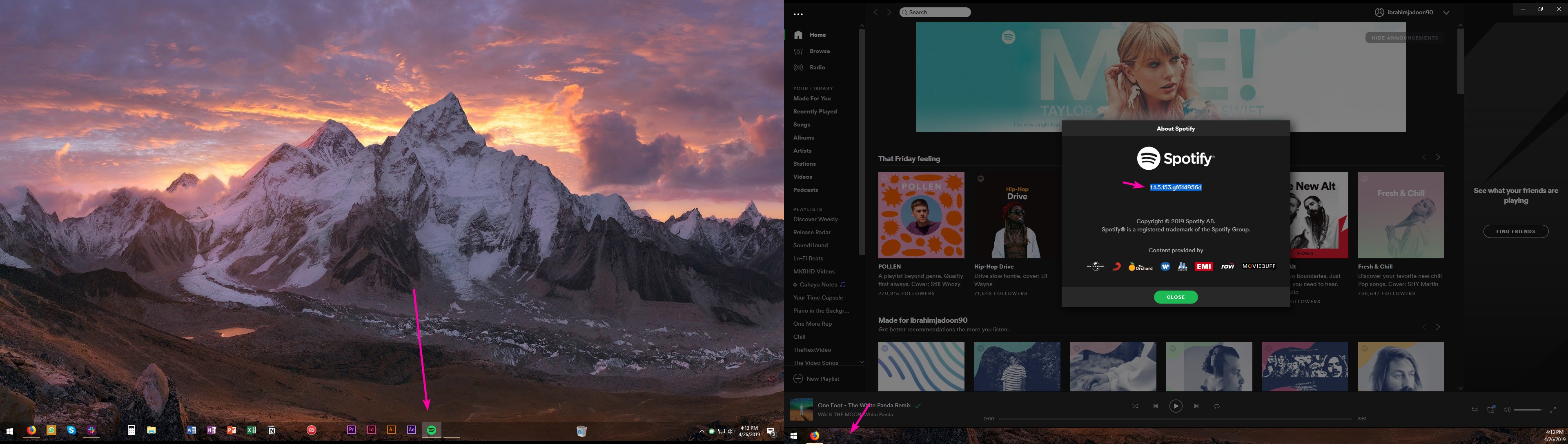

Same issue
Windows 10 1809 (OS-Build: 17763.437)
Spotify: 1.1.5.153.gf614956d

Same issue
Windows 10 1903 (Build 18362.86, insider slow ring)
Spotify 1.1.5.153.gf614956d
Hardware accelaration off fixed it
Hardly. 😞 It works once or twice, at best, for most users. Then Spotify reverts to its broken state. A lot users stumbled onto that, too, but it's so temporary, I don't even consider it a workaround. Screenshot of trying it again for the kicks:
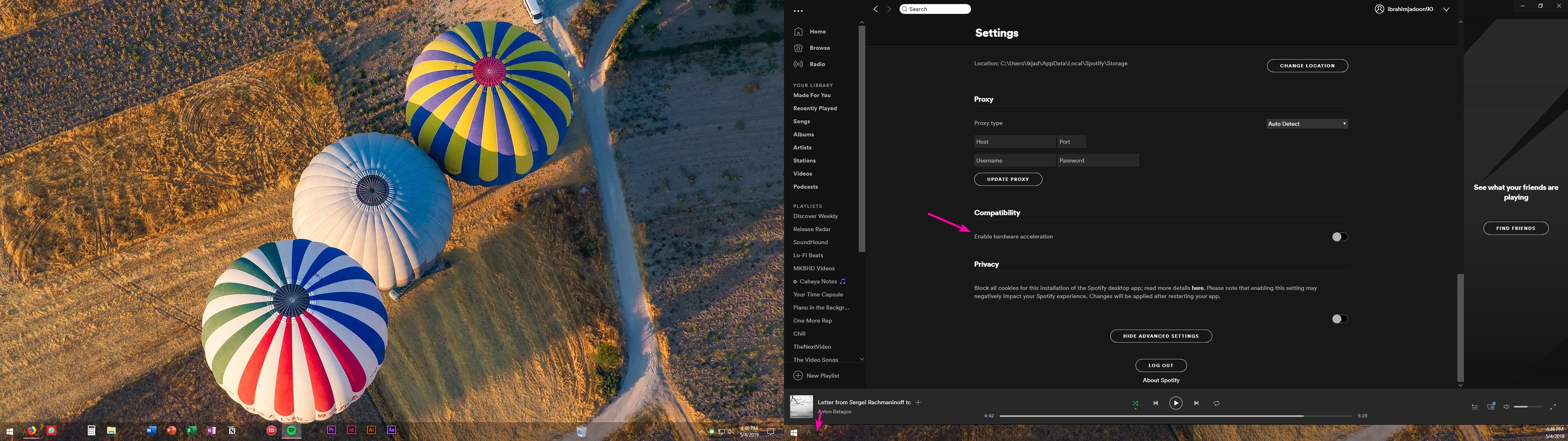
The hardware acceleration toggle is very tempermental: it's like the updates. You can update it, it'll fix itself for a few restarts, and then you're back to broken.
Still broken on 1.1.7.13766.gf9dc3904.
Posting also to keep this thread alive; if no one replies for some time, Spotify will automatically lock the thread.
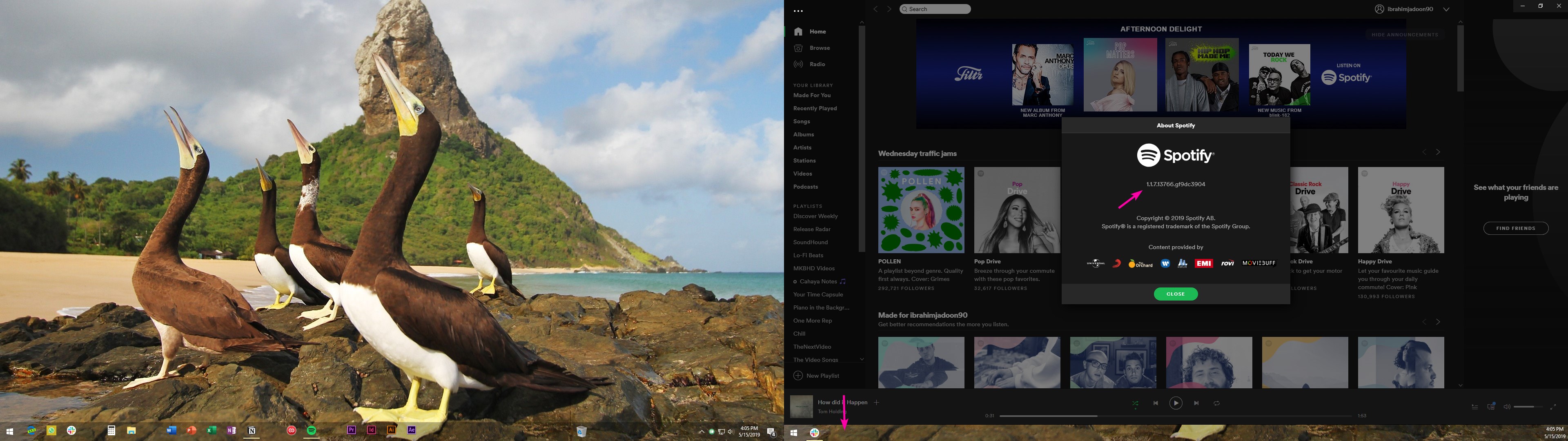
Yes, this is anoying as **bleep**.
Especially as it is quite inconsitent - you can move Spotify window from secondary screen to main screen and then back to secondary, this fixes issue temporary. But after a while (not sure when), Spotify taskbar item moves back to main screen leaving window in secondary...
Never I had such a problem with any other application in my life

Still broken.
Version: 1.1.7.13766.gf9dc3904
Fix this fking bug.
THERE IS NO SOLUTION. (Tip to Spotify Community mods: don't mark your confused responses as "solutions"...that helps nobody)
YES, it is STILL broken on 1.1.8.439.g8502297d. Yes, it will temporarily fix itself until you restart your computer...and then it's broken again forever.
https://i.imgur.com/72ljLUQ.jpg
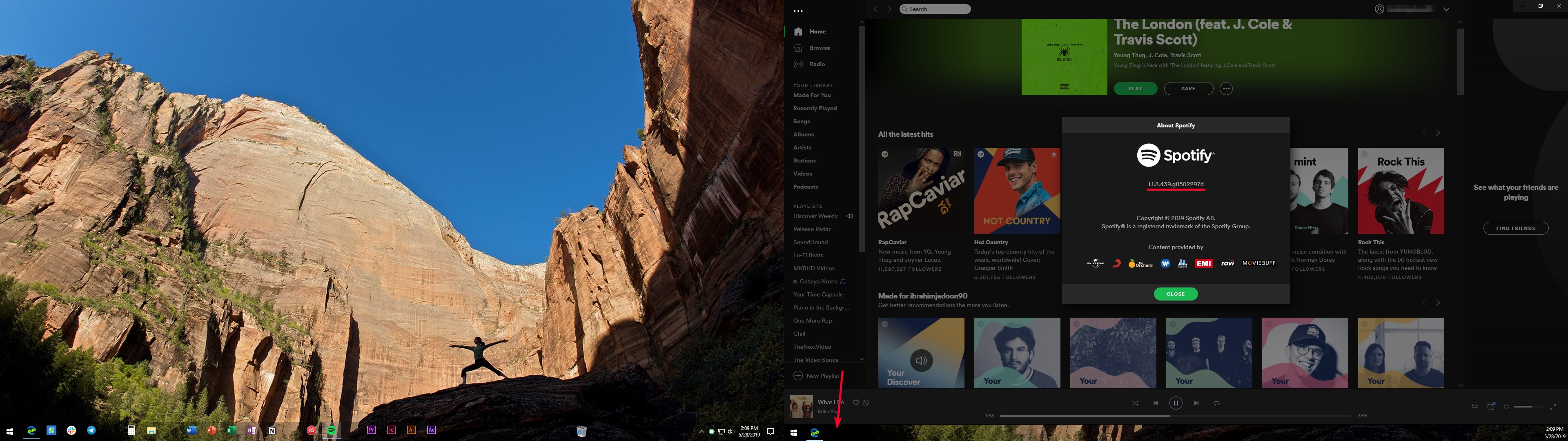
I just received an update for spotify and it's still broken.
 Still broken.
How about you listen to your community and fix this shít already?
Really sad.

This type of issue is SUPER unprofessional for a company this big. I just joined spotify only to discover this bug and I WILL cancel my subscription and return to Amazon Music if this is not fixed. I truly expected more...
So far...thats the case...

Spotify as an app/program can't decide on which taskbar their icon shows up, so it's not their problem. I have that problem also sometimes, but when I log on, and my spotify auto starts on my second screen, the button is on my second screen where it belongs.
EDIT its indeed only the spotify store app. With the desktop app it works as usual.

Are you sure? Even after rebooting and starting Spotify again? Most of the time it works only once or twice and then stops working again.
Spotify Community moderators: please stop and remove the "top answer". It's blatantly false, misleading, and ludicrous to suggest it's a Windows problem.
I've now added this image to the first post. Just asinine...
Today's Twitter reply...as useless as ever (and wholly contradicts the Spotify Community Moderator):


I was on another thread, but that was closed down and I was sent over here.
I found something that worked, but it is still an annoyance.
Image 1 - When I first open Spotify, the icon first shows up on my primary screen (screen 2). A moment later, the window pops open on my right screen (screen 3). At this point, I have the same issue where nothing I do with moving the window or icon will let me get it over on the other screen.
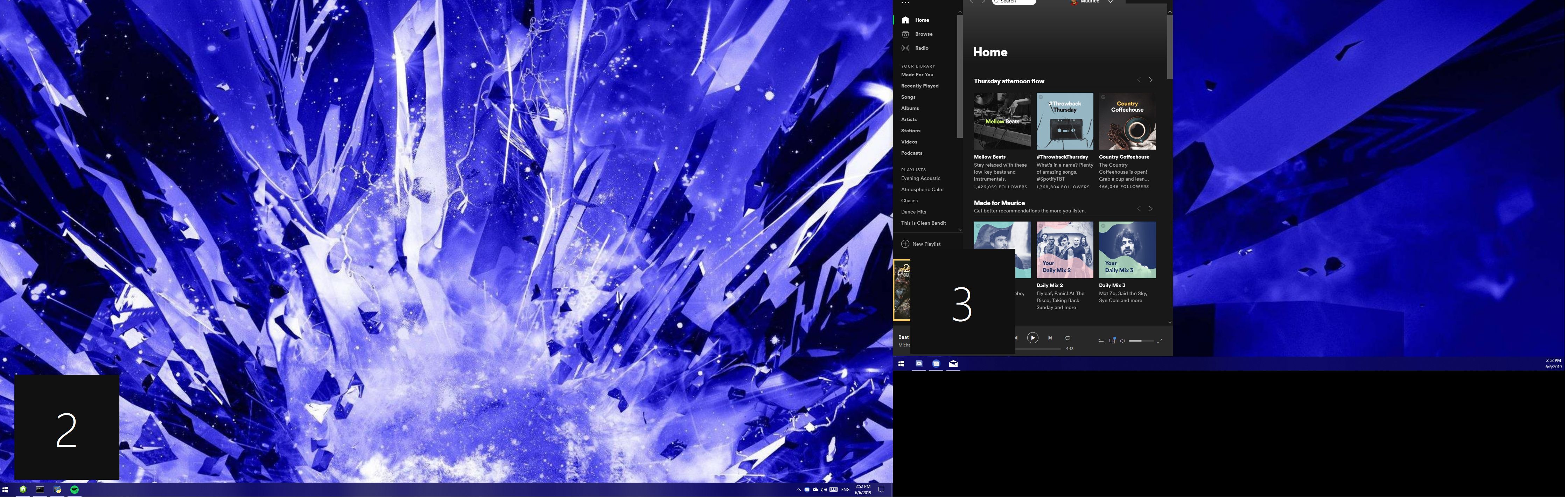
Image 2 - When I close out of Spotify by using Alt-F4 or clicking the "X", the window closes and the icon disappears. When I open Spotify again from the start menu, it shows as below on with the window and icon on the correct screen. It will then work properly from that moment forward.
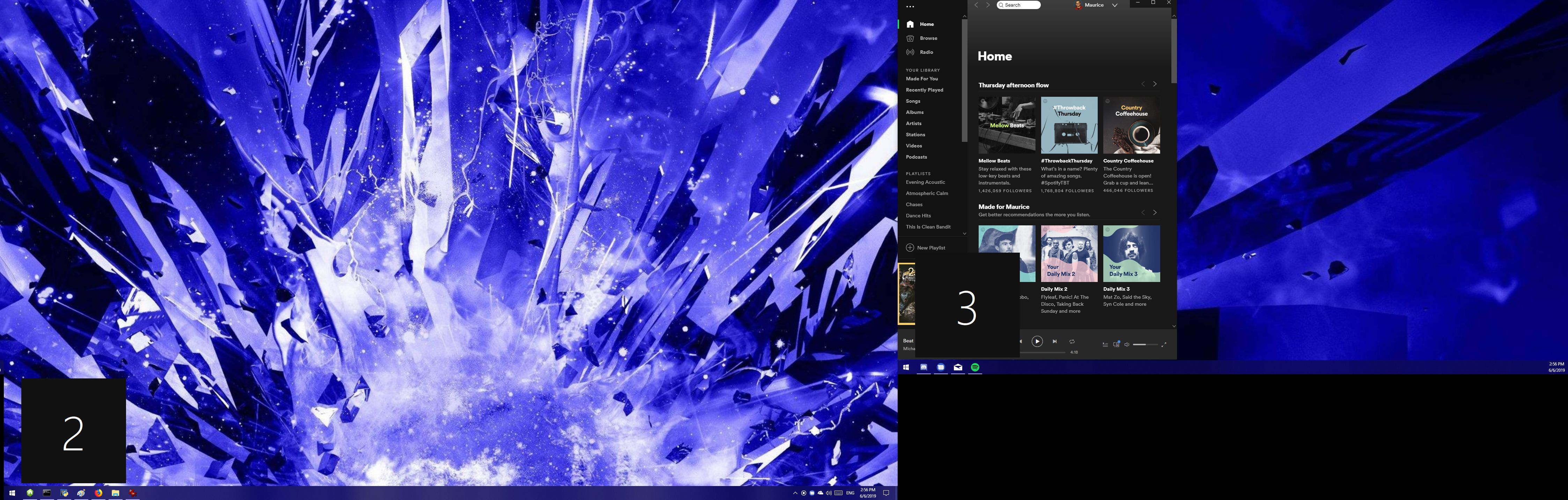
In order to reproduce this error, I can kill Spotify in the Task Manager or restart my machine. When I open Spotify after having done either of those two things, it reverts back to Image 1 where the icon is on the wrong screen despite the window being on the other.
I hope that this data point helps those of us experiencing this issue. I will highlight what other forum members are saying in that this is a Spotify issue, and suggesting that we contact Microsoft is laughable.
Good luck all!
Very interesting--that bug actually seems different than this one (from my take). Here's this bug:
In this bug, the user can always move the Spotify icon between screens.
In this bug, the Spotify window never jumps between monitors (under any amount of time).
In this bug, there is no difference between using the "X" or Task Manager (I'd never tried this, but I can confirm it now on 1.1.8.439.g8502297d. It worked exactly once and then never again.)
This two bugs could (and likely are) related, but this workaround (i.e., closing via "X") isn't doing anything for me.
its only the first startup, but i can work with that.
Referencing the video, the behavior of the bug on my machine is exactly the same.
To your points:
- I can still move Spotify between screens. I can't move the icon between screens without my workaround. Then again, I don't think it's ever been a thing to move icons between screens.
- I don't fully understand what you mean between "jumps to different monitors". When I first open Spotify, the icon appears on my primary screen, but the window "jumps" (ie. originates from the primary screen icon and moves from there) to the other screen. This is the last location of the window, so that's not surprising. It is problematic though that the icon appears before the location of the window is determined, and then the icon doesn't move to reflect where the window is.
- I will say that I'm also 1.1.8.439.g8502297d (Windows Store version). I can reproduce the bug consistently.
I hope that offers some clarity.
I've installed the Windows Store version and here's what happened: if I open/close it repeatedly, then once (randomly) it worked--and when it did work, I did notice the icon jump immediately after opening: wrong monitor -> jumps to the correct monitor.
But every attempt thereafter, it's broken again.
Have I missed something here from your tests, where you can get this consistently?
This single success is after ~10 attempts. The one time it worked (which I can't reproduce now):
- Close Spotify on right.
- Open Spotify. Then, it's icon = left vs window = right.
- Drag Spotify window to left.
- Close Spotify on left.
- Open Spotify. Icon/window = left.
- Drag Spotify window to right.
- Close Spotify on right.
- Open Spotify. Icon/window = right.
I've followed that procedure 5x now and it's never fixed itself again. 😞
When I watched you do, it looked to have worked exactly the way it did for me / as expected. I don't understand why you had to do it multiple though..
Here's a screen capture so you can see me doing it: https://streamable.com/0hqfm
This was my first time. And then you could see me reset it, and then do it again.
Do you see something that I'm doing differently?
I hope this helps!
My apologies for the delay--I missed this email notification.
Wow, it's exactly as easy as you described! I've never heard of anyone who could fix it. Would you mind sharing details of your system? Maybe we can all reproduce your fix somehow!!
I'm not sure what's important, but here's what I've got:
- Windows 10 Pro x64 (Build 17134.765, aka "1803"--this is found in Start -> Run -> "winver" most readily)
- Dual 1920x1080 monitors @ 100% DPI + extended + both landscape
- One via HDMI on a NVIDIA GT 710 and the other through DisplayPort an i5-8600K's iGPU
- Spotify Premium on Spotify's Windows Store app 1.1.8.439.g8502297d
Are you running any multi-monitor software, by chance? Could it be a triple monitor thing? Is anyone else running triple monitors and could test this out?
From the start of this thread alone, it's been:
139 days
with no fix.
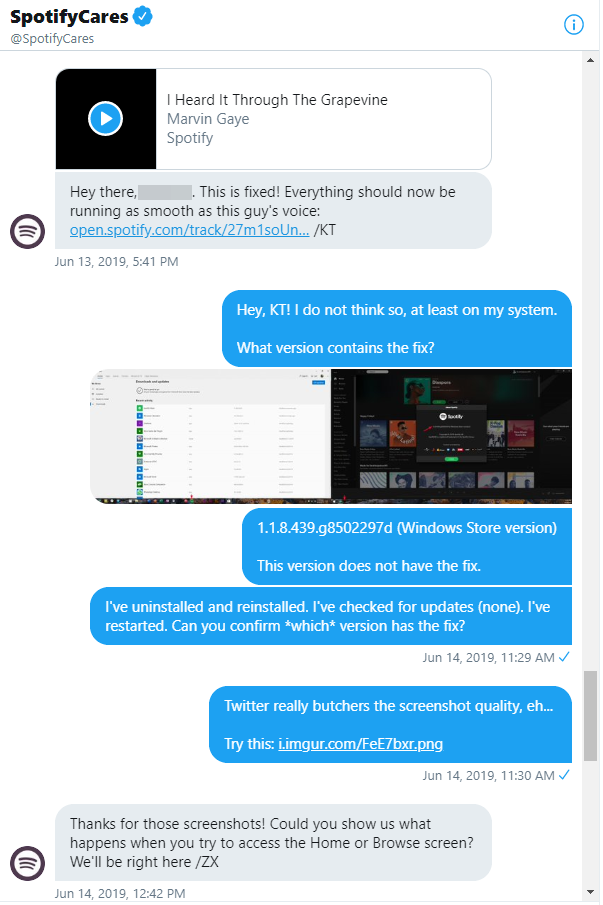
The @SpotifyCares account has been unresponsive for two weeks now. At last contact, they erroneously claimed they fixed it, clearly did jack, and now we need to "try to access the Home or Browse screen".
If everyone can please make a SERIOUS effort to open EITHER the Home or Browse screen, ZX from @SpotifyCares will be right here to help...
Hello everyone,
We really appreciate your reporting this to us and providing all this info.
We've decided to take another look at things and are gathering more details in this ongoing issue thread.
If you're affected by this, we suggest you head over there to add your +VOTE and subscribe so you'll be notified if there are any updates.
We'll be keeping an eye out for your replies, thanks!