Font appears very blurry

Plan
Free
Country
The Netherlands
Device
Lenovo Legion y540 15IRH
Operating System
Windows 10 Pro
My Question or Issue
All fonts appear blurry, it's unbearable to look at. It also won't let me fullscreen fully.
Accepted answers
All comments

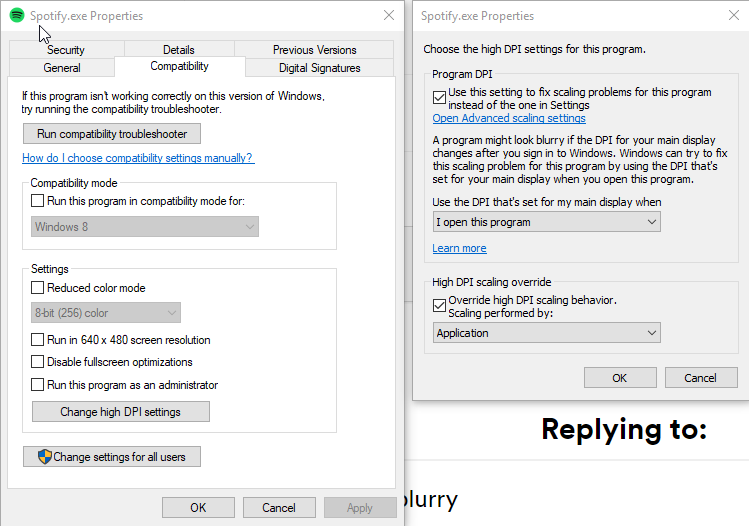
Find spotify.exe on your computer (should be in AppData\Roaming\Spotify), right click and open Properties. Open the Compatibility tab. Click "Change high DPI settings". Check both boxes. In the first dropdown, set it to when "I open this program". In the second dropdown, select performed by "Application". Restart Spotify completely and the blurriness should be resolved.

Thanks. Was really annoying not being able to read anything without straining my eyes lol.

Hey there @OverWims,
Thanks for posting here in the Community about this and glad to hear that @AndrewBlizard's post helped!
In this case, we hope you don't mind us marking that post as solution so it's more visible to users with a similar issue.
Don't hesitate to give us a shout if there's anything else we can help with - we're happy to lend a hand!
Have a lovely day 🙂

I'm tried to do this but could not find the spotify.exe file - it doesn't show in User\AppData\Roaming\Spotify, that is just an empty folder.
Turns out Windows installs the Spotify as an 'App' in C:\Program Files\WindowsApps\SpotifyAB.... This folder is not accessible in File Explorer.
From the task manager you can right-click spotify.exe, select properties and then make the changes as suggested by AndrewBlizard.
The screen scaling issue is really frustrating and I hope Spotify can fix this. Also installing as an untouchable Windows App is a pain.

Known Windows issue, the same is happening in parts of Steam (the gaming platform). Yet it doesn't affect all Windows programs, so Spotify probably could fix it if they prioritized it.
Find spotify.exe on your computer (should be in AppData\Roaming\Spotify), right click and open Properties. Open the Compatibility tab. Click "Change high DPI settings". Check both boxes. In the first dropdown, set it to when "I open this program". In the second dropdown, select performed by "Application". Restart Spotify completely and the blurriness should be resolved.