Next song starts somewhere in the middle
On some playlists (the last one this happened on was "Deep House Relax") when one song ends it starts the next some somewhere in the middle after an unusually long crossfade.
After some investigation, it seems this is a feature that some playlists have. This behavior should have a setting to disable it as it's quite disruptive to the listening experience in my opinion. (and apparently, also everybody else who joined in on this thread)
Important: This is not the regular crossfade! This starts songs literally a minute in, not just 12 seconds like the normal crossfade. This behavior seems to appear even with crossfade turned off!
Family Premium
Germany
macOS 10.13.6 (latest at the time)
Accepted answers
All comments

I've just recently started to notice this issue, its a real pain. I checked I never had crossfade enabled and I don't. I also checked it was not the gapless music part and it doesnt seem to be the problem either, I never had it enabled anyway.
Can someone please help with this, it's really annoying.

Its 2019, and still some playlists have this settings and cannot be disabled. It looks like Spotify's Software is making its own mix and trying to join both songs rithms, causing some songs to start at second 40 or so. Trully annoying.

This has been going on for some time now! I seen it happen on Brain Food and Lo-Fi Beats playlists, which are Spotify playlists, so maybe there is something wrong with their playlists? I don't know, but it is really annoying!

This "feature" ist terrible. I'm listening to Lo Fi Beats while working and it throws me off when this happens. How can u add a feature that messes so hard with the listening experience and not supply the user with a button to turn it off? Smooth? Nope!
I'd like to remind everyone to please vote on the idea to get Spotify to fix this problem. https://community.spotify.com/t5/Live-Ideas/All-Platforms-Playlists-Switch-on-off-crossfade-in-certain/idi-p/4565390

Wow, this is extremely annoying, I seriously thought my app is broken, tinkered with it for quite some time and was dumbfounded since my crossfade was disabled (as has always been).
How could anyone ever thought this was good idea, if it's really intentional? I really think this is a bug, since the "crossfades" are totally random and "harsh".
I voted for the idea next door, hope it gets fixed!
Happened to me in the Brain Food playlist for the first time, as others here also reported. Also I don't think copying the playlist is the best fix, since then it won't be updated with new music, which happens from time to time in these Spotify created playlists if I'm not mistaken? But I guess better than this...

Well, to me this isn't an issue, AT ALL.
It's something Spotify is starting to implement in some playlist... for the time being, only on the ones made by them... the thing is, this feature doesn't fit very well in all playlists (I've been listening to Deep House Relax and the transition is not very well done between some songs).
If you listen to Techno Bunker playlist for example, it actually works really well, despite of your will to listen to an intro of a techno song being the same for 1+ minute... If you just want to listen to the entire song and hate this kind of mixing, there's millions of playlists out there made by users.
It'll be great if this feature were unlocked for premium accounts. Think of yourself making a mix within Spotify in a playlist format, public or private. Totally amazing.
@axl_magnum If you like the feature that is just fine. We're not trying to take anything away from you. All we want is an option to turn this off, because, as you can obviously see, this is a matter of personal preference and different people have very different experiences with this feature. As you've said yourself, it works better on some playlists and worse on others.
The point is, that it's critical that Spotify allows users to make this decision themselves. The workaround of listening only to user-created playlists is not a long term solution as it would seriously reduce the value of the service we're paying for. We would also like to listen to curated playlists but that is obstructed by the sometimes very jarring crossfade into the middle of a track.
I hope you understand this point of view. We are not striving for conflicting goals but rather for an option to choose freely.
Yeah, I've seen the submission you made, and I totally agree with it. Just saying that from what I've read, many users think it's a bug and are reporting it as if it were one, or submitting ideas to encourage Spotify to disable this, without knowing. To make it clear, I really like your idea, I've just pointed to the ones that think this is a real issue instead of thinking that is a preference matter.
(sorry for accidentally toggling the solution)
This feature is so badly designed that in many instances, this "feature" looks like a bug. Also, Spotify might notice this problem faster if it's marked/reported as a bug. However, we are still striving for a solution that adds an option to turn it on and off.
@axl_magnum I spoke with my friend who actually liked the feature as you did - as kind of a artificial DJ in playlists. For him it worked pretty well on some playlists/transitions.
So I am not for nuking it straight away, but nevertheless the option should be present for switching it off and on - as the idea for it is described.
Yes, as I stated yesterday, I think the feature is achieved for some playlist (specifically for the techno ones) but not for all of them, causing the complaint of some users. It would be great having an on/off playlist, as a multigenre listener I also want to be capable of turning it off when I listen to some Lofi (e.g. Jazz Vibes playlist).

Posting another workaround aside from the copying the playlist to make your own version of it:
Adding the playlist to your queue will also disable the autofade. The disadvantage of this method being you can't shuffle it.
Hopefully they give us the option to shut this feature off soon!

This sort of under the rug "let's test this and not tell anyone" is why I only get Spotify when it's 1$ or heavily discounted. I'll never support this business model of forcing change on the user without some warning.
People actually like listening to full tracks without a jarring switch. Isn't that crazy?

Go to settings, and then advanced settings and then automix and disable it. Problem solved!

Hey there everyone,
Thanks for posting about this here in the Community!
Some playlists, like Deep House Relax on Spotify that @douira mentions, have beat-matched transitions even when Crossfade or Shuffle are toggled off.
However, as @apurba mentioned, if you'd like to disable these transitions you can toggle Automix off from the app's Settings.
Hope this helps! Don't hesitate to give us a shout if there's anything else we can lend a hand with.
Have a lovely day 🙂

This is not helpful at all, for over 2 years now I have had my most played playlists, chill tracks and brain food just start every next song as some random spot and there is NO WAY to turn it off...
seriously if this isn't fixed soon I am switching to Apple Music, absolutely ridiculous.
There is an option to turn this off now, it's just an issue of finding it. Here are three screenshots on how to find the setting on macOS. The setting will be similarly placed on Windows.
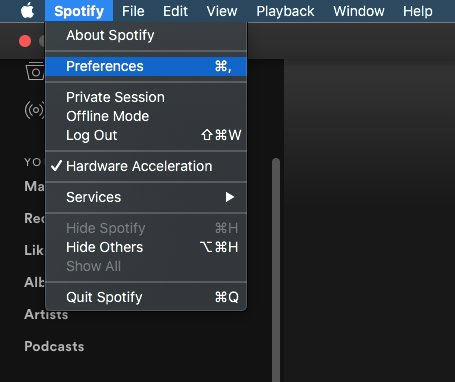
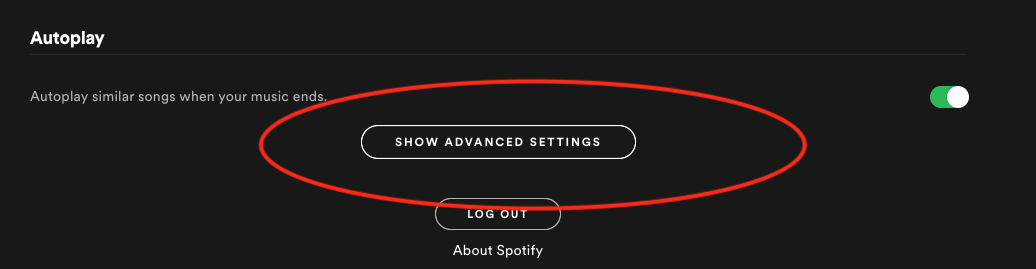
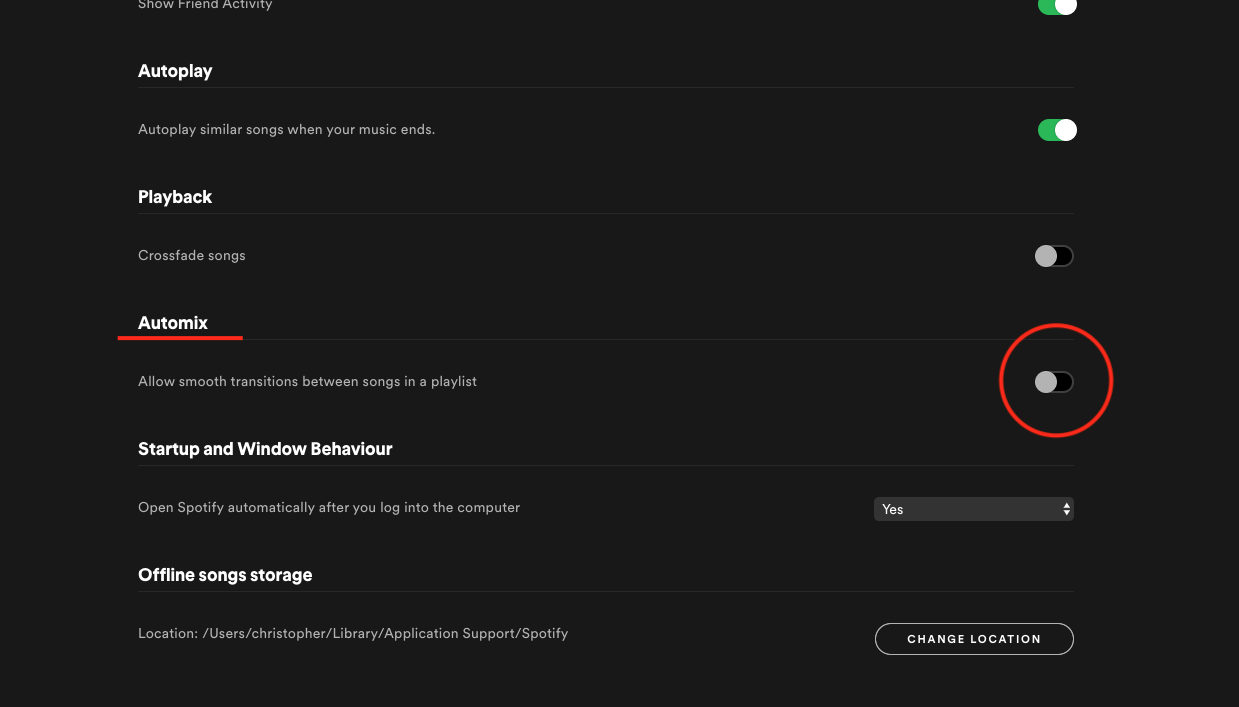
I have no such option:
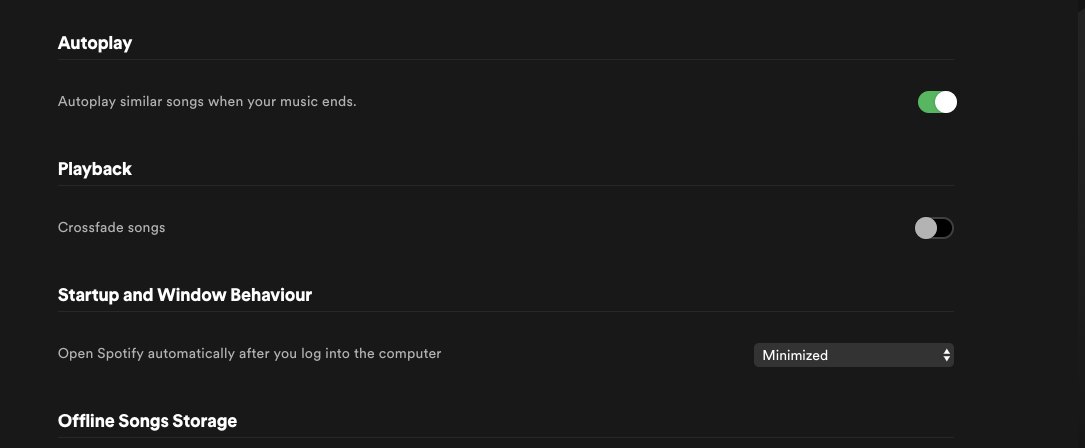
Have you updated to the latest version of Spotify? The current latest version is 1.1.28.721.g5b5ee660 on macOS. Which OS are you using?
Hey there everyone,
Thanks for posting about this here in the Community!
Some playlists, like Deep House Relax on Spotify that @douira mentions, have beat-matched transitions even when Crossfade or Shuffle are toggled off.
However, as @apurba mentioned, if you'd like to disable these transitions you can toggle Automix off from the app's Settings.
Hope this helps! Don't hesitate to give us a shout if there's anything else we can lend a hand with.
Have a lovely day 🙂