The option to save, bookmark or add an individual podcast show to a playlist would be nice to have. I'm actually somewhat surprised that this functionality isn't available.
Updated on 2019-09-06
Hey folks,
Thanks for adding your votes to this idea.
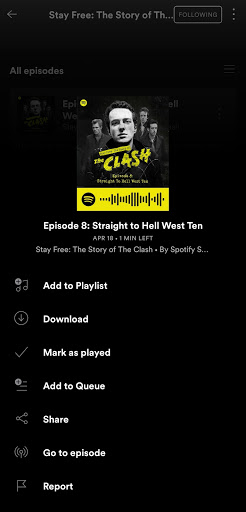
It's now possible to add Podcasts to playlists on iOS and Android. Just head to a podcast, click the three dots on the episode you want and select 'Add to Playlist'.
Thanks again!
Great news! But why is this still not possible in the desktop clients?
Hi @krikelin,
Looks like a new idea 😉
Regards,
René
I would assume there are plans to add it to the desktop version?
Agreed: I hope that plans to implement this in the desktop client are high priority. Lists are growing many and large and re-organization is much quicker on a desktop with more real estate.
The mobile implementation is great. Exactly what I wanted. That we can make lists of both songs and podcasts is very cool. Thank you for implementing this, Spotify.
For everyone making lists of podcasts, remember that you can make folders of lists. Folder: Podcasts. Lists under Podcasts: Business, Relationships, Comedy, Best.
Really appreciate Spotify adding this functionality. I was just in the process of moving to another service and this puts a hold on this for now. We do need the ability to manage this on the desktop client as well. The mobile client is small and clunky - I want to manage this all on the desktop and then go for a run\bike\hike with it all set up on my phone.
The weird thing is it appears on the desktop client and suggested podcasts can be added - but that's it.
Hi,
Because this topic isn't closed yet, I assume they are still working on it.
Very nice! Now I'm just missing the same function in the Mac OSX-app 😃
I would like to be able to add individual podcasts to a playlist from a desktop. Right now, I usually use spotify on my computer but when I find a podcasts that I want to add, I would then open the app on my phone and I tried to find the exact same podcast on my phone to add to a playlist. I would like the "Add to Playlists" option on my computer.
Also, I would like the option to add entire playlist to a new playlists
Hello, It has been a long time since this issue was raised and seems like spotify doesn't care. I switched to Castbox, and it has been great! It is a lot cheaper than Spotify (about $15 a year! ) and they actually have real people on their support team that reply and answer any question. Spotify has been a shame recently, I am really surprised people still use it as a main streaming service, I hope they will me more and more alternatives on the market soon.
Glad they added BUT this does not work for News podcasts, like NPR Now and BBC Minute.
I would like to put together a playlist of latest news podcasts.
But either the podcast doesn't allow you to add those to a play list or you can only add an individual podcast and not the channel for latest stream.
Would like to be able to do this on my desktop computer as well.
How do you do this on the Spotify desktop?? Ridiculously hard to do.
I think this feature needs some tweaking. When you add a podcast to a playlist, it seem to just add the episode and once you listen to it it gets dropped from the list. I expected to have the most recent episode from the podcast each time i play the list.
I want to be able to put episodes I love of different podcasts together in a saved location/ playlist. I don't want to have to download all the ones I love in order to find them. This is years in the making Spotify - what gives?
Why is this STILL unavailable on desktop???? And why am I finding that there's a pattern of updating one platform but not the others to match? It's extremely reasonable to expect that you can do the same things and see the same information on mobile and desktop.
It cannot be done on desktop. I can't remove podcast from playlist neither add podcast to it. In context menu there are only Add to Queue and Share.
This is great, and sorely needed, so thank you very much, but please make it so it also works from the desktop. Everyone, please upvote the idea that speaks to this: https://community.spotify.com/t5/Live-Ideas/Desktop-Podcasts-Add-Podcast-shows-to-your-own-playlists-on-the/idc-p/4895964#M105707
Yes, it's possible to create a playlist of individual podcast episodes. But what would be much more useful is the ability to create a playlist of entire podcasts, where the playlist updates with the most recent episode of each podcast you add to the playlist. For example, I'd love to create a playlist that includes all the news-based podcasts I listen to. Then, each time I play that playlist, I'll get the latest episode from each podcast source. Overcast makes this really easy. It would also be great if users could edit their Daily Drive. Let users select which podcasts and which music they want to hear rather than presuming an algorithm can do it for them.
Hello please add function “my station” What is it?
to my playlist add every day fresh news podcast episode info about weather, news or sport... (this tipe podcasts are existing in every country)
every day add new espisode and play every 2/3 hour
this functions making download daily podcast from me selected or added podcasts.
this functions making od Spotify realy radio station of more music & mini up to date news
classic rádio station is more comercial break 😞 more news and traffic news and some times play music
Can you please also add this feature to the Spotify desktop app too !?!
Yea so why isn't this possible on desktop? When can we expect it on Desktop? Also, why can I not like a podcast? I'd expect a menu item somewhere that takes me to a list of podcasts I have listened to.
I want to make a list of my favorite podcast episodes to recommend to my friends and to listen to myself. How is Spotify missing this basic functionality! Most other podcast apps allow me to do this. If I can add songs to playlists, why would podcasts be specifically excluded?
Is it also possible to save podcasts in playlists on the web version? Because I usually listen to podcasts while working on my laptop (to save the battery of my phone).
Thanks in advance!
I use desktop - is there a way to do it there?