[Mobile][Playlists] 'Add to playlist' sort order should be custom

In the latest Spotify library redesign, when I try to add a song to a playlist, the modal that opens sorts my playlists in a seemingly random order. This is very annoying since I have a mix of many playlists/folders in a specific custom order, and now finding the correct playlist to add a song has become a pain. This has only become a problem in the latest update, and worked perfectly in previous Spotify versions. I think that the order of the playlists in the "Add to playlist" dialog should follow the same order as the main Playlists tab - that is, if I have my playlists sorted by custom, the dialog should be sorted the same way.
Comments

I can't believe how long this problem has been going on. Each time I see an update us due for Spotify, I keep hoping that someone there will sort this out. But so far nothing.
It's almost as if they're all sitting up in their offices somewhere in Sweden, laughing away: "Look at all these helpless little Spotify listeners, trying to organise their music, paying us all this money, knowing they won't quit Spotify and try another streaming service because they've already spent years loading up their playlists." "Let's change the page layout, design, fonts. Give them options that haven't been requested, but don't fix this." "Hey, I know how to really annoy the customers on the forum: Let's tell them they have to have a certain number of likes before we'll look at the problem. Then we'll adapt their question and tell them the likes count starts at zero again. Ha ha it's so funny."

So when is this happening? The add to playlist overview is starting to become absolutely and unavoidably aggravating. Fix your cucking doodoo, Spotify. There's nothing logical going on here.

I don't understand how this bug/behavior was even generated? I mean is the call to the meta data regarding the list structure not the same across all portals, and does that record not get updated across all portals? I mean since the order is saved on one portal, why not all? I also don't find the recently used playlist shot up out of order to the top of the stack helpful. I think users with extensive amount of playlists spend so much time carefully organized their collection, then for them to go outside and see their lists in disarray is just messed up. I'm a paid user, but I'm not sure for how long if every time I want to find a playlist that's supposed to be in position x, but now is in position a-1 on mobile/tablet, and then I have no choice but to resort to search feature. Might be time to look for an alternative service. 😞

but essentially ignored what I was saying, suggesting I raised it as an
"idea", then annoyingly telling me "thanks and if there's anything else
please just ask". I don't think they listen to this stuff. It's their
product and they do what they want with it. I love spotify but this tiny
issue bugs me on a daily basis, and would be trivially fixed with a search
box or just allowing the playlists to be sorted in "custom order".
@cuban_pete, I think they'll start to listen (or delete the thread in which) when someone shares a competitor's product that offers everything they do plus none of these ludicrous UX/UI limitations which have no reason for existing. It's like the devs get to 95% of spec requirement and then say: "close enough," and peace out.

I've had the same kind of response from their support team. It's pretty lame and I wish they would take a hint!
Thanks Spotify for fixing this problem. It's been a week or so since it changed back to being customised. Even in these times of lockdown from coronavirus, I'm loving being able to add songs to playlists in alphabetical order. Thanks for doing this simple tweak back to what Spotify used to be like. You've change my life in a small but significant way.
Reading my previous comments on this issue, I must have been pretty frustrated to write on this forum. I reckon "if it ain't broke, don't fix it". So please keep this feature forever!

In mine the problem remains. Updated and all.
Frustration is nothing but the word that defines it.

Yes, I can't see any change like user Wadereeve1 is describing, it is still as bugged as ever.
I am using the Android client, perhaps they are not.
So Spotify, we are coming closer to the first anniversary of this bug.
It would be interesting to see how you are thinking about this?

This is a case study on "it's not a bug it's a feature"
I'm amazed they still haven't sorted this. And it seems very dishonest for them to close any tickets about this software fault and then ask us in the most condescending way possible to "suggest it as an idea".
Just fix the damn fault.
could always just use a different platform I guess.

This is the worst thing I've ever come into contact with in my 10 years of using spotify - please please please fix this! To users like me with 1000+ playlists this isn't a niggle, it ruins my spotify experience. At least put a search into the add song to playlist feature
Anniversary
We are now closing in to the One Year Anniversary of this bug. Before that, "custom sort order" was the only order that existed, and it worked out of the box in all views.
Peter).

I feel like nobody wants to memorize the order in which they created their over 100 playlists. If this was fixed that would be really helpful. Even though it's been around a year of struggling with no fix, this comment is my final effort to please have this fixed it's painful.
- I tried taking this up with them out of frustration and they said something about over a 100 votes and they might consider things or maybe not. I'm not sure if this means they expect that for one particular comment and could care less if 100 people care enough to complain. The people who care about this most likely have a bunch of playlists so Spotify are complacent about them leaving the platform if the tin ear they give this is any indication.

I can't believe this is actually an 'idea' that has to be put forward by customers. What is going on in product design and quality control at Spotify? The amount of time this apparently 'relevent' sorting is wasting me is infuriating. Long story short, this idea needs to be implemented ASAP.

Are we ever going to get clarity on this issue? I am constantly playing whack-a-mole trying to find my newly created playlists. This has been an ongoing problem for two years and your crappy layout has yet to be fixed. On top of that you guys added this new "hide song" function right where the "add to playlist" order was. Thanks for messing with everyone's muscle memory. Try adding new features at the bottom, not the top. Also, there should still be a prompt totheuser whether they really want to hide the song as it's often hit by accident. Don't know why you got rid of that but it's clear there is a bunch of people annoyed by accidentally hiding songs.
@frostyapples I totally agree with this - these small UI oversights have really caused me to be more reluctant to add songs to playlists simply because it is so clunky to do so.
If you guys are also annoyed by "Hide this song" appearing on top, I found this idea that we should all also vote for: https://community.spotify.com/t5/Live-Ideas/Mobile-Re-arrange-song-quot-quot-index-options/idi-p/4931473

I would love to see a fix here, too! Ideally the playlists should just have the same order like on the desktop version even if we can't change the order on our mobiles. That would be the quickest fix to execute! Please do fix this finally!!
I figured the playlists are apparently sorted by "date created". So actually one could create a new playlists and move the songs from the old playlists and voila you have your old playlist on top now.
What are your workarounds for finding your playlists quickly?
@all - Shoot me down if if this doesn't help, but I figured out one way to get rid of 'relevant' sorting by sorting them alphabetically. When you do this it also means that when you are adding to playlists they will be sorted by name as well, which is saving me so much grief. To my own surprise I didn't come across this solution anywhere in the community pages but I could have missed it, in any case follow the steps below:
1. In the app go to Your Library in the bottom ribbon.
2. Drag the playlists down so the Find in Playlist bar appears at the top, and to the right of this you will see the Filters box.
3. Click on Filters and Sort by Name.
When you go to add to your playlists they should be sorted alphabetically after making this change. However, the problem now is you have to scroll to get to the right playlist (Y is a pain) but at least its not random anymore. The fact that we can't just search playlists when adding songs is still a major problem, a really basic function that's available on other platforms (I'll name no names). Anyhow, to address I'm drafting a letter of complaint to Spotify (I've given them a heads up) about the lack of basic functionality in their UI (today I've found out you can't do the same thing and organize playlists alphabetically in the desktop app, you have to drag them to be in order... what a joke), but if anyone else has anything they would like me to share on this letter DM me.
@rua_donn Thanks for this - honestly I'm shocked that this works at all. Did some more testing and it looks like all of the playlist sort options except Custom Order - Relevance, Name, Recently Played, Recently Added - actually do sort the "Add To Playlist" menu accordingly. This proves that this behavior is a bug and not an intended feature, since it is exclusive to the "Custom Order" option. And since this "New Idea" is essentially an outstanding bug for months with almost 300 individual reports, Spotify really needs to solve this as soon as possible.
This doesn't solve much for my use case, since I have a mix of playlists/folders that I have manually sorted in a very specific order, and I need to use the Custom sorting option.
The other features you mentioned (searching when adding to playlists, sorting playlists on desktop) should also be addressed but I think you should make new Ideas for them if they don't exist elsewhere, to prevent cluttering this one up.
Let us know if your letter of complaint gains any traction, although I'm not too optimistic given the Spotify team's lack of useful responses on this forum and through their customer service channels.
@kentoshin Thanks. I really hope it isn't a bug, for me at least it's a joy having my playlists in alphabetical order.
Completely agree about the lack of traction, I actually left some feedback a few days ago in the survey request. I'm new to the community, but when I joined it was really disappointing to see so many people repeatedly pleading for really basic stuff only to get brushed aside because it doesn't have enough likes. I mean if the same sort of things exist on other platforms then it really isn't an idea, it's just asking Spotify to keep up.
Anyhow, I'm making note of a few things first before reaching out to Spotify, but I'll let you know when I send the letter, aiming in a few weeks.

This has been extremely annoying, preventing me from adding a new song to a playlist on the spot on my pixel phone, maybe this is fine for someone who has 10 playlists but many of us have over 20.

When there are over three playlists in a folder, it gets difficult to scroll through it on desktop. I would love to see this feature on the desktop app

Well, it's been over a year since this post was made, the original "idea" (which is just a bug report actually since the problem didn't exist prior to some update last year) has +300 votes and since then there's been countless updates to the app, but none of that has helped fixing this specific and very annoying problem.
Since I'll never get back all the time i've lost scrolling through the "Add to Playlist" window but I don't want to keep that momentum going, I've developed a workaround that's personally been working great.
Basically I organize playlists by categories/genres and/or by vibe/feel and give each one a main keyword at the beginning. This keyword will be the most broad category and works as a tittle. At this point I make a ghost playlist to work as a visual divider (with that tittle). Then bellow that category i'll make several playlists that fit that category but have their specific feel to it so would't be good to fit them all together in the same big box.
Now I can make a playlist of dance music and it will go bellow the D A N C E category. « dance_(playlist name)».
Using this method I can now go to the mobile app and sort playlist by name and I know exactly where they gonna be.
Tips:
- I do all the name editing and organizing on the desktop app and keep checking how it sorts in the app in real time.
- I add an empty space before the tag in order for the name sorting to keep all my "hand-made" playlists showing before the automatic spotify playlists and playlists made by others that i also follow.
- I don't like to use Folders too much as it's one click further away to show anything that's inside them, but I do use them on categories or playlists that I don't work on so much.
- On the Dekstop playlists are not 100% sorted by name as I'd rather have some categories close to each other like Grooves and Soul, which obviously don't get close if in alphabetical order. But most of them is indeed sorted by name (manually, of course, as no such auto sorting options exists on the desktop lol), and they will all be sorted by name in the mobile app, so be experiment with those names and that sort feature!
Finally, this is how it looks on my desktop app (windows): 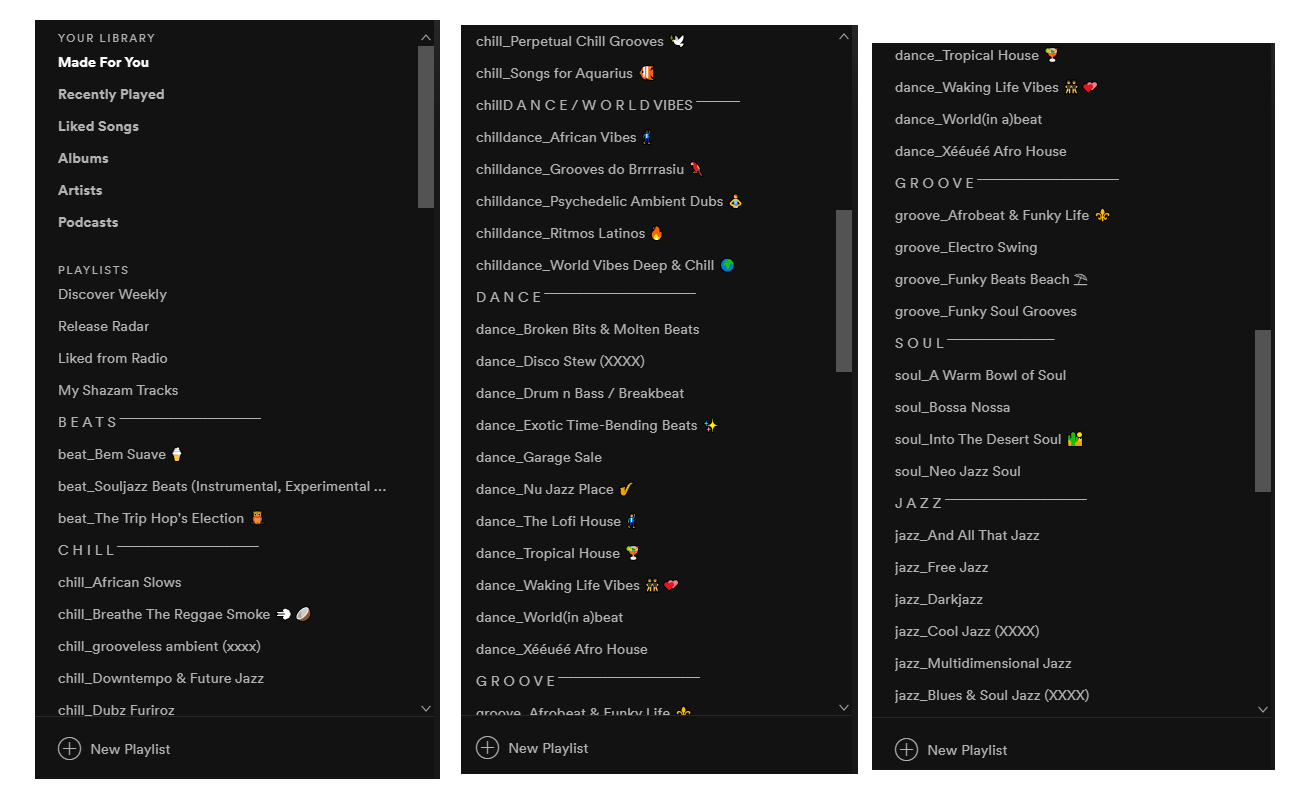
And here are some prints from how it looks on my phone (android):
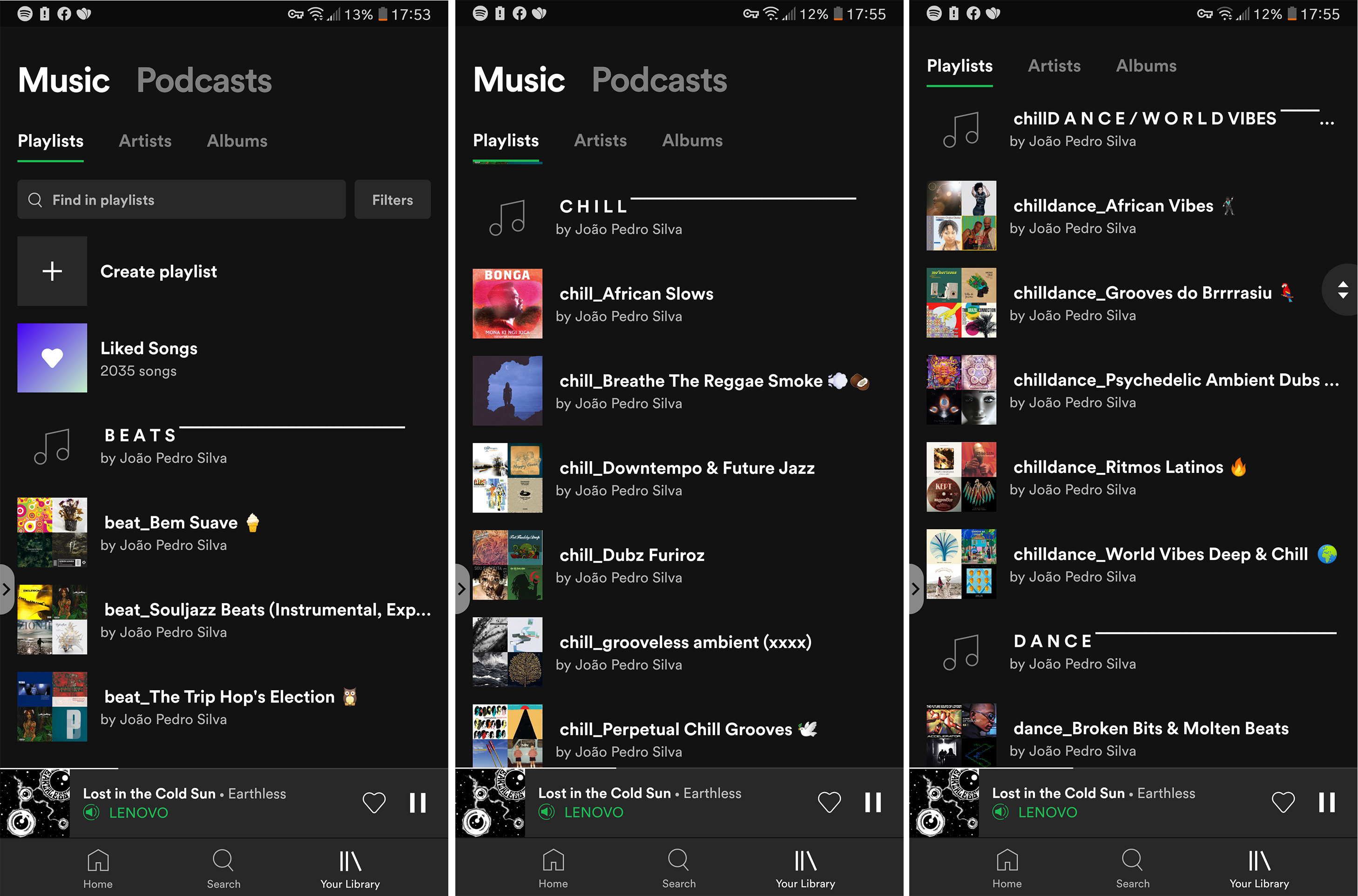
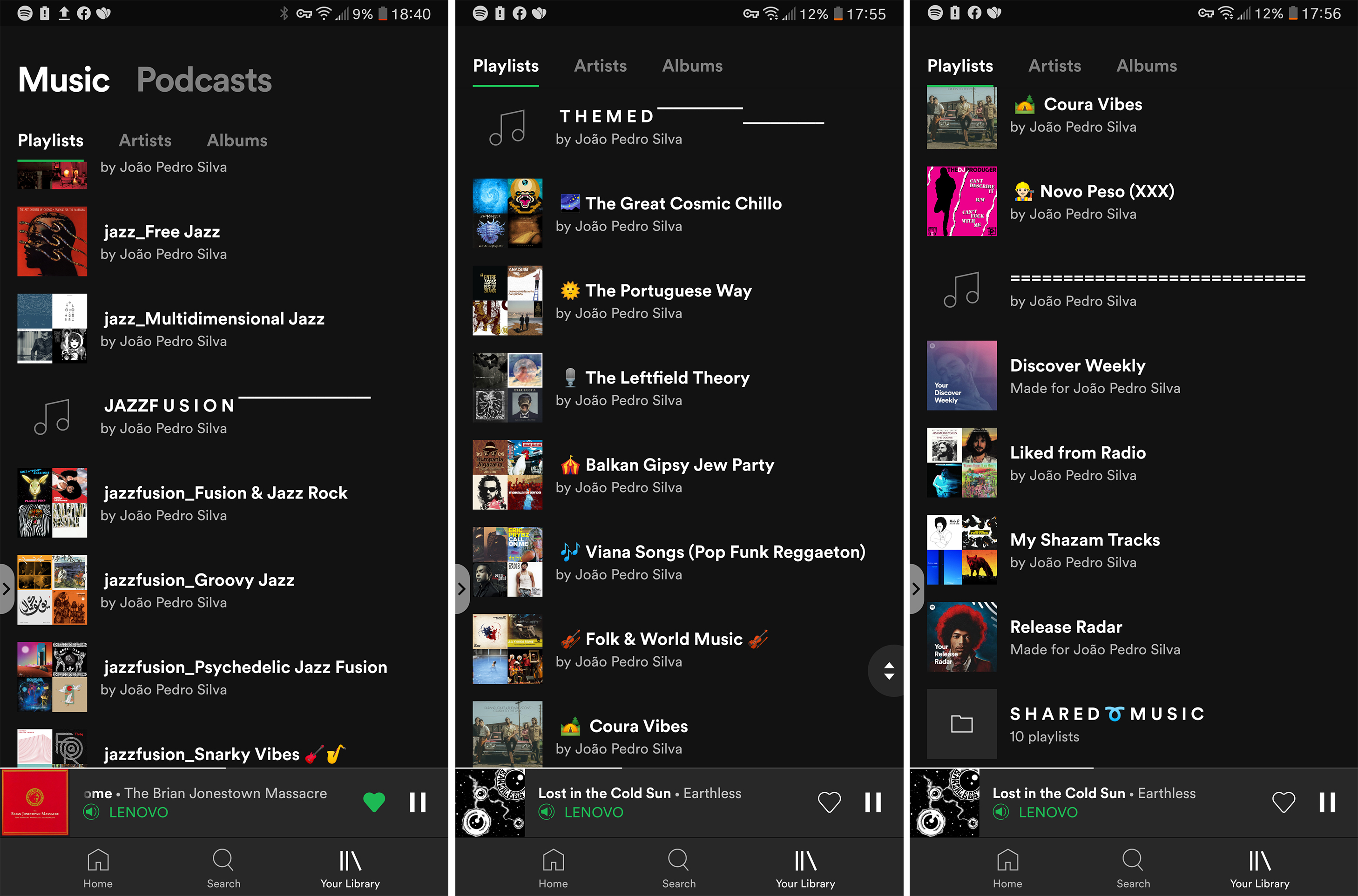
So that's it! I hope this can help people who where driving nuts every time they wanted to add new music to their playlists. It is indeed a time consuming workaround, especially if like me you have dozens of playlists. But in the end it's worth it. Now everything is exactly where it should be, no matter what plattform i'm using, it's super quick and clean, including the otherwise-spooky-nonsense "Add to Playlist" menu.
And if you're interested in these playlists just search my username on the app! They are a constant work in progress, but it's 100% vibes guaranteed! 🌞
Happy music hunting friends! 🙂
I forgot to add a little detail to my last post:
In order for all the playlists to stay organized UNDER each category, you need to add an empty space in the beginning of their names. And you can only add empty space as first character on the Desktop app.
Categories also have an empty space as first character.
This way I can avoid external playlists (playlists that I follow, default spotify playlists, shared playlists, etc) to not pop up in between my "library", as they will be sorted alphabetically before all the playlists that start with a space!
This has existed forever! Please fix; what is even thr logic for not keeping the add-to list in thr same order as the general set of lists when you browse? Isn't consistency one of the key elements of a good ui? Tbis creates an unneeded cognitive load. I known you are trying tonconstsntly innovate, bit inovation that breaks basic rules of a design methos is not the right direction.

Some help for my fellows with this issue; I still rely heavily on sorting alphabetically. I have a workaround to share alongside that of @jpessego.
Spotify allows hierarchical playlist folders; use this to your advantage.
I have 3 main buckets of music, aka top level playlist folders:
(1) "core" aka my main set of genre and theme playlists, and also my method to share; see below.
(2) my monthly musics (fads, trends, things to file; sorted by "every other month": "nov/dec 2020),
and (3) artists for specific filters on artists I love.
Each have their own folder, but "core" in particular has 3 sub-buckets which has meant I can actually find the folder I need without too much trouble (emphasis for any Spotify PMs!)
When adding new music, "core" is usually near the top, and finding the right playlist is easy by the right sub-bucket. It's a process, but is sure as **bleep** better than scrolling a full list. I 100% created this on Desktop. I don't add new playlists to Core often, but I add new songs from mobile frequently.
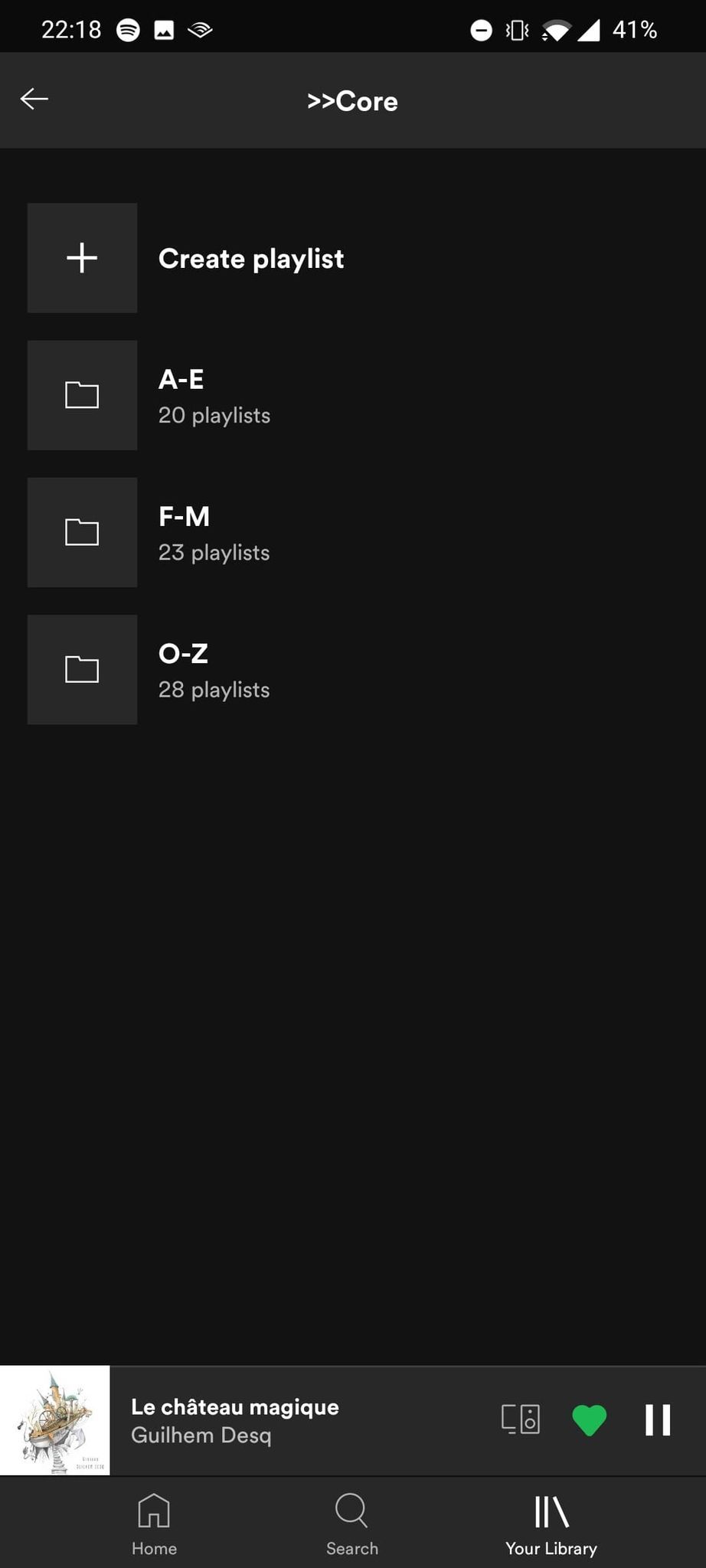 Core
(btw thanks for sharing your own @jpessego ; definitely seeing what you have on offer. I'm @rhejinald if you like musical intersections of electronic swing and power metal! XD)

I mean the order of the playlists when youre adding a song is the same as the library, but it would be best if the top three in the list were the playlists you most recently added songs to
Why can't/won't Spotify just fix this problem? It never used to be like this. Trying to add songs to playlists is ridiculously time consuming because it currently isn't possible to alphabetise or customise the order in which playlists appear. This is the single most annoying and useless thing about Spotify. Who cares about adding it as an idea and hoping to get likes in order for Spotify to fix it? Just fix it. It's infuriating.