Spotify attempts to open then just shuts down

Plan
Premium
Country
USA
Device
Windows Desktop
Operating System
Windows 10 1909 Build 18363.535
My Question or Issue
Spotify auto updated yesterday and now it will not run. It attempts to start up then closes down. I uninstalled today and reinstalled v1.1.22.633.g1bab253a from the website and it does the same thing. I have spoken with several other people who hare having the same issue.
Accepted answers
All comments
It my be true that it is a proxy server setting issue. Since Spotify refuses to work directly with me I refuse to spend a lot of time doing testing. If they would like to work directly with me to log data to try and resolve the issue I would be happy to spend the time doing it. But they don't care, so I'm not wasting my time on it. I will soon be changing my music service if it is not corrected by the 26th. Regardless if it is a proxy server issue the fact remains that it worked perfectly before the Spotify update that I installed around 12/19/2019. Which means that they were able to handle the proxy server issue and then they broke it...and refuse to roll back to a working desktop client.
It has now been two full months since I originally brought this issue to light on this forum and they have released several versions that continue to be broken since then. Tick Tock...

Just curious, but why can't you switch to a different service?

Thanks Doomblaster
I'll try this out.
The debate whether this is Windows or Spotify is pointless. OS and Software is co-dependant. A Windows update can break Spotify, so can a change in Spotify.
My guess is something around the proxy as well, seeing how this is mostly happening at workplaces and only when connected to a network.
These things are tricky and can't be figured out quickly. I've been using Xpo Music, a 3rd party Spotify app from the Win10 Microsoft Store, while this is being fixed. Works well as a workaround until they figure this out. Best we can do as users if offer other users workarounds and technical details to support reps.
I just thought I would mention that I came across a third party app called Fidelify today. It will not connect to Spotify's servers through my work network. I've never tried it at home so I'll give it a try this weekend. But the fact that it will not connect to Spotify's servers, and the fact that it is a different client software may indicate an issue on the back end at the Spotify servers rather than their desktop client, where the servers might be rejecting the connection for some odd reason. Not sure if that will be helpful but figured I should mention it since it is a different client that won't connect.
[EDIT] Never mind. I see now that this Fidelify program is old as dirt (it is from 2014). I wasn't even paying attention to the version number when I downloaded it. So it probably just doesn't work. I'll still try it at home though just to see for sure. [/EDIT]

Hey there folks,
We really appreciate your reporting this and providing us all this info.
We've passed this all to our tech team who are investigating this. If you’re experiencing this issue, we'd first recommend to make sure to cover the following troubleshooting steps:
- Perform a clean reinstall. You can find the exact steps to do so here.
- Check the firewall and make sure Spotify is set as an exception.
- Disable any antivirus or ad-blocking software, and turn off VPN if in use.
- Check if the proxy settings are set to default (auto-detect).
- Remove host files. Head here to find out how.
- If possible, switch to another internet connection (WiFi, mobile data via tethering, or going direct via LAN cable).
- Try accessing the web player before re-attempting to log back in to the desktop client.
- Run Spotify on Safe Mode.
In case the issue persists, let us know by adding your +VOTE and the following details in a comment below:
- Your device and its OS version.
- The exact Spotify version.
- An exact description of your issue (include any error codes you are getting).
- Approximate date when the issue started.
- The troubleshooting steps you have tried so far.
-
Are you on a corporate or private network?
- Is this only happening on a work computer? Does Spotify work on other computers at home?
- Can you access the web player?
Once we have that, we will pass it on to the relevant team, who will look further into it.
We'll be keeping an eye out for your replies, thanks!
as @kmankashani mentioned, switching the proxy setting to "No Proxy" appears to make the desktop functional again. I'm currently running v1.1.26.501.gbe11e53b with no issues with the "No Proxy" setting.
@Xenia I have confirmed that the "No Proxy" setting fixed the issue on two more of our work computers.

Hi All,
I think the latest update of Spotify has fixed the issue.
I did not change any proxy settings or anything.
Each time when i restarted my work laptop, spotify will automatically update and after the installation, it will crash. I will then install the offline installer that was provided in this thread.
But today, this was not the case. After the update, spotify stayed open and all is good now.
I hope this works for everyone.
Happy Days!!!!
I just tried changed the proxy setting back to "Auto Detect" with the version I mentioned above, and it crashed again when reopening it. So I just downloaded the dynamic installer from the Spotify website...and it also crashed when trying to open. I had to set it back to "No Proxy" to get it working again.

Hello again folks, @Peter & @Xenia ,
Been trying to get a fix for this issue since mid December. Really getting very tired of it.
I have tried the "No Proxy" setting but it makes no difference, the program crashes as soon as it detects any form of internet.
-The version I have just clean reinstalled is 1.126.501.0.
-Windows version 1903 18362.657
-Same issue on ethernet and WiFi at work but it works fine on my home network.
-No error code given --> the program launches, instantly freezes, RAM usage shoots up and then the program crashes.
-If I disconnect from any internet connection, then the program is stable (but seeing as it is music streaming service, then not being able to access the internet poses a challenge.....).
-Web player works fine.
Thanks for the help.
Good morning again,
Spotify launched automatically when I started my computer this morning and it did not crash.
I'm not going to celebrate just yet but it's looking good.
Currently running Spotify 1.1.26.501.gbe11e53b (Microsoft Store version).
Thanks.
Hi all,
Many thanks for bearing with us and going through the recommended steps as well as providing all the relevant information. We really appreciate your cooperation on this!
For those of you still experiencing difficulties launching the latest version of the app, do you mind trying if it works with the "No Proxy" setting? @Pheeal, @arvastra and @acp89 can you confirm if changing your proxy setting does the trick? If not, it'd be great if you could send us the info requested in the latest status update, so that we can investigate this further.
Thanks again - Keep us posted!

Switching to "No Proxy" and restarting seems to fix this for me.
Hey folks,
We appreciate the recent comments confirming that switching to "No Proxy" is fixing the issue.
Meanwhile, our tech team did some changes backstage, so that things should be up and running again with the proxy set back to its default "Auto-Detect" setting. Do you mind giving it a try and let us know if the app is still crashing on the most recent version?
We'll keep an eye out for your replies.

Hi Xenia,
It's too little too late for me, I've been a happy user of Tidal for over a month now and no problems at all. A bit miffed it's taken Spotify this long to fix - 3 months!
Anyway I'll let my colleague know as he still uses Spotify. Will report back if it works for him
Regards
I just installed with the dynamic installer and unfortunately it is still broken. I would like an explanation as to why they did not roll back to the last working version instead of letting this issue go on for 3 MONTHS (and counting). As others have mentioned, Tidal, Amazon, Apple...none of them have these issues. And I'm guessing when they do have an issue their developers are competent enough to roll back to the last working version while they try to figure out what the issue is. Spotify's developers obviously are not.
I just tried with the "Auto Detect" proxy settings and the program crashed upon loading, just like it did before.
I have disconnected from all internet connections, changed the setting to "No Proxy" and now it runs fine.
Guess we are now 3 months down the line and no improvement to the situation has been made, just a work around that disables functionality....
I'm not angry, just disappointed.
Hi Team,
I also turned the Proxy to Auto Detect and it does the same as before. The program crashes.
Please see below screenshot a couple seconds before it crashes.
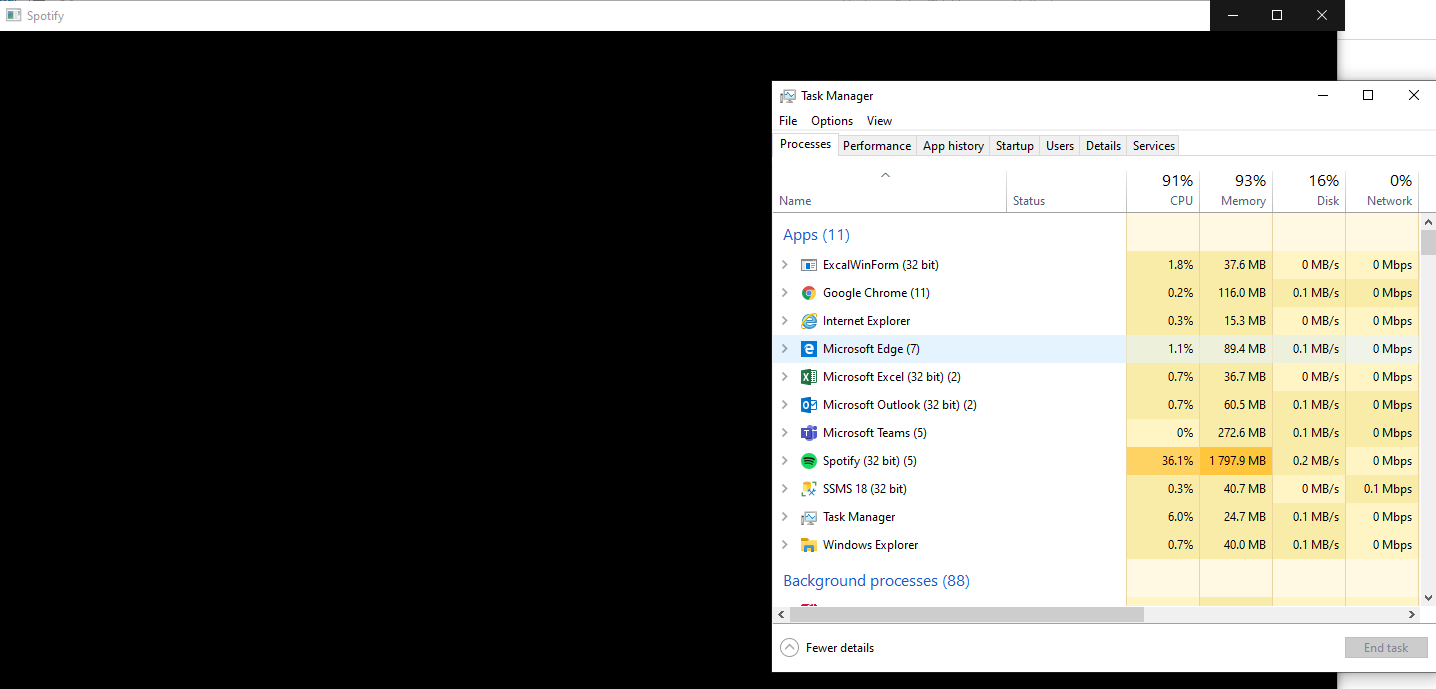
Thanks,
My computer just auto downloaded another update. Setting the proxy back to "Auto Detect" still breaks it.
Hi everyone,
Thank you all for giving it another try! Can you please confirm with us what Spotify version you're currently running?
Sorry, if this seems to be repetitive, but we really need this info for our tech teams to be able to investigate the issue.
Thanks - Keep us posted!
I'm officially done wasting my time on this. Because there is a really simple fix. ROLL IT BACK TO THE LAST WORKING VERSION WHILE YOU TRY TO FIGURE OUT WHAT THE PROBLEM IS. Any good programmer (and company) would have done that IMMEDIATELY.
Hey there folks,
Our tech teams are still looking into this however, since we haven't received any other contacts or reports after we asked for more info, we're now moving this thread back to the Help Boards.
If you come across this issue in the future, try switching the proxy setting from "auto-detect" to "no proxy" and in case that doesn't do the trick, make sure to cover the following troubleshooting steps:
- Perform a clean reinstall. You can find the exact steps to do so here.
- Check the firewall and make sure Spotify is set as an exception.
- Disable any antivirus or ad-blocking software, and turn off VPN if in use.
- Remove entries in the hosts file. Head here to find out how.
- If possible, switch to another internet connection (WiFi, mobile data via tethering, or going direct via LAN cable).
- Try accessing the web player before re-attempting to log back in to the desktop client.
- Run Spotify on Safe Mode.
Hope this info is helpful but don't hesitate to give us a shout if there's anything else!
Hey there folks,
Our tech teams are still looking into this however, since we haven't received any other contacts or reports after we asked for more info, we're now moving this thread back to the Help Boards.
If you come across this issue in the future, try switching the proxy setting from "auto-detect" to "no proxy" and in case that doesn't do the trick, make sure to cover the following troubleshooting steps:
Hope this info is helpful but don't hesitate to give us a shout if there's anything else!