School/University Search Not Working

I'm an Australian student and I've been trying to go through the verification process to renew my student discount (I had it last year but it ran out a few months ago and I'm only just getting around to sorting it out). Whenever I try to type in my university's name, nothing comes up and as soon as I click out of the box my typing disappears and resets. The dropdown box briefly displays the text 'loading...' when clicking on it but immediately disappears.
I know my university is one that SheerID works for, or at least, it has in the past. I tried typing in other larger universities in my area to see if anything came up at all or if it was just mine, but nothing would come up for any searches. I've tried on multiple devices - iPhone and iPad in Safari and then on Macbook Air 2013 in Chrome (both regular and incognito tab) and Safari. Any advice on how to get past this issue would be a godsend - thank you!
Accepted answers
All comments

Plan
Premium Estudiantes
Country
España
Buenos días, estoy intentando renovar el plan Premium Estudiantes pero no me permite añadir ninguna universidad. He seleccionado el país España y no me permite seleccionar ninguna universidad y cuando escribo el nombre de la universidad, se borra. Lo he intentado con dos dispositivos diferentes, con Safari y con Chrome, con navegación privada y con pestaña de incógnito y sigue sin permitirme poner la universidad.
Gracias

Hey folks,
Thanks for all the input you provided in the comments.
Our tech team is currently testing out a fix for this issue. We recommend that you now try to apply for the discount again via the student verification form.
Should the issue persist, make sure to try opening the link in an incognito/private window or a different browser.
Let us know in the comments if you were successful or not.
Have a great day!
Hey there @grassotmarina,
Thanks for reaching out and welcome to the Community!
We hope you don't mind us answering in English as this is the official language of the Community. The folks at our tech team are currently testing out a fix for this. Could you try getting verified once more, again using all previous troubleshooting steps if the issue persists?
We'd be happy if you keep us posted on your results in this Ongoing Issue.
Have a great day!

Plan
Premium
Country
Indonesia
Device
Macbook Pro 2020
Operating System
macOS Catalina
My Question or Issue
I got an email informing that my student premium subscription plan is ending. I clicked on the link provided in the email to renew my subscription. Unfortunately, the drop down list isn't working and i'm unable to enter my university name- though the first time i registered, it's clearly stated that my university is eligible.

Hello, I'm also having this issue with the drop down list. Tried to open the verification form multiple times in different browsers and on and off my home wifi, and it still isn't displaying any school names.
It's quite disappointing to see that the issue has been going on for so long without resolution, as it would be a big inconvenience when my student verification runs out...

Tried all the steps, but sadly the issue is still present.
A message said that it would be useful to be on the university campus's WiFi, is this necessary or just optional?

Hey there @Elektra26, @ecruvo and @eunikeagt,
Thanks for keeping us in the loop about this!
It would be really helpful if you could share a screenshot of how the list looks for you currently if you're still having troubles - we'll pass it along to the folks looking into this.
We'll be keeping an eye out for your reply 🙂
Hi there! I decided to give it one more shot for the screenshot and was able to successfully complete the verification! I'm not sure what Spotify or SheerID did since Monday but (at least for me) it's now working!! :'D 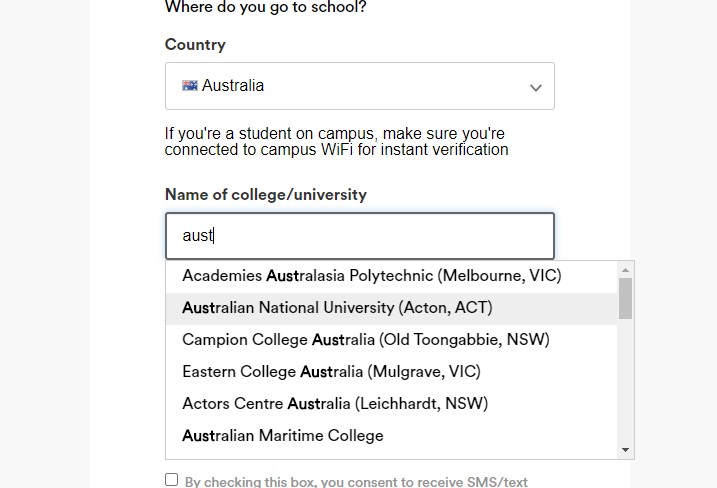
Hello @Katerina !
I just checked the link again and the drop down list is now working properly.
Thank you!
Hi. Just want to say that it is now working perfectly. Thank you very much for resolving the issue!!

Hi,
Tried all the solutions, different browsers, clearing the cache and private sessions and still not working for me.
Is there another solution?
Thanks

A mi me pasa lo mismo y lo he intentado muchas veces. Además no me avisaron cuando caducó mi licencia y me han cobrado el precio normal
Al final lo conseguí, lo intenté al día siguiente y me funcionó.
Muchas gracias

Hey everyone,
If you're still having trouble with the student verification form, we'd recommend waiting for about an hour and try again in an incognito/private window or a different browser.
In case the issue persists you can reach out to the SheerID support team here to get help with your verification.
Hope this helps. Let us know how you get on.

Hi, the above solutions have not worked for me today, odd how it's working for some people now. Any more advice?Thanks

im having the same issue on my phone computer different web browser and incognito, all i want to do is renew my subscription,

Hello, I am having the exact same problem, and I have tried all of the suggestions, none if them worked. My discount will run out tomorrow, and I really do not want to pay the full price, as I am indeed a Student in Austria, and have gotten the discount for the previous semester. Please contact SheerID and tell them to solve this problem, especially since a lot of people are experiencing it.
It is not fair if people have to pay more because of technical issues.


Figured out a workaround. It seems like SheerID has changed the way their API works. The type "UNIVERSITY" no longer exists. Instead, it is now called "POST_SECONDARY" in many cases. You can verify this by using this url:
https://orgsearch.sheerid.net/rest/organization/search?type=POST_SECONDARY&country=US&name=Michigan
Thus, the engineers at Spotify or SheerID have to change the form accordingly.
To fix this yourself, right-click the University text field and click inspect or open Developer Tools. There, find the <input> with id "organizationId" and change data-org-type="UNIVERSITY" to data-org-type="POST_SECONDARY". Clicking the arrow should now get you search results for universities.
See the screenshot below for the attribute that has to be changed.
 Edit HTML

Just to check i used youtube music's sheerID and my university is showing there. So I am sure that my university is eligible.I tried with other top universities of my country to see if the problem is with mine only but it isn't working for any colleges/Universities. I tried with multiple devices - my android phone and windows laptop using Chrome, Firefox(both in normal and incognito mode). Any advice on this issue will be really helpful . Thanks

I am having the same issue, the drop down menu isn’t working and I cannot get the student discount, super unprofessional and inconvenient, should’ve just stuck with unidays

Still not working, tried different browsers as well as different device, incognito etc. A simple dropdown menu that's not being fixed is stopping me from getting my premium haha

Hi
This drop down list will still not work and I have tried everything (different browsers, incognito browsers, different wifi).
Can you please help?

Hey - I have the same issue as here:
It seems a couple of months old now. I've tried on different devices, different browsers, incognito .etc to no luck - any progress?

Hi, I have the same problem. I am french student.
I have tried every solution I saw on the forum and nothing worked...
Different computers, different bowser, private window, clear the cache.
What can I do ?
Thank you

guys just use. VPN to sign up on the student form, it works 100%
do it on ur phone and just use a free trial of a vpn for it

I am also a student in France and am having the same problem. Last year everything worked fine but even with all the techniques given nothing works.
I hope this gets sorted quickly!
I used US as VPN country . Hope it Helps !!

Right now checking the list of Spanish organizations (https://orgsearch.sheerid.net/rest/organization/search?country=ES) only shows High Schools:
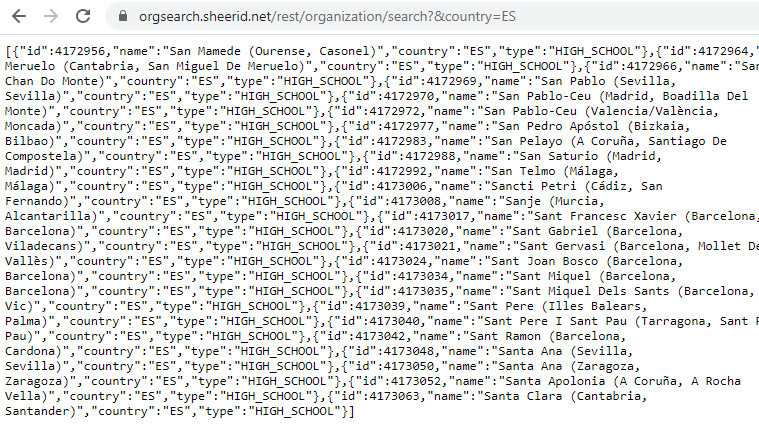
Hope there is some progress with this issue.
That is because only the first 25 results are shown. Try this:
https://orgsearch.sheerid.net/rest/organization/search?country=ES&type=UNIVERSITY
or
https://orgsearch.sheerid.net/rest/organization/search?country=ES&type=POST_SECONDARY
Hello there,
Yesterday I got in touch with SheerID about the same trouble.
Then I received the useful advice from SheerID, and I could success my verification.
So I want to share that with you!
On a computer:
1. Open the Google Chrome browser
2. Clear the cache of the browser
3. Log-in to your Spotify account
4. Submit a new request now at https://www.spotify.com and type the name of the school
Please note that after typing in 3 or so characters, you should see a list of options, then kindly click the name of your school.
I really hope that above would make something good to you! You can check out their support page for additional guidance.
(Sorry for all my weird English expression because I'm Japanese!)